
EasyLinux v1.2
Manufacturer: Easy Information Technology
E-Mail: info@eIT.de
Price: $21 US (cd only)
Reviewer: Pedro Bueno
In my first contact with EasyLinux v1.2, which I received as the manager of LinuxGO, a Brazilian user group, I thought it was just another Linux distribution. In spite of some bugs, it was a very good-looking distribution. In the new EasyLinux v2000, it proves to be a really stable and competitive Linux desktop distribution.
EasyLinux, developed by Easy Information Technology, has as its main goal an easy way to install Linux. It doesn't specify any minimum requirements, but I tried it on two machines, a Pentium 133MHz with 16MB RAM and a 1GB hard drive; and a Pentium MMX 233 with 32MB RAM and a 1GB hard drive. On the first machine, the installation was very slow and the final results weren't good. The opposite occurred with the second machine; the speed and ease of installation were much better. The user can choose either a boot diskette made with rawrite or a bootable CD. With the use of Frame Buffer, Vesa2.0, which is supported by most video cards, can provide a very impressive graphical installation, superior to Red Hat's and even better than Caldera's. This also makes it possible for any MS Windows user to use EasyLinux. It offers three different installation modes:
Beginner: for new users who can choose between an Internet or a stand-alone PC
Advanced: for users who know more about networking and may want a LAN client
Professional: in this option, the user can also choose between a LAN client and a server.
All three modes, except the LAN server option, can also be used in another category called Laptop, designed specifically for those who want to install EasyLinux on laptops. Each mode has a basic packet installation and is supplied with the common applications. All new applications such as StarOffice, games, editors and compilers, are available to the user after the installation is complete just by clicking the CD-ROM icon on the desktop.
With the intention of minimizing use of the terminal command line, EasyLinux built a set of applications to help the user administer the system: eLILO, eFdisk, ePrinter and eHelpAgent (see Figure 3). Two items are worth special note: eRegistry and eHelpAgent.
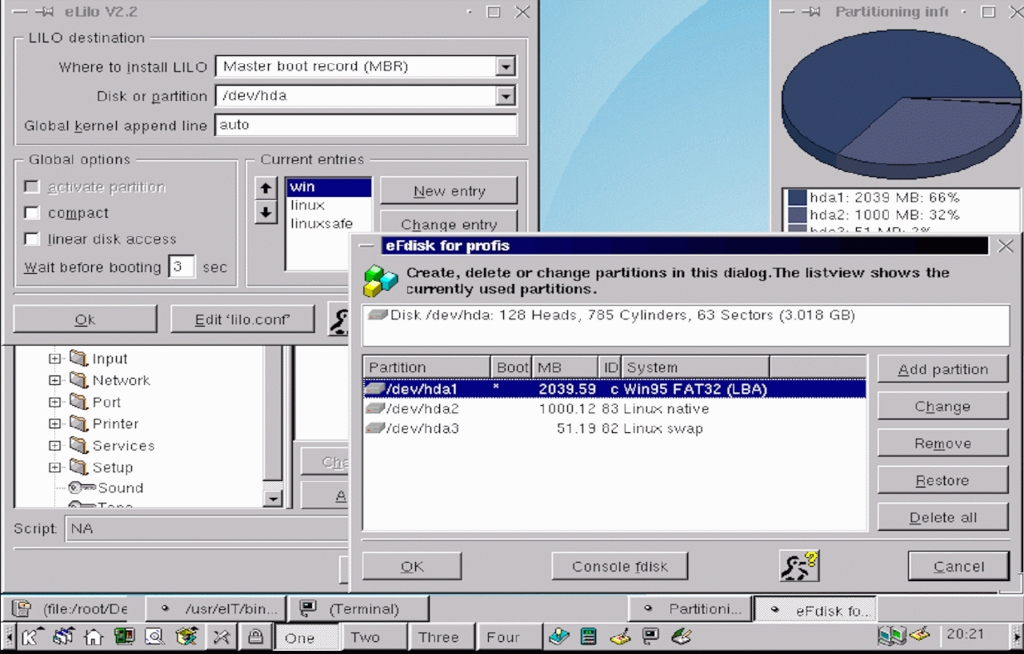
Figure 3. Administration Applications
The eRegistry application, or Regedit (see Figure 1), has nothing to do with the MS Regedit. On the contrary, it is just a system configuration application that is very useful in configuring some important system items.
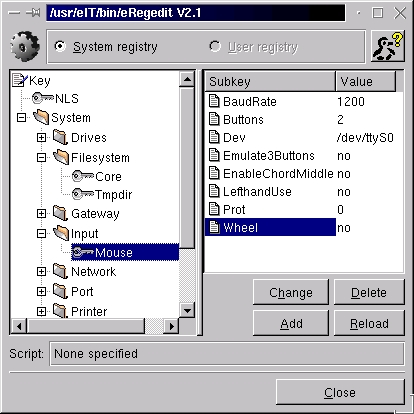
Figure 1. Regedit
eHelpAgent is another important application, because it can show information on the most common problems that may occur during the system's use. The System Window (see Figure 2) is another great aspect of EasyLinux, which acts like MS Control-Panel and gathers together all system configuration applications such as ePrinter, Hardware Setup and User Manager to simplify the config task.

Figure 2. The System Window
As a self-proclaimed desktop Linux distribution, EasyLinux succeeds. It is really a robust operating system, very easy to install and configure, and designed for the user who likes GUI and doesn't know or doesn't want to know about console, terminal or any kind of command-line option. One benefit of EasyLinux is that it uses the .RPM (Red Hat Packet Manager) format for its packets, which provides an easier way to upgrade and install new packets. Another good point is that it is completely based on the KDE Window Manager. As I said before, there are three different installation modes, and although the results are surprisingly good in all modes, I didn't like the LAN server mode and imagine most current administrators wouldn't like it either. The reason is simple: as system administrators, we need the freedom to configure our systems in the way we need and like, but with EasyLinux, we are dependent on the GUI and its applications. As stated on the site, EasyLinux “concentrates on those users who want to apply Linux as a desktop workstation or as a PC (of course working with the shell is still possible).” In this aspect, it is very well done.
Nowadays, with the discovery of Linux as a great and powerful operating system, a whole new market has been discovered: the desktop. All the existing Linux distributions are improving their systems in order to establish a friendly interface with new users. New distributions are being created specifically to attract new users who want to experiment with Linux, and EasyLinux is a good example of this. It offers a fast and easy installation mode that allows both the novice and experienced user to begin to use Linux. If you want to try it, I suggest taking a look at a free download of EasyLinux v2000 from their site.

