
Visual SlickEdit 5.0
Manufacturer: MicroEdge, Inc.
E-mail: sales@slickedit.com
Price: $295 US
Reviewer: Larry Ayers
I can't think of many commercial software packages that have been continuously evolving since the early days of the personal computer industry. Visual SlickEdit, MicroEdge's award-winning programmer's editor-cum-development environment, was initially released in 1988 as a DOS and OS/2 character-mode editor. This was when IBM was marketing text-mode-only OS/2 as “a better DOS than DOS”.
Clark Maurer, currently CTO of MicroEdge and still active in SlickEdit development, was employed at IBM's Watson research lab. He was one of the developers of the legendary internal IBM editor E; this experience enabled him to quit IBM and begin development of the first SlickEdit releases.
Having installed an earlier version of SlickEdit from floppy disks a couple of years ago, I anticipated no problems installing version 5.0 from CD-ROM. A GUI installation interface makes the process even easier than before, but I ended up with an installed editor which wouldn't even start up. After an exchange of e-mail and phone calls with MicroEdge's responsive and helpful service personnel, I still couldn't get it to work. I e-mailed a core-dump file to MicroEdge; it seems there were some compatibility problems with the particular version of Debian I've been running, which admittedly is the “unstable” release. The support staff even went so far as to install Debian 2.0 on one of their test-bed machines, and reported that SlickEdit started up just fine. Since there didn't seem to be any immediate solution to this problem, I installed SuSE Linux on a spare partition and soon had a functional editor. I imagine this particular incompatibility hadn't come to light before due to the nature of SlickEdit's normal user base, which probably uses older and more proven versions of Linux.
Customization possibilities are extensive. Aside from the expected keymap and syntax-highlighting adaptations which can be made, menus and pop-up dialogs can be altered and even created from scratch. Much of the editor's functionality is written in a C-like language called Slick-C, but the language itself doesn't need to be learned, as SlickEdit comes with a Slick-C IDE (integrated development environment) called the Form Editor. With this editor (which resembles Visual C), existing dialog boxes can be modified and new ones created from scratch. These two screen shots illustrate the HTML font dialog box opened for editing.
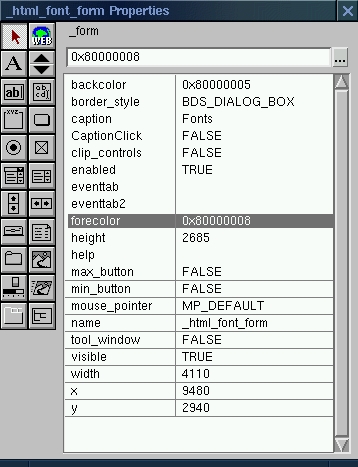
Figure 1.
Making the guts of a program accessible to users, which enables almost unlimited tailoring of a program to individual (or corporate) preferences, is a familiar concept to Emacs users, but rare in commercial products.

Figure 2.
SlickEdit is feature rich. Leaving aside the basic abilities any good programmer's editor should have, this editor abounds with useful functions, including:
SlickEdit is unparalleled in its broad base of supported platforms. Along with Linux, versions are available for Solaris, HP-UX, Digital UNIX, Windows 95/98/NT, SGI-Irix and IBM OS/390. The look and feel is identical across all platforms.
An extensive array of programming languages are supported, while new languages can be added easily.
Context Tagging can be quite useful. Expression type, scope and inheritance analysis are performed as you type. Members and inherited members of objects are displayed in a dialog, while at any time, you can navigate with a keystroke to the definition of an identifier, including class members, functions and variables.
Sophisticated file differencing (called DiffZilla) is similar to the traditional Linux diff utilities, but is controlled via dialog boxes and is thus easier to learn and use. The Diff dialog can operate on multiple files in a directory tree, while other directories can be excluded from the operation.
The search and replace functions are analogous to those in Emacs, even to the extent of including the invaluable incremental search, which allows searches to be completed as a phrase or string is typed.
Up to fifteen clipboards are available. Their contents are accessible from a dialog box and are saved between sessions.
Window treatment is easily controlled from the menu bar, especially important in an editor with so many possible windows. Tiling, cascading and linking windows are among the possibilities. All windows are confined within the main SlickEdit window and can be positioned and resized just as any X window can be.
Code beautification, which reformats indentation, tag styles and brace styles to your preference, is helpful when viewing or editing someone else's files. Version 5 of SlickEdit not only lets you beautify C, C++ and Java files; now, JavaScript and HTML (and HTML with embedded JavaScript) are also supported.
SmartPaste is another editing convenience. Paste a cut or copied block of code into a file, and it will be re-indented automatically to the appropriate level.
SlickEdit makes good use of the IDE-inspired concept of projects, assemblages of source files and compiler command lines along with the working directory. These can be loaded as a unit and shared with other programmers. Another useful concept is the workspace, a higher-level collection of projects. Dependencies can be defined within projects in a workspace, so that one project must be built before another. Projects can inhabit more than one workspace, and (as with projects) workspaces can be shared with colleagues. Visual SlickEdit can open workspaces and projects created with Visual C++ and Tornado.
When more than one programmer is opening and modifying files and projects, some form of version control is essential. SlickEdit has built-in support for commercial version-control systems such as ClearCase, SourceSafe, SCCS and several others. Adding support for a new version-control system can be done easily.
This release sports enhanced HTML-editing capabilities. When used with the extensive collaborative and distributed development features, SlickEdit has positioned itself as a viable platform for web content creation.
Spell checking is exceptionally versatile in this release. Checking can be limited to comments and strings in source files, while HTML spell checking automatically ignores tags. Multiple files can be checked with one command, even recursing down into subdirectories.
Although it may seem odd for an editor to double as an FTP client, this feature can, in effect, let a user edit files on a remote machine as if they are local. Rather than manually downloading, editing, then re-uploading files to a site, the built-in FTP client lets these remote files appear and be accessed as if they are in just another local directory.
Previous versions of SlickEdit allowed users to emulate Emacs, Brief and vi key bindings, enabling UNIX users to come up to speed quickly. Version 5 introduces Visual C++ emulation, providing a similar service to users in the Windows camp.
Tagging of source and header files is an important part of SlickEdit's functionality. Emacs and vi users will be familiar with ctags and etags, two separate utilities for generating tag files. Tagging is useful in any programming project with more than a few source files, as it helps the programmer keep track of just where functions and classes are defined. Usage of tag files in SlickEdit is similar to that in Emacs; a keystroke summons a window with the tag reference. SlickEdit's approach is easier to learn for those unfamiliar with Emacs, vi and UNIX in general. As with other UNIX-like functionality in SlickEdit, instead of using separate command-line utilities with their own peculiar syntaxes, etc., the tagging utilities are built into the editor and are accessed via dialog boxes.
The first time a new user starts up SlickEdit, the tag-generation utility attempts to build a tag-file database of source-code files in the current directory, if any, and of general compiler header files. In my case, the header files in /usr/X11R6/include and /usr/include, as well as the Linux kernel source header files, were all catalogued. Tag files are used by the Class Browser, allowing the user to quickly find classes, functions, variables and other code constructs referred to in source files.
SlickEdit's tagging facility is an impressive piece of work, effectively bringing an esoteric and somewhat abstruse but enormously useful facility to a broader programming community.
Bucking the lamentable software industry trend toward less documentation, SlickEdit is bundled with a three-hundred-page hard-copy manual, and the same material is also available on-line through an integrated help facility. This documentation is clearly written and well-illustrated. A complete reference to the Slick-C language is included, a helpful feature for project leaders with a desire to tailor the editor to the work at hand.
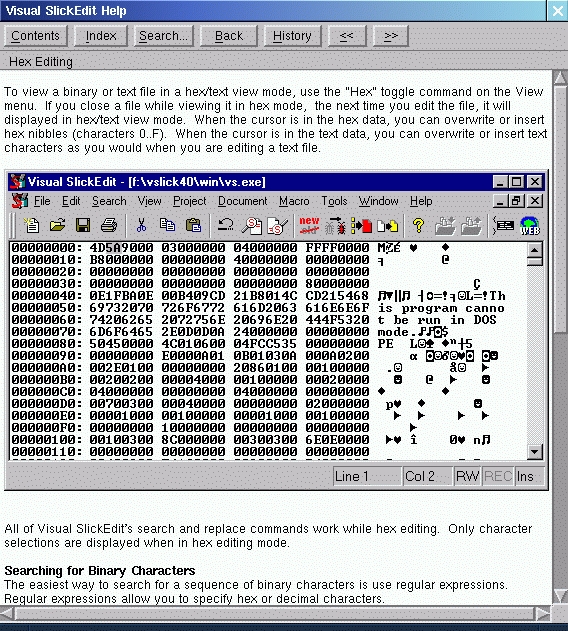
Figure 3.
At $295.00 per copy ($99.00 for an upgrade from a previous version), prospective users might wonder if the program is worth that much, considering so many free, high-quality editors are available for Linux, each with active and responsive developer and user communities. The answer is: it all depends on how much time you have available for learning to use an editor effectively, and even more important, how much time and inclination your co-workers have to spare. Nearly all of the functionality of SlickEdit can be duplicated by the various versions of Emacs or vi, but only at the expense of time for tracking down the necessary packages and configurations. This may be second nature for programmers imbued with the UNIX philosophy, but what about that co-worker who is more accustomed to Visual C++? SlickEdit provides a sort of neutral ground, an environment which is acceptable to programmers from a variety of backgrounds. The cross-platform nature of this editor is one of its strongest selling points, especially significant now that more and more commercial software is being released in versions for a variety of operating systems.
SlickEdit probably won't appeal to many solitary or academic programmers; its niche is corporate programming environments, where a common style of code and project files can increase productivity.
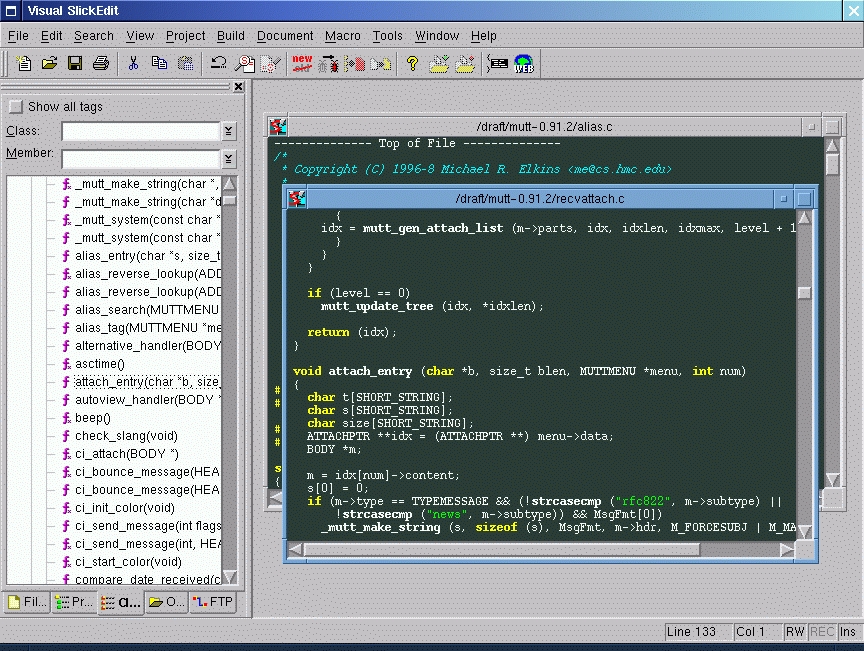
Figure 4.
MicroEdge maintains a web site for SlickEdit users and prospective customers at http://www.slickedit.com/. Patches for registered users are available there, as well as macros and tips from other users and the MicroEdge developers.
SlickEdit is a mature Linux product; this isn't one of those Windows applications quickly ported to Linux. MicroEdge has been supporting Linux for several years now, and this is evident in the stability and usability of the editor. While SlickEdit may be priced out of the range of the typical Linux home user, the price is not out of line for a product intended for business use. The advantages for group usage, including sharing files, projects and configurations, along with excellent support from MicroEdge, make the product a good value in its intended market.
Larry Ayers lives on a small farm in northern Missouri, where he raises sheep, shiitake and shell scripts. Between bouts of running a portable bandsaw mill and helping local people and businesses with computer problems, he tries to find time to play the violin and cello. His e-mail address is layers@marktwain.net.
