
Cygwin: For Windows NT
Manufacturer: Cygnus Solutions
E-mail: info@cygnus.com
Price: $99 US
Reviewer: Daniel Lazenby
During 1999, Cygnus released products such as Cygnus Insight, Source-Navigator and Code Fusion. These tools focused on providing a better-integrated, Linux-based development and debugging environment. Cygnus recently added another tool to the Cygnus development tool chest, named Cygwin. With Cygwin, Cygnus takes a step in a slightly different direction. Cygwin is a port of GNU development tools to Windows NT. This port also brings a Linux/UNIX environment to the Windows platform.
You might ask, why would I want it? What does this do for me? The answer is, “it depends.” Are you a developer who wants to bring your Linux/UNIX open-source projects to Windows platforms? Do you want to develop open-source Windows applications? Or are you a Linux/UNIX administrator with the responsibility of also administering Windows NT workstations and servers? Cygwin can support all three situations.
Once Cygwin is installed, an administrator has the same shell interface on both Windows and Linux/UNIX platforms. Many traditional Linux/UNIX shell commands are included with the product. In the two default directories /bin and /contrib/bin, I counted about 300 commands and basic Linux/UNIX tools. (In this context, I am calling a command such as wc a tool.)
In addition to NT's GUI administrator interface are several console NT administrative commands. These include a series of “net...” commands that may be used to stop, start, pause and resume services. For example, these commands can be used with printers, print queues and shared items. There are also commands to change certain user account attributes. The command net send is used to send a message globally or to a specific user. A set of TCP/IP-related commands is also available.
The ability to intermix the Windows console commands, like those above, and Linux/UNIX commands in the same program is the result of Cygwin's integration with Windows. Jointly, these commands, tools, Linux/UNIX programs and shell scripts may be used to manage a Windows platform. I did have to play a little with escapes and quotations to get the Windows commands to execute properly from within bash scripts.
Several open-source Internet d<\#230>mons are included in the Cygwin product. telnetd and ftpd are examples of the included inetd d<\#230>mons. Capabilities such as rlogin are also provided. Combined, these tools make it possible to do system administration of Windows platforms remotely. Some inetd d<\#230>mons duplicate Windows commands. I kept getting a syntax error on a couple of commands, until I used “which” to learn the command's real location. A slight change in Windows pathing corrected my syntax problem.
Most administrators have a favorite scripting language and set of power tools. Cygwin scripting languages include bash, ksh and tcsh. Power tools such as Perl, Tcl/Tk, awk and sed are included. I also found both the vim and xemacs editors. I got a strange behavior with xemacs, though. The xemacs file-open menu option caused a dialog box to appear momentarily. All other xemacs menu options seemed to behave normally, as did the traditional Ctrl keyboard commands.
Cygwin does not automatically build a POSIX-compliant directory structure. Therefore, the library you need may be in a different location. I had to make pathing edits to a couple of the supplied awk scripts. Constructing a POSIX directory structure and properly linking to directories should reduce pathing edits.
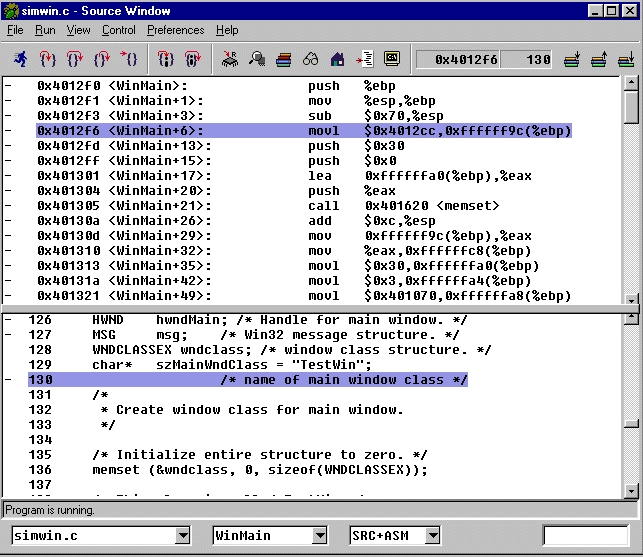
Figure 1. Source Window
Cygwin contains eleven GNUPro tools optimized for Intel Pentium processors. These tools include GNUPro compilers, linkers, assembler and comparison tools. The Cygnus Insight Visual debugging tool is also included in the package. Insight was formerly known as GDBTk. Figure 1 is a screen capture of the Insight debugger's Source Window. The October 1999 issue of Linux Journal contains a review of GDBTk.
Cygwin may be used to develop both console and GUI-based applications. The cygwin.dll portability library makes it possible to write and compile Windows applications with GNU tools. This library also supports the ability to port Linux/UNIX open-source projects to Windows. A sizable subset of UNIX SVR4, BSD and POSIX APIs have been integrated into Cygwin. These APIs make it possible to develop traditional Linux/UNIX programs on a Windows platform. Combined, these features and tools provide a standard Linux/UNIX GNU development environment on a Windows platform.
Using Cygwin to compile a console-mode C application on a 300MHz Pentium II with 64MB of RAM produced a timely response. A couple of Perl and awk scripts also performed well.
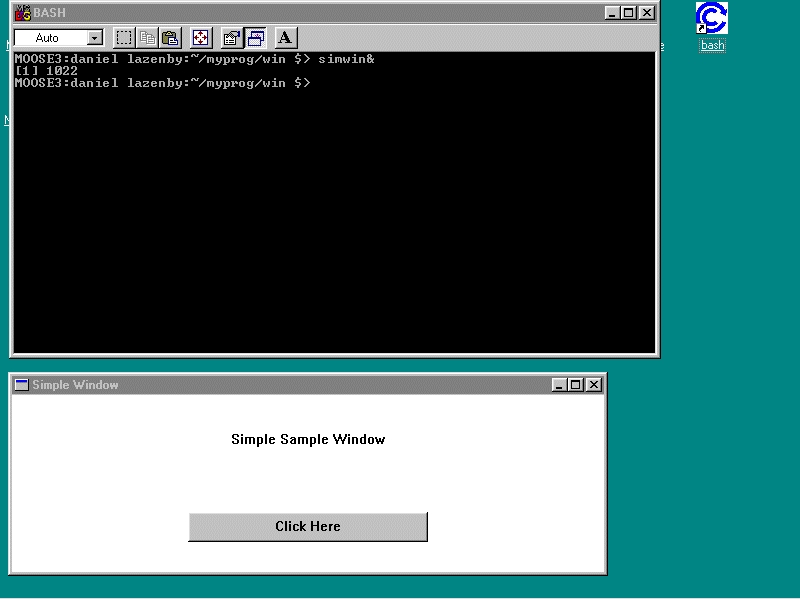
Figure 2. Sample Window
Simwin.c contains code for a simple no-frills window. Compiling from the command line performed well. Issuing the simwin.exe command at the bash shell prompt caused the sample window to appear on the desktop as though it belonged there (see Figure 2). Resource files and DLLs are required to compile more robust Windows applications. Cygwin includes the capability to use custom resource and DLL files. The documentation briefly highlights building and linking to DLL and resource files. I am not a Windows developer, therefore, I was not able to exercise some of Cygwin's Windows compiling features seriously.
The documentation says Cygwin uses standard Windows APIs. According to the documentation, use of standard Windows APIs means Cygwin will keep functioning whenever Windows is upgraded to the next release.
As with the other Cygnus tools, Cygwin is under the GPL. Be sure to review the various licensing terms and conditions before distributing your applications. All programs or applications developed with these tools must be open source. This does not mean you can never use the tools to develop commercial applications, however. Contact Cygnus for information regarding licensing if you want to do commercial work.
Cygwin requires at least a Pentium processor with 32MB of RAM and 100MB free disk space. The supported operating system is NT 4.0 with at least Service Pack 3. Plan to allot more than 100MB for this product. Install Shield suggested 300MB would be required for the basic product and contributed files. When source code was also selected, the storage requirement went up into the 1GB+ range. On my system, I selected the basic product and contributed files. They appear to use about 140MB of disk space.
Cygnus uses the very reliable Install Shield to install Cygwin. Install Shield properly installed and registered Cygwin with my Windows system. Pay heed to installation instructions. Cygwin should not be installed in any directory with spaces in the directory or path names. Once installed, traditional Linux/UNIX escaping, quoting or tabbing is necessary to get to directories with spaces in their names.
After installation, several steps are required to set up the Cygwin environment. A few of the tasks that need to be done include creating mount points for existing disk drives and directories; establishing the desired POSIX Cygwin directory structure; establishing environment variables; establishing and verifying file and path naming conventions; and customizing the shell.
Platform security is an area requiring a few moments of attention. Maintaining platform and file system security is important, and maintaining security on platforms containing business data is critical.
Cygwin has two security-related options: NT Extended Attributes (ntea) and NT Security (ntsec). Ntea can work with both FAT and NTFS file systems. The NTFS file system is required by the ntsec option. Enabling the ntea option permits NT file permissions to behave like UNIX file permissions. This option works best with NTFS file systems. It does work with FAT file systems. After using ntea a while with the FAT file system, one can expect a major performance hit.
NT can reproduce the POSIX security model. Enabling the ntsec option will cause file ownership and permissions, and process privileges to be treated in a UNIX-like manner. For processes, this means one can start a process with the group owner being the administrator. Anyone who is a member of the administrator group may send signals to the process. Normally, only the ID creating the process has permission to send signals to the process. Proper function of ntsec requires both /etc/passwd and /etc/group files. Using supplied tools, these files may be generated from the NT security files.
I am not sure how adding Cygwin to an NT platform impacts maintenance of a desired security posture. Once fully integrated, altering an established NT security posture with Cygwin seems possible. I do have one general question: are two sets of security reviews and corrective actions now required, one for NT and one for Linux/UNIX (Cygwin)? I believe the Cygnus documentation should include some discussion or clarification related to which NT/Cygwin security attributes take precedence.
A couple of sections in the manual provide concise information and guidance on Cygwin functions. Much of the rest is a collection of facts about the product. These facts have been organized to appear as though they are providing guidance. One example is the “Setting up Cygwin” topic. This topic presents eight bullet items, pointing to various pages. Each set of pages discusses aspects of setting up Cygwin, so one must go to eight different places in the manual to read about the Cygwin environment. This technique is used several times throughout the manual. I found the process of piecing information together tiresome. I never got the feeling I had seen all the information I needed to configure Cygwin properly.
On-line documentation includes man pages, Texinfo and HTML pages. Some man pages are no longer actively maintained. Instead, one should use the Texinfo source. Texinfo is the authoritative information source for many traditional man pages. Cygwin has complete control over the HTML files distributed with the product. Cygnus suggested the HTML files are the more accurate source of information at the time the product is shipped. Therefore, the HTML documentation should be consulted first.
The web-based FAQ is not very big, however, the few minutes it takes to browse this FAQ are worth the time. It provides an itemized list of implemented ANSI C and POSIX.1 API calls. All of the compatible APIs are also listed in the local on-line and printed documentation.
The Cygnus documentation is considerate of individuals who have Windows experience. References to Linux/UNIX and Linux/UNIX programming for the non-Linux/UNIX-initiated are provided.
Product installation support is available. Once the installation support ends, assistance may be obtained from the Cygwin mailing list, cygwin@sourceware.cygnus.com. Another source of information is the sourceware.cygnus.com/cygwin web site.
Daniel Lazenby (d.lazenby@worldnet.att.net) first encountered UNIX in 1983 and discovered Linux in 1994.
