
Advanced Packet Data Testing with Linux
What is your 56K modem doing while you ponder the sophisticated on-line articles at Linux Journal's web site? Nothing. The majority of the time you are connected to the Internet, your modem sits idle. However, your phone call ties up at least one dedicated circuit in a telephone network. The unused capacity and potential revenue of this circuit's bandwidth is lost forever.
Telephone company operators and manufacturers recognize that forming data paths by switching fixed-capacity circuits is inefficient. Interactive data communication is transmitted in bursts. You pull down a web page and whimsically move on to the next, unconcerned about the circuit bandwidth you tie up.
The same problem exists in cellular systems today. Most of the advanced second-generation digital cellular systems reserve a channel intended for voice transmission when making data connections. This scarce and wasted bandwidth, bought or leased from the governments of the world, is a very expensive commodity to lose while customers read web pages.
If you only knew what was happening beneath that sleek, stylish mobile phone you carry in your pocket. You would be amazed at what it takes to deliver a simple dial tone—not to mention conferencing your uncle in on a forwarded call from your grandmother while crossing the border from Italy into France, all the while downloading the latest Linux kernel.
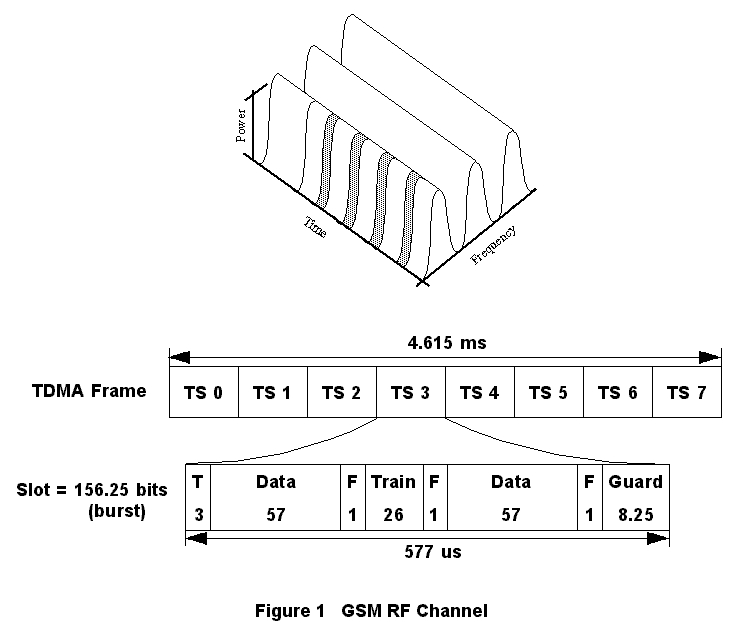
Figure 1. GSM RF Channel
If you are traveling from Italy to France, it is likely that your mobile phone is a Global System for Mobile communications (GSM) cellular telephone. GSM is a worldwide second-generation digital cellular standard. GSM offers many voice and short message services such as calling line ID, call barring, call forwarding and advice of charge. As shown in Figure 1, GSM's radio frequency (RF) interface is comprised of 200KHz bandwidth carriers divided into eight time slots. A time slot is one channel which can carry digitally compressed voice at 13Kbps. On a data call, this same time slot can carry up to 14.4Kbps of circuit-switched data.
The GSM standards body recognized the inefficiency inherent in circuit-switched data and added a service called General Packet Radio Service (GPRS) to the GSM standards. GPRS is a packet overlay of the GSM network. Packet-switched technology efficiency greatly exceeds circuit-switched technology efficiency for carrying and delivering data.
In a packet-switched cellular network, the mobile telephone shares the RF packet channels with the other mobiles in range of a cell site. Rather than reserving a specific time slot or channel on one of the base station's carriers for the entire session, the GPRS mobile uses one or more packet channels to transmit or receive data in bursts. Once the mobile finishes with that bandwidth, it releases the packet channels, making them available for other mobiles. A GPRS mobile reaches a peak data throughput of 120Kbps while a circuit-switched GSM mobile has a maximum throughput of 14.4Kbps for a data connection.
Nortel Networks is committed to providing integrated voice and data solutions with the highest level of quality. As we introduce new technologies such as GPRS, the challenges for a GPRS developer begin. How does a developer verify that the interface to the protocol layer he just completed works correctly? How does the developer complete an end-to-end call when there are no mobiles yet in existence that use the protocol? The authors of this article develop test systems that allow the GSM GPRS developers to verify that our GPRS products are performing at a high level of quality and dependability.
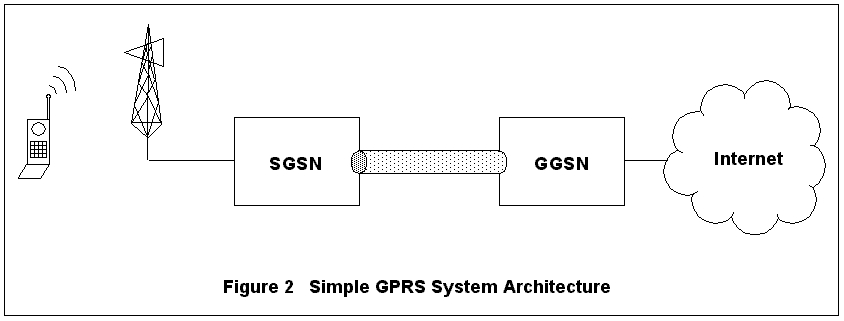
Figure 2. Simple GPRS Network System Architecture
A GPRS system consists of several network nodes including mobiles, base station system, serving GPRS service node (SGSN) and gateway GPRS service node (GGSN). These nodes are shown in Figure 2. When the mobile activates an Internet protocol (IP) packet data session, the base station notifies its SGSN. The SGSN activates the session, called a packet data protocol (PDP) context, with the GGSN. If necessary, the GGSN assigns a dynamic IP address to the mobile's context. When the GGSN acknowledges successful context creation, an IP tunnel using the GPRS tunneling protocol (GTP) is created between the SGSN and GGSN. The tunnel ID (TID) is tied to that mobile's context at both the GGSN and the SGSN.
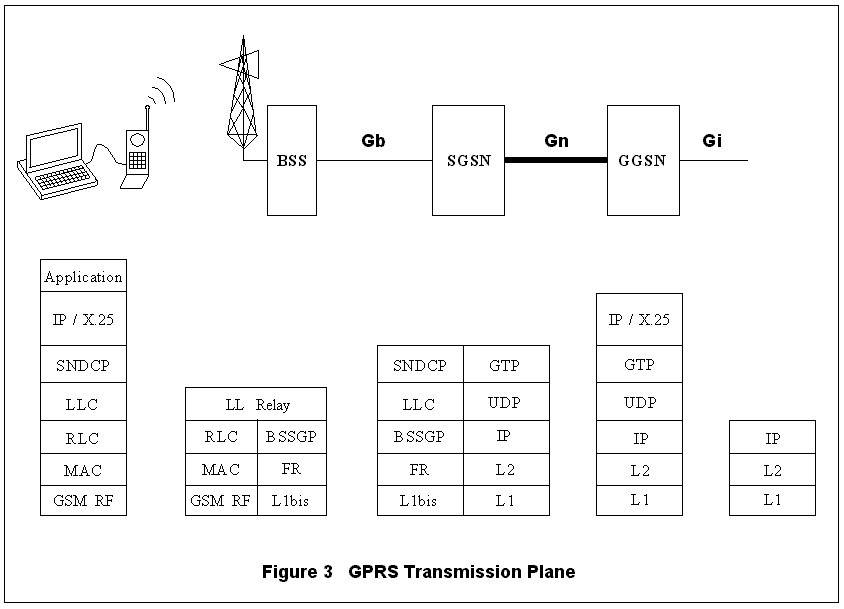
Figure 3. GPRS Transmission Plane
Tracing mobile-originated IP packets through the GPRS nodes (overlooking the RF access details) illuminates some of the testing challenges. When the mobile sends IP data, the packets are compressed and segmented by the subnetwork dependent convergence protocol (SNDCP) and sent down through the logical link control (LLC) layer traversing the stack shown in Figure 3. The mobile's LLC layer ensures the packets arrive in sequence and resends any packets not acknowledged by the SGSN. The LLC layer sends the packets through the radio-specific portion of the RF stack, over the RF link to the base station and the SGSN. At the SGSN, the peer LLC layer acknowledges the received packets, and the SNDCP compression and segmentation are undone.
As shown in Figure 3, the resulting IP packet is enveloped in a GTP UDP/IP message with a header containing the mobile's context TID. The SGSN sends the GTP packet to the GGSN's GTP port. The GGSN extracts the IP packet and places it on the Gi interface. An example of a Gi interface for IP is the Internet. For mobile-bound packets, a similar procedure is repeated in the opposite direction.
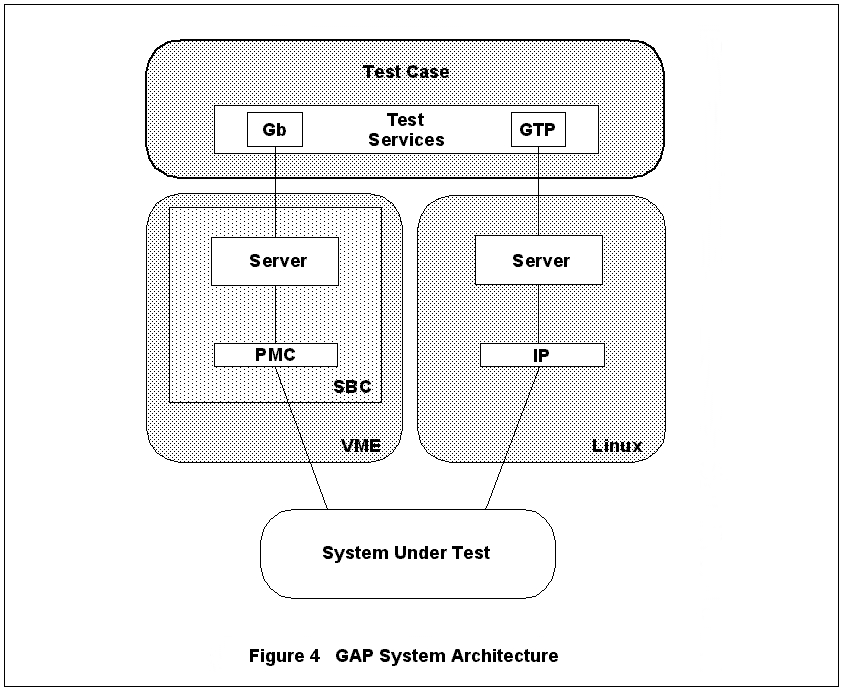
Figure 4. GAP System Architecture
Our typical approach to an automated test solution is to place a test server at each interface to be tested, as illustrated in Figure 4. The GSM developer then writes a test-case client using a “test services” application program interface (API) to send and receive messages via test servers. In response to these test-case requests, a server performs actions to the system under test (SUT). In message-based protocols, the server typically sends the test-case's message to the SUT. When receiving a message from the SUT, the server identifies the test-case client to which the message belongs, and routes and forwards the message to the test-case.
This testing paradigm was developed jointly by various groups at Nortel Networks and was named the test tools framework (TTF). Our automation team adopted the TTF paradigm and built the GSM automation platform (GAP) on top. Although originally written for HP-UX and VxWorks, TTF and GAP have been ported to Linux to allow greater flexibility.
This system performs well when the automation group writes the protocol stacks. However, the GPRS system requires the entire IP stack, including the applications such as TELNET, FTP and HTTP. We quickly realized that it would be impossible for us to generate real TCP/IP traffic without rewriting the IP, UDP, TCP and application stacks.
Linux's open and evolving IPv4 stack is very useful. When testing a protocol, we are required to step outside of the specification and test not only compliance, but error scenarios as well. For example, if the path maximum transmission unit is set to 1499, we will need to send a packet with 1500 octets to see what happens. Linux's open-source kernel and networking code makes this possible.
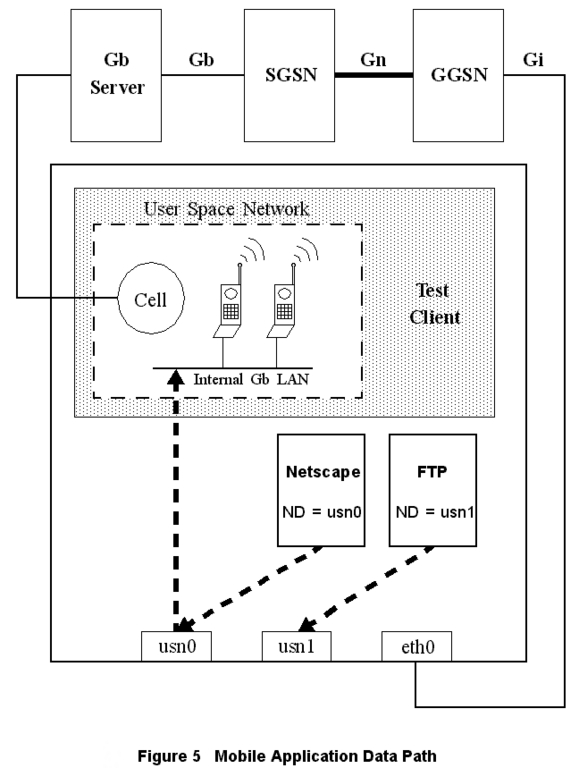
Figure 5. Mobile Application Data Path
In the arrangement pictured in Figure 5, the test case running on the Linux test-case machine brings up a tunnel using GPRS signaling paths. Once the tunnel is established, the test-case machine creates an IP alias for the test case's Mobile IP. The test case machine is multi-homed on the user-space Gb LAN and the Gi LAN. The test case uses IP applications or sockets to generate real IP traffic through the Gb test server to the SGSN, through the Gn test server, on to the Gi LAN, and possibly to the test-case machine's Gi interface.
The first question to be answered was how to reuse the Linux TCP/UDP/IP stacks. In our GPRS test system, the Gn test server receives the GTP tunneled packets on a UDP socket, pulls the packet out of the envelope and sends it out on another LAN (i.e., the Internet). In the other direction, the Gn test server acts as a gateway for the mobile receiving the packet from the Internet, enveloping it into a tunnel packet and sending it to the SGSN's GTP UDP port.
In the Linux system, the kernel transfers the packet from the Gi LAN Ethernet card to an enveloping, outgoing UDP message. At first, we brainstormed ways to use UDP sockets in kernel space; however, we eventually decided upon a different approach.
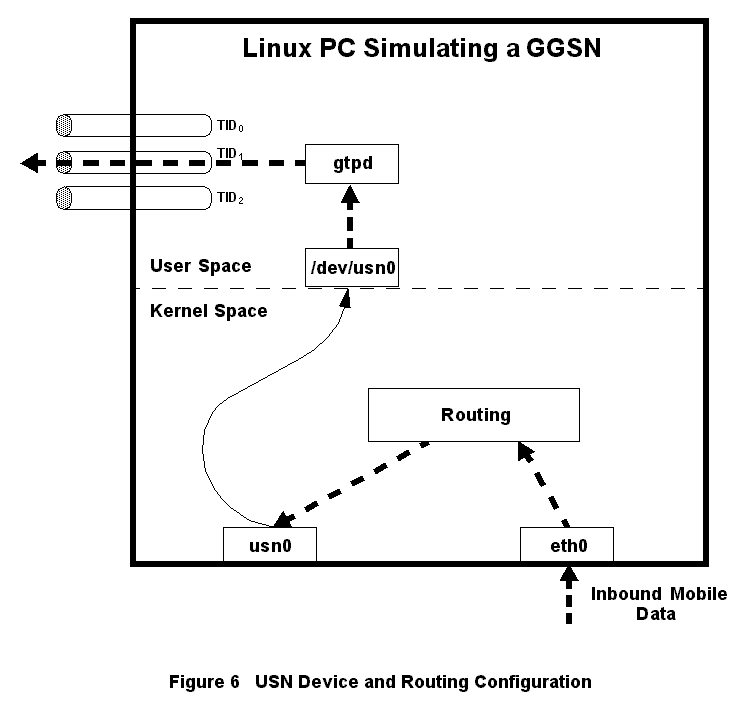
Figure 6. USN Device and Routing Configuration
Inspired by Alessandro Rubini's book Linux Device Drivers (see Resources 3), we sketched out a dual-device driver. One side of the device driver would appear to be an Ethernet card to the Linux kernel, while the other side would be a character device as shown in Figure 6. Applications could read packets sent out the Ethernet side of this device by reading from the character-device side. Likewise, applications could send packets into the Ethernet side of the device by writing to the character file. We called this device the user-space network (USN) device. Effectively, the USN device allows the kernel to send and receive packets from any user-space application that opens the USN's character device file.
The Linux machine on which the Gn test server resides acts as a gateway for the mobile's IP subnet. The routing tables are configured so that the mobile-bound IP packets are routed to the USN device. When the kernel sends packets to this device, our user-space daemon (gtpd) triggers and reads the packets from the USN character-device file (e.g., /dev/usn0). Our daemon then places them in an enveloping GTP message and sends the message to the SGSN's GTP port. Before starting this development item, we spent a large amount of time admiring our brilliance.
However, as our driver development continued into what we thought was unknown territory, we began to notice Alan Cox's footprints when we discovered the 2.0 kernel's netlink device (see Resources 4). The netlink device is exactly half of our device driver. It provides a character device and shell for dealing with sk_buff structures. At this point, all we had to do was write the Ethernet device half of our driver. While joking that half our job was already done, we were wondering how truly original our idea was.
Around the time we finished the device driver, we obtained the Linux 2.2 kernel. We loaded it onto one of our development machines and discovered Alan Cox's ethertap device. The ethertap device is exactly our USN device. It has interesting potentials for tunneling and packet manipulation. Does your router allow only HTTP packets through? The ethertap device could be used to route Quake packets through your user-space application that envelopes them into benign-looking HTTP packets.
Due to the time it would take to certify TTF and GAP on a new kernel and, maybe, to prop up our diminished egos, we decided to stay with our USN device rather than move to the Linux 2.2 kernel and the ethertap device.
At this point, the work on the Gn test server was progressing nicely and we began to focus on the other pieces of the puzzle.
Data transportation in the world of mobility is often treacherous. The Gb protocol stack (see Figure 3) is designed to support reliable data transportation for multiple network addressing schemes (e.g., IP or X.25), serving innumerable applications in the packet data network.
Another large piece of the puzzle was the development of a test server and test services to test the Gb protocol stack. This development began about halfway through the development of the GGSN test server. Naturally, Linux was our primary development environment, and we planned on reusing the USN device and the Linux UDP/TCP/IP stacks all over again. However, this time they would be used to test the Gb stack by simulating calls via virtual mobiles, cells and base stations.
The server portion of the Gb test interface is a distributed application consisting of two primary components. One component resides on a PowerPC single board computer (SBC) housed in a VME chassis running a commercial RTOS. This component drives a frame-relay interface running on PCI (peripheral component interconnect) Mezzanine cards that support multiple T1 or E1 carriers. The second component performs resource management, proxies the frame-relay services and implements the BSSGP (base station system GPRS protocol) and NS (network service) layers of the Gb protocol stack. Thanks to the diversity of TTF, this component runs on either a PC running Linux 2.0 or a PowerPC SBC target running an RTOS.
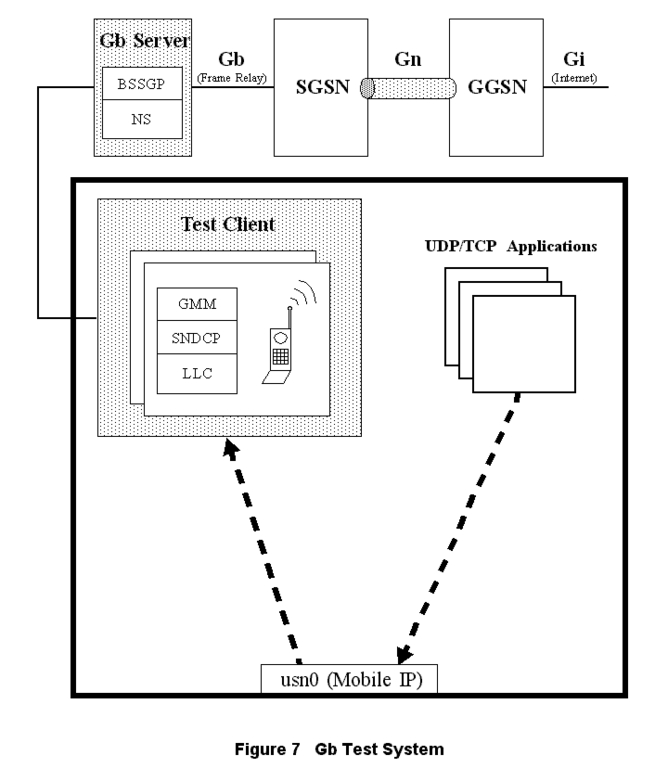
Figure 7. Gb Test System
Within the test case as shown in Figure 7, the developer creates instances of mobiles, cells and base stations using Gb test services, all of which act as clients to the Gb test server. These test services complete the Gb stack by implementing the LLC, SNDCP and GMM (GPRS mobility management) Gb protocol layers per virtual mobile.
Reserving mobiles, cells and base stations, the developer can bring up simulated calls within their test case. Once the calls are up and the PDP contexts are established, the developer uses basic UDP or TCP sockets to send and receive data. The data is encapsulated by the Linux UDP/TCP/IP stack and is routed to the USN device. From there, test services retrieves the data from the USN device, passes it through the Gb SNDCP, the LLC layers of the virtual mobile, and then the Gb test server. At the server, the data is passed through the BSSGP and NS protocol layers and then transported over frame relay to the SGSN. This process is reversed in the receive direction.
All of this was very nifty, but a larger problem loomed on the horizon. What if we wanted to do something “normal”? Perhaps something that could stress the SUT. What about bringing up several simulated calls and using Netscape over them to browse the Internet? That would mean binding an application's execution environment to a specific PDP context.
The test-case machine sits on both the user-space internal Gb LAN and the Gi LAN. In an example where the test case has two mobiles, each with an active context, several routing problems become immediately apparent. In this case, the user might want to launch two instances of Netscape, “binding” each instance to a different mobile's context (i.e., IP address). If one of these Netscape sessions opens a TCP socket to a Gi LAN web server, the kernel has three choices for routing the TCP packets: the kernel could send the packets to either one of the two mobile's USN devices, or to the Gi LAN's real Ethernet device.
For UDP or TCP sockets opened by the test-case developer, the developer can use the SO_BINDTODEVICE option by calling setsockopt. Binding to a specific device forces all packets sent on that socket to use the bound device; however, applications such as FTP, TELNET and Netscape do not use this option.
After careful observation of a Linux Virtual Private Network software package, we noticed programs such as TELNET and Netscape routed all their IP traffic out the VPN tunnel. Using nm on the provided shared library, we found that the shared library contained a complete replacement for the socket API calls.
As web browsing is the major motivator for mobile data services, we had to provide a way to surf the Web through a mobile's context. After many hours looking through the Linux networking code to forego rewriting the entire socket API, we decided to hook into the IPv4 socket creation. Our hook searches the current task's environment table for an environment variable (ND), and if it exists, binds it to the device specified by the ND variable.
We wanted to do the hook as a loadable module. However, we found we had to modify the Linux 2.0.36 networking code. We modified the kernel to export the inet_proto_ops structure globally and tweaked the sock_register and sock_unregister routines to turn interrupts on and off correctly. The Linux 2.2 kernel appears to have made both these changes unnecessary and opens opportunities for loadable-module “over-binding” of the native IP stack operations.
When our module loads, we hook the socket creation process by calling sock_register with the inet_proto_ops structure's create function pointer pointing to our socket create function. From this point, whenever a socket is created, our routine is called.
While we were in the kernel, we applied kernel patches to provide a serial console and microsecond resolution time-stamping for received Ethernet packets. We also modified the netlink driver to increase its number of minor devices.
As mentioned before, when the hook is in place, our socket creation function searches the current task's environment table for the ND variable, and if found, binds the socket to that device.
The function first finds the environment table in physical memory (in which the kernel runs), but the environment table memory location is stored as user memory addresses under the task structure (current-->mm-->env_start to current-->mm-->env_end). We use get_phys_addr from fs/proc/array.c to convert from the user address to the physical address. Using this address translation function, our code searches the current task's environment for ND=.
If the ND variable is found, our code calls sock_setsockopt with the SO_BINDTODEVICE option and the specified device. However, sock_setsockopt copies the ifreq structure from user space to kernel space. Since our code lives in kernel space, we had to implement the device bind by setting sk->bound_device ourselves.
Once we had the /dev entries for the USN device and the SO_BINDTODEVICE mechanism compiled into the kernel, we were ready to begin testing our concept. The initial test was very straightforward; we used ifconfig to configure a USN device and then set the new kernel-supported ND environment variable to that device. From that point, any application we ran in that environment had its outbound IP packets sent into our USN device. To actually watch the packets, we executed tcpdump -i on our USN device (in this case, usn0).
The ping program was the simplest way we knew how to start sending IP traffic, so we executed it first. Everything proved to work the way we envisioned. The ping packets began showing under tcpdump. There was no one reading the device file at the time, so no response was made to the ICMP requests. But for our purposes, everything worked as planned.
We then tried ftp and telnet, another pair of IP applications that generate IP traffic. We saw the ftp and telnet traffic appear on our USN device, and that was sufficient proof to us that our idea was sound—until we decided to open an xterm.
Naturally, as for any X application, to see the xterm we had to set the DISPLAY environment variable to the host name of our desktop machine. Setting the display is simple, but when we tried to launch the xterm, we didn't quite expect what happened next—nothing.
Unfortunately, our kernel modifications and USN device worked a bit too well. After launching the xterm, a glance at the tcpdump output made it apparent what was happening: all of our packets, including the X packets, were being rerouted to the USN device. While that had been a very good thing for ping, FTP and TELNET, it was now a very bad thing. X packets were being written to the USN device, never reaching the X server on the host machine.
We were, to say the least, disheartened. We had several options at that point. The first idea was to note the transport protocol in use (TCP) and the X port number as packets flowed through the kernel, and route those packets through the Ethernet device. This idea was quickly dismissed due to its complexity and lack of elegance.
The second solution was to create a virtual X-user environment the tester could open, as opposed to using telnet or rlogin to access the test-case machine. This concept was fostered by our recent introduction to some of the interesting possibilities the VNC (virtual network computing) software package created. VNC's abilities are impressive, due to the fact that it is multiplatform. Unfortunately, the VNC approach proved to be too slow.
The concept was sound, and ironically, preferable to having the tester telnet in, export his display, etc. For all intents and purposes, we could have testers log in from Windows PCs and open VNC sessions to the Linux boxes. However, since the test community was based in X running on HP-UX, why couldn't we turn to an X server that allowed nesting?
The Xnest X server is both an X client and an X server. It is a client to the X server on the host display (in our case, the HP), and it is a server to X applications you execute on the remote machine (the Linux box). The procedure to getting an Xnest session up and running is quite simple. First, you log in to the remote machine, export your display back to the host display, then run Xnest with a local display string. This display string is then used to run remote applications in the Xnest session.
Using our USN device, the ND environment variable and our Xnest-user environment, we provide Nortel Networks' GPRS developer with a desktop testing environment where they can exercise the latest GPRS nodes simulating mobile web surfers and the Internet.
Linux's open network code made all our work possible. Using Alessandro Rubini's Linux Device Drivers (see Resources 3) and the Linux source code as a guide, we developed a device driver in a very short amount of time, even though we had never before written a device driver. Rubini's book also helped us during our kernel modifications. It is hard to imagine being able to do something this complex in such a short period of time with a closed-source OS.
It is interesting to compare different versions of the Linux kernels. The kernel's networking code is becoming more modular and incorporates IPv6. With the latest kernel versions, all our device driver and kernel modifications would have been unnecessary. In addition to books such as Rubini's and being open source, Linux is a capable choice for any networking application because of the standards it supports and the constant improvements the Linux development community provides.
Wes Erhart (erhart@nortelnetworks.com) majored in electrical engineering at Texas A&M. He joined Nortel Networks in 1993 and has been managing the GSM automation development group for two years. Not a particularly good coder and harboring an irrational distrust of all computers, Wes did possess enough good sense to marry a goddess and now has a wonderful daughter godette filling his life.
Joseph Bell (jobell@nortelnetworks.com) is a Texas A&M University computer engineering graduate and has been with Nortel Networks since he was a sophomore in college. He enjoys all things Linux and anything that can be programmed. When not coding, he can be found ranching on his farm in north Texas.
Marc Hammons (hammons@nortelnetworks.com) is a University of Texas computer science graduate and has been with Nortel Networks since 1994. He has lost all faith in nihilism and is a born-again Linux enthusiast. In his spare time, he enjoys digging into source code, a good cup of coffee and the game of foosball.
Mark Mains (mmains@nortelnetworks.com) graduated from LSUS with three degrees, in Physics, Math and Computer Science. He started work for Nortel Networks in 1997 and has been using Linux since 1996. Most of his spare time is spent in front of his computer, building circuits or working on his Z28.

