
Code Fusion Version 1.0

Manufacture: Cygnus Solutions
E-Mail: info@cygnus.com
Price: $299 US
Reviewer: Daniel Lazenby
Code Fusion is Cygnus' next step in providing Linux developers with an integrated C, C++ and Java tool suite. The Code Fusion environment includes an ANSI/ISO C compiler, an ANSI Tracking C++ compiler and a Java compiler. A linker, build utility, debugger, source browser, an interface to version control systems, plus some other utilities are also included in this IDE (integrated development environment). Could this be an IDE for the masses?
Code Fusion is an integration of two other Cygnus products: Source Navigator and Cygnus Insight (also known as GNUPro Toolkit. Each of these products has been reviewed in Linux Journal.) The integration of these two products provides a very usable integrated development environment. A primary advantage of the Code Fusion IDE is its quick visual access to project files, commands and build configuration files. Another positive attribute of Code Fusion is the compiler. It has been optimized for the Intel Pentium processors. Some benchmarks indicate a significant improvement in compile speeds. Compiles of my sample C, C++ and Java code went very quickly. Unfortunately, my code was too short to get a good measure of the compiler's true speed improvement.
In addition to the C and C++ compilers, Code Fusion includes a GNU Compiler for Java (GCJ/gcj). GCJ is a front end for the gcc compiler. GCJ accepts .java, .class, .jar and .zip file types. Using the -C option, gcj makes .java files into .class files. GCJ is capable of natively compiling both Java source and bytecode. More information on the gcj compiler is available at http://sourceware.cygnus.com/java/.
Code Fusion version 1.0 GCJ is compatible with JDK 1.1 and includes some JDK 1.2 functionality. Several pages of the manual are devoted to listing the specific Java 1.1 and 1.2 classes/methods/fields that are/are not included in the distribution.
Opening a Java project with Code Fusion provides the same kinds of access to Java information available for C and C++ projects. For example, the Source Navigator's Symbol Browser provides a visual representation of a Java project's files, classes and methods. Selecting a file, class or method opens the Source Navigator's Editor Window. Within this window are four browsers, an editor and search tools. A GUI compiling function is included within the Source Navigator portion of Code Fusion. Insight, Cygnus' GNU debugger, may also be used to debug compiled Java programs. I found this tool very useful in understanding some Java code I had acquired.
Code Fusion's target audience seems to be the experienced individual developer. I feel the Code Fusion IDE code-building conventions may not make a lot of sense if you are not already familiar, or comfortable, with building applications from the command line. The example application-build tutorial provides adequate guidance on what IDE dialog boxes to use, how to access the IDE dialog boxes and what data are needed to build the example code. There is little guidance as to why you are using a dialog box or why you are entering the requested data. I feel this understanding can come only from having learned to do it the old-fashioned way.
As with Source Navigator, Code Fusion's Version Control is based on RCS, CVS, SCCS and the Clear Case product. There were some version control functionality bugs in my review copy of Code Fusion. I could only check project code in or out. I got error messages whenever I tried to use any of the other IDE version control functions, so I contacted Cygnus about the symptoms I was receiving. Cygnus promptly informed me they were aware of the symptoms and were in the process of testing a fix. This should be fixed by the time this review is published.
Code Fusion v1.0 supports Caldera 2.2, Red Hat 5.2/6.0 and SuSE 6.1 Linux distributions. This product requires a Pentium with memory—Cygnus recommends 64MB. This product also needs about 200MB of free disk space to install. My Caldera distribution mounts the Code Fusion CD-ROM as a non-executable device. A README file containing guidance on mounting an executable CD-ROM device is included.
Installation is divided into loading the application and configuring it. There is a CLI and a GUI install script; I chose to use the GUI script. Code Fusion came with a preprinted CD asset key. The asset key-based install means you need one licensed copy of the product per developer. Installation involves entering the asset key, typing in the installation directory and choosing the type of install.
After entering the asset key, you are presented with a graphic of the file systems and told to select your install directory. At the bottom of this graphic is a text field displaying the default path. The release I reviewed would not respond to a directory selection—I had to type over the contents shown in the directory text field. A custom install option provides the means of selecting which Code Fusion files or components to install. Two status bars are presented once the install begins. One bar indicates which of the seventeen files is being installed, the other indicates the file's install progress. The install is not complete until a couple of environment variables are configured.
I once saw the phrase “Here there be dragons” on a museum map. The “Here there be dragons” phrase truly applies to the environment-variable configuration step. These variables must be configured prior to running Code Fusion. In addition to adjusting the standard PATH variable, two other environment variables need to be established to ensure Code Fusion uses the proper libraries in the proper sequence: LD_PRELOAD and LD_LIBRARY_PATH.
The LD_PRELOAD variable points to a library that must be loaded before any other shared libraries are loaded. There are two ways of establishing the LD_PRELOAD path: one is to include the variable in one of the traditional environment setup files, the other is to use the /etc/ld.so.preload file. Here is where the dragon lived. A simple typographical error in this /etc/ld.so.preload file raised havoc with my system, the likes of which you don't want to experience. I tried both maintenance and shell boots; neither of them were of much use. I found it easier to restore my system from a backup I had made just prior to starting the install. The next time I got to this environment variable configuration step, I placed the LD_PRELOAD variable into a test user's .profile. This way, I could localize any problems to a single user ID. Needless to say, I was triple cautious when it came to setting up the LD_LIBRARY_PATH. The test user ID .profile was used for the first implementation of this variable as well. Once I had proven to myself it was safe, I moved the variables to an environment file, where they had a more global effect. I did not use the /etc/ld.so.preload file. Be sure you can recover your system before you start configuring these environment variables.
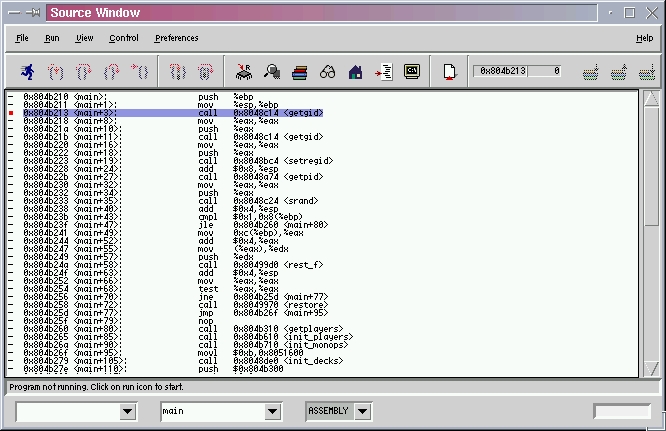
Figure 1. Example Window
In general, the Code Fusion documentation is clear and concise. I do have a couple of minor complaints, though. The manual is primarily a composite of extracts from the Source Navigator “User's Reference Guide” and the GNUPro Toolkit “Getting Started” manual. Some new pages cover the integrated and new features. The manual highlights basic Source Navigator interface characteristics, and after highlighting the characteristic, the reader is then referred to the Source Navigator's “User's Reference Guide” for more details. Other parts of the Code Fusion manual directed the reader to Source Navigator's “Programmer's Reference Guide”. The author of this manual seemed to be working under the assumption that a Code Fusion owner already owned a copy of Source Navigator. This premise may be true for a short while after the initial release of Code Fusion. Once Code Fusion has been on the market for a while, this premise will no longer be valid. Code Fusion documentation should be able to stand on its own. The author shouldn't count on the buyer of Code Fusion already owning a copy of GNUPro or Source Navigator.
The on-line Code Fusion documentation resembles the manual information. I was unable to locate the on-line Source Navigator or GNUPro documentation that was often referenced in the Code Fusion manual. Within the on-line documentation are references to unavailable user guides. For example, the “Launching the Insight Debugger” topic referred the reader to the GNUPro Getting Started Guide. No hyperlink to the referenced Guide was present, and I was unable to locate the document in the product install directories. At a minimum, I feel the proper reference documentation should be made available in either hard copy or on-line.
The Code Fusion product contains GNUPro and other GNU-licensed products. Chapter 2 has eighteen pages of general license and terms for use and distribution of applications created with the Code Fusion IDE. Reviewing the various licensing terms and conditions is worth the time it takes. The rest of the manual is devoted to describing how to use the basic Source Navigator and GNUPro Toolkit interfaces.
Six demonstration projects are included with Code Fusion: one for COBOL, FORTRAN, C++, Assembly, Java and a program called monop. The monop program is used for Code Fusion demonstration purposes. There are supposed to be README files for the other demonstration projects, but I was unable to locate several of them. The README files I did locate did not provide any useful information.
As with other Cygnus products, 30 days of installation support is included with your purchase. Cygnus also maintains a Code Fusion support web site. The web site was still under construction at the time of this writing. When I visited the site, I found a FAQ, bug list and a patch database. A developer discussion forum and a couple of other features were listed as “coming soon” and may be implemented by the time this review is published.
Overall, I feel Cygnus did a great job of integrating the two products into an application IDE. I found Code Fusion easy to use and easy to navigate around. The interface between Source Navigator and GNUPro worked very smoothly. Code Fusion's management of project files takes only a couple of mouse clicks to add, delete or apply revision control. Please note, there is a slight IDE learning curve if you have not used either the Source Navigator or GNUPro Toolkit products.
Before paying list price, check on what upgrade paths are being offered. At the time I wrote this, Cygnus was offering three upgrade paths. Each offered a significant savings over the product's list price.

