
Oracle Database Administration with Orac
Orac is an open-source database administration tool written in Perl/Tk. It was written primarily by and for DBAs (database administrators). However, it will also be very useful to developers and anyone else who wants to understand more about how (and how well) their database is working.
Orac provides much of the functionality that any DBA could want. It includes scripts that help in managing physical database files, users, database objects (such as tables, views, sequences, etc.) and scripts that help tune the database and resolve “locking” conflicts.
Orac builds on this collection of widely available SQL scripts by providing a nice GUI and a logical organization of the scripts. Orac is extensible, of course, in the sense that the source code is readily available. Even better, though, Orac has an easy method of adding support for more SQL scripts without editing even a single line of code. So for those DBAs out there who already have their favorite scripts, Orac is even more useful.
By the way, the Orac program was named after a supercomputer in the BBC science fiction television series “Blake's 7” and in no way takes its name from the Oracle database or the Oracle Corporation. No affiliation with Oracle Corporation is intended or implied.
Many experienced DBAs manage databases almost exclusively with command-line utilities. Oracle provides a number of tools such as sqlplus for querying the database, svrmgrl for startup and shutdown of the database and sqlldr for loading ASCII files. Like the Oracle database, these simple command-line tools have proven themselves solid, reliable and efficient.
Unfortunately, the same cannot always be said for the various high-end database administration tools on the market. Configuration and setup can be difficult. They are often slow, and at times it may not be clear exactly what the tool is doing. Some commercial DBA tools even require the use of a proprietary scripting language. (By the way, I'm running Oracle 8.0.5, WordPerfect 8 and Orac 1.1.11 on a Pentium 75/64M, and it works just fine for single-user experimentation.)
Orac provides an elegant way to capture and organize the various scripts many DBAs need to do their job. It represents a middle ground between having a bunch of ad-hoc scripts executed at the command line and the complicated commercial tools.
There will always be a role for the commercial offerings, of course, and you might eventually decide to purchase one. However, the knowledge gained from having used a free tool like Orac in a real-world setting can only be a benefit.
Orac is a Perl script that performs two basic tasks. It retrieves information from the database and presents the information to the user. A couple of important Perl modules are used to do this work. First, DBI.pm is used to make the connection to the database. Here is a simple code snippet that connects to the Oracle database called ORA1 and gets a list of files that make up the database.
#!/usr/bin/perl -w
use DBI;
$dbh = DBI->connect('ORA1','ADMIN','ADMINPASS','Oracle');
$sth = $dbh->prepare
   ("select file_name from dba_data_files");
$sth->execute;
while (@row = $sth->fetchrow()) {
   print "File Name: @row\n";
}
$sth->finish;
$dbh->disconnect;
exit;
Of course, Orac reads its SQL from a file instead of hard-coding the statement into the Perl script, but the basic principles remain the same.
Once the needed data are in hand, it is fairly straightforward to display them using the routines in the Tk module. The script in Listing 1 is similar to the one above, but instead of using a simple print to send the information to standard output, it uses Tk to display the results in the X Window System. Figure 1 shows the results from running the Perl/Tk script.

Figure 1. Output Display of Listing 1
Again, Orac uses Tk in a very flexible way. Orac loads its menus from a text file after the program starts. To recap, Orac loads both the SQL scripts it executes and the menus making up the program from text files, after the program starts. Any idea where this might lead? More on this later. Figure 2 shows how SQL gets executed in Orac.
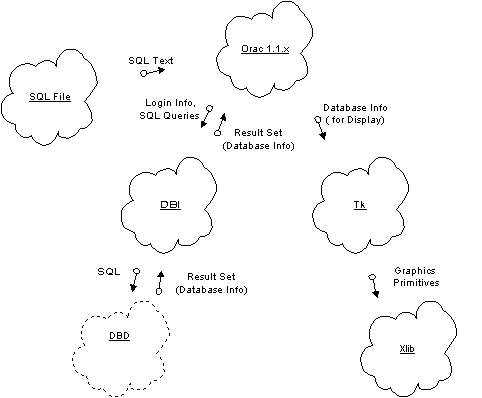
Figure 2. How SQL is Executed by Orac
A number of common tasks are faced by DBAs, such as the management of users, database performance, and of course, the actual database files. We'll take a look at the last item, database file management, to show how Orac can be used to make this task easier.
A full explanation of Oracle storage concepts is beyond the scope of this article. In short, though, a database is composed of Tablespaces which can contain multiple DataFiles. A Tablespace is composed of 1 to n DataFiles. Each of these DataFiles contains the actual database information for tables, views, stored procedures, etc. Typically, the data is segregated in such a way that system-related information is stored in a different Tablespace/DataFile than application-related data. Since DataFiles are fixed in size at database creation time, DBAs must monitor the available space and add or expand the DataFiles before they run out of room. Newer versions of Oracle, by the way, have more sophisticated space management techniques which alleviate some of these problems.
Figure 3 shows a list of Tablespaces in the database and how much free space remains. Orac has summed the total space for each Tablespace. In other words, if a Tablespace is composed of three DataFiles, then the total space available in the three files is displayed. This brings up another great feature of Orac. Each report includes a button called “See SQL” that displays the exact query run to generate the report. If there is ever any question about how a report was generated, you can get to the actual source quickly and make the needed improvements or corrections.

Figure 3. List of Tablespaces
As mentioned earlier, Orac loads both the SQL and its user interface from a text file at startup. Orac is perfectly capable of loading a user interface and the related SQL for databases other than Oracle. In fact, developers are hard at work on Informix, and some work has also been done for Sybase. The Orac team would very much like to see additional databases such as MySQL, mSQL and PostgreSQL supported in the future, and we're actively looking for volunteers to help out.
Another area developers are hard at work on is the dbish (database interface shell). This module provides the user with a way to enter ad hoc SQL into the database. The initial module has already been coded and is being tested now. By the time you read this, most of the bugs will likely have been worked out.
While parts of Orac make use of Tk to draw some primitive graphs, there is certainly room for improvement. In the near future, Orac will make use of the functionality in the GD and GIFgraph Perl modules to provide better charting and graphing capabilities.
These are only a few of the areas where work is in progress. The Orac team is actively soliciting feedback from anyone and everyone who would like to make Orac a better program.


