
An Introduction to Using Linux as a Multipurpose Firewall
High-speed Internet connections are becoming more readily available and popular for home computer users. ADSL (Asymmetric Digital Subscriber Line), Nortel's 1MB modem and cable modems all offer connection speeds many times faster than that of a standard 56K POTS (plain old telephone service) modem that most of us know all too well. The other big advantage of these new services is that they are always connected. That is, you don't need to dial your service provider with your modem to start up your Internet connection. When you turn on your computer, the connection is already there, and your operating system will establish a link as it boots up.
Like the standard modem, these connections allow only one computer to connect to the Internet at a time. In some cases, additional IP addresses can be assigned to additional computers, but there is usually a monthly cost involved in providing this service.
By installing Linux on that old 486 you have sitting in the corner collecting dust, you can create a firewall so all the computers on your local LAN can see the Internet, and at the same time, transfer data back and forth between each other, (see Figure 1). You don't even need a dedicated PC. A faster PC can simultaneously be used for other purposes while acting as the firewall; however, there are two main drawbacks with this approach:
Users on your LAN may experience a slower connection to the Internet.
You could inadvertently open a security hole, allowing someone on the Internet to get in and play havoc with your system or files.
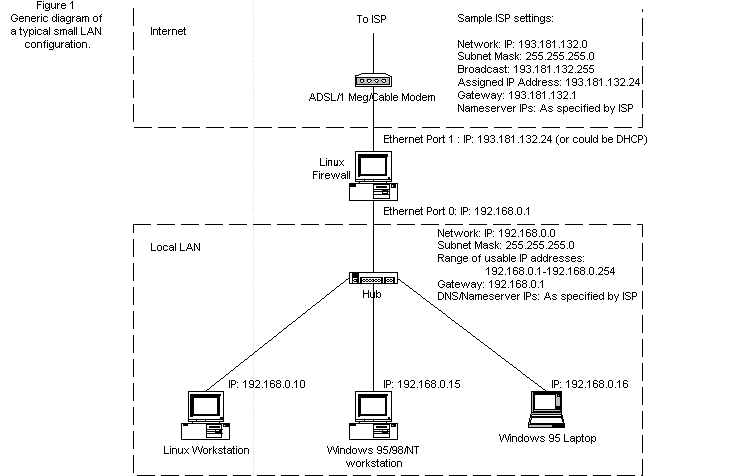
Figure 1. Generic Diagram of Small LAN Configuration
I will be discussing two different types of Linux firewalls. The first type consists of a 486 with 12MB of RAM, and a 200MB hard drive using either Red Hat 6.0 or Slackware 3.6. The second, called the Linux Router Project (LRP), uses a 486, 12MB of RAM, a 1.44MB floppy and no hard drive. Two Ethernet network interface cards (NICs) will be required, regardless of which firewall configuration you install.
Someone is always watching, and people are always on the lookout for computers on the Internet with poor security. Their motivation can be as simple as boredom, or more seriously, a need to find a system to penetrate so they can use it to hide behind while they continue breaking into other systems, leaving evidence that points to you.
If you are running a standard Windows installation, you probably don't have the means to see who is trying to check out your machine. As long as “File and Print Sharing” is turned off inside of Windows, for the most part, you are safe. However, it is possible someone may find a new security hole in your PC and exploit it.
If you have Linux running, you can check out your system logs. Upon doing an informal survey with friends who run Linux firewalls, I found on average five attempts by outsiders each day to use TELNET or FTP to break into their Linux boxes. In the case of a firewall, you can turn off or restrict most services. In general, the strength of your firewall security decreases for each service you open up to the Internet, since each service is an invitation for someone to try and sneak in to your system. For example, if you open TELNET, someone can use it to break in. A safer alternative is to restrict TELNET to certain incoming IP addresses, such as the IP addresses you might use to access your home system from work. If you have no plans to TELNET or FTP into your firewall from the Internet and all your traffic is originated inside your local LAN, you can lock your firewall fairly tightly. It is always a good idea to stay caught up on new security holes and the fixes for them. Check out http://www.cert.org/ for more information.
There are many reasons for having a firewall, some of which I have already mentioned. They include:
Ensuring that local traffic on your intranet does not spill out to the Internet.
Allowing the full use of file and print sharing in your LAN without having to worry about unwanted intrusions.
Providing security for your LAN.
Allowing yourself and authorized users access to your LAN to read e-mail, listen to MP3s or access file backups.
When you copy a file from another local PC on your LAN using Windows “Network Neighbourhood”, or when you FTP a file from another PC on your LAN, that traffic has no reason to go to the Internet. If you had a high-speed modem directly connected to your LAN, it would send out that data, because it has no way of knowing it should not be sent there. By default, it sends all traffic it sees, and although it won't likely get past the next router in the chain, it is sending out data that does not need to be there. This may impact the overall speed of your local LAN. You probably don't want this particular traffic to go out over the Internet, so the firewall prevents it.
One of the TCP/IP settings on our PCs, regardless of the operating system, is the “default route”. When the destination IP address cannot be found on our local LAN (this is determined by the subnet mask), then the default route is used. The default route in this example will point to the IP address of the NIC on the local LAN side of the firewall (Ethernet 0 in Figure 1). This IP address usually ends in 1. For example, if you have a local LAN with a network address of 192.168.0.0 and a subnet mask of 255.255.255.0, you have 192.168.0.1 to 192.168.0.254 available for local IP addresses (see Resources for more information on the Linux NET-3-HOWTO ). In this case, 192.168.0.1 would normally be assigned to the NIC on the firewall.
Any traffic intended for an IP address outside our local LAN will go into the firewall. The firewall will replace (masquerade) the source address of the PC in the local LAN that originated the packet with the firewall's IP address (assigned by your ISP), so that to the Internet, the traffic looks as though it originates from the firewall and is coming from a valid IP address. Any return packets relating to this originating packet will go through the reverse transformation, so the traffic finds its way back to the originating PC.
Rules can be set up to allow certain packets to make it through the firewall or to be stopped dead. By default, nothing gets passed. A small set of rules are needed to support features such as TELNET, HTTP, IMAP and POP3, and a few extra rules are needed to allow other features such as RealAudio or on-line gaming to function. (Gaming can be a little more difficult to set up, as each game is different.)
In Figure 1, you can see how a typical small LAN/firewall configuration might look. You need to determine how many PCs will be in your network, and how many of them will be connecting to the Internet. The IP addresses chosen for your internal network will be determined by the size of the network. Table 1 shows which groups of IP addresses have been reserved for private LANs, such as the one we are designing. For the most part, a class C network address will be sufficient, as it will allow up to 253 hosts or PCs in our LAN, leaving one IP for the firewall. Table 2 shows an example configuration.
The complete firewall will be built over several stages. These include building and configuring the hardware, installing and configuring Linux, configuring the network cards, building a new kernel, establishing routing between the networks, then introducing security and locking down the PC and the local LAN.
First, you must decide what type of system you want to build. If you want to use your firewall only for firewall/routing purposes, then once it is set up and running, it does not need a keyboard or a monitor. In fact, many systems will run without a video card; however, you might want to keep one handy in the event of a system failure. Software changes can be done by either connecting to the firewall over your local LAN via TELNET, or using a modem program on a laptop (such as Hyperterm) and connecting to the firewall via the serial port. This type of configuration is well-suited to LRP. If you actually want to have a few users on your machine reading things like e-mail (either locally or via TELNET), you will need a hard drive and RAM sufficient to handle that. A 200MB hard drive and 16MB of RAM will work for this if you don't load unneeded packages, such as the X server or source code, and your users keep space constraints in mind. If you plan on the LAN using your firewall PC for additional functions, you will need to upgrade it appropriately in all respects: memory, hard drive size and processor speed.
You will need at least two network cards in your firewall. One card will face the Internet and the other will face your local network (Figure 1). If you can't afford a hub and you have only a few PCs to connect, you can put multiple cards in your firewall, one for each PC, and wire an Ethernet cable as a “turn-around” cable. ISA network cards can be found inexpensively in some markets these days, and may be less expensive than an Ethernet hub. The use of more than two network cards in your firewall machine will require more rules in your firewall, but that is easily handled.
You will need the DOS configuration disks for your network cards if they are jumperless cards which use non-volatile RAM (NVRAM) to remember their settings (I/O address, IRQ, etc.). The configuration software for most cards can be found on the Internet at the card manufacturer's web page or at some of those helpful Windows driver repository sites.
Make a DOS floppy boot disk, and have the configuration program for each card handy on floppy.
Install one network card at a time and boot your PC. Run the configuration software for that card, and set the I/O address and IRQ settings. Make sure you don't configure the card to a setting already in use by some other card. For I/O addresses, the only item you may have trouble with is an old CD-ROM drive with a proprietary controller (see Table 3). Once configured, remove the card, insert the next network card and repeat the procedure. Once you have your network cards individually configured, you can install them all in the firewall. In my firewall, my first network card is set to an I/O address of 300 and an IRQ of 12, while my second network card is set to an I/O address of 320 and an IRQ of 15.
It is now time to install Linux. The sample configuration that follows is based on Linux kernel 2.2.9. If you install a Linux distribution from the Net or from a recent CD, you may find this kernel included. If not, you can get it from http://www.kernel.org/. The more recent the distribution, the less likely it is that you will run into outdated libraries or utilities. One of the utilities we will be using to control the firewall is called ipchains. This program runs only on kernel version 2.2.x and higher. If you plan on using an earlier version of the kernel, you will need to find ipfwadm. It is always best to use a recent (but not necessarily the most recent) kernel version. Follow the instructions provided with your distribution, and install the distribution. If the default kernel on the CD is not of the 2.2.x variety, don't worry; you will need to build a new kernel later anyway. If you are building a small system, you will want to install as little of the distribution as possible. At a minimum, you will need to install the base files and networking support.
At one point during the installation, you will be asked to configure the Ethernet interfaces (ports). Generally, you will be able to configure only one of the interfaces during the installation. The remaining interfaces can be configured by editing the configuration files. Alternatively, Red Hat 6 offers a GUI-based application called netcfg; however, it requires you to install the X server, something I don't recommend if you are tight on hard drive space or don't plan on leaving a monitor connected to the PC. When you do come across the configuration request for the first interface (generally called eth0), you should enter the information for your local LAN. In our example as per Table 2, we configure this interface as:
IP address: 192.168.0.1
Subnet Mask: 255.255.255.0
The default gateway of the firewall (not the PCs inside your LAN) is that of the gateway provided by your ISP. If the subnet mask provided by your ISP ends in a .0, your ISP gateway IP address will generally end in .1, for example 193.181.132.1. After the setup and installation of the distribution is complete, you will have to add the additional information on your second Ethernet interface (generally called eth1). We will need to edit or create configuration files for both Slackware (Listing 1) and Red Hat 6.0 (Red Hat sidebar).
If your NIC cards are all of the same type or all use the same driver, you must tell Linux to search for more than one card of that type at boot time. LILO provides a nice way of doing this that works for most Ethernet drivers I have tried. Edit the file /etc/lilo.conf and add the line
append="ether=0,0,eth1"
anywhere in the LILO global section near the top of the file. If you have more than two Ethernet cards, you would add
append="ether=0,0,eth1 ether=0,0,eth2"You can also explicitly define all the cards instead of just telling the system to look for additional cards by using the following on one line:
append="ether=irq_card0,io=0xaddress0,eth0 ether=irq_card1,io=0xaddress1,eth1"In the example of my configured cards above, I could then use
append="ether=12,0x300,eth0 ether=15,0x320,eth1"Don't forget to type lilo after you have finished editing the file so the new lilo parameters are read and installed, but, more importantly at this point, so you know you have not created any errors in the LILO configuration file.
Do not reboot yet, as we still need to build a kernel to support our various hardware and firewalling needs.
A variety of configurations are required to make the kernel run. Listing 2 shows the settings I have used in my system. If you have never built a kernel before, see “Linux Kernel Installation” by David Bandel in the November 1997, issue 43 of Linux Journal. A quick summary is as follows:
cd /usr/src/linux
make menuconfig
Look at the many screens, read the help and any other reference documentation it points to. This will help you determine which options you need. After you have finished choosing your options, save the kernel, then type:
make dep
make bzlilo
make modules
make modules_install
The resulting files, the new kernel file called vmlinuz and a new System.map file, will likely be located in the root directory /. You will need to copy the System.map file to the root directory, like this:
cp /System.map rootAlso make sure the file /etc/lilo.conf and the line inside it which reads image=IMAGENAME (where IMAGENAME is the name and location of your kernel used at boot time) is correct. If it does not point to the correct location, change it and re-execute the lilo command to complete the process of setting up the new kernel.
This will build and install the Linux kernel, update LILO to reflect the new kernel and install a variety of modules, such as support for RealAudio which by default is blocked by the firewall.
Listing 2 includes only those options required to make the firewall function. Other options such as processor type are left out, since these are specific to the hardware you are using for this project. As a rule, I put as little in the kernel as required, and I minimize the use of modules. If you are not sure how an option I have shown in the table is used, or where it shows up in the kernel-configuration program, you can match up the item by clicking on help for the items in that section. You will find its configuration file name at the top of the help page. Similarly, if it's not shown in Listing 2 and you don't need it to make your hardware run or support some other feature, then it should be set to off.
If you are building a bare-bones system and are going to compile the kernel elsewhere, be sure to save your kernel on that machine first, and also save that PC's kernel configuration in an alternate file (see the bottom of the kernel configuration program menu). After it is built, you need to copy the files over to the firewall PC via sneaker net or LAN. Don't forget to copy the modules installed in /lib/modules/2.2.9 as well.
It is now time to reboot the PC and cross your fingers. If everything works correctly, both Ethernet cards will be recognized, and they will both be configured. When the system is fully booted, log in as root and type ifconfig. It should show detailed information about three interfaces:
lo0: the local loop interface
eth0: the Ethernet port pointing to your local LAN
eth1: the Ethernet port pointing to the Internet
You can also type route and see what default routes are up. It should show a default route to the Internet, as well as some information about your local LAN. At this point, the firewall should be able to see both your local LAN and the Internet. If you hook your high-speed modem to the eth1 port at this point, you should be able to ping sites on the Internet (e.g., ping www.linuxjournal.com) and see an answer coming back about once per second. Press CTRL-c to stop the pings. Some high-speed modems need to learn your Ethernet card's MAC address, and only do so each time they are turned on. Therefore, if you are connecting your modem to a different Ethernet card than it was previously connected to, you will have to power off both the modem and your firewall PC, power the modem on, wait a few seconds, then turn the PC on. If you don't do this, you may find you can't see the Internet at all.
We currently have a Linux PC, connected in the middle of two networks. It can see both, and both can see it. The PC is also wide open with all the default ports turned on. We want to restrict this as much as possible. People are always looking for new ways of breaking into systems. The more we lock down this firewall to the outside, the less vulnerable we are to attacks. Nothing is perfect, and the only true way to be sure people are kept out is to unplug your Ethernet connection when you are not there. Since that's undesirable for most of us, this is the next best thing.
What needs to be done now is disabling all services we don't need. If you are making this a true firewall, you can disable almost everything except TELNET and FTP, and these two will be limited to ports from only inside your LAN and trusted outside IP addresses.
The file /etc/inetd.conf, as shown in Listing 3, is where these ports are configured. This file affects traffic terminating at the firewall, not passing through it. Disabling something like POP3 or IMAP is acceptable, since when you go to get your mail from a PC inside your network, this traffic will pass through the firewall (but not stop) on its way to your ISP's POP3 or IMAP mail server.
Remember, the more ports and addresses you choose to leave open, the more closely you will need to watch your firewall for break-in attempts. We have left TELNET and FTP open, so we'll want to restrict the originating IP addresses on both networks to those we want to let in.
This is done by editing the files /etc/hosts.deny and /etc/hosts.allow. By editing these files, you can deny access to everyone except a few specific addresses or range of addresses, or you can allow everyone in by default and disable problem IP addresses down the road when you discover unwanted access from those points. If this is the case, be sure to watch your system logs closely. See the “Setting Services” sidebar for more details. In one sense, we could have left inetd.conf alone and restricted people from those ports via the /etc/hosts.deny table; however, it is always best to lock down ports in multiple ways.
By default, most UNIX systems do not allow root to log in from anywhere but the console. If your system is not set up that way, it should be. You will at least want to slow down someone who might want in your system. If they can't log in directly as root, this is an additional security benefit. Check the file /etc/securetty. In Red Hat 6.0, look for pty1, pty2, etc. entries in the table. In Slackware, look for ttyp0, ttyp1, etc. entries in the table. If these entries are in place, root login is allowed on those TELNET ttys; therefore, remove the entries. The other remaining entries in the table cover your various consoles and serial ports.
Since you can't log in remotely as root and you do not have a console with a monitor and keyboard, it would be best to add a second user to the firewall to ensure you can “su to root” to do work on the firewall.
useradd -g 100 -d /home/USER -s /bin/tcsh -c\
 'YOURNAME' USER passwd USER
The -g controls which group this user will belong to. In this example, 100 was used, as this is the user's group in Red Hat 6.0. If this does not work for you, check out /etc/group to find a suitable group. YOURNAME is whatever you want to put in the Name field of the user account, and USER is the ID chosen for the user, i.e., I may choose to use jeff as my ID.
In a small system, the only processes we want running are ones that pertain to the operation of the firewall. This means disabling processes: all but one or two consoles, Sendmail and anything else you don't need. You can see what is running right now by typing:
ps -xa
To keep Sendmail from starting next time, you will need to move or edit the file where it starts. Linux usually starts up in runlevel 3. In Red Hat 6.0, you can check that by looking at /etc/inittab and looking for the line that reads id:3:initdefault:. The 3 indicates runlevel 3. Therefore, in /etc/rc.d/rc3.d, there is a file called S80sendmail. Move this file to 80sendmail, as follows:
mv /etc/rc.d/rc3.d/S80sendmail\
/etc/rc.d/rc3.d/80sendmail
Some programs like elm require that sendmail be running to operate properly. This opens up a potential hole to to the outside world since it also means port 25 will be open to possible attacks and possibly even mail relaying—allowing others on the Internet to use your firewall to send out spam mail. Turning off port 25 access is the easiest way to prevent this problem. Other solutions can be found at http://www.sendmail.org/.
In Slackware, edit /etc/rc.d/rc.M and change the line:
/usr/sbin/sendmail -bd -q15m
to:
/usr/sbin/sendmail -bm -q15m
In Red Hat 6.0, edit /etc/rc.d/rc3.d/S80sendmail and change the line:
daemon /usr/sbin/sendmail $([ "$DAEMON" = yes ] && echo -bd) \
to:
daemon /usr/sbin/sendmail $([ "$DAEMON" = yes ] && echo -bm) \
Currently, we have a reasonably secure PC quite incapable of passing the network traffic from the local LAN to the Internet. It is now time to set up and configure the rules that will make our firewall function. As mentioned earlier, these rules allow acceptable packets to pass through the firewall, while still offering various levels of security to unacceptable packets.
Download (with FTP) the ipchains package from http://www.rustcorp.com/ipchains/. Follow the installation instructions you obtained with the package to install it on your system.
Listing 4 shows the /etc/rc.d/rc.local file which is used to start any process not normally started as part of the distribution's installation. It is here where we set the rules for our firewall. Since our firewall is fairly straightforward, all we need to do is set up forwarding of masqueraded packets. To be able to use the full functionality of FTP, RealAudio, IRC and others, we need to support their port requirements as well. Many of these can be supported using the ipchains command above, but there are loadable modules that will take care of this, such as those shown in the sample rc.local file in Listing 4. See /lib/modules/2.2.9/ipv4 for a list of modules supported in your kernel. This directory should have been created earlier when you built the kernel.
That should do it. You are now ready to test your network firewall. Set one of your PCs inside your local LAN to one of the sample settings shown in Figure 1. For example, on Windows 95, you will need to enter a local LAN IP (such as 192.168.0.10), a subnet mask of 255.255.255.0, a gateway IP of 192.168.0.1 and DNS entries given to you by the ISP. If the high-speed modem was originally connected to this PC, the DNS entries in the PC should already be set.
To test out your new firewall, try connecting to a web site with one of the PCs on your internal LAN. Try using RealAudio, FTP and other functions you regularly use. If none of these work, try using TELNET to get to the firewall PC. If you can do so, and you can ping a site on the Internet (or get to it via TELNET) from the firewall PC, check your rules in the /etc/rc.d/rc.local file, as you might not have turned on IP forwarding. If web access works, but (say) IRC does not, check to see if you loaded the IRC module correctly. Use the command lsmod to show which modules are loaded.
The configuration of LRP I will describe also uses the setup in Figure 1. It was set up on a 486 with 12MB of memory, a 1.44MB floppy drive, two Western Digital ISA network cards and no hard drive. For your system, install and configure the network cards in the same way as for the full firewall build earlier in this article. LRP version 2.9.4 is based on kernel version 2.0.36. This kernel is older than the 2.2.9 used above, and as a result, does not offer some features you may require if you want an advanced firewall. By the time you read this, there will likely be a new version available based on version 2.2.x of the kernel. I will describe setting version 2.9.4, and if you need some of the 2.2.x features, you have a foundation from which to work.
LRP uses a DOS-formatted floppy, either formatted as a standard 1.44MB disk or larger. (A utility called 2m can squeeze additional, usable storage space out of a floppy.) During boot time, a RAM disk is created, which is used as the live file system. Various portions of the system are created from compressed archive files (tar) that end in .lrp and are found on the floppy. In general, the floppy can run with write protect on. This means if someone were to find a way in to your firewall, any changes they made would disappear when the system is rebooted.
LRP is available in many forms. The hard way is to create a disk, make it bootable using a program called syslinux, and install the kernel and various LRP files required. However, at ftp://ftp.linuxrouter.org/linux-router/dists/2.9.4/, you will find in the download section a file called idiot-image_1440KB_2.9.4. The name might not be flattering, but it is the easiest way to start building an LRP disk. After you get the file via FTP, copy it to the floppy in one of two ways. In DOS, use the rawrite utility that came with your Linux distribution. In Linux, type:
cp idiot-image_1440KB_2.9.4 /dev/fd0
I have assumed /dev/fd0 is your 1.44MB floppy, but if it is not, change fd0 to the correct device name.
Now go to http://www.linuxrouter.org/modmaker/ and make a kernel that includes hardware support for our network cards and includes any modules required to support FTP, RealAudio, etc. This web site is a very nice way to generate a kernel. Click on 2.0.36final and tick off the modules you require. Unless you know you don't want support for one of the few masquerading modules in this list (like IRC), tick off all options that start with ip_masq such as ip_masq_irc and ip_masq_ftp. Then go down the list and find the drivers for your hardware. You may have to do some research as to the driver your NIC cards require. If you don't know which driver to pick, run make menuconfig on a working full Linux system and look at the devices under Network Device Support. When you find your card, look at the help and find out its module name. This module name is what you need to tick off on the module maker screen you are looking at. If you want to support serial port access to connect to your firewall using the serial port to do maintenance, select the serial module as well.
Once you have made these choices, click “Create modules.lrp file” and download a copy of modules.lrp and a copy of the kernel. Copy these files to your floppy using either the DOS copy command or mcopy in Linux. When you copy your downloaded kernel to floppy, name it linux. You will have to overwrite the existing modules.lrp and linux files.
You are now ready to boot the system. It should come up, but may or may not see one or both of your network cards, as we might still have to add some options to the modules setup as discussed below.
Log in as root. You will get a menu with various configuration options available. Select 1 for Network Settings and 1 again for Network Configuration (auto). Listing 5 shows a sample of the file /etc/network.conf. Edit the file on your screen to meet your needs, using mine as an example. I have placed as many details in the example as possible. Save the file by pressing CTRL-W and go back to the menu by pressing CTRL-C.
Next, edit the /etc/hosts.allow and /etc/hosts.deny files, using menu options 4 and 5. The same rules apply now as they did when the first firewall was built. Refer to the sidebar “Setting Services” for more details.
Quit back to the main configuration menu, then go on to option 2 for the system settings. If you wanted serial port access as mentioned earlier, you will need to edit the /etc/inittab file by selecting option 2 from the menu. You will find the serial port access commented out towards the end of the file. Uncomment the line to make it function.
The last step is configuring the modules to support the network cards, if they were not automatically detected when you booted up. Quit back to the main configuration menu and select 3 for Package Settings, 2 for modules and 1 for Kernel Modules. Find the line that shows the module for your system. Listing 6 is an example of the /etc/modules file. For my WD Ethernet cards, I use the configuration information to tell the WD driver exactly where to find each card.
One last thing to avoid possible problems: delete the /etc/resolv.conf file. If you have one lying around, it will be used even if you turn off DNS support in the configuration menus.
That's about it. Make sure you change the root password, and don't forget to back up your changes (currently, they are changed only on your RAM disk) to floppy via the backup option from the main menu. You should be able to boot up with a basic firewall, and it should function similarly to the one we built above. It is less configurable only because of the lack of a hard drive, but you can build on it. If you quit the menu program and get to the shell prompt, but want to get back into the menu, type lrcfg and press ENTER.
Some service providers do not assign an IP address to your connection, but rather assign you one each time you boot your PC, and at regular intervals afterwards. This is known as DHCP, or Dynamic Host Configuration Protocol. Some providers give you a choice of which you want to use. The decision to use one or the other depends on your situation. DHCP means it would be more difficult for someone to find your PC and break into it over a long period, because your IP address would change from time to time. However, if you wish to use TELNET or FTP to log in from the Internet, you would have to find a way to notify yourself of your firewall's new IP address each time it changed.
Red Hat 6.0 makes it easy to set up one interface for DHCP support. For the NIC facing the Internet, edit the /etc/sysconfig/network-scripts/ifcfg-eth1 file and set it up for DHCP use as per the Red Hat sidebar. If you have an X server available, you can also edit the settings via netcfg.
For both Slackware and the LRP, it is not quite as easy. DHCPCD is a program that comes installed on the latest Slackware, but may require configuration. For Slackware, you can start dhcpcd INTERFACE, where INTERFACE in our example would be eth1. Once that is in place, you would then create your routing tables. Therefore, start DHCPCD by placing this line in the /etc/rc.d/rc.inet1 file as shown in Listing 1. You will have no need to define the second card as we did in the static IP examples discussed previously.
For LRP, you will have to use FTP to get DHCPCD and build it on your system (remember that .lrp files are in fact groups of compressed (zip) files that make up the file system in a tar archive). By the time you read this, there will hopefully be a DHCP.LRP file available for LRP. For more information on DHCP setup, take a look at the mini-FAQ listed in Resources.
In the past several months, some service providers have rolled out Point-to-Point over Ethernet (PPPOE). As the name suggests, this is somewhat similar the Point-to-Point (PPP) used for most dial-up connections. There are variety of reasons why this is being introduced. Some reasons are the provision for access control as well as billing based on the user's amount of use. Because it is similar to dial-up PPP, you will likely have a different IP address assigned each time you boot your PC, as well as at regular intervals if you never turn your PC off. I have seen IP addresses change anytime after a few days to a week in the one installation I observed. For the service providers trying prevent their customers from running a web page or FTP server on their high-speed connection, the changing IP address makes it easy to discourage such uses.
To be able to communicate with a provider using PPPOE, you will require PPPOE compatible software/drivers on your Firewall.X Some service providers will supply at least the software and installation instructions, if not the full technical support for the installation of the PPPOE software itself. If no software is available from your service provider, look up PPPOE on the web, and you will should find enough information to get you started. The basic firewall configuration does not change, only the configuration of the Ethernet interface facing the ISP.
What I have presented to you is only a beginning. It may work very well for your application, but you may also want to expand on its abilities. I have added a third network card to my firewall so I can support a second local LAN segment. This works out well because it saves me from having to purchase another hub, and it also means that while I am using a lot of bandwidth, such as copying files on the local LAN, I am not chewing up bandwidth on the other local LAN, so that user who happens to be the only user on the second LAN segment can access the Internet without any difficulties. The firewall at that level acts as a router, and allows the user to print to my printer or have access to files on this segment, while preventing outsiders from doing so.
My firewall also acts as a DHCP server (using dhcpd) for my laptop, so that when I am out on the road or at home, I can leave the PC set for DHCP in both cases.
Other uses you may consider include allowing a small number of outside users to read their mail via a shell account on your firewall (they can IMAP or POP their mail and use something like Elm or Pine to read it). You could also create a small web server for either the internal LAN or the external LAN on your firewall. Shell accounts and Apache require you to enable services that would otherwise have been disabled.
I have also had the opportunity to see some virtual private networking over a Linux firewall. This could be used to allow you to access your internal LAN via the Internet and add encryption and other features. This is handy if you are on the road a lot and might normally call long distance to get into your LAN. Just dial up an ISP wherever you are currently located, and off you go.
You can also increase the overall security by implementing additional rules to prevent IP spoofing in the full firewall. These rules are already included in the LRP.
As you can see, you can do a lot with that old 486 sitting in the closet gathering dust. It can make a wonderful firewall, and allows you some flexibility if you have more than one PC you want to connect to your high-speed modem. Just remember to do what you can to keep up with any new security holes that someone may have found. Check the resources at the end of this article to learn more about where to look for more ongoing security information.

