
Writing a Java Class to Manage RPM Package Content
Installing a Linux system for the first time is quite straightforward. You can find good and cheap Linux packages on the market that will quickly install themselves. You need only choose some configuration options describing the type of hardware on which you want to install, and that's it.
As time goes on, you will add some new components to your Linux system, and that's where the nightmare may begin. A Linux system is composed of hundreds of components and dynamic libraries. In order to keep your system up and running, you should be careful, since installing a new version of a component may introduce incompatibilities in your system, making it more unstable as time goes on.
Replacing an existing component with a new version at first looks like a trivial task: you just need to pick up a new compiled version of the component, generally available on the Net in a .tgz file (tar + gzip compression), and install it on your system. Some dynamic libraries of the component you just upgraded may already be used by other installed components and might not be compatible with the new version you just installed.
It would be great to have a tool which could report the dependencies of each component installed on your system. Such a tool could tell you the version of Samba (for instance) installed on your system or that you can't install egcs-1.0.2-8 on your system prior to having binutils 2.9 up and running. This tool already exists on Linux—it is called RPM—and is on many existing Linux distributions, including Red Hat, Caldera, SuSE and Linux Mandrake.
RPM stands for Red Hat Package Manager and is described by its creator as “an open packaging system available for anyone to use and works on Red Hat Linux as well as other Linux and UNIX systems” (from the Red Hat installation guide).
Before starting the programming discussion, I will introduce the RPM package manager and give a general overview of it. If you need more information, see Resources for more than 400 pages of interesting details on RPM's history, design, usage and programming.

Figure 1. RPM Tool Components
The diagram in Figure 1 represents the different components involved in the RPM tool. RPM is composed of three main parts:
a database
candidate packages
RPM utilities, which modify the database and packages
The RPM database, located in /var/lib/rpm on Red Hat distributions, is owned by root; it is a mirror of all the packages which are presently installed on your system. The RPM utility accepts various commands which query the database for installed packages, install or update the system with new RPM packages, remove unused packages from the system, and verify and check installed package dependencies. Usually, when a new version of a given component becomes available on the Net, you have two choices:
Look for a tar gzip file containing the sources. Compile the sources on your system, then proceed with installation of the binaries. The given package generally provides a README, a make and make install procedure to help you.
Look for a tar, gzip file containing the binaries, meaning that someone else has already compiled the sources for you on the same kind of computer as yours. Then proceed with installation of the binaries.
Let's say you are interested in installing version 1.9.18 of Samba. First, you should look on the Net for an RPM of the Samba package (instead of a tar, gzip package). Once you have it, type:
rpm -uvh samba-1.9.18p8-50.1.i386.rpm
This command will install (or upgrade) a copy of Samba on your system. It will also check that all dependencies needed by this version of Samba are present on your system. If the rpm command completes with no error messages, you're guaranteed the installed package will be ready to run without trouble at the end of the installation process.
This installation process will also update the RPM database which keeps track of all installed packages on your system and all their dependencies.
So if, six months later, you want to find out which version of Samba is installed on your system, typing the following command:
rpm -q samba
will tell you
samba-1.9.18p8-50.1If you want to remove a package from your system, the RPM utilities will remove the files which were installed on your system during installation.
Now we know RPM packages are interesting. Many of them are available on the Net today and having a portable tool able to analyze an RPM package before installing it could be an interesting utility.
I think there are only two possibilities if you want to be portable to multiple UNIX and non-UNIX systems and easy to use in the Internet context: Perl or Java. From a technical point of view, there is no reason to prefer one over the other. The choice is a personal decision.
I have more experience programming Java than Perl. After a long and difficult thought process, I decided to start in Java, reasoning that if I later needed to add graphical presentation classes to the component, I could use the Java Swing package (which is available with JDK1.1 or JDK 1.2).
If you look at the /usr/lib directory of a Red Hat distribution, you will find a librpm.a static archive library. This library is provided with its corresponding C language prototypes: rpmlib.h, header.h and dbindex.h, located in /usr/include/rpm.
You can use those prototypes if you need to develop C utilities which deal with RPM resources. Chapter 21 of E. C. Bailey's book (see Resources) provides detailed information on how to do this. But, since we want to provide an independent Java package, these prototypes are of no interest to us.
The right place to start from (in the same resource) is Appendix A: Format of the RPM file, which gives us the RPM File format. The same appendix also provides us with the following sage advice: “RPM file format is subject to change.”
If an RPM file format is to be manipulated, you are strongly urged to use RPM routines to access the package file. Why? “RPM file format is subject to change”!
In our case, we will assume there is no immediate danger in querying an existing RPM package, since we commit to never modifying its structure inside our Java package.
very confusing. Please make sure a pair of technical eyes looks it over to make sure it sounds OK. Dave Wright's changes were incorporated. -Ellen
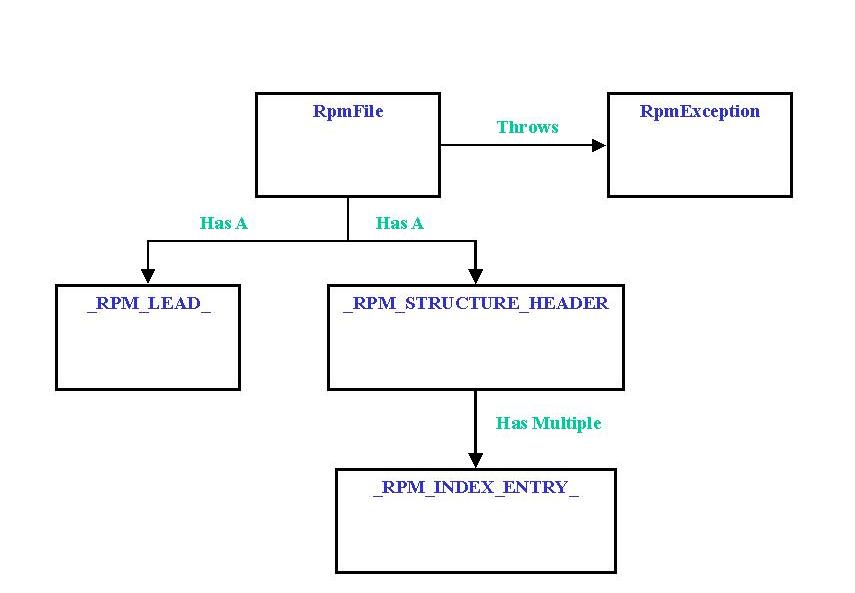
Figure 2. Structure of the Java RPM Classes Design in UML Format
Figure 2 represents the structure of the Java RPM class designs in UML format (Unified Modeling Language). Let's explain it in more detail. The UML class design provides a clean high-level representation of what an RPM package is.
Content is interesting information on the package and its installation rules. The content itself (not represented in the UML picture, for clarity) is only a compressed archive. When uncompressed, it is a cpio archive in SVR4 format with a CRC checksum (see Resources).
I cleanly separate the RPM object from its graphical representation. The classes in Figure 2 implement only operations on RPM files; they don't provide any graphical representation of them. Another class, called RpmFilePanel, will be added to provide a simple Swing display, which will graphically manipulate the basic RpmFile class, designed to implement the behavior of an RPM file.
The first interesting class is the RpmException class. This class inherits from the basic Java Exception class and implements a default constructor with no parameters and a constructor which takes a String message parameter. This class is the only exception rendered by the RpmFile Java Package. I am convinced that, when writing a new Java package, the first thing you should do is build an exception wrapper for the package. Later on, all the classes of the RpmFile package will throw an RpmException with an accurate message when something goes wrong. From an object-oriented design point of view, this technique improves your design's robustness, providing your package with full isolation from the basic system layer. You can, of course, do the same thing in C++. The only problem is that support for exceptions by some C++ compiler implementations may not be available, and portability of your C++ code could be more difficult to implement.
The next public Java class is the RpmFile class itself. The public methods made available by the RpmFile class implement the following basic services (The constructor gives the ability to build a class instance. It does not take any parameters.):
set_rpmFileName (fileName) method: this takes a URL fileName string as its parameter. This method binds the RpmFile instance with an URL representing a valid RPM package to view. If a problem occurs during the bind, a RpmFileException is thrown.
Vector get_rpmReport() method: once the Rpm package has been bound to the RpmFile instance, this method can be called to get the package information. The information given back by this method uses a String vector which contains all the information found in the RPM package header structures.
The RpmFile logic is based on following two inner classes:
_RPM_LEAD_: internally instantiated by the RpmFile class to validate the RPM lead structure of the loaded RPM URL file.
Once the _RPM_LEAD_ has been validated, the RpmFile class instantiates an _RPM_STRUCTURE_HEADER_ class, which is used to check the RPM file header content. The header content consists of multiple _RPM_INDEX_ENTRY_ stored in an internal array. Each element of this array represents a piece of header information which will be made available later via the get_rpmReport method. Since there is no reason to make those classes visible to mere mortals outside the RpmFile, they have been implemented as internal Java Classes inside the RpmFile class. A more precise UML graph is provided in Figure 3. I used the JVision 1.2 tool to automatically generate the UML class diagram from the Java source code. JVision is a very interesting, easy-to-use tool from Object Insight (http://www.object-insight.com/). This tool is able to automatically generate UML diagrams from Java source classes. Although not free, the license price is reasonable compared to other products. I have been using it for more than one year now, and it helps me in producing Java project documentation. A Linux beta version (free for non-commercial use) of the product is available on the Object Insight web site.
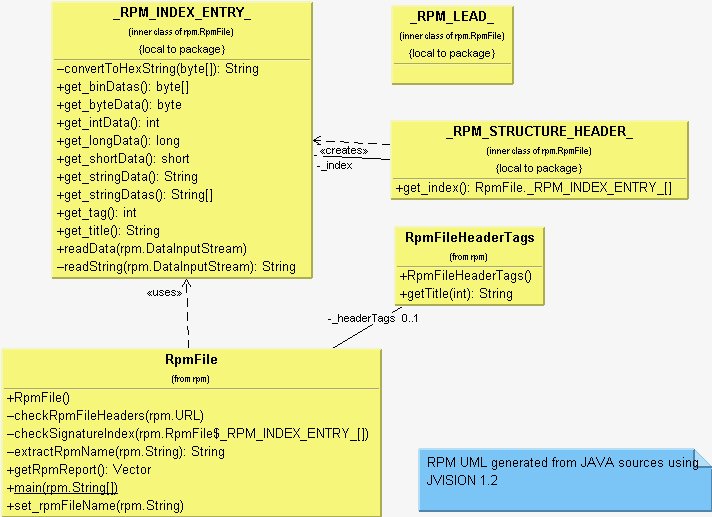
Figure 3. RPM
Now our basic class structure, which is able to manipulate headers of RPM packages, is in place, and it would be a good idea to add a minimal GUI interface to it. We will build this very simple interface using the Java Swing package, available with either JDK 1.1 or JDK 1.2.
This very simple GUI interface is managed by the RpmFilePanel.Java class. This class inherits the basic JPanel graphical component and divides the screen into three parts using a Java BorderLayout:
URL input field to input the RPM input file location in URL format
scrollable ListBox to display the RPM file information
button bar containing a “load” button, which proceeds with the URL RPM file loading Let's now explain how the GUI interface RpmFilePanel Java class interacts with the RpmFile class.
The RpmFilePanel.java file contains a static main method to launch the Swing frame inside a Java application. You can use the JDK Java utility from the shell to start it:
java rpm.RpmFilePanel
Warning: you should have compiled the Java package and installed it in a location accessible from your CLASSPATH.
You should provide a valid RPM package file in URL form and type it into the URL field as shown below. Finally, pushing on the Load button will:
instantiate a new RpmFile instance
call the set_rpmFileName method with the RPM of URL field
call the get_rpmReport method and display its String Vector result into the Swing List box as shown below
Figure 4 shows the screen layout after querying an RPM package.
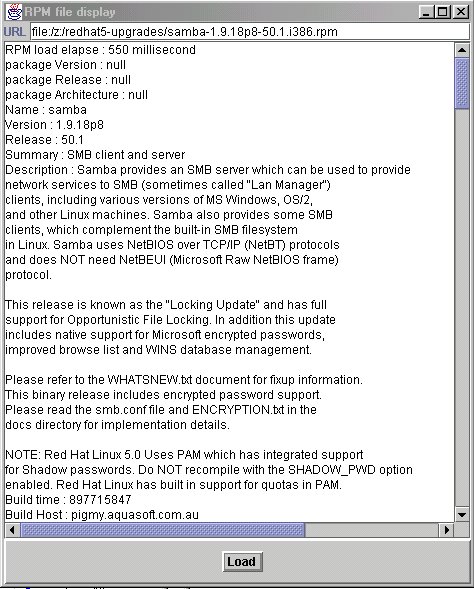
Figure 4. RPM Screenshot
When you need to build the provided source package, you may use either a JDK 1.1 version or a JDK 1.2.2 version. If you use JDK1.1, the prerequisite is to download the Swing package from Sun's site.
Using Java to analyse RPM file formats may be useful, and it gives you cross-platform portability, which may help you display RPM file contents on heterogeneous platforms. This basic tool may easily be enhanced, for instance to convert RPM contents into other formats or extract other parts of an RPM package.

Jean-Yves Mengant (jymengant@ifrance.com) is Chief Architect at SEFAS Technologies in Paris, France. He has been a professional programmer for more than 20 years on multiple OSes (MVS, Linux), languages (assemblers, C, C++, Java and Perl) and software topics (Network, Tp Monitors and GUI interfaces). He has used Linux systems professionally for programming tasks since 1995 and kernel 1.2, and the Java language since 1996 and JDK 1.0.

