Implementing Linux System Calls
This article is based on my experiences in creating and installing a system call in Linux and how to install one interrupt vector to control the serial port. In one way, this is a mini-HOWTO about these two topics.
A system call (or system request) is a call to the kernel in order to execute a specific function that controls a device or executes a privileged instruction. The way system calls are handled is up to the processor. Usually, a call to the kernel is due to an interrupt or exception; in the call, there is a request to execute something special. For example, the serial port may be programmed to assert an interrupt when some character has arrived, instead of polling for it. This way, the processor can be used by other processes and service the serial port only when it is required.
The internal operation between an interrupt request and its servicing involve several CPU registers and memory segments. Briefly, a device raises an interrupt by asserting an interrupt request line on the Peripheral Interrupt Controller (PIC) which informs the CPU by setting the interrupt request pin. After each instruction, the CPU checks this pin. If it is enabled, it gets the ID from the data bus, which points to the Interrupt Descriptor Table (IDT), where a number of task, interrupt and gate descriptors are stored. The descriptor contains a selector to the Global Descriptor Table (GDT) which contains the base address to a memory segment in which the Interrupt Service Routine (ISR) resides.
Note that the CPU has suspended the process it was executing, so it has to save some information to be able to resume the process after the interrupt has been serviced—this is a context switching. Several files are involved in this process; most can be found in the linux/arch/i386/kernel/ directory. One is entry.S, an entry point to all system calls which initializes the treatment of exceptions. Another is irq.c, which contains the functions to deal with interrupts. The linux/arch/i386/boot/setup.S file initializes the GDT, installs virtual memory, etc. There are many connections between files ending in .h and .c. You can check irq.c to see how many includes are there to get macros definitions, such as cli(), which clears interrupts in linux/include/asm-i386/system.h.
To follow the definition path of any function, type at your command prompt:
grep cli 'find / -name '*.[ch]'
-print'
This will search all files with extension c and h in the root directory for the word cli. Also, you can issue the command man 2 intro to see something about system calls.
There are several ways to create, install and execute a system call. The best is the one that isn't concerned with low-level details like context switching and doesn't code any routines in assembly language. This can be done through the use of the _syscallN macro in the linux/include/asm/unistd.h directory; it is expanded in assembly, but the operating system takes care of details. It uses the int 0x80 to transfer execution control to the kernel. One possible problem is this macro can expand to an existing function, so care must be taken; otherwise, you will overwrite the existing function.
In order to implement your own system calls, you should have the Linux kernel source code (first make a backup) to use as the working copy. As superuser (root), create in your home directory an entire tree copy of /usr/src/linux, as you will not have the chance to do so again. The files we will use are in somewhere/linux/.
Now you must choose a name for every function you are planning to implement. You can check the existing ones in your source tree at linux/arch/i386/kernel/entry.S and linux/include/asm/unistd.h. In entry.S, they are at the end, and in unistd.h, at the beginning. Checking these files will also help you get an idea of how to create a prototype of a system call. While checking, you will see that each call is associated with one number. This number is passed in the %eax processor register indicating the number of arguments, and each argument of the system call (a function) is passed in %ebx, %ecx, %edx, %esi or %edi--up to five arguments on Intel platforms. The macro definitions corresponding to each _syscallN, depending on the value of N, can be found in unistd.h. More on the internal workings can be found in various files under linux/arch/i386/, because we will leave the “dirty work” to the operating system.
Now let's see how to implement a new system call using the syscallN macro in the simplest possible way. Let's make a system call sysSum, which accepts two integer arguments and returns the sum of the two. Also, it uses printk, which is similar to printf except that it works on the kernel level, so we will see when our function is called.
To do this, edit a randomly selected file (for example, the file linux/ipc/sem.c), and at the end, add the following lines:
asmlinkage int sysSum(int a, int b)
{
        printk("calling sysSum\n");
        return a+b;
}
Then edit unistd.h and add
#define __NR_sysSum 171171 is the next in numerical order. In entry.S near the end, add
.long SYMBOL_NAME(sysSum)Finally, increment by one the number that is the last line:
.space (NR_syscall-172)*4If you don't match number and name in both files, you will get an “undefined reference to sysSum” error message. If you have a working kernel, you have to be careful only about incrementing the numbers by one and correctly writing your function name. At this point, you have added your system call; now you should get the new kernel with it. To recompile the kernel, take the following sequential steps:
#make config
#make dep
#make clean
#make zImage
#cat ~/linux/arch/i386/boot/zImage >/dev/fd0
Step 1 creates the basic kernel configuration; you can skip it next time if no hardware changes are made. Step 2 checks that any dependency between files is correct. Step 3 cleans any compilation intermediate file (object files, etc.). The last two create a compressed kernel image and copy it to floppy, so we can try our new kernel and keep the original one untouched.
Reboot using this newly created kernel to invoke the system call from a user program: simply insert the floppy disk on the drive and reboot. This simple program tests the newly created system call:
#include <linux/unistd.h>
_syscall2(int, sysSum, int,a,int,b)
main(){
printf("the sum of 4+3 is %d\n",sysSum(4,3));
}
The include line indicates where the _syscall definition is located. The next line says our system call has a return type of int and two arguments of type int. To compile, use the command
gcc -I ~/linux/includeto instruct the compiler to use our include file. After execution, you will see messages: first the one from sysSum, then the one from the test program.
The functions we will implement will be the basic ones needed to control the serial port using interrupts on character reception. The serial ports can't be accessed by a common user. In Linux, the functions inb(port) and outb(byte, port) exist to receive and send one byte; inw and outw do the same on two-byte data. In order to use them, you have to gain the rights by using the iopl or ioperm functions, which must be invoked as super user and will give the common user application access to the I/O ports.
The serial port, called UART or RS-232, has two I/O addresses given by BIOS (on PC systems) associated with it and one IRQ (interrupt request) for each. Fortunately, they are the same as in DOS:
COM1 0x3F8 IRQ4
COM2 0x2F8 IRQ3
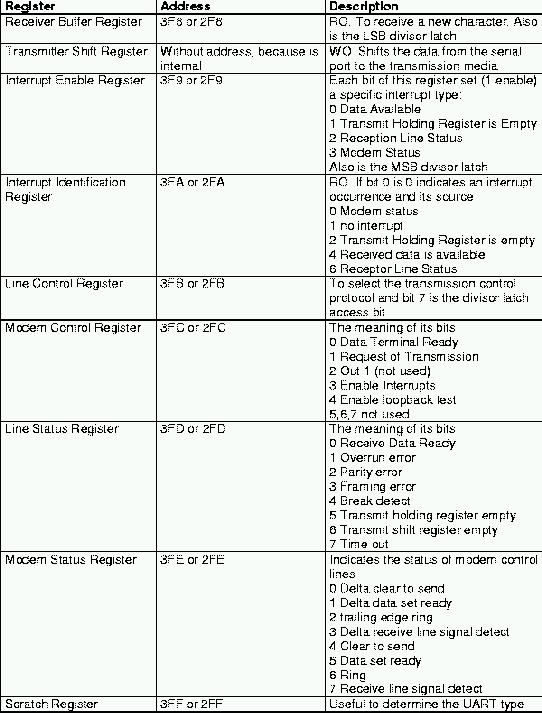
Each I/O port has a range of addresses to hold various support registers. COM1 is mapped in memory from 0x3F8 to 0x3FF, and COM2 from 0x2F8 to 0x2FF. See Table 1 for a description of some of them. To set one bit in any register, first read the actual value, and then OR with the desired value, thus preserving the other bit values.
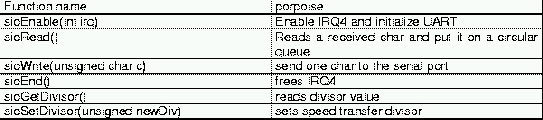
The functions we are going to implement are the ones shown in Table 2. At this time, we will use IRQ4, but it's not difficult to use the other port or implement a select port routine.
As you can see in Listing 1, we set some defines and global variables, save flags and disable interrupts to make our transaction atomic:
save_flags;
cli();
If an interrupt with higher priority takes the processor, the UART will be initialized incorrectly. We also need to indicate the routine or interrupt vector that services IRQ4. To service the interrupts, we use request_irq (in linux/arch/i386/kernel/irq.c) that is more or less the equivalent of setvect in DOS. Its prototype is
int request_irq(unsigned int irq,
void (*handler) (int, void *, struct pt_regs *),
unsigned long irqflags,
        const char *devname,
        void *dev_id)
and we call it with:
i = request_irq (
myirq,sioRead,SA_INTERRUPT,"sioJRMS",NULL);
if (i) return -1;
where myirq is equal to 4 (the COM1 IRQ), sioRead is a void pointer to the interrupt vector, that is, the routine that will service the interrupt; and SA_INTERRUPT is a flag that states our interrupt will be of type “fast” or non-maskable. sioJRMS is a name generally used to identify device drivers, but is used here to monitor the interrupts serviced by our routine by looking at the /proc/interrupts file. Once our program is running, we check this file to see if our interrupt has been set. If the value returned for i is 0, the interrupt vector is installed.
Next we have to set some UART initial values by using the outb function. Remember, at this time we are a superuser. After we have created our system calls, recompiled the kernel and rebooted with it, these functions will be available as an interface to the serial port in a library for every user without requiring special privileges. We use a constant, PORT, to identify the port address, so you can change it later.
outb(0,PORT + 1);     /* Disable interrupts - bit
                          0 ->0 */
outb(0x80,PORT + 3);  /* enable DLAB - bit 7 ->1*/
outb(0x0C,PORT + 0);  /* Set Divisor LSB */
outb(0x00,PORT + 1);  /* Set Divisor MSB */
outb(0x03,PORT + 3);  /* 8 Bits, No Parity, 1
                           Stop Bit */
outb(0xC7,PORT + 2);  /* Enable FIFO if UART is
                         16500+ */
outb(0x0B,PORT + 4);  /* Turn on DTR, RTS, and
                         OUT2 */
outb(0x01,PORT + 1);  /* Interrupt when data
                         received */
These instructions set an initial baud rate of 9600. To set to a different rate, divide 115,200 (crystal frequency) by the divisor formed by registers 3F8 (MSB) and 3F9 (LSB) when bit 7 of 3FB is 1. Now that we have initialized the UART, we can restore flags with the line:
restore_flags(flags);We don't need sti (set interrupts), because it is done automatically by restore_flags. Next, define the routine that will service the interrupt to read a character and put it in a circular queue:
static void sioHandler(int myirq, void *dev_id, struct pt_regs * regs)
{
 int i;
 do { i = inb(PORT + 5);
        if (i & 1) {
                buffer[bufferin] = inb(PORT);
                bufferin++;
                if (bufferin == 1024) bufferin = 0;
                }
        }while (i & 1);
}
The next function is the one available as a syscall to all users:
asmlinkage int sioRead(void)
{
char ch;
if (bufferin != bufferout){
        ch = buffer[bufferout];
        bufferout++;
        if (bufferout == 1024) bufferout = 0;
          return ch;
        }
}
It will return a character from the buffer. The purpose of other
syscalls is explained in Listing 1. Now we have to deal with
informing the kernel that new system calls are created, using the
steps mentioned previously.
In unistd.h, we put a line for each one of the newly created syscalls:
#define __NR_sioEnable          170
#define __NR_sioRead            171
#define __NR_sioWrite           172
#define __NR_sioEnd             173
#define __NR_sioSetDivisor      174
#define __NR_sioGetDivisor      175
Note that the corresponding numbers will vary depending on the total number of system calls you have. In the entry.s file, put the lines:
.long SYMBOL_NAME(sioEnable)
.long SYMBOL_NAME(sioRead)
.long SYMBOL_NAME(sioWrite)
.long SYMBOL_NAME(sioEnd)
.long SYMBOL_NAME(sioSetDivisor)
.long SYMBOL_NAME(sioGetDivisor)
and remember to increment the number in the last line.
.space (NR_syscalls-177)*4
This time, we are not going to modify any files. Instead, we will create our library with our system calls. First, create a directory called /sio under the kernel source tree. Within it, you are going to create a file called sio.c which will contain the entire source of Listing 1 with all the includes, defines and system calls we have created. Now, in order to rebuild the new kernel with our library, we have to create a Makefile, also located in the /sio directory:
#Makefile for Serial Input/Output system calls
O_OBJS = sio.o
O_TARGET = siocalls.o
include $(TOPDIR)/Rules.make
This file will invoke Rules.make under our Linux source directory. Also, the top-level Makefile (the first under your source directory) will work for us. Edit this Makefile, define where the directories of sources are defined, and add our new directory with the line:
SIOCALLS = sio/siocalls.oThis appends the name of our directory to the path of source directories. Because we are using outb, we must compile with -O or -O2 to enable optimization to allow the use of inline macros. Don't worry—the top-level Makefile does this. Now follow the steps mentioned earlier to recompile the kernel.
To work with our system calls over the serial port, make a serial cable in null modem configuration. You will need two DB-9 connectors and wire 2-3, 3-2, 4-6, 6-4, 5-5, 7-8 and 8-7 pins. Then reboot with the new kernel and use some program like the one in Listing 2 in the archive file (see Resources) as a non-superuser, and you will see you have control of the serial port using our functions. Remember to connect two Linux boxes with the cable settings described in the COM1 port.
Jorge Manjarrez Sanchez (jmanjarr@acm.org) has a master's Degree from the Center for Computing Research at IPN Mexico. He is now involved in a co-doctorate program with UPM at Spain. He has participated in several research projects mainly in the database and Internet fields and has developed a JDBC-Access type-3 driver. He spends his spare time studying Linux, Mexican History, Astronomy and leading an ACM Student Chapter at CIC-IPN.