xxl: A Free Spreadsheet for Linux
Provider: University of Nice-Sophia Antipolis
URL: http://www.esinsa.unice.fr/xxl.html
Reviewer: Larry Ayers
xxl is the fruit of a long-term student project of the “Maitrise d'Informatique” at the University of Nice-Sophia Antipolis in France. The intent of xxl is to produce a graphical spreadsheet which is both uncomplicated and easy to learn and use. xxl, along with the STk and TkTable packages upon which it depends, are freely available, open-source software. The license terms are similar to those accompanying the Tcl/Tk software.
This spreadsheet is not completely self-contained. It needs a working installation of STk, a variation of the Tk toolkit which uses the Scheme programming language as a command interpreter instead of the usual Tcl. The TkTable widget library (which gives Tk the ability to display data in a tabular format) is included with the xxl distribution.
xxl is not designed to load or save files in the proprietary formats used by commercial spreadsheets. Files can be saved in four formats: HTML, plaintext, LaTeX and CSV (comma-separated values). The CSV format is supported by many commercial spreadsheets; it is sort of a least-common-denominator ASCII text data format which uses new lines to distinguish the rows and commas to separate the columns.
xxl does not install quickly, due to its dependence on the STk package. STk can be obtained from http://kaolin.unice.fr/STk/ in both source and binary formats; the source code is preferable, since it will most likely be the latest version. Luckily, STk is not at all difficult to build. Before installing xxl, it is a good idea to try out the test programs in the /Tests subdirectory of the STk source distribution, just to be sure it is working correctly.
Once STk is up and running, compiling and installing xxl is relatively easy. A configure script adapts the Makefile to your system, and there really isn't much code to be compiled. Most of xxl (aside from the TkTable library and a few other small shared libraries) is in the form of STk and STklos scripts, which are written in Scheme. The make install copies the xxl files to /usr/local/lib/xxl. In order to be able to run xxl from any directory, I created a symbolic link from xxl.stk to /usr/local/bin/xxl. Make sure you save a copy of the sole documentation file, xxl.doc.ps, and the files in the /Tests subdirectory, which are example spreadsheets saved in various formats. These files are helpful as examples while learning the application.
In order to make full use of this spreadsheet, a TeX and LaTeX installation is also needed. Although xxl can save files in other formats, the LaTeX format enables high-quality PostScript versions of files to be created, which are well-suited for printing.
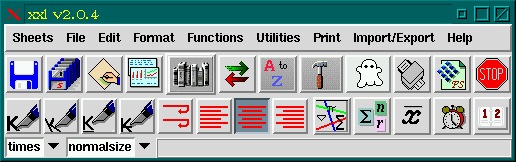
When xxl starts up, two windows are created. The larger one is the spreadsheet and the other is an independent control window containing the icons and menus. Small “balloon help” messages appear above each icon when a mouse cursor lingers over it. At first glance, I thought I would be able to create a simple spreadsheet without consulting the documentation, but after several fruitless attempts to enter the formula for the sum of a column, I finally read the PostScript documentation.
My assumption that simply clicking on the icon would be enough to sum cell values was wrong; doing this will enter part of what is needed into the command-input entry field, but the remainder has to be entered manually. Clicking the icon will enter sum(, but what is needed is (as an example) =sum(B2:B8). This has to be done only once, as the copy-and-paste key bindings can copy a formula from one cell and paste it into another; the column location is automatically changed to accommodate the new location. Columns are automatically recalculated when entries are added or changed.
xxl has some useful mouse-based features. Clicking button two on a cell border allows the cell to be dynamically resized. Cutting, copying and pasting of cell values is analogous to the standard x-selection method.
The font, font size and style of either individual cells or selected groups of cells can be set from the control bar. Currently, no support exists for graphing or charting of the spreadsheet data. A wide variety of mathematical, statistical and Boolean functions can be applied to selected cells or columns, but as with the above “sum cell values” example, only a bare skeleton of the required formula command is entered into the command entry field. The remainder needs to be entered by hand, but thereafter the formula can be easily copied and pasted into other cells. Any row or column can be “stuck” in place, which is typically used for identification text at the left and top. These fixed rows and columns will remain visible when a spreadsheet is scrolled.
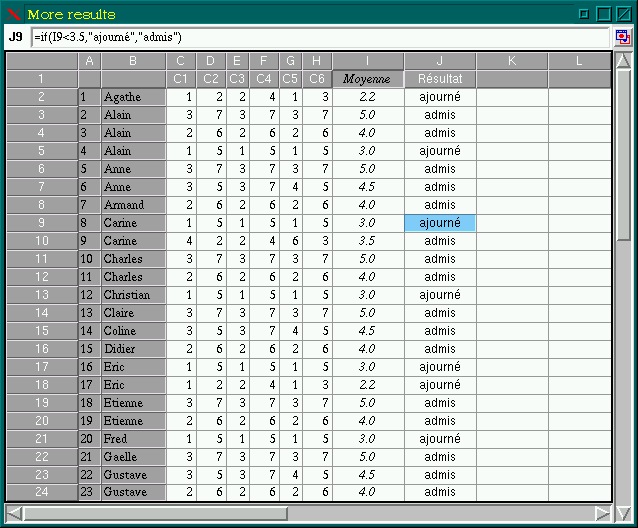
Several sample spreadsheets are included with the xxl source. I found these to be at least as useful as the documentation while learning to create a spreadsheet with xxl. Load one of these examples into the main window, then select one of the cells and the formula which produced it will be shown in the input entry field.
Since an undo command isn't currently implemented, saving often is advisable. The lack of graphing and charting capabilities limits the usefulness of xxl in a business environment, but xxl can produce nicely formatted text-only output. The use of Scheme (and STk's object-oriented Scheme extension, STklos) has its pros and cons. A user familiar with Scheme would be able to add extensions and generally adapt xxl to particular needs, but others will see xxl as yet another application with a new scripting language to learn. Scheme has a relatively simple and transparent syntax, and even non-Schemers can adapt existing scripts to their purposes. The case of the GIMP graphics application and its Scheme-based Script-Fu scripting facility shows that people can use existing scripts as templates to produce new functionality without being Scheme adepts.
The xxl web site (http://www.esinsa.unice.fr/xxl.html) has the latest information on xxl, as well as a link to the FTP download site.
Several other freely available spreadsheets, offering various mixes of features are under development. I found the Siag (which stands for Scheme In A Grid) spreadsheet, part of the Siag Office Suite (http://www.edu.stockholm.se/siag/), to be easier to use than xxl. Like xxl, Siag is Scheme-based, but has both an X Window System and a character-mode interface. Siag can save in a variety of formats, including those supported by xxl, as well as Lotus 1-2-3, a native Siag format, Scheme code and troff. Along with its native Scheme, Siag has the ability to accept commands in Tcl, C and Guile (the GNU Scheme-based scripting language). Siag is distributed along with a basic word processor and an animation package. These two components are currently not as useful as the spreadsheet, but the source distribution includes all three. I've noticed that the Debian Linux distribution has separated these applications, so that if someone just wants the spreadsheet, it can be obtained separately.
Miguel Icaza, one of the principal developers of the GNOME desktop project, has been working on a spreadsheet called Gnumeric. It is still in the early stages, but looks as if it may end up being worthy of investigation. The screenshots available on the http://www.gnome.org/ web site certainly look promising.
The Oleo spreadsheet from the GNU project (ftp://alpha.gnu.org/pub/gnu/oleo/) has been available for quite awhile, but until recently it was strictly a character-mode application. I had just about given up on further development, when new versions began to appear in recent months. The current beta versions have a Motif X Window System interface (which compiles and functions well with newer versions of LessTif) and a GTK version is in the works. Oleo is particularly appealing to users of the Emacs or XEmacs text editors, as many of the key bindings are identical. Oleo can make use of Sciplot for graphical output. The current version (1.6.8) is not completely usable, but is meant as a proof-of-concept. I was impressed by the progress.
xxl is not an application that lends itself to quick utilization by the typical business user. The learning curve could be made simpler, although a user familiar with Scheme will have a definite advantage. More complete documentation (and perhaps a tutorial) would help. I found the icons on the toolbar to be misleading in a way. A traditional spreadsheet normally requires a user to learn the formula syntax and enter it manually. The xxl icon for summing a column, for example, will enter part of the formula needed, but not all. It seems to me that an icon should either do most of what is also needed in such a case or not be there at all, as the whole point of such icons is to make core tasks possible without prior study. On the plus side, xxl is free, and the Scheme scripts which contain most of its internal routines can be augmented and extended. The calculation functions seemed speedy enough, and the various save formats functioned well for me.
Those looking for a graphical spreadsheet with graphing and charting capabilities might take a look at Xesslite, an inexpensive subset of the Xess spreadsheet available in a 30-day trial form from http://www.ais.com/. A related commercial spreadsheet from another firm is NExS, available in a trial form from http://www.xess.com/prodinfo.html. Both of these products are able to read Excel files.
Other alternatives are the spreadsheets included with the Applixware and StarOffice business suites.