
The Xxl Spreadsheet Project
During the time frame of my academic work, I must periodically deliver statements of student grades to the administrative offices. The number of grades I manage is not immense, about two thousand per year, but it is enough to warrant automating the computations with the help of a spreadsheet program. My daily computer environment is Linux and until 1996, I was regretting the lack of a public domain graphical spreadsheet program for the X Window System, one which was user friendly and simple to use.
Of course, spreadsheets have been available in the UNIX world for many years, but in my opinion, none of them met the criteria of freeness, simplicity and user-friendliness I desired. I was forced to use a commercial spreadsheet on another computer with a different operating system in another office. This situation was not convenient, so I decided to build my own spreadsheet. At the same time, there was a call for proposals of computer projects in the Computer Science Master's program. This was a good opportunity to launch the project and I submitted this idea. It was chosen by a team of four students, thus, Xxl history began.
The origin of spreadsheets is in the world of accounting. This name refers to paper sheets used for computing cost differences between offer and demand, and more generally, between two prices. These computations were made by hand and were tedious and error-prone. The first theoretical work on computer versions occurred in the early 1960s. The main principles of using matrices, cells and budget simulation, as highlighted by these theoretical works, were implemented in FORTRAN programs for simulating enterprise budgets (see Resources).
However, it was not until 1978 that two MIT students, D. Bricklin and B. Frankston, designed a computer spreadsheet, VisiCalc, that was truly usable on a personal computer. VisiCalc allowed many small enterprises to use costly computer techniques previously affordable only to larger companies. This program contributed significantly to the success of personal computers, especially the Apple II, for which the first version was written. VisiCalc was a tremendous success, but unfortunately for its authors, a very short one. At the beginning of the 1980s, VisiCalc encountered difficulties in trying to deal with the rise of IBM PCs. It was replaced by a new spreadsheet based on VisiCalc, Lotus 1-2-3 by M. Kapor. New features of Lotus 1-2-3, such as a simpler denotation for cells, the concepts of cell row or macro and the addition of graphic handling quickly made it a market success and a de facto standard.
In the late 80s, after Macintosh opened the door, most operating systems began to provide graphical user interfaces. The spreadsheets Quattro Pro and Excel appeared at that time and made sheet handling simpler, thanks to the use of tear-off menus, buttons and dialog boxes. Today, Excel is one of the most widely used commercial spreadsheets.
For many years, the UNIX world did not seem to be interested in spreadsheets. The first free and open spreadsheets available were sc and ss (an sc variant). They more or less offer all the basic functionality expected from a spreadsheet, but have no graphical interface. In the early 90s, Xspread (based on sc) and Oleo from the GNU project were the first spreadsheets with an X interface. Both provide new features (Xspread can generate graphics), but their graphical interface is still awkward and lacks user friendliness (none of them offers tear-off menus or provides for the X-style cut and paste).
Today, thanks to the qualities of its kernel and applications, the success of Linux is such that this system is beginning to overshadow some great builders of commercial operating systems. Linux is beginning to enter the industrial world—this is one of the reasons for the present burgeoning development of office suites (StarOffice, Koffice, Applixware, Gnome project's Gnumeric) which aim to equaling their commercial rivals.
Xxl has been designed for ease of use with a user friendly interface. It does not try to compete with spreadsheets such as Excel or Lotus 1-2-3, but will handle small and medium-size sheets.
Most often, due to lack of time or competence, the programming projects of the Master's degree in Computer Science of the University of Nice—Sophia Antipolis are either not completed, or the final result cannot be used in practice. Expecting a usable result should not be a priority, since the goal of the project is mainly pedagogic. For this particular case, I wanted to get a usable preliminary version of the spreadsheet, even though I anticipated some parts of the software product would need revision, as was the case. Thus, the goal of the project was clearly defined and the spreadsheet was limited to the basic functions of any classic spreadsheet, with a flexible and user friendly interface. The project was divided into two different parts, as little connected as possible. Two students dealt with the spreadsheet kernel and two others worked on the graphical interface.
Since the spreadsheet functionality was limited from the beginning, it had to be written to allow for subsequent extensions; therefore, choosing the programming language was of utmost importance. I wanted a language that would facilitate writing a spreadsheet prototype and enable an incremental development method. It also needed to be easy to alternate quickly between test cycles and corrections. Moreover, it should integrate an easy-to-use graphical library to free the programmer from all cumbersome aspects of X programming.
I chose STk, developed by E. Gallesio, which is an implementation of the programming language Scheme together with the Tk graphical toolkit (see Resources). In fact, it is similar to the Tcl/Tk system, with the Tcl interpreter replaced by a Scheme interpreter. More specifically, STk provides all the power and ease of use of the Tk toolkit from within the Scheme world. Moreover, Lisp (Scheme is a Lisp dialect) has already demonstrated its qualities for software extension (e.g., GNU Emacs). Finally, STk offers an object layer, STklos, which provides for a posteriori reutilization and extensions.
Tk (and thus STk) does not provide in its distribution any specialized widget for representing the computing sheet of a spreadsheet program and its predefined components do not make such a widget easy to build. The students could not devote more than half a day per week to the project. Asking them to program such a widget was out of the question—the project would have been an immediate failure. Thus, it was necessary to reuse some already-built components in order to make the programming task as small as possible.
One of the strengths of Linux is that it offers its users an open world. Thousands of programmers around the world are designing and developing programs, often of superior quality, which they offer for free to the international community. One of these programmers, J. Hobbs, is the present maintainer of a Tk widget called tkTable. Not only does this widget specialize in the representation of computing sheets, but it also had a property that made it the ideal interface between my two teams of programming students, i.e., the spreadsheet kernel and its graphical interface. The tkTable widget provides for associating a data structure (representing the cell values) with the graphic computing sheet. After any change in content of the computing sheet, the widget automatically updates the data structure. In addition, and even more importantly, after any change in the data structure, the widget updates the computing sheet. Thanks to this property, the two student teams could work fully independent of each other.
The second component we re-used was the LaTeX environment, available on any UNIX platform. Xxl uses LaTeX for printing computing sheets and previewing them on the screen.
In June 1996 at the project's end, the students delivered the first usable version and we decided to distribute it freely. To give access to the source text of a software product is to accept the judgment of those who will scrutinize it. I used part of my vacation time to revise the code before the first distribution, which occurred in September.
The next year, to my disappointment, no student team chose to pursue the development of Xxl. Its present state was satisfactory for my own needs and I had no time to devote to its further development. Then I received mail from a new web site aimed at promoting scientific applications for Linux (SAL). They offered to give me a page for Xxl. This site gave the spreadsheet a larger audience, which encouraged me to improve it. Once more, I spent part of my summer vacation modifying the Xxl code, which I signed with a mock name. This time I rewrote almost all the code, with considerable simplifications, thanks to the use of the Flex and Bison parser generators. I also corrected some errors and offered new functionality. In September 1997, a new version was delivered.
At the beginning of June 1998, E. Gallesio delivered a new version of STk, with a small error which prevented the spreadsheet from working correctly. Since I was not using this version, I did not have a problem, but I got many messages asking me to correct it from users who thought the error came from Xxl. I had not been aware that Xxl had so many users. I devoted part of July to the distribution of a working version.
While it is clear that in an open environment like Linux, re-using already built software components is a good thing and should be encouraged, this does come with problems. In particular, programmers who use external components which they do not fully master (even with the source code at their disposal) are very dependent on the evolution of these components. Software tools like Flex, Bison or LaTeX, which have been stable for many years, did not cause any problem. This was not the case for the tkTable widget or for STk, which is still under development and constantly changing.
With each new version of tkTable, it is necessary to adapt it to STk. This represents about a hundred changes in the source code of the widget. Obviously, Xxl must follow the evolution of the tkTable widget, since the improvements are a benefit to it.
The evolution of STk could also be a source of problems. Fortunately, the author of this language is a friend whose office is not far from mine. This made it possible to solve many problems. While Xxl certainly benefitted from the improvements to STk, STk also benefitted from Xxl. In fact, the sheer size of the spreadsheet makes it a good test program, exposing some errors in the interpreter.
Xxl has most of the characteristics of a classic graphical spreadsheet program. It handles computing sheets containing information stored in cells. Each sheet is edged with scrollbars. The number of sheets is not limited except by the size of the physical memory.
Computing sheets are structured in rows and columns. Rows are denoted by numbers and columns by letters. A cell is the intersection between a row and a column and is denoted, as in Lotus 1-2-3, by a column number and a row number (e.g., A1, AB23, ZZA2345). A cell range is denoted with the first and last cell, separated by a colon (e.g. A1:A3, A1:C1, A1:B8). Note that the last example denotes a rectangle. Users can interactively and without limits increase the number of rows and columns of a sheet. Every sheet is headed with a typing area for entering the value of the current cell. Figure 1 shows an example of an Xxl spreadsheet.
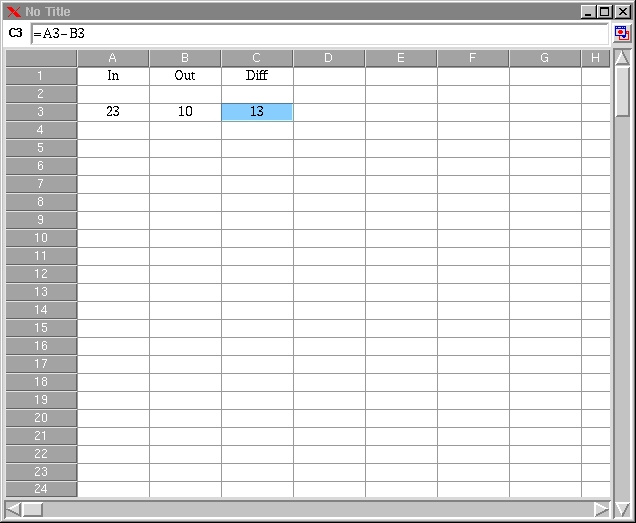
Figure 1. An Xxl Spreadsheet
The information stored in cells is made up of data (character strings, numeric values or booleans) or formulas which enable the computing of data. Integer arithmetic is of infinite precision. Formulas are mathematical expressions preceded by an equal sign. They involve arithmetic and classical relation operators, as well as a set of predefined functions. The functions deal with arithmetic (sum, prod, max, etc.), statistics (avg), logic (if, not, when), time (date, time) or character string handling (concat, len). Notice that all visible cell values are automatically computed anew.
Formulas can also contain internal or external references to cells in two modes: absolute or relative. A dollar sign in front of a row or column name denotes an absolute reference (e.g., $B2, D$13, $A$1). Absolute references do not change in move operations (addition or suppression of rows or columns, cut-and-paste operations). Without a dollar sign, the reference is a relative one (e.g., B2, D13, A1). It can be changed by a move operation. The cell C3 of Figure 1 contains the formula =A3-B3, which represents the difference between the values of the A3 and B3 cells.
The preceding references are internal ones, since they refer to cells in the same computing sheet. By contrast, external references refer to cells in other computing sheets and must be preceded by the name of the specified computing sheet. This name is that of the UNIX file containing the computing sheet.
Xxl offers several modes for displaying the cells. First, the size can be modified by enlarging or shrinking rows or columns. Second, Xxl offers several conventional modes for displaying the cell contents: several fonts in various sizes, bolding and slanting; several justification modes (left, right, centered), texts on several lines; several number representations (fixed, scientific, financial, percentage) or currencies (franc, dollar, euro).
One of the aims of Xxl is to provide a simple usage model by means of a graphical interface. All features of the spreadsheet can be accessed through a control panel, consisting of a bar with buttons, menus and a message area, all controllable by the mouse (see Figure 2). The control panel acts on the current sheet, which can be selected by the “sheets” menu or by a button in the upper left part of each sheet.
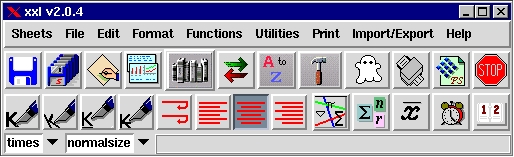
Figure 2. The control panel
The main functions to which the control panel provides access are the following:
Selecting the current sheet: when several computing sheets are open at the same time, all commands of the control panel apply to the current sheet.
Opening, closing and saving computing sheets: the storage format is the STk code that describes the computing sheet. Thus, loading a sheet is simply interpreting the program that describes it.
Printing and previewing the computing sheets: these functions use LaTeX.
Creating series: this function enables creation of a sequence of integer or textual values, with any step size.
Cutting and pasting rows or columns
Sorting rows or columns: this can be done by increasing or decreasing key values.
Writing computing sheets in several formats: LaTeX, text, csv, HTML.
The mouse is also used for two important functions: selecting references and cut-and-paste operations. Entering cell references in a formula can be done automatically by selecting the needed cells with the mouse. This is especially useful for references to rows or to external references, where keyboard input is error-prone. Copying and pasting cells within a computing sheet or between two different sheets is done according to two modes: whether one wants to copy (or move) values with or without formulas. Xxl also allows cutting and pasting from a computing sheet to another X application and vice versa.
Finally, Xxl offers on-line help with dialog boxes and balloon contextual help on the buttons of the control panel. On-line help, however, is somewhat scarce, but it can be considered sufficient if the spreadsheet usage is intuitive enough.
We have just considered the main characteristics of Xxl. One could ask which features are missing to make it a first-class spreadsheet. Xxl was designed to be simple and it will remain so. I do not think, for example, that it is necessary to be able to handle dozens of fonts or page layouts.
New features to be implemented in the near future are the following:
Exporting to other formats for representing computing sheets (SYLK, WKS, ... ) and importing files in these formats. It is very important, in my opinion, to ensure compatibility with other spreadsheets.
Extending the set of functions for the formulas. Presently, the spreadsheet offers only thirty predefined functions. Search functions (hlookup, vlookup) are missing, as well as financial computations.
Generating graphics. Histograms and pie charts are important tools for aiding quick and global understanding of a computing sheet.
Internationalization. A Russian user noted that he was unable to sort character strings written in his mother tongue. In the last version of STk, E. Gallesio integrated some comparison mechanisms for character strings that use localization. Thus, internationalizing the spreadsheet will be done very soon.
Integrating a mechanism to allow users to add their own extensions.
Long-term development will deal with making the production of computing sheets more reliable. Writing a spreadsheet is an error-prone activity. A very interesting study by R. Panko (see Resources) shows that a significant error rate exists in the production of computing sheets of various sizes, even when done by experienced developers. He also demonstrates the frequent lack of validation methods for building computing sheets and the scarce use of a posteriori checking tools. It is also surprising to learn that many companies use simple spreadsheets for developing large accounting applications instead of using more reliable software products that are better suited to handling a large amount of data.
A computing sheet is a set of values linked by references, which constitute a sort of graph. The formula denotations of most spreadsheets, based on cells which refer to other cells, provide very low-level semantics for describing the spreadsheet structure. Mutatis mutandis (the necessary changes having been made), this is similar to the programming languages of the early 60s, with the goto statement used as the main means for structuring code. This analogy with programming languages is not fortuitous. Building a computing sheet is similar to building a program. For at least three decades, work in the programming world has been done in order to offer numerous tools and methods for building programs that are structured, reliable, extensible, etc. Apparently, such work has not yet been done in the area of spreadsheets or at least has had no visible effect in most software products.
Thus, the aim of Xxl is to provide a new spreadsheet model. In particular, it will result in the development of a unique language that will permit it to integrate mechanisms for cell typing, assertion definition and global descriptions directly within the spreadsheet. Cell typing will validate input or cut-and-paste values. Assertion mechanisms will prove the validity of the global spreadsheet description.
Documentation of spreadsheets is an important aspect; however, spreadsheet developers generally consider it superfluous. Actually, documentation tools are almost nonexistent in Xxl. Time must be taken to propose a mechanism to simplify and automate the documentation of cells and spreadsheets.
Programming is a complex activity requiring knowledge and savoir faire. Spreadsheets are very popular software products, used generally by non-specialists. For most of them, the use of a high-level programming language would be a true difficulty. It is necessary to provide them with a graphical, interactive interface, simple and user friendly, in order to describe the semantics of spreadsheets without having to use a programming language.
Xxl is an academic project developed by students at the University of Nice—Sophia Antipolis. It was born in 1996 to fill the need in the UNIX world for a user friendly, easy-to-use and public-domain graphical spreadsheet program. UNIX has a long tradition of open source software. In the early 80s, R. Stallman and his FSF paved the way. Today, it goes on in different ways with Linux and the Internet. During its development, Xxl took advantage of various free software products. In turn, its authors are happy to offer it free to the international community.
The latest version of Xxl provides a truly functional spreadsheet for small or mid-size needs. The model it defines is similar to that of all present-day spreadsheets. However, this model is limited and needs to be entirely revised. Xxl is a stable experimental platform for future student projects to propose and define tools for a new spreadsheet generation.


