Getting Started with Quake
Quake is one of the coolest games available for any platform. Thanks to Dave Taylor, who began id Software's tradition of porting their games to Linux back in 1995 with Linux Doom, today we have Quake for Linux. This article is meant to be a quick start to getting Quake running on your Intel Linux system. If you encounter problems not addressed here, look at the Linux Quake HOWTO at http://www.linuxquake.com/howto for more detailed troubleshooting information.
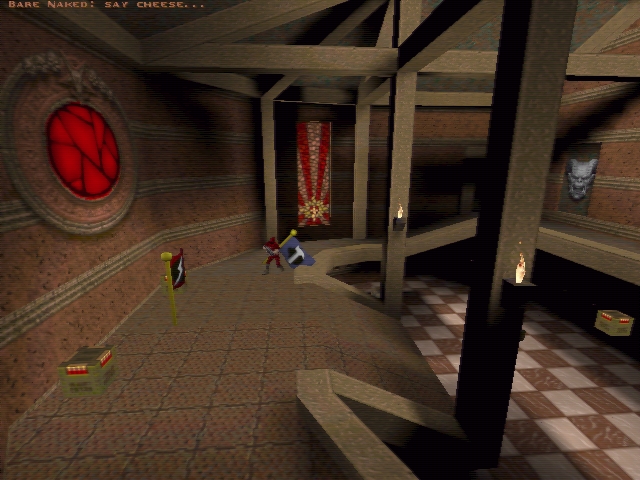
Figure 1. Player about to capture the blue flag in the “Capture the Flag” game
The minimum system requirements for Quake are shown in the “System Requirements” sidebar. To install Quake on your Linux system, you will need some flavor of the official Quake distribution from id—either the retail DOS/Windows CD-ROM from a software store, or the shareware version downloaded from the Net. Alternatively, if you already have Quake installed on a DOS/Windows machine, you can use the relevant files from that installation.
In addition to the official Quake files, you will need Linux-specific binaries. All the necessary files for Linux Quake are available at ftp://ftp.idsoftware.com/. id's site can be very busy, so you may want to use one of their mirror sites (see Resources).
Version numbers in this article are current as of September 1998 and aren't likely to change. Quake is considered a finished product, so new versions will be released only if major bugs are found.
The shareware Quake for Windows distribution is necessary only if you don't have a Quake CD-ROM (ftp://ftp.idsoftware.com/idstuff/quake/quake106.zip).
Quake can render its graphics three ways: in an X11 window, full-screen SVGA, or hardware-accelerated OpenGL. You'll need to download the binaries only for the renderers you plan to use. (See Resources.)
QuakeWorld is a multi-player version of Quake optimized for play over the Internet. Get one of the packages listed in Resources if you plan to play on-line. Red Hat 5.x/Debian 2.x users should get the glibc version. The .rpm and .tar.gz package contents are identical. Choose one according to your distribution.
If you plan to run an Internet QuakeWorld server, select one of the dedicated server-only binaries (see Resources). Most people won't need them.
Start by creating the directory in which you will install Quake. The “standard” location is /usr/local/games/quake. The QuakeWorld RPM package installs its files in this directory, so it is a good idea to install here if you plan on installing QuakeWorld later.
mkdir /usr/local/games/quake
If you have a very early release of the Quake CD-ROM, these instructions won't work. Please see the Linux Quake HOWTO for details on installing from older CD-ROMs.
A file on your Quake CD-ROM, resource.1, is an lha archive of all the Quake game files (lha is a file compression and archiving format like tar or zip). We will use the lha command (see Resources) to extract it.
Mount your Quake CD-ROM, move to your Quake directory and extract the resource.1 archive:
mount /dev/cdrom /cdrom #change for your system
cd /usr/local/games/quake
lha e /mnt/cdrom/resource.1
Your /usr/local/games/quake directory should now contain a bunch of new files and a subdirectory called /id1. The most important files for Linux Quake are in /id1, so you can safely remove everything else. If you are totally new to Quake (or even if you are not), you may wish to keep the *.txt files for reference. On my system, I put all the READMEs that accumulate into a /doc subdirectory.
The single-episode shareware version of Quake has all the features of the full version of Quake, with a couple of major limitations: you cannot play QuakeWorld (multi-player) with it, and you cannot play custom or modified levels.
Installing the shareware version of Quake is not much different than installing from the CD-ROM. Put the quake106.zip file in your Quake directory, then extract the resource.1 lha archive:
cd /usr/local/games/quake
unzip -L quake106.zip
lha e resource.1
Now save the README files (optional) and remove everything else except the /id1 directory:
mkdir doc
mv *.txt doc
rm -f *
If you have Quake installed under Windows or DOS on a different machine, you can transfer the files in quake/id1/ to your Linux system via FTP or some other mechanism. Keep in mind that the file names on your Linux system must be in lower case for Quake to find them, so you may have to rename them after the transfer. Also note that it may be necessary to delete your DOS/Windows installation after you do this, to remain in compliance with the terms of id's software license.
If your DOS/Windows and Linux systems are on the same machine, you have two options: copy the files from your DOS/Windows partition to your Linux partition, or link to the necessary files from Linux. Both options work equally well. You save around 50MB of disk space when you link instead of copy.
Whatever you choose to do, start by changing to your Quake directory and creating a new subdirectory called /id1:
cd /usr/local/games/quake
mkdir id1
To copy the files from your DOS/Windows partition, type:
cp /win95/games/quake/id1/*.pak id1To create links to your DOS/Windows Quake files, type this instead:
cd id1
ln -s /win95/games/quake/id1/*.pak .
Of course, you should replace /win95/games/quake in the examples above with the correct path to your DOS/Windows partition and Quake directory.
Now it is time to decide which of the three Quake executables you would like to install.
X11 Quake allows you to run Quake in a window on your X desktop. It is the least exciting client, but is a great, safe way to test your installation.
Squake is the SVGAlib Quake client; it runs full screen on your console.
GLQuake is the OpenGL Quake client. If you have a 3Dfx card, this is a must-have.
Download the packages you want (see the “Necessary Files” section) and extract them to your Quake directory:
cd /usr/local/games/quake
tar -xzf XXXX-i386-unknown-linux2.0.tar.gz
If you want sound from Quake, /dev/dsp needs to be readable and writable. Most distributions give it 662 (rw-rw—w-) permissions by default. The simplest solution is just to chmod 666 /dev/dsp. On most systems, the ability to read from the sound device will not pose a significant security threat. If this approach is unacceptable for your system, create a group that owns /dev/dsp and make your Quake players members of that group.
If you don't have a sound card installed or configured for your system, make sure to use the -nosound command-line option when starting Quake. Failure to use -nosound will cause Quake to exit with a segmentation fault when it tries to initialize your non-existent sound card.
If you installed the X11 client, your system may need further configuration for glquake and squake, but at this point quake.x11 should be ready to go.
cd /usr/local/games/quake
 ./quake.x11
If all is well, a small window running a Quake demo should appear. You should hear sound effects and possibly music, if the CD is mounted. You can use the -width and -height command-line options to create a bigger window.
Both squake and glquake require SVGAlib to be running (glquake uses SVGAlib for keyboard and mouse input, in case you were wondering). SVGAlib comes with most modern distributions and must be properly configured before squake or glquake will run correctly.
libvga.config is SVGAlib's configuration file. On most systems, you will find it in either /etc or /etc/vga. Make sure the mouse, monitor and video card settings in this file are correct for your system. See the SVGAlib documentation for more details.
If you don't already have SVGAlib on your system, it is available on Sunsite (see Resources).
If you have a Red Hat 5.x or other glibc-based Linux distribution, remember that since Quake was compiled with libc5, all the libraries it links to (such as SVGAlib) must also be libc5-based. If you are going to compile a newer version of SVGAlib yourself, make sure it links to libc5 (and friends) rather than glibc, or Quake won't run.
Once svgalib is properly installed, you are almost ready to run squake. squake needs to run with root privileges in order to access your sound and graphics cards. One (bad) way to deal with this is always to run it as root. Responsible system administrators will cringe at this filthy suggestion. Making the Quake binaries setuid root is a more acceptable solution. Quake can then be run by regular users and still have the privileges it needs to access the graphics and sound devices. Be warned that any setuid program represents a security risk. A clever user could exploit a bug or security hole in a setuid program to gain root access to your system. If you don't run a multi-user system, this will not be a big concern.
Make squake setuid root with the following commands:
chown root squake
chmod 4755 squake
Note that you should run squake from a virtual console. It won't run from X unless you are root when you start it, and running a game as the root user is a situation to be avoided. If you are in X, do a ctrl+alt+f1, log in and then:
cd /usr/local/games/quake
./squake
Hardware-accelerated OpenGL Quake is Quake the way it was intended to be. There is no substitute—once you have experienced it, there is no going back.
To make GLQuake work, you need a 3-D card with the 3Dfx Voodoo or Voodoo2 chip set on it, the glide library, the Mesa library and SVGAlib. Getting your 3Dfx card working under Linux is a big topic, one I will discuss very briefly here. See Resources for places to find more information.
First of all, make sure SVGAlib is installed and properly configured as outlined in the previous section. Remember, glquake uses SVGAlib to get mouse and keyboard input.
Next, get and install the glide library. Glide is a library that provides an API for programming 3Dfx-based cards. If you want the Mesa graphics library to use your 3Dfx card, you must have it. Select the package(s) appropriate for your system (see Resources) and install according to the instructions on the web page.
Note that unless you download the 3Dfx-device-driver package in addition to the Glide library, you will be able to run Glide applications (like GLQuake) only as root. Install the /dev/3dfx module and you can play GLQuake as a regular user.
Once you have glide installed, try out the test program that comes with it. Remember this test program; it is a good way to reset your display if you ever have a glide application (like GLQuake) crash, leaving your screen switched off. Run this test from a VC, not X. It is possible for the test application to lose mouse and keyboard focus in X; then you'd have no way of shutting it down. Type usr/local/glide/bin/test3Dfx and your screen will turn blue and prompt you to press any key. After you press a key, you will be returned to the prompt.
Now you need to install Mesa, a free OpenGL-like graphics library by Brian Paul (brianp@elastic.avid.com). Luckily, you won't have to look far, because Mesa 2.6 is included with the QLQuake and QuakeWorld binaries. All you have to do is move it to the right place:
cd /usr/local/games/quake
cp libMesaGL.so.2.6 /usr/local/lib
ldconfig
If you want to upgrade Mesa to a more recent version (Mesa 3.0 should be released by the time this is printed), download the latest version from ftp://iris.ssec.wisc.edu/pub/Mesa. When installing Mesa 3.0 or higher, keep in mind that glquake is linked against libMesaGL.so.2, so you must create a symbolic link from your new libMesaGL.so.3.0 to libMesaGL.so.2 in order for glquake to find it. Also, as I mentioned earlier, remember that since Quake is a libc5-based application, all the libraries it links to must also be built with libc5. A libMesaGL linked against glibc will cause glquake to abort with a segmentation fault and possibly hang your system.
Now that SVGAlib, glide and Mesa are installed, you should be able to run glquake. Switch to a VC if you are in X (ctrl+alt+f1) and start glquake:
cd /usr/local/games/quake
 ./glquake
QuakeWorld is a multi-player version of Quake that is optimized for Internet play over a modem. Problems with the original Quake's network code, like excessive lag and packet loss, are reduced or eliminated in QuakeWorld.
To play QuakeWorld, you need the full, registered or retail version of Quake and a Linux QuakeWorld client. QuakeWorld clients come in the same flavors (X11, SVGAlib and OpenGL) as normal Quake, but are bundled together in one package. The prerequisites and configuration for these binaries are the same as for regular Quake, so if necessary, refer to the previous sections for help on setting up SVGAlib or glide/Mesa.
If you are installing one of the RPM QuakeWorld packages, installation should be as simple as typing the following:
su root
rpm -Uvh qwcl-xxxxx.i386.rpm
To install from the tar.gz packages, type:
cd /usr/local/games/quake
su root
tar -xzf qwcl-xxxx-i386-unknown-linux2.0.tar.gz
Four new executables (qwcl, qwcl.x11, glqwcl and glqwcl.glx) will be installed in /usr/local/quake. glqwcl.glx is a GLX application linked against standard OpenGL libraries. This should allow QuakeWorld to run with OpenGL implementations other than Mesa. The programs qwcl, glqwcl and glqwcl.glx are installed setuid root so that the graphics devices on your system can be accessed. If you installed the /dev/3dfx driver mentioned in the GLQuake section, you can remove the setuid permissions on glqwcl and glqwcl.glx.
Once QuakeWorld is installed with your Quake files, you can start it up by typing the following:
./qwcl +connect some.server.address
Qstat is a command-line utility created by Steve Jankowski (steve@activesw.com) that returns the status of Internet Quake, QuakeWorld and Quake 2 servers. Qstat (see Resources) is a must-have tool if you are planning on doing any Internet Quaking.
XQF (see Resources) is a graphical front-end to Qstat that uses the GTK toolkit. This is currently the best QuakeWorld/Quake 2 server browser in existence. Roman Pozlevich (roma@botik.ru) is still cranking out new versions at the rate of about one per month. If you are familiar with GameSpy for the Windows platform, this is the closest thing to it for Linux.