
Arkeia

Vendor: Knox Software
E-mail: sales@knox-software.com
URL: http://www.knox-software.com/
Price: Variable, depending on the number of client computers. The shareware price is user-defined.
Reviewer: Charles Curley
Arkeia software presents a backup solution to administrators of heterogeneous networks of all sizes. From a one-computer shop to a large shop with hundreds of computers, Arkeia is designed to work on any size IP network. It also works cleanly with a mix of widely different operating systems. The product is aimed at professional network administrators, but don't let that scare you off. It is documented well enough that an amateur who is reasonably knowledgeable about Linux and his organization's network can set up and run the software. The product installs easily on Linux and on Windows 95. This is the kind of product that will make Linux a serious contender as a real-world operating system.
The server software can run on Linux, Solaris, SGI, AIX, HP-UX or SCO. Give it a fast connection to your network and one or more fast tape drives, and you are ready. Clients, in addition to the servers just listed, include Windows NT, Windows 95 and 98, Novell, VMS, ICL and others. The servers and clients communicate over TCP/IP, so the physical layer of your network doesn't matter. You don't need Windows sharing or NFS to do your backups.
To review the software, I downloaded the shareware version. I set up the server on my 333 MHz Pentium II Red Hat 5.0 Linux box and put the Windows 95 client on my 166 MHz Pentium laptop. They are connected over a TCP/IP network on Ethernet. The installation and operation manuals are in Adobe PDF format.
The software for Linux comes in gzipped tar files and contains its own installation software. The installation software inserts the NLSERVD daemon into the boot sequence and starts it running, so as soon as you finish the installation you are ready to use the product. Knox does not offer an RPM version. The software goes into its own /usr subdirectory and uses one file of its own under /etc, so there is no conflict with an RPM system.
The Windows 95 client software is delivered in a professionally done InstallShield package. The average Windows user who can install his own software will be able to install it with no problem. It correctly saves and restores Windows 95 attributes—something backups over SAMBA to a non-Windows tape server won't necessarily do. The Windows 95 client will not back up a file while Word 6 has it open, but will get the automatic backup file if there is one. This is a failing of Windows 95, not Arkeia; the only workaround is for users to shut down programs when they leave for the day.
The interface for the software is a GUI using X on Linux. It was a bit disconcerting when I first saw it but is internally consistent, and I quickly learned to use it. Tool tips make the software much easier to use.
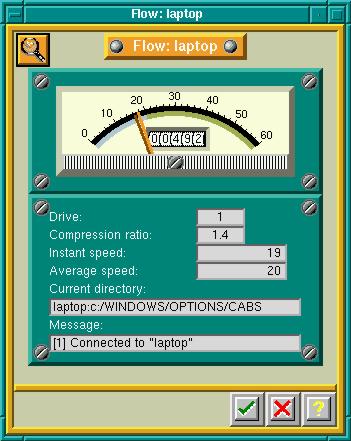
Figure 1. Backing up a Windows 95 laptop showed an average rate of 20MB per minute and a compression ratio of 1.4 to 1.
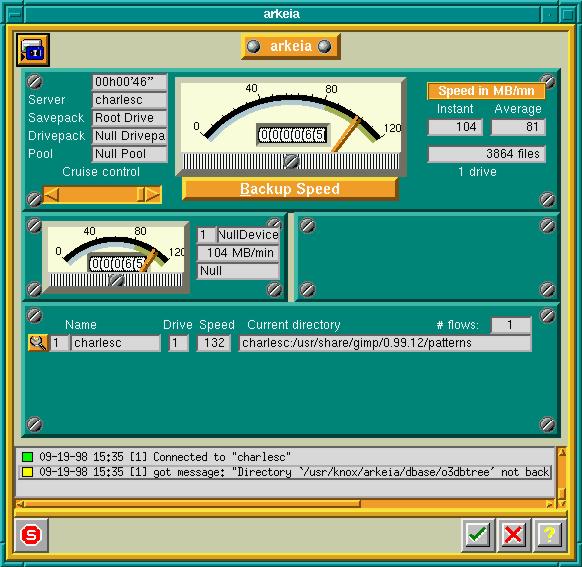
Figure 2. The main backup window shows a test backup to the null device. 65MB into the backup, the average data rate of 81MB per minute shows what the software could do on a Pentium II processor at 333 MHz. Note the error message with the yellow flag, which will be logged.
Because the software is clearly designed to support large shops, Arkeia is conceptually more complicated than typical backup software such as BRU. Before you can even do a test backup, you must define a number of objects.
You must define tapes to the system. Provisions are made for writing labels with bar codes for use with robot arms. (Since I don't have a robot arm, I was unable to test that part of the system.)
Tapes are combined into tape pools. The software rotates the tapes within each pool as needed.
You also define “savepacks”. These are the computers and directories on the computers to be backed up in units. For example, I have a savepack that consists of my laptop. I could easily define a savepack that consists of several computers (say, a department of a company) or one that consists of a single directory on one machine (such as an engineer's CAD drawings).
Customer support, even for the shareware package, is excellent. I made an error and e-mailed the support address for help. They replied with a preliminary diagnosis and a request for some log files. I returned those and got a diagnosis back within 24 hours of my first e-mail. Try that with any large software vendor. I was favorably impressed. I also made some suggestions for improving the product. The return e-mail indicated that my suggestions will be seriously considered. Again, Knox compares favorably with many software vendors.
One thing I like in a backup package, but is missing, is a manual retension command. Of course, I can use mt retension on most any UNIX or Linux box. Arkeia also has a provision for a user-defined command-line operation before and after each backup. If you like retensions before each use of a tape, add it here. This is customization I have not seen with other tape backup programs.
Scheduled backups are essential in any production shop. Defining them is simple and flexible. You can run daily, weekly, monthly and yearly backups. Periodic backups are defined in terms of savepacks and tape pools. For unattended backup, you can require a new tape with each backup.
Pricing is reasonable compared to an NT server network backup package. The shareware version has no set price, but a quarter of contributions over $20 will be contributed to Software in the Public Interest, the organization which supports the Debian Linux distribution. Details are readily available on the Knox web site.
Using Arkeia on Linux means no expensive NT server licenses. It also means you can find a use for that old 486 box the IT department has been using for a doorstop because NT on anything short of a Pentium 200 is too slow to use.
Network backup is probably the mission-critical application in any organization. I have no qualms about recommending Arkeia on Linux for that application. If you want to investigate this package further, get the manual from Knox's web site and read it. Better yet, get the manual and the software and use them, as I did.
Charles Curley (http://w3.trib.com/~ccurley/) lives in Wyoming, where he rides horses and herds cattle, cats and electrons. Only the last of those pays well, so he also writes documentation for a small software company headquartered in Redmond, WA. He can be reached via e-mail at ccurley@trib.com.
