
X-ISP
Living in the “information highway” era, we must all connect our computers to the Internet to be able to send e-mail, read newsgroups, browse the Web and communicate with the world in general.
Configuring your machine to connect to the Internet via your ISP can be an easy or difficult process, depending on your choice of operating system and tools.
Since Linux is our platform of choice, we are left to select the tools to use. Using X-ISP to configure our machine insures that we can connect our Linux boxes to the Internet in a short time, without any problems and with the advantage of using an X-based interface.
X-ISP is a visual, X11/XForms-based, user-friendly interface to pppd/chat. It offers an X11 dialup networking tool that can also act as a small ISP and phone company (PTT) database manager, and also as a tool to log dialup costs and usage. In addition to that, it provides maximum feedback from the dialing and login phases on a message browser (Figure 1), versatility in interrupting a call in progress, a manual login terminal window as well as call-back and DNS server selection capabilities.

Figure 1. X-ISP Main Window
The user interface of X-ISP is very simple, intuitive and user friendly. It consists of a form with four buttons (Connect, Interrupt, Disconnect and Quit), three menus (Options, Logging and Help) and a drop-choice list of ISP entries (in case the user wants to configure the machine to dial more than one ISP). The “Options” menu contains the five items discussed below.
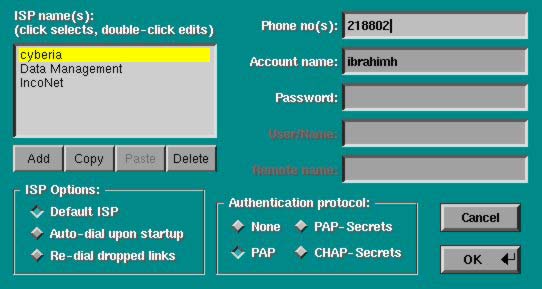
Figure 2. Setting User Account
Information: The user can create ISP entries, set the default ISP, set auto-dial and re-dial on disconnect options and the authentication protocol (none, PAP, PAP-Secrets or CHAT-Secrets). In Figure 2, X-ISP is configured to connect to any of the three ISPs: Cyberia, Data Management or IncoNet (actual ISPs in Lebanon) with Cyberia as the default ISP.
Dialing and Logging: From the dialing and logging window, the user controls several options such as the Dialer Options (number of maximum dialing trials, inter-dialing delay, maximum wait time for connection to be established, etc.), and the Manual and Automatic Logging options. The script section, for both dial-in and call-back, is divided into Expect and Send sections, as used by the call to the chat command. Here, the user must enter the script lines employed by chat to negotiate a successful login for the particular ISP.
Communication Options: These control the settings of the modem device and its properties (Reset and Init strings, baud rates and flow control), dialing method and asyncmap, software compression, serial port baud rate and flow control. All of these options have an initial default value.
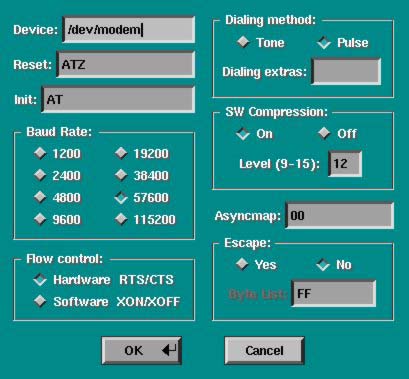
Figure 3. Communication Setup Window
TCP/IP Options: controls the settings of dynamic local and remote addresses, netmask and DNS.

Figure 4. Setting Up the TCP/IP Options
Paths Setup: enables editing the paths to the pppd daemon, the location where pppd saves its process ID files, the chat utility, the xispdial and xispterm utilities, and where XISP will keep the named pipe node used for communicating with its components.

Figure 5. Paths Setup
The “Logging” menu contains the following two items:
PTT Editor: This form enables editing of phone company information maintained by X-ISP. The user can add his local phone company to the compiled list and set up its rates. This way, when the user retrieves on-line statistics, he will receive a report of the actual cost.
Statistics: This displays time/cost information and also makes a bar chart of costs for each period (weekly, monthly and bimonthly).
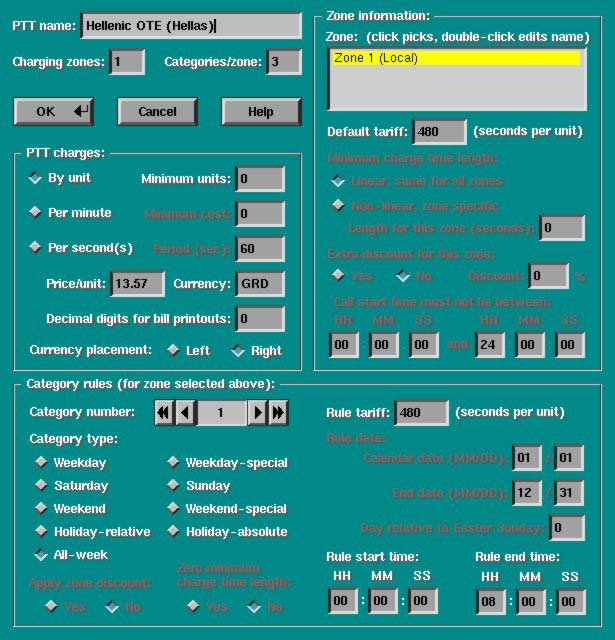
Figure 6. Setting up PTTs
The X-ISP package implements a user-friendly interface to pppd/chat and provides maximum feedback from the dial-in and login phases on the browser screen. It saves a lot of time compared to configuring PPP manually. X-ISP has several advantages over manual configuration:

Figure 7. Connection in Process
X-ISP enhances the user's knowledge of what is happening while a call is in progress in a graphical way, rather than the usual scripts that write output to the terminal.
X-ISP provides a mechanism to save ISP logs and to keep track of how many calls you make, their duration and cost.
One major facility is that the user can maintain two databases: one for the ISPs and the other for the phone companies (PTTs). This feature allows the user to configure his machine for more than one ISP and for more than one account with every ISP.
The phone company database supports all (known) PTT attributes applicable while logging phone-call costs, and saves its information in a separate file in the subdirectory /.xisplogs in the user's home directory.
X-ISP was developed by Dimitrios P. Bouras and can be downloaded at no charge from http://users.hol.gr/~dbouras/.
In order to install the X-ISP package on your system, four requirements must be satisfied:
The ppp-2.2.x package must be installed on the system.
X11R6 (XFree86 version 3.1.2 or newer) must be installed.
The xforms libraries (version 0.88 or newer) are needed. You can download a copy from either http://bloch.phys.uwm.edu/xforms/ or http://bragg.phys.uwm.edu/xforms/.
A copy of the XPM library (version 3.4 or later) is also needed.
Once these requirements are fulfilled, installation is straightforward. I have installed X-ISP on several machines (Slackware 3.4, kernel 2.0.30) by running make and make install. I was surprised I did not have to re-edit any configuration file or fix file permissions or anything. It worked perfectly from the first trial. However, in case you run into trouble, an explanation on solving your installation problems is in the documentation.
X-ISP comes with a large amount of technical documentation discussing implementation issues, security, architecture, and the interaction between the different components. It also has a good help facility that guides the user through setting up X-ISP step by step. Help is also available on-line from the main window.

