Product Review: The K Desktop Environment, Version 1.0
Developer: KDE Project Team
URL: http://www.kde.org/
Price: free
Reviewer: Bill Cunningham
Everyone's done a double-take at one time or another. For me, they can be the result of seeing a European sports car, a pretty girl or a UFO. I did a double-take on catching sight of a Linux window manager recently.
About a month ago, I received a S.u.S.E. flyer in the mail. The flyer had a screenshot of a new window manager called KDE, the K Desktop Environment, up and running. At the risk of sounding like a surfer, KDE was the sharpest, coolest window display I had ever seen on any operating system. I wanted my Linux desktop to look exactly like that.
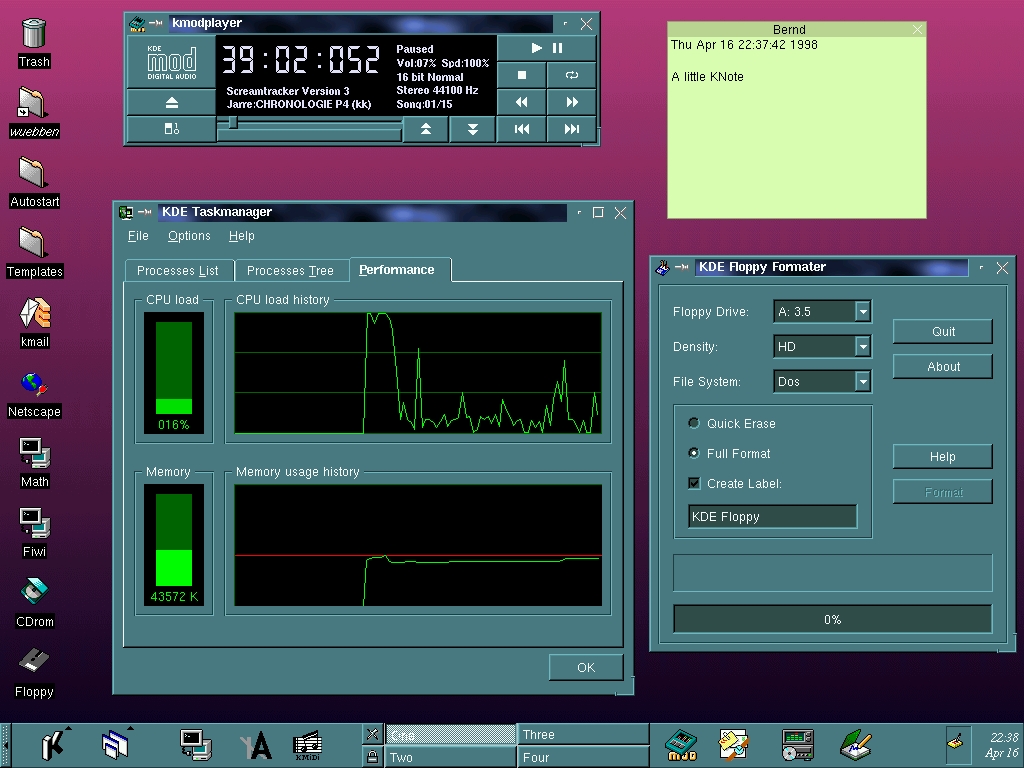
Figure 1 is the screenshot that sold me. Compared to KDE, my old standby, FVWM, looked downright humble. I vowed to get KDE as soon as possible.
A Yahoo search led me to the KDE project's page at http://www.kde.org/. The web site has extensive documentation that I won't recite here. A slide show at http://www.kde.org/kdeslides/ summarizes the whole project quite nicely.
KDE is primarily a complete, windows-based graphical operating environment for UNIX platforms. The KDE Core, also called kdebase, comes with a highly configurable window manager, control panel, file manager and virtual terminal. A user can download and install just the core package and be up and running in fine style. All your original X Window System applications will still work as before.
However, to fully benefit from KDE, one can additionally install specialized, interoperative application suites from any or all of these functional areas:
multimedia
graphics
utilities
games
networking
system administration
More will surely appear in the future.
These applications were designed to be highly interoperable. At first, I wanted only the basic desktop. It proved to be so powerful and easy to use that I quickly decided to get the multimedia package. These applications work equally well. Inevitably, I will have all the KDE packages by Christmas.
In my experience so far, KDE seems to be quite solid. The basic desktop takes about five seconds longer to come up than FVWM did (I have a P-133, 32MB RAM). Once up, however, the applications run noticeably quicker than comparable, older applications under FVWM. The applications are sharp-looking and responsive. Memory usage seems to be no more than non-KDE applications use. On my system, I had Netscape, the Applix word processor, one kvt and an active PPP connection running simultaneously before I saw any swapping. Even then, I had about 66% of my 16MB swap space still free. This is about the same system usage required by FVWM.
Working with FVWM is sort of like ice skating on a vast, frozen lake. With KDE, I can have fun on my computer for hours changing the background pattern, moving scrollbars around and fiddling with the controls. Sure, all this was possible with FVWM, but who ever had time to figure out how? With KDE, every aspect of the desktop's appearance is configurable with a couple of mouse clicks.
Linux distributions from all over the world are now shipping with KDE. Here are some of the latest:
German companies S.u.S.E GmbH, Delix Computer GmbH and Chip Extra Magazine
Caldera OpenLinux 1.2
PTS Linux
Eurielec 98 and COX-Red Hat 5.0 (Spanish)
Dream (French computer magazine)
Turkuaz (Turkish Linux distribution)
Connectiva (Brazilian-Portuguese)
Linux Mandrake
Walnut Creek's FreeBSD 2.2.7
InfoMagic
Stampede
LinuxPPC 1998 (PowerPC)
MkLinux (Power Macintosh)
New Linux users will probably use KDE as their X interface from the beginning. The following information is for users who would like to switch to KDE from another window manager.
The only warning I would make at this point is that KDE is somewhat large. Together, kdebase and kdelibs take up about 20MB once installed. The kdesupport package was another 4MB installed, and multimedia added 5.4MB. For most hard drives, these numbers are a drop in the bucket. I would even go so far as to say that KDE is worth buying a new hard drive for, if yours is getting full. With a complete Slackware installation, a whole year's worth of FTP downloaded applications and KDE, my 1.5GB hard drive is only 25% full.
The KDE packages can be downloaded from the KDE web page. The web page contains directions for installation. When you unpack the source files, be sure to read the README and INSTALL files as well.
Several mirror sites around the world provide optimum download times. The packages are available in source and binary RPM, source and binary .tgz and source and binary Debian.
The KDE team recommends RPM for the inexperienced UNIX user whose system supports that format. My Slackware system did not, so I had to compile the sources. Although this took about an hour, the process was well-documented and I had no problems with the installation. If you're compiling the sources yourself, here is a tip that may help: decide on and create a “kde root” directory, for example /usr/local/kde. Put your distribution files in /usr/local and use tar to unpack them in that directory. All your compiled files and libraries will end up under /usr/local/kde/, and any additional packages you install later will be able to find the necessary libraries and binaries.
Once KDE is properly installed, you must create a mechanism to start it. On most Linux systems, startx starts the X Window System and then runs another script, /usr/lib/X11/xinit/xinitrc. This script is a link to one of several scripts that start the different window managers such as FVWM, FVWM95, TWM, etc.
Edit the file that /usr/lib/X11/xinit/xinitrc points to and find the line that launches your old window manager. Comment out that line and add a line under it to launch startkde. The last few lines of your file should look something like this:
# extract from /usr/lib/X11/xinit/xinitrc.FVWM
if [ -f $usermodmap ]; then
 xmodmap $usermodmap
fi
# start some nice programs
xsetroot -solid SteelBlue
#FVWM <-comment this out
startkde # <-and add this!
Now, save this file and at the prompt, type startx. KDE should fire right up, greeting you with a very impressive deep-blue desktop. Try the virtual desktop selector on the bottom bar. It has four buttons, named one, two, three and four. These switch between virtual desktops, each of which has a different background. The background files are in .jpg format and can be easily changed. I have some .jpg files containing photos taken by the Hubble telescope, which make great backgrounds.
Now that KDE is up and running, let's try doing something with it. Put your cursor on the bottom bar icons, but don't click anything. After a second or so, a label will pop up with the icon's function. All the way to the right is the “Terminal Emulation (kvt)” icon. kvt, or K virtual terminal, is KDE's version of the xterm. Clicking once on this icon will open up a kvt. Don't double-click—that would open two kvts.
An interesting property of the kvt is that it is not by default a login shell. In other words, none of the commands in any of your login scripts will run when you open a kvt: no DIRCOLORs, no aliases, no special environment variables. This is quite easy to change if you desire. Simply click the right mouse button on the kvt icon and open “Properties”. On the “Permissions” tab, make sure you have the Read and Write buttons pushed in for User. Then on the “Execute” tab, Execute input area, the default command to run is
kvt -caption "%c" %i %m
To open kvt as a login shell, just add -ls so it now reads:
kvt -ls -caption "%c" %i %mThen click on “OK”. Your next kvt will open as a login shell. If this doesn't work, shut down KDE and restart it as root. This time, the modification will definitely work.
After having set kvt up as a login shell, you may notice a curious message on the first line of the kvt display that reads:
/dev/ttyp2: Operation not permitted
Below this line will be your normal shell prompt. This message can safely be ignored.
In all my years of running X, I never figured out how to open FVWM with icons on the screen. A Netscape icon can be created with KDE in about a minute and doesn't require reading man pages.
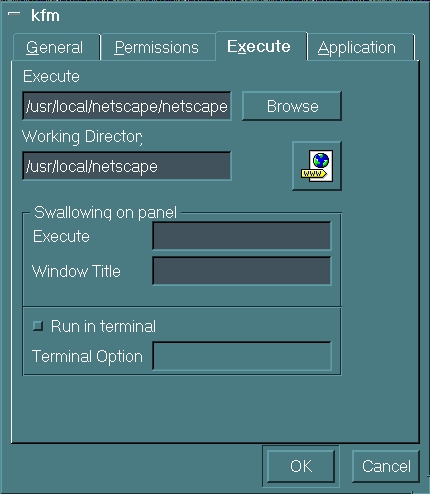
On the left border, open the “Templates” folder. Select File->New->Program. In the KFV dialog's “General” tab, change Program.kdelnk to Netscape.kdelnk. In the “Execute” tab, type in the path to the Netscape executable and specify an appropriate working directory. Click on the icon that seems logical. Click OK, and you are done. (See Figure 2.) Remember, don't double-click on the Netscape icon unless you want two browsers to open.
With FVWM, several programs could be opened and iconified in order to set up the desktop. Then, when FVWM exited, it all disappeared and the next time FVWM was opened, all changes would have to be redone. KDE opens in exactly the same state that you leave it. To me, this is both logical and convenient.
What about KDE's drawbacks? So far, I haven't found anything with KDE that I don't like or that is “broken”. It seems to be solidly engineered and stable. I'm keeping it!
One objection to KDE is that it looks a lot like MS Windows 95. Once you use it for a while, though, you realize KDE is not much like Windows 95 at all. It does have a silver bar along the display bottom (and top), and icons on the left side. However, every aspect of KDE's appearance is configurable; these are just what come out of the box. Similarities to Windows 95 end at the screen pixels.
Some have also said that KDE represents a moving away from the low-level workings of the operating system. For many people, this is actually good news. For the programmers and kernel hackers, Linux is still underneath it all. I believe most will see KDE as a breath of much needed fresh air. Recall what happened to OS/2—a highly specialized operating system that catered strictly to intellectuals.
The Linux community can't simply find a comfortable niche and stay there forever. We are either attracting users or losing them—not everyone is a kernel hacker or system programmer. If Linux is to be a vibrant, mainstream, “world dominant” operating system, it needs conveniences for the average user: straightforward installation, good applications, good looks and ease of use. KDE is a quantum step in this direction.