MuPAD
A Computer Algebra System (CAS) is a software package designed for the symbolic manipulation of mathematical expressions. A CAS should be able to:
perform numerical arithmetic with precision bounded only by the computer's hardware
perform basic calculus: partial and complete differentiation; symbolic and numerical integration
solve differential equations (partial and total)
manipulate power series
simplify algebraic expressions
understand standard functions: exponential, trigonometric, hyperbolic; in particular their derivatives and anti-derivatives, and their power series expansions
have a knowledge of some other functions: hypergeometric, Bessel
manipulate matrices and vectors; basic arithmetic, eigensystems, determinants, matrix decomposition
create two- and three-dimensional graphs
produce output in various forms: TeX/LaTeX, Fortran, C, HTML, PostScript
interact with other software; the CAS should be able to incorporate programs written in other languages
be extended: the CAS should have some programming language built in so that a user can add further functionality
number theoretical functions: primality testing, modular arithmetic, primitive root finding
orthogonal functions: Legendre, Chebyshev, Laguerre
animation of sequences of graphs
recurrence relation solving
MuPAD is a CAS developed at the University of Paderborn by a team headed by Benno Fuchssteiner. Although it may not have quite the range and pizazz of its better known rivals Maple and Mathematica, it is equal to them in depth, and in some ways even surpasses them. Its name is short for “MultiProcessing Algebra Data Tool”, and as we shall see, is a fairly good descriptor of it.
In contrast to the major commercial CASs, MuPAD is designed to be an open system—anybody can extend and add to it. The current version is 1.4, and was released in March 1998.
Let us suppose that you have installed MuPAD on your system. (I will discuss installation later.) What now?
You can start MuPAD in two ways: in a console, using the command
mupad
or, if you are running X, the command
xmupadwill provide a graphical interface. If you have installed MuPAD correctly, both of these commands are, in fact, shell scripts which define certain environment variables and then call the actual executables.
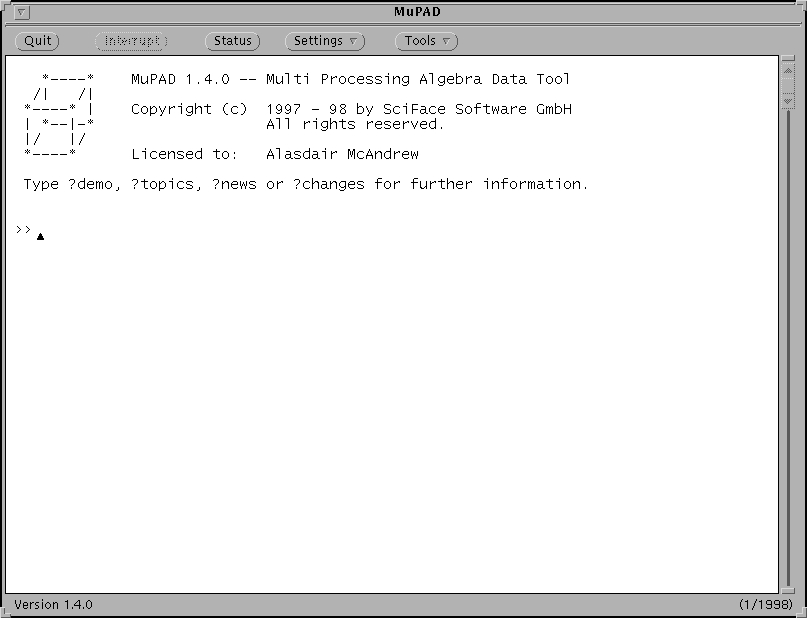
Let us suppose you have chosen the latter. You will obtain a window something like that shown in Figure 1.
Figure 1. The Initial MuPAD Window
Notice the OpenWindows look and feel. As yet the MuPAD team has not released a Linux binary using Athena or Motif widgets, although one is in preparation. MuPAD was designed to work with the OpenWindows widget set, and as such behaves best if you use an OpenLook window manager. Many of its subsidiary windows do not have their own close or exit button, but rely on the window manager for this. For all the figures and screenshots in this article I have used olvwm: the Open Look Virtual Window Manager.
You will also notice that the menus are rather sparse; there is, in fact, not a great deal more functionality offered by the graphical interface than in an intelligent console. Don't be put off—there's more here than meets the eye!
To save displaying too many screenshots, we shall go back to console mode. All MuPAD expressions are terminated with a colon or semi-colon (the colon suppresses display of the output), and the syntax is similar to that of Maple.
When MuPAD is started, a kernel (written in C++) is loaded; this defines a number of basic commands, functions, and constants. Other commands are available in specialized libraries, written in MuPAD's own language. These commands have to be loaded explicitly: either individually, or with the entire library.
We will start our investigation of MuPAD with a mathematical classic:
>> 2+2;
                                     4
Passed with flying colours! Now let's try some problems beyond the reach of your average hand-held calculator.
>> 3^(4^5);
37339184874102004353295975418486658822540977678373400775063693172207904061
72652512299936889388039772204687650654314751581087270545921608585813513369
82809187314191748594262580938807019951956404285571818041046681288797402925
51766801234061729839657473161915238672304623512593489605859058828465479354
05059362023765478074427305821445270589887562514528177934133521419207446230
27518729185432862375737063985485319476416926263819972887006907013899256524
297198527698749274196276811060702333710356481
As you see, MuPAD has no fear about dealing with very large integers.
>> DIGITS:=1000:float(PI);
3.141592653589793238462643383279502884197169399375105820974944592307816406
28620899862803482534211706798214808651328230664709384460955058223172535940
81284811174502841027019385211055596446229489549303819644288109756659334461
28475648233786783165271201909145648566923460348610454326648213393607260249
14127372458700660631558817488152092096282925409171536436789259036001133053
05488204665213841469519415116094330572703657595919530921861173819326117931
05118548074462379962749567351885752724891227938183011949129833673362440656
64308602139494639522473719070217986094370277053921717629317675238467481846
76694051320005681271452635608277857713427577896091736371787214684409012249
53430146549585371050792279689258923542019956112129021960864034418159813629
77477130996051870721134999999837297804995105973173281609631859502445945534
69083026425223082533446850352619311881710100031378387528865875332083814206
17177669147303598253490428755468731159562863882353787593751957781857780532
171226806613001927876611195909216420199
The value DIGITS gives the number of significant digits when dealing with floating point values. Its default is 10, and it can be set to any value between 1 and 2^31 - 1.
>> DIGITS:=100:float(1/997);
0.001003009027081243731193580742226680040120361083249749247743229689067201
604814443329989969909729187562
>> 43^(1/5);
2.121747460841897852639905031079416833442447899377300135845506404964677379
294415637755003497680157377
The general command solve can be used to solve equations of all types: algebraic, differential, recurrence.
>> solve(x^2-4*x+3=0,x);
                                  {1, 3}
>> sols:=solve(a*x^3+b*x^2+c*x+d=0,x):
We will suppress the output as it is rather long, but let's see what we can do with it:
>> op(sols,1);
/                3     /   2              3      3       2  2  \1/2 \
| b c     d     b      |  d     b c d    c      b  d    b  c   |    |
| ---- - --- - ----- + | ---- - ----- + ----- + ----- - ------ |    |^(1/3)
|    2   2 a       3   |    2      3        3       4        4 |    |
\ 6 a          27 a    \ 4 a    6 a     27 a    27 a    108 a  /    /
           /                3     /   2              3      3       2  2  \
      b    | b c     d     b      |  d     b c d    c      b  d    b  c   |
   - --- + | ---- - --- - ----- - | ---- - ----- + ----- + ----- - ------ |
     3 a   |    2   2 a       3   |    2      3        3       4        4 |
           \ 6 a          27 a    \ 4 a    6 a     27 a    27 a    108 a  /
   1/2 \
       |
       |^(1/3)
       |
       /
The op command picks out subexpressions; in this
case, as the result is a three-element set, we have chosen its
first element.
>> generate::TeX(%);
"- \\frac{b}{3 a} + \\sqrt[3]{- \\frac{d}{2 a} + \\frac{b c}{6 a^2} - \\fr\
ac{b^3}{27 a^3} + \\sqrt{- \\frac{b c d}{6 a^3} + \\frac{d^2}{4 a^2} + \\f\
rac{c^3}{27 a^3} + \\frac{b^3 d}{27 a^4} - \\frac{b^2 c^2}{108 a^4}}} + \\\
sqrt[3]{- \\frac{d}{2 a} + \\frac{b c}{6 a^2} - \\frac{b^3}{27 a^3} - \\sq\
rt{- \\frac{b c d}{6 a^3} + \\frac{d^2}{4 a^2} + \\frac{c^3}{27 a^3} + \\f\
rac{b^3 d}{27 a^4} - \\frac{b^2 c^2}{108 a^4}}}"
The TeX command is one not automatically loaded
when MuPAD is launched. To access it, we have to give its full
address within MuPAD's libraries.
Here % refers to the output of the previous command. This result can now be saved to a file:
>> fprint("solution.tex",%);
MuPAD can also solve systems of algebraic equations.
>> solve({x+2*y+a*z=-1,a*x-3*y+z=3,2*x-a*y-5*z=2},{x,y,z});
   { {              2             2                           2      } }
   { {         a - a           3 a  - 5 a - 19      11 a - 2 a  + 19 } }
   { { z = --------------, x = ---------------, y = ---------------- } }
   { {      3                   3                     3              } }
   { {     a  - 17 a - 19      a  - 17 a - 19        a  - 17 a - 19  } }
The above system, being linear, could have been solved equally well
by using the linsolve command.
There are a few basic number theory functions in the kernel; others are contained in the numlib library.
>> isprime(997);
                                   TRUE
>> Factor(2^67-1);
                          193707721 761838257287
>> nextprime(1000000);
                                  1000003
>> powermod(9382471,322973,1298377);
                                  880825
>> phi(nextprime(2^20)-1);
                                  498400
Here phi is Euler's totient function returning the number of integers less than and relatively prime to its argument. These functions allow us to perform simple RSA encryption and decryption. Suppose we choose two primes and compute their product:
>> p:=nextprime(5678);
                                   5683
>> q:=nextprime(6789);
                                   6791
>> N:=p*q;
                                 38593253
Now we have to choose an integer e relatively prime to (p-1)*(q-1);
a smaller prime will do; say e:=17.
>> e:=17:The values e and N are our “public key”. Now we find the d, the inverse of e modulo (p-1)*(q-1). This is very easily done using the convenient overloading of the reciprocal function:
>> d:=1/e mod (p-1)*(q-1);
                                  6808373
Suppose someone wishes to send us a message M < N; say
>> M:=24367139;They can encrypt it using our public key values:
>> M1:=powermod(M,e,N);
                                 18476508
We can now decrypt this using the value d (and N):
>> powermod(M1,d,N);
                                 24367139
This is indeed the value of the original message.
We have seen a glimpse of MuPAD's symbolic abilities in the equation solving above. But MuPAD can do much more than this: all manner of algebraic simplification; rewriting in a different form; partial fractions; and so on.
>> expand((x+2*y-3*z)^4);
 4       4       4         3      3            3       3            3
x  + 16 y  + 81 z  + 32 x y  + 8 x  y - 108 x z  - 12 x  z - 216 y z  -
       3              2          2         2           2  2       2  2
   96 y  z + 216 x y z  - 144 x y  z - 72 x  y z + 24 x  y  + 54 x  z  +
        2  2
   216 y  z
>> Factor(%);
                                            4
                             (x + 2 y - 3 z)
>> sum(1/(k*(k+2)*(k+4)),k=1..n);
                                  2        3       4
                     310 n + 337 n  + 110 n  + 11 n
                 ----------------------------------------
                                2        3       4
                 4800 n + 3360 n  + 960 n  + 96 n  + 2304
>> partfrac(%);
               1           1           1           1
           --------- - --------- - --------- + --------- + 11/96
           8 (n + 3)   8 (n + 1)   8 (n + 2)   8 (n + 4)
>> normal(%);
                                  2        3       4
                     310 n + 337 n  + 110 n  + 11 n
                 ----------------------------------------
                                2        3       4
                 4800 n + 3360 n  + 960 n  + 96 n  + 2304
>> Factor(%);
                                            2
                      n (n + 5) (55 n + 11 n  + 62)
                    ----------------------------------
                    96 (n + 1) (n + 2) (n + 3) (n + 4)
>> sum(sin(k*x),k=1..n);
(I exp(-I x) - I exp(I x) + I exp(-I n x) - I exp(I n x) -
   I exp(- I x - I n x) + I exp(I x + I n x)) /
   4 - 2 exp(-I x) - 2 exp(I x)
>> rewrite(%,sincos);
(2 sin(x) + 2 sin(n x) + I cos(x + n x) - 2 sin(x + n x) - I cos(- x - n x)
   ) / 4 - 4 cos(x)
MuPAD's calculus skills are excellent. It implements very powerful algorithms for differentiation, integration, and limits.
>> diff(x^3,x);
                                      2
                                   3 x
>> diff(exp(exp(x)),x$4);
                             2                       3
exp(x) exp(exp(x)) + 7 exp(x)  exp(exp(x)) + 6 exp(x)  exp(exp(x)) +
         4
   exp(x)  exp(exp(x))
The dollar operator, $, is MuPAD's sequencing operator. As with most operators, it is overloaded; in the context of a derivative it is interpreted as a multiple derivative. We can of course also perform partial differentiation.
>> int(sec(x),x);
                    ln(2 sin(x) + 2)   ln(2 - 2 sin(x))
                    ---------------- - ----------------
                           2                  2
>> int(cos(x)^3, x=-PI/4..PI/3);
                                 1/2      1/2
                              5 2      3 3
                              ------ + ------
                                12       8
>> int(E^(-x^2),x=0..0.5);
                           /    1                 \
                        int| --------, x = 0..0.5 |
                           |        2             |
                           |       x              |
                           \ exp(1)               /
>> float(%);
0.461281006412792448755702936740453103083759088964291146680472565934983884\
2952938567126622486999424745
If we require only a numeric result, then we don't want to force
MuPAD to attempt a symbolic or exact solution first. In such a case
we may use the hold command, which returns the
input unevaluated, but “holds” onto it for the purposes of later
evaluation. Thus we may enter:
>> hold(int(exp(-x^2),x=0..0.5));followed by the float command.
The default order of a power series is 6. This can be changed either by changing the value of ORDER (analogous to DIGITS above), or by including the order in the series command. This last inclusion is optional.
>> tx:=series(tan(x),x,12);
                  3      5       7       9         11
                 x    2 x    17 x    62 x    1382 x        12
             x + -- + ---- + ----- + ----- + -------- + O(x  )
                 3     15     315    2835     155925
>> cx:=series(cos(x),x,12);
                    2    4    6      8        10
                   x    x    x      x        x          12
               1 - -- + -- - --- + ----- - ------- + O(x  )
                   2    24   720   40320   3628800
>> tx*cx;
                  3    5      7       9        11
                 x    x      x       x        x           12
             x - -- + --- - ---- + ------ - -------- + O(x  )
                 6    120   5040   362880   39916800
This certainly looks like the series for sin(x), but let's see if MuPAD recognizes it as such.
>> sx:=series(sin(x),x,12):
>> is(tx*cx=sx);
                                   TRUE
>> type(tx*cx);
                                  Puiseux
This means that the result of the series product is recognized by
MuPAD as an object of type “Puiseux”; that is, a series possibly
containing fractional powers.
MuPAD can also deal with polynomials.
>> p1:=x^8-3*x^5+11*x^4-x^2+17;
                            4    2      5    8
                        11 x  - x  - 3 x  + x  + 17
>> p2:=x^3-23*x^2-4*x+11;
                            3             2
                           x  - 4 x - 23 x  + 11
>> divide(p1,p2);
                  2        3       4    5
285641 x + 12337 x  + 533 x  + 23 x  + x  + 6613228,
                           2
   23310861 x + 153111100 x  - 72745491
The result of the last command consists of two terms: the quotient, and the remainder. MuPAD also has commands for extracting coefficients from polynomials, evaluating polynomials using Horner's algorithm, and lots more.
We shall first create a matrix domain:
>> M:=Dom::Matrix();
               Dom::Matrix(Dom::ExpressionField(id, iszero))
The result returned here indicates that MuPAD expects that the elements of matrices will be members of a field for which no normalization is performed (the function id just returns elements as given), and for which 0 is recognized as the zero value.
Now we shall make all the commands in the library linalg available to us:
>> export(linalg);
Now we shall create a few matrices and play with them. First, a matrix with given elements.
>> A:=M([[1,2,3],[-1,3,-2],[4,-5,2]]);
                             +-            -+
                             |   1,  2,  3  |
                             |              |
                             |  -1,  3, -2  |
                             |              |
                             |   4, -5,  2  |
                             +-            -+
We have entered the matrix elements as a list of lists (a list, in
MuPAD, is delimited by square brackets).
Next, a matrix with elements randomly chosen to be between -9 and 9. We do this by applying the function returned by random to each of the elements.
>> B:=M(3,3,func(random(-9..9)(),i,j));
                              +-           -+
                              |  -7, -5, 8  |
                              |             |
                              |   3, -1, 7  |
                              |             |
                              |   3, -5, 6  |
                              +-           -+
Clearly this approach can be used to generate any matrix whose elements are functions of their row and column values. There is a randomMatrix command in the linalg library, but it requires the elements to be members of a coefficient ring. For our purposes, it is as easy to roll our own.
>> A*B;
                            +-              -+
                            |   8,  -22, 40  |
                            |                |
                            |   10,  12,  1  |
                            |                |
                            |  -37, -25,  9  |
                            +-              -+
>> det(A);
                                    -37
>> 1/A;
                         +-                     -+
                         |  4/37,  19/37, 13/37  |
                         |                       |
                         |  6/37,  10/37,  1/37  |
                         |                       |
                         |  7/37, -13/37, -5/37  |
                         +-                     -+
As we have seen above, MuPAD supports operator overloading, which
means that since A is a matrix,
1/A is interpreted as the inverse of
A.
>> A^10;
                   +-                                 -+
                   |   19897010, -20429930,  22281963  |
                   |                                   |
                   |  -42711893,  43857348, -47862790  |
                   |                                   |
                   |   64993856, -66730117,  72852811  |
                   +-                                 -+
>> b:=M(3,1,[7,9,-21]);
                                 +-     -+
                                 |   7   |
                                 |       |
                                 |   9   |
                                 |       |
                                 |  -21  |
                                 +-     -+
Here the first two (optional) values give the number of rows and
columns of the matrix, the matrix elements are then given in a
single list. If the list isn't long enough, the remaining values
will default to zero.
>> linearSolve(A,b);
                                 +-    -+
                                 |  -2  |
                                 |      |
                                 |   3  |
                                 |      |
                                 |   1  |
                                 +-    -+
>> AM:=A.b;
                           +-                 -+
                           |   1,  2,  3,  7   |
                           |                   |
                           |  -1,  3, -2,  9   |
                           |                   |
                           |   4, -5,  2, -21  |
                           +-                 -+
The . operator is concatenation. Again, this is an overloaded
operator, as it will work for other data types as well.
>> gaussJordan(AM);
                             +-             -+
                             |  1, 0, 0, -2  |
                             |               |
                             |  0, 1, 0,  3  |
                             |               |
                             |  0, 0, 1,  1  |
                             +-             -+
The linalg library is very full-featured, and
contains plenty of commands for operating on matrices and vectors:
row and column operations; matrix factorization and decomposition;
commands for dealing with matrix polynomials and eigensystems; and
so on.
We first define a differential equation by defining it to be an equation in the ode domain.
>> de:=ode(y'(x)+4*y(x)=exp(3*x),y(x));
               ode(4 y(x) + diff(y(x), x) = exp(3 x), y(x))
Note that MuPAD supports the dash notation for the derivative.
>> solve(de);
                        {       3                }
                        { exp(x)                 }
                        { ------- + C1 exp(-4 x) }
                        {    7                   }
We can, of course, solve equations with initial conditions:
>> de2:=ode({y''(x)-2*y'(x)+3*y(x)=0,y(0)=1,y'(0)=2},y(x));
ode({D(y)(0) = 2, y(0) = 1, 3 y(x) - 2 diff(y(x), x) + diff(y(x), x, x) = 0
   }, y(x))
>> solve(de2);
             {                              1/2        1/2  }
             {               1/2    exp(x) 2    sin(x 2   ) }
             { exp(x) cos(x 2   ) + ----------------------- }
             {                                 2            }
MuPAD will solve linear differential equations with little fuss,
and also a large class of non-linear differential equations.
Recurrence relations are solved similarly; by defining an equation to be of type rec, and applying the command solve.
>> rr:=rec(a(n)=a(n-1)+3*a(n-2),a(n));
                  rec(a(n) = a(n - 1) + 3 a(n - 2), a(n))
>> solve(rr);
               {    /   1/2       \n      /         1/2 \n }
               {    | 13          |       |       13    |  }
               { a1 | ----- + 1/2 |  + a2 | 1/2 - ----- |  }
               {    \   2         /       \         2   /  }
If we include initial conditions, MuPAD will return the exact solution.
>> rr2:=rec(a(n)=a(n-1)+3*a(n-2),a(n),{a(0)=1,a(1)=3});
       rec(a(n) = a(n - 1) + 3 a(n - 2), a(n), {a(0) = 1, a(1) = 3})
>> solve(rr2);
{ /           1/2 \ /         1/2 \n   /     1/2       \ /   1/2       \n }
{ |       5 13    | |       13    |    | 5 13          | | 13          |  }
{ | 1/2 - ------- | | 1/2 - ----- |  + | ------- + 1/2 | | ----- + 1/2 |  }
{ \         26    / \         2   /    \   26          / \   2         /  }
In the case of a non-homogeneous equation, MuPAD returns the
particular solution.
>> rr3:=rec(a(n) = a(n - 1) + 3*a(n - 2)+n^2, a(n));
                                                   2
               rec(a(n) = a(n - 1) + 3 a(n - 2) + n , a(n))
>> solve(rr3);
                          {           2         }
                          {   14 n   n          }
                          { - ---- - -- - 59/27 }
                          {    9     3          }
Graphical display in MuPAD is produced by means of a separate program called VCam, which can be used entirely independent of MuPAD. But let's suppose we are in the middle of a MuPAD session (started with xmupad), and we wish to plot a few functions. The command plotfunc will allow us to plot functions of the form y=f(x), or in three dimensions, of the form z=f(x,y).
>> plotfunc(1/(1+x^2),x=-4..4);
>> plotfunc(x^3-3*x*y^2,x=-2..2,y=-2..2);
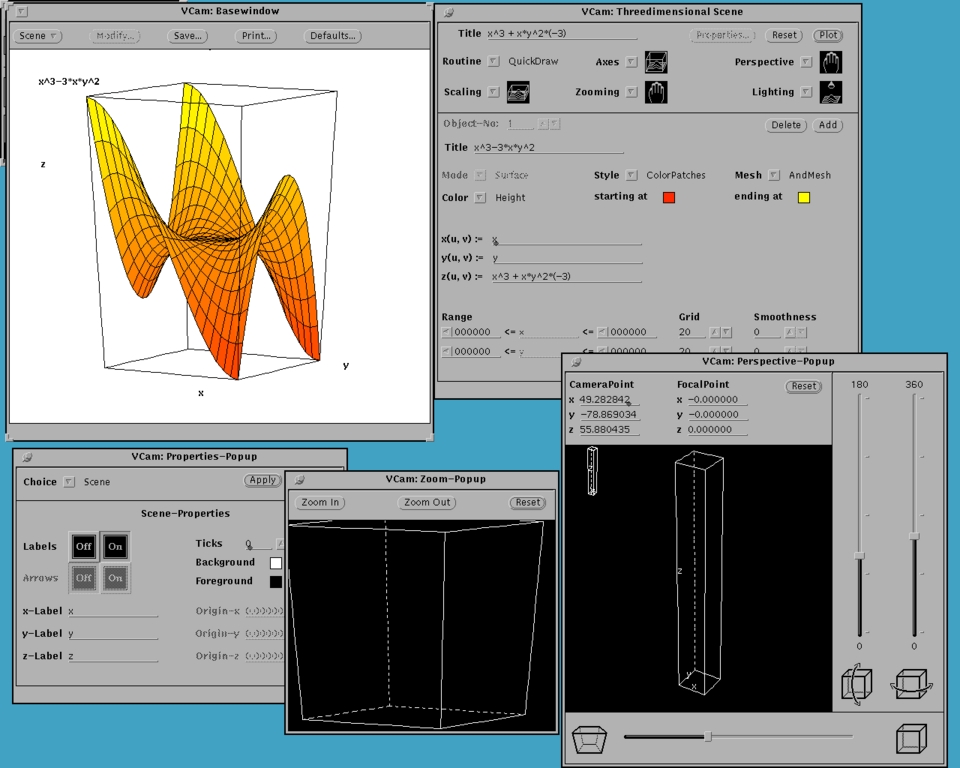
Such commands will open up a VCam window with the function displayed in it, and also another window in which it is possible to change various plot options. The output of this second command is shown in Figure 2, along with various of VCams's windows.
Figure 2. A Screenshot of VCam in Action
More general plot commands are plot2d and plot3d, by which the above plots can be generated as follows:
>> plot2d(Mode = Curve, [u, 1/(1+u^2)], u = [-4, 4]]);
>> plot3d([Mode = Surface, [u, v, exp(-sqrt(u^2+v^2))], u = [-4, 4],
v = [-4, 4]]);
We see that these commands use a parametric representation of the function. This allows for the easy plotting of a large number of different functions. There are a large number of plot options, including colours of plots and backgrounds, style of curves or surfaces, position and style of axes, labels and titles. All these can be changed interactively in VCam, or given as options to the plot command.
For a more complex example, let's plot a torus, with radii 3 and 1. This can be plotted with:
>> plot3d([Mode = Surface,
          [(3+cos(u))*cos(v), (3+cos(u))*sin(v), sin(u)],
          u = [0, 2*PI], v = [0, 2*PI]]);
This will give a wireframe torus with three numbered axes—not a particularly elegant result. We can add more options to this basic command to give us a nice filled-in torus with hidden lines, nestling in a box with no numbers:
>> plot3d(Title = "A torus", Axes = Box, Labels = ["","",""], Ticks = 0,
          [Mode = Surface,
          [(3+cos(u))*cos(v), (3+cos(u))*sin(v), sin(u)],
          u = [0, 2*PI], v = [0, 2*PI]
          Style = [ColorPatches, AndMesh]]);
All these options can now be changed again with VCam. We can also
change the perspective; zoom in and out; modify the colour scheme;
and many other things. We can draw several surfaces at once, by
placing multiple surface definitions in the one
plot3d command. For example:
>> plot3d(Title = "Two tori", Axes = Box, Labels = ["","",""], Ticks = 0,
          [Mode = Surface,
             [(5+cos(u))*cos(v), (5+cos(u))*sin(v), sin(u)],
             u = [0, 2*PI], v = [0, 2*PI],
             Style = [ColorPatches, AndMesh]
          ],
          [Mode = Surface,
             [sin(u), 5+(5+cos(u))*cos(v), (5+cos(u))*sin(v)],
             u = [0, 2*PI], v = [0, 2*PI],
             Style = [ColorPatches, AndMesh]
          ]
          );
The result of this is shown in Figure 3.
Figure 3. Two Interlocking Tori
When dealing with such long expressions as this, it is convenient to first use your favorite editor to create a small file, say “tori.mu”, to contain the above command, then read it into MuPAD:
>> read("tori.mu");
This obviates using MuPAD's own text editing facilities, which are very basic.
We have loosely tossed about the term “domain”. We shall now look at this in a bit (but not much) more detail. Domains are fundamental to the way in which MuPAD works, and we need to have a basic understanding of them in order to use MuPAD effectively.
A domain in MuPAD is either an algebraic structure (such as finite field or permutation group) or a data type (such as Matrix, Polynomial or Fraction), for which overloaded operators or functions defined on that domain always return results in the domain (or the result FAIL if no result exists).
To give some examples, suppose we investigate matrices over the integers modulo 29. Since 29 is prime, these integers form a Galois field, and so the matrices should respond to all standard arithmetic operations.
First the definition:
>> M29:=Dom::Matrix(Dom::IntegerMod(29));
                     Dom::Matrix(Dom::IntegerMod(29))
We have two domains being used here: Dom::Matrix, which creates a matrix domain, and Dom::IntegerMod(29), which creates the field of integers modulo 29.
>> A:=M29([[100,200,-30],[47,-97,130],[13,33,-1001]]);
                   +-                                 -+
                   |  13 mod 29, 26 mod 29, 28 mod 29  |
                   |                                   |
                   |  18 mod 29, 19 mod 29, 14 mod 29  |
                   |                                   |
                   |  13 mod 29,  4 mod 29, 14 mod 29  |
                   +-                                 -+
Notice that the result returned by MuPAD is automatically
normalized so that the matrix elements are in the required field.
If we enter values which can't be normalized (say, decimal
fractions), MuPAD will return an error message.
>> 1/A;
                   +-                                 -+
                   |   3 mod 29,  8 mod 29, 15 mod 29  |
                   |                                   |
                   |  28 mod 29,  9 mod 29, 22 mod 29  |
                   |                                   |
                   |  12 mod 29, 19 mod 29, 13 mod 29  |
                   +-                                 -+
Here the inverse operator returns a suitable result. Let's check
this.
>> %*A;
                    +-                              -+
                    |  1 mod 29, 0 mod 29, 0 mod 29  |
                    |                                |
                    |  0 mod 29, 1 mod 29, 0 mod 29  |
                    |                                |
                    |  0 mod 29, 0 mod 29, 1 mod 29  |
                    +-                              -+
This is the identity for our particular matrix ring. Now we can try
a few other matrix operations.
>> linalg::det(A);
                                 12 mod 29
>> linalg::gaussElim(A);
                   +-                                 -+
                   |  13 mod 29, 26 mod 29, 28 mod 29  |
                   |                                   |
                   |   0 mod 29, 12 mod 29,  2 mod 29  |
                   |                                   |
                   |   0 mod 29,  0 mod 29,  9 mod 29  |
                   +-                                 -+
>> linalg::gaussJordan(A);
                    +-                              -+
                    |  1 mod 29, 0 mod 29, 0 mod 29  |
                    |                                |
                    |  0 mod 29, 1 mod 29, 0 mod 29  |
                    |                                |
                    |  0 mod 29, 0 mod 29, 1 mod 29  |
                    +-                              -+
>> A^10;
                   +-                                 -+
                   |  22 mod 29, 10 mod 29,  3 mod 29  |
                   |                                   |
                   |   3 mod 29, 21 mod 29, 16 mod 29  |
                   |                                   |
                   |   4 mod 29, 18 mod 29,  5 mod 29  |
                   +-                                 -+
>> exp(A);
                                   FAIL
The matrix exponential exp(X) is defined as 1 + X + (X^2)/2 +
(X^3)/6 + (X^4)/24 + . . . + (X^n)/n! + . . . As you might expect,
this is not defined for matrices over our field. For another
example, consider polynomials over the integers modulo 2. The
definition is similar to the matrix definition above.
>> PK:=Dom::Polynomial(Dom::IntegerMod(2));
                    Dom::Polynomial(Dom::IntegerMod(2))
Now we'll create a polynomial in this domain.
>> p1:=PK(x^17+1);
                                   17
                                  x   + 1
For good measure, we'll create a second polynomial which looks the
same, but is not in our domain.
>> p2:=x^17+1;
                                   17
                                  x   + 1
Even though they look the same on the screen, MuPAD knows all about
them; the type command will tell us.
>> type(p1);
                    Dom::Polynomial(Dom::IntegerMod(2))
>> type(p2);
                                  "_plus"
(The result of this last command is that p2 is
an object formed by adding things together.)
>> Factor(p1);
                3    4    5    8            2    4    6    7    8
    1 (x + 1) (x  + x  + x  + x  + 1) (x + x  + x  + x  + x  + x  + 1)
>> Factor(p2);
          2        3    4    5    6    7    8    9    10    11    12    13
(x + 1) (x  - x - x  + x  - x  + x  - x  + x  - x  + x   - x   + x   - x
      14    15    16
   + x   - x   + x   + 1)
The domains package is part of MuPAD which is
very much in a state of constant revision and enhancement. For
example, at present, it is not possible to perform polynomial
division in a polynomial domain.
MuPAD comes with a very full-featured programming language. So much so, that I would say that this is one of MuPAD's greatest strengths. In contradistinction to other CASs, MuPAD allows:
procedural programming
functional programming
object oriented programming
parallel processing
It would take far more than an introductory exposition such as this to even scratch the surface of MuPAD's programming power, so we shall just look at a few simple examples. For more involved examples, try the expose command, or look at some of the files in your $MuPAD/share/examples directory.
For procedural programming, MuPAD offers all the standard programming requirements: loops of various sorts, branching, and recursion. Here, for example, is a simple procedure designed to implement Hofstadter's chaotic function, with line numbers as shown:
1   q:=proc(n) option remember;
2   begin
3   if n<=2 then
4       1
5   else
6       q(n-q(n-1))+q(n-q(n-2))
7   end_if;
8   end_proc;
Suppose we create a small file called Hofstadter.mu containing these lines, and we read it into MuPAD with
>> read("Hofstadter.mu");
This will make the function q(n) available to
us. We can then list the first 20 values:
>> q(i)$i=1..20;
      1, 1, 2, 3, 3, 4, 5, 5, 6, 6, 6, 8, 8, 8, 10, 9, 10, 11, 11, 12
Or we can graph the first ten thousand values:
>> plot2d([Mode = List,[point(u,q(u)) $ u=1..10000]]);A few points about this simple procedure: the option remember in line 1 means that values generated by the function are automatically stored where they can be retrieved if needed. With all the nested recursion, evaluating function values without using previous values would be hideously slow. The syntax is pretty standard, and is very similar to that of Maple.
We can define simple functions very readily by using an “arrow” definition:
>> f:=x->x^2+1;
Curiously, I can't find any reference to this in the manual.
For a slightly more involved example, suppose we try to write a program to generate truth tables. That is, so that something like
>> tt(p and q);
will produce
                                  p, q, p and q
                                  T, T, T
                                  T, F, F
                                  F, T, F
                                  F, F, F
To make things easy for ourselves, we shall include the variables
of the boolean expression in the function call, so as to save the
bother of parsing the expression to obtain its variables. And here
is such a program:
 1  tt:=proc()
 2  local i,j,n,l,ft,f,r,rf;
 3  begin
 4      if args(0) <= 1 then error("Must include all variables");
 5      end_if;
 6
 7      ft:=[FALSE,TRUE];
 8      n:=args(0)-1;
 9      print(Unquoted,args(j)$j=2..args(0),expr2text(args(1)));
10
11      for j from 2^n-1 downto 0 do
12         f:=args(1);
13
14         for i from 1 to n do
15            l[i]:=floor(j/(2^(n-i))) mod 2;
16         end_for;
17
18         for i from 1 to n do
19            f:=subs(f,args(i+1)=ft[l[i]+1]);
20         end_for;
21
22         for i from 1 to n do
23            r[i]:=_if(l[i]=0,"F","T");
24         end_for;
25
26         rf:=_if(simplify(f,logic),"T","F");
27
28         print(Unquoted,r[i]$hold(i)=1..n,rf);
29      end_for;
30  end_proc:
Some points here: the value args(0) in lines 4
and 8 gives the number of arguments; the
expr2text function in line 9 simply returns a
string version of a given expression; the error
statement in line 4 immediately exits the procedure; the
_if command (lines 23 and 26) is a functional
form of the standard if statement. The rest of the program simply
lists all possible truth values for the variables (this is done in
lines 14 to 20), and prints them out, along with the value obtained
when those truth values are substituted into the function.
This program may be considered as skeletal only; for example, it does no type checking.
There are several ways of obtaining information about MuPAD: through the extensive on-line help facility, or from published articles.
A few MuPAD books are currently available, but I haven't seen one. The on-line documentation is excellent. It exists in two forms: plain ASCII (for use with MuPAD in terminal mode); and dvi with hyperlinks, when using MuPAD under X.
For ASCII, the help commands are obtained with a question mark:
>> ?<command>
will provide a few screens of information about <command>. Notice that this is the only MuPAD command which doesn't require a terminating colon or semicolon. The amount of documentation varies; but usually includes a basic description, some examples, and a list of related commands. Some help files are very large indeed; others very small. For example
>> ?stats::medianis short; it basically just tells you that this command returns the median of a list of values. However
>> ?Dom::Matrixis very long, with a detailed discussion about creation of matrices, and operations defined for matrices.
Information about a MuPAD library can be obtained with the info command; for example
>> info(numlib);
provides a list of all commands in the numlib library. You can also use
>> ?numlibto obtain a brief description of all of numlib's commands.
You can see the MuPAD programs which define a function with the use of expose. Again, programs vary greatly in length. For example
>> expose(length);
returns a short function defined by a six-line program, but
>> expose(D)returns a 164-line program. You can also use op to obtain information; again the amount given varies;
>> op(Dom::Matrix);returns all 1482 lines of the MuPAD program defining matrices.
The documentation for xmupad is provided in the form of a dvi file of the manual, with lots of hyperlinks. The manual can actually be read independently of MuPAD with the hypage command. As with the commands for starting MuPAD, this is a call to a shell script. However, hypage is started automatically with xmupad.
All the relevant documentation is provided in the form of hyTeX dvi files; that is, dvi files with embedded hyperlinks. If you are used to TeX and dvi viewers, this approach will seem very sensible: the mathematics is superbly typeset, as you'd expect, and there are plenty of included graphics. It may seem a bit odd at first to use a book (with all the trimmings: table of contents, chapters, an index) as the paradigm for on-line documentation, but in fact it works very well. And after all, everybody is familiar with the structure of a book, so there is no need to learn the particular exigencies and peculiarities of some new and strange help system.
The amount of information is superb. As well as discussions on all commands and functions, there are extensive chapters on graphics, programming, and debugging, as well as two excellent demos. Moreover, as well as the manual, there are hytex dvi files covering all the MuPAD libraries, as well a handy quick reference.
Once xmupad and hypage are up and running, the help command
>> ?<command>
will open up the manual at the relevant page. Once inside the manual, you can use the hyperlinks to travel through other similar commands. I find hypage very easy to use. If you have installed MuPAD, you should find this entire article redundant, as everything in it is covered in far greater depth in the manual.
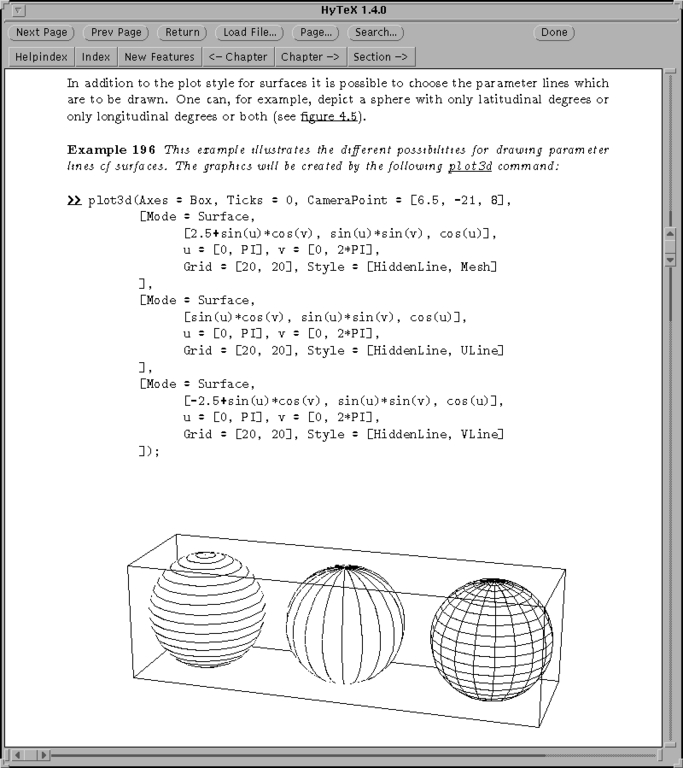
A screen shot of hypage is shown in Figure 4.
Figure 4. Hypage—MuPAD's Graphics Hypertext Manual
However, I have a few niggles with hypage. The main one is that there is no way of changing the font size or page layout. If you reduce the size of the hypage window, for example, the text is not reformatted to fit the available window size, and so you have to use inconvenient scroll bars to view the text. This makes hypage nearly unworkable on a 640x480 VGA screen (such as on my laptop). Moreover, all the text is in the same colour (hyperlinks are given by underlines), which I find a bit dull. There also doesn't seem to be much in the way of keystroke movements. I found three (they aren't listed in the manual): p for previous page; f for forward, and r for return (to the linking page).
On the other hand, with a higher resolution screen, hypage is a delight to use.
The canonical MuPAD site is
but most information is at
to which you are directed from the MuPAD site. Here you will find a few FAQs, some examples of MuPAD in different areas of mathematics, and some comparisons with other CASs. Unfortunately these comparisons are fairly old, and at the time of writing they have not been upgraded to the latest version of MuPAD. There are also a few technical articles written by members of the MuPAD team discussing aspects of MuPAD internal workings. These articles should be read if you wish to master MuPAD.
You will also find some MathPAD journals. These are published by the MuPAD team, and cover CASs and their uses in general. Only a few of them are devoted to MuPAD, and these few are well worth reading, as they give fascinating insight into the development of MuPAD, and the reasons for various design considerations.
As yet, there are no books on MuPAD, aside from the published manual, and few articles in the open literature. The two sites above, and the on-line documentation, pretty much cover the lot.
Couldn't be easier! You need to download two files: one containing the binaries (mupad, xmupad, vcam, hypage and such); and the other the “shared” material: the documentation and MuPAD libraries. Uncompress them, and untar them in a suitable directory (/usr/local/MuPAD is a good spot, but anywhere will do), and add /usr/local/MuPAD/share/bin (or whatever) to your path. As I mentioned before, this bin directory contains only shell scripts, which set all necessary environment variables before calling the binaries. Thus there is no need for any extra fiddling.
To use the graphical capabilities of MuPAD, you also need the xview libraries installed on your system.
You will find that MuPAD, thus installed, has certain memory restrictions: you will be unable to deal with commands requiring intensive memory use. To overcome this, you need to register your copy of MuPAD. This will provide you with a license key which you can use to unlock the MuPAD's memory use.
One of the most commonly asked questions to the sci.math.symbolic newsgroup is: “What's the difference between...?” The best answer I've seen so far is: “They're spelled differently!” In that spirit, I intend not to give a detailed anaysis of the differences between MuPAD and other CASs, but instead to make a few general points.
First, MuPAD can't be beaten on price: it's free! Strictly speaking, this is not true; there are circumstances for which you must pay to use MuPAD. But for a single-user Linux user (and which of us is not?), it costs nothing.
The interface is pretty clumsy compared with the lovely worksheet interface of Maple and Mathematica. The interface for MuPAD under MS Windows 95/NT is much more refined, but you have to pay for it. For this reason alone, I would say that MuPAD is not as well suited as its rivals for elementary teaching. It's nice to see input and output in different colours, and for mathematics output to be presented properly typeset. I also like having graphical output as part of the worksheet. Currently, none of these are possible in MuPAD.
Again, MuPAD does not have the mathematical breadth of its rivals. An example will illustrate my point: the attempt to solve the Riccati differential equation dy 2 2 -- = x + y , y(0) = 1. dx Maple can solve this with no problem; the solution is a complicated expression involving Bessel functions. However, MuPAD can't solve this; it doesn't know enough about Bessel functions to recognize all possible places where they may apply. Also, its solve command, as applied to differential equations, does not have the power of Maple's dsolve command. However, MuPAD is a much younger product, and wheras both Maple and Mathematica are produced by large companies with enviable resources, MuPAD is produced by one small and chronically underfunded research team.
On the flip side, MuPAD is as extendible as its rivals. Its programming power is easily equal to that of Maple and Mathematica. What's more, it provides different programming paradigms, and doesn't force you into any particular style. Again, it offers full parallel programming, and comes with an excellent graphical debugger. To do these topics justice would require at least another article the same size as this one, so get MuPAD and read its documentation!
The use of domains in MuPAD means that it is possible to explore deep aspects of mathematics, and to write very general routines. Thus MuPAD has a depth equal to or greater than its rivals, even if it loses out on breadth.
So why use MuPAD? If you are after a CAS to be used as a “black box” to churn out solutions to equations; then MuPAD is not as suitable as its rivals (at least, not yet). However, if you are exploring mathematical relationships and structures, then MuPAD would appear to be the tool of choice.
I am extremely impressed with MuPAD; free software of this excellence is produced very rarely indeed. MuPAD deserves the full support of the Linux community, and if you use mathematics in any way, then MuPAD should find a home on your system.