Multicast: From Theory to Practice
As the Internet grows up, new communication needs arise. First, e-mail and FTP were enough for most people. Then the WWW arrived and people wanted to see graphics, not just plaintext. Now, even static graphics are not enough; real-time video and audio are demanded.
As communication needs evolve, communication paradigms originally designed to deal with e-mail and FTP need to evolve too. A new one that has developed is “multicast”.
Imagine transmitting an event over the Internet (perhaps a Linus Torvalds conference), and multicast is not available. A single source of information, which could be a computer connected to both the Internet and the video cameras and microphones Linus is talking to, is transmitting multimedia streams to several hosts dispersed over the Internet. Of course, traffic should be sent as efficiently as possible—the less bandwidth used, the better.
With pre-multicast technology, two communication paradigms are available, both of which are inadequate.
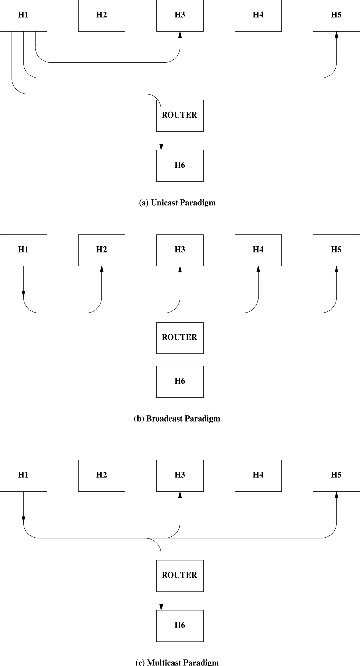
The first one is Unicast. TELNET, FTP, SMTP and HTTP are unicast-based protocols with one source and one destination. To send to multiple destinations, different communication paths are needed between the source and each of the destinations (see Figure 1.a). Therefore, a copy of each audio and video stream would need to be made and sent separately to each receiver. Clearly, this is not affordable. Even if you are quick enough in copying real-time audio and video streams, both your network and the Internet would collapse. Audio and video are extremely bandwidth expensive. Obviously, TCP cannot be used in multicast applications, as it is clearly unicast-oriented.
The second choice is Broadcast. The broadcast paradigm (see Figure 1.b) saves a lot of bandwidth compared to unicast. If you want to send something to all computers on your LAN, you don't need a separate copy for each. On the contrary, only one copy is sent to the wire, and all computers connected to it receive the copy. This solution is better for our problem but is still insufficient, as we probably need to broadcast to only some of our computers, not all. Even worse, it is almost certain that many hosts interested in your conference will be outside your LAN. While broadcast performs well inside a LAN, problems arise when broadcast packets are routed across different LANs. Thus, broadcast is good for applications and protocols that don't need to cross LAN limits (such as ARP, BOOTP, DHCP and even routed), but it is not good enough for our problem. Finally, it is very likely people want to have more than one video conference at a time, when only one broadcast address is available.
After having looked at the problem, it is apparent we need a solution that provides the following:
Allows data to be sent to multiple receivers in an efficient way, avoiding per-receiver copies.
Is not constrained by arbitrary network limits, so it can reach anyone, anywhere on the Internet.
Differentiates between multiple and unrelated transmissions, so that a computer may know which ones are of interest for applications.
The third point relates well to radio or TV channels (not cable TV). If you are interested in a particular channel, you tune your receiver to listen to a particular range of frequencies and discard the rest.
The solution that meets all three requirements is multicast. Figure 1.c shows that host 1 sends data only once (i.e., no per-receiver copies are made) and only hosts interested in this data (hosts 3, 5 and 6) receive it.
The radio/TV example will remain a good starting point for the rest of the article. In the same way that multiple frequencies ease the process of recognizing and isolating different TV channels, multiple multicast addresses ease the process of recognizing the multicast traffic of interest.
The range of IP addresses is divided into classes, based on the higher order bits of the IP address. Multicast addresses are class D addresses: those starting with the first three bits set to 1 and the fourth set to 0. This means multicast addresses range from 224.0.0.0 to 239.255.255.255. This is the range of “frequencies” in which you can transmit or listen for traffic. Each “frequency” identifies a different and specific multicast group.
Some of these multicast addresses are well-known, reserved for a specific purpose. For instance, 224.0.0.1 is the all-hosts group. Just “ping” this address, and all multicast-capable hosts on the network should answer. Any multicast-capable host must join this group at start-up on all its multicast capable interfaces. 224.0.0.2 is the all-routers group, and so on. In any case, your multicast applications should never send datagrams to addresses 224.0.0.0 through 224.0.0.255, as they won't be forwarded across multicast routers. Similarly, you should avoid groups 239.0.0.0 through 239.255.255.255 as they are reserved for administrative scoping. See the “Multicast over TCP/IP HOWTO” (included in the Linux Documentation Project) for further details.
In order to play with multicast, your GNU/Linux box needs special configuration. Your kernel must be compiled with IP: multicasting enabled. This will add support for the IGMP protocol (Internet group management protocol) to send and receive multicast traffic. If you keep on playing with multicast, it is quite likely you will need to use your box as a multicast router, as old routers do not support multicasting. In that case, check the HOWTO for several additional compile options which must be enabled (i.e., say YES). You will also need the mrouted application, a daemon which instructs the kernel on how to forward multicast datagrams when acting as a multicast router (mrouter).
Finally, you need to set a default route for outgoing multicast datagrams. Assuming the eth0 network interface is to act as that outgoing route (your application can instruct the kernel to send its datagrams using a different interface if needed), you'll need to use:
route add -net 224.0.0.0 netmask 240.0.0.0 dev eth0
Now that multicast is defined and your hosts are set up, I will explain how to write multicast applications while developing one. Its aim is to be both a didactic and useful tool. The reader needs a basic background in network programming using the sockets API. UNIX Network Programming by W. Richard Stevens, Internetworking with TCP/IP Vol. 3 by Douglas E. Comer and the setsockopt man page are helpful references.
The idea for the application in Listing 1 came from a popular TV commercial in Spain: a little boy takes his father's mobile telephone, starts calling numbers randomly and saying: “Hi, I'm Edu. Merry Christmas!” His father gulps when he discovers it and, of course, the lesson is how cheap this company's mobile phone calls are (in Europe, local calls are quite expensive).
Our program (see Listing 1) will do the same thing: it will send to the multicast group and port, passed as command-line arguments, the string “Hi, I'm name_of_machine. Merry Christmas!” along with the time to live (TTL) of the message. The program is short and simple, but it is also quite useful. I have used it several times when configuring multicast networks. You can run it on all your machines to see whether they are sending and/or receiving traffic. The TTL is very handy when using multicast routers and/or tunnels, as it makes it easy to determine the lowest TTL needed to reach a given destination.
The first lines of the program are the usual include statements. I tried to add comments to point out which functions and/or data structures need them. In the main function, variable definition and basic initializations are done in lines 27 to 44. Later, we use a dedicated socket for sending (send_s) and another for receiving (recv_s). These sockets must be SOCK_DGRAM (UDP), as TCP does not support the multicast paradigm.
When multicast was implemented, the sockets layer was extended a bit to support it. That support came via the setsockopt/getsockopt system calls.
Three of the five new optnames (see the setsockopt man page) were intended for use when sending data: IP_MULTICAST_LOOP, IP_MULTICAST_TTL and IP_MULTICAST_IF. They are all at the IPPROTO_IP level.
If IP_MULTICAST_LOOP is set, all multicast packets sent from this socket will be looped back internally by the kernel. This way, the rest of the applications waiting to receive traffic for this group will see it just as if it had been received by the network card. We are not interested in that behavior for our application, so it is disabled in lines 65 to 69. By default, loopback is enabled.
The TTL field of the IP header plays a primary role in multicasting. Its original role of avoiding problems with packets being looped forever due to routing errors is kept, but a new one is added: that field is also associated with a meaning of “threshold”. It acts as a delimiter to keep multicast packets from being forwarded without control across the Internet. You can establish frontiers by specifying a multicast packet will cross your multicast router only if its TTL field is greater than a particular value. This way, you can multicast a conference restricting its scope to your LAN (TTL of 1), your local site (TTL<32), your country (TTL<64) or allow it to be unrestricted in scope (TTL<256). Our test program lets you specify the TTL on the command line, then sets it using the IP_ MULTICAST_TTL option. If none is specified, TTL 1 is assumed (see lines 52 to 62). If you are using multicast tunnels or your applications are separated by multicast routers, you can run the program on both ends by increasing the value of the TTL field until the two programs “see” each other. This way, you can easily discover the minimum TTL necessary for your applications to communicate.
If not otherwise specified, outgoing multicast datagrams are sent following the default multicast route set by the system administrator. If this is not what you want, you can specify another output interface for that socket. Our sample program is quite simple and does not need this feature, so we did not use the IP_MULTICAST_IF option. Instead, we let the kernel choose the correct route. If you need it, write code such as:
struct in_addr interface_addr;
setsockopt (socket, IPPROTO_IP, IP_MULTICAST_IF,
   &interface_addr, sizeof(interface_addr));
filling the interface_addr structure with a suitable value. If later you want to revert to the original behavior, just call setsockopt again using INADDR_ANY as the interface field.
Your radio or TV must be tuned to receive the channel you want to hear. In a similar way, you must “tune” your kernel so that it knows which multicast groups are of interest. This is known as “subscribing” the host to a particular group. Note it is the host, not the process, that is subscribed. Processes are bound using bind to a particular multicast group/port pair and must tell the kernel they want to receive traffic for that group. The kernel then knows it must not drop packets for that group. When it receives them, it makes copies for all processes bound to that multicast address and port pair. When the last process that remains subscribed to the group “drops membership”, the kernel stops sending these packets to the upper layer protocols and ignores them again.
In short, if you want to receive traffic from a multicast group, you must take the following steps:
Create the socket (lines 71 to 74).
Bind the group/port (lines 81 to 84).
Optionally, use the SO_REUSEADDR option (lines 76 to 79), so that more than one process can bind the same group and port on the same machine, i.e., have multiple receivers.
Join the group (lines 87 to 92).
The IP_ADD_MEMBERSHIP option expects a pointer to a struct ip_mreq. This structure is defined in netinet/in.h. The first field, imr_multiaddr, contains the group address you want to join. The second, imr_interface, holds the IP address of the interface to which the group will be joined. This is a key point: membership is associated with both groups and interfaces. You do not just join a group; you join a group on a network interface. If your host is multi-homed, you can join the same group on all your network interfaces, on one of them or even on some of them. This way, the application will get packets sent for that group and received on that particular interface.
Normally, you want to receive traffic for that group and you don't care which interface received it. In those cases, fill the imr_interface field with the INADDR_ANY wild card (see line 88).
When you are done, you might want to drop membership (stop being a member of that group), although this is not strictly necessary if you are going to close the socket right afterward. The kernel will drop membership for you on all groups the socket was subscribed to when you close it.
If your process drops membership for a particular group but keeps the socket bound, it will keep receiving that group's traffic as long as any other process in the host remains a member. Joining a multicast group only tells the IP and data link layers (which in some cases explicitly tells the hardware) to accept multicast datagrams destined to that group; it is not a per-process membership, but a per-host membership.
The rest is easy; we fork and let the parent send messages (lines 123 to 137) and the child receive them (lines 104 to 122). As we told it not to loop back, we do not see our own messages. Change the IP_MULTICAST_LOOP option, and you'll find you are talking to yourself.
Feel free to test, modify and enhance this example program. You'll probably see that there are certain subtleties not fully addressed in the text. It is difficult to cover everything in a short article, but you can check and complete it by reading the Multicast HOWTO (tldp.org/HOWTO/Multicast-HOWTO.html).
All listings referred to in this article are available by anonymous download in the file ftp.linuxjournal.com/pub/lj/listings/issue65/3041.tgz.