Linux System Initialization
As the title indicates, I will discuss, in one form or another, how Linux system initialization works. System initialization starts where the kernel bootup ends. Among the topics I intend to explain include system initialization à la Slackware—a BSD (Berkeley Software Distribution) knock-off—as well as System V (five) initialization à la Red Hat, Caldera, Debian, et al., and also point out the differences between them. You'll soon see that the systems are truly more similar than they are different, despite appearances to the contrary. I will also cover passing switches through LILO to init during the boot process—this is used mostly for emergencies.
What I will not discuss (for brevity's sake) are the details in some of Red Hat's, Caldera's or other initialization scripts, specifically configuration information found in the /etc/sysconfig or /etc/modules directories. For those details, you're on your own. Besides, those details are more subject to change from one release to the next.
Back in the days when UNIX was young, many universities obtained “free” copies of the operating system (OS) and made improvements and enhancements. One was the University of California at Berkeley. This school made significant contributions to the OS, which were later adopted by other universities. A parallel development began in a more commercial environment and eventually evolved into what is now System V. While these two parallel systems shared a common kernel and heritage, they evolved into competing systems. Differences can be found in initialization, switches used by a number of common commands (such as ps: under BSD, ps aux is equivalent to System V's ps -ef), inter-process communications (IPC), printing and streams. While Linux has adopted System V inits for most distributions, the BSD command syntax is still predominant. As for IPC, both are available and in general use in Linux distributions. Linux also uses BSD-style printcaps and lacks support for streams.
Under initialization, the biggest difference between the two (BSD and System V) is in the use of init scripts. System V makes use of run levels and independent stand-alone initialization scripts. Scripts are run to start and stop daemons depending on the runlevel (also referred to as the system state), one script per daemon or process subsystem. System V states run from 0 to 6 by default, each runlevel corresponding to a different mode of operation; often, even these few states are not all used. BSD has only two modes (equivalent to System V's runlevels), single-user mode (sometimes referred to as maintenance mode) and multi-user mode. All daemons are started essentially by two (actually more like four to six ) scripts—a general systems script, either rc.K or rc.M for single- or multi-user mode, respectively, a local script and a couple of special scripts, rc.inet and rc.inet2. The systems script is usually provided by the distribution creator; the local script is edited by the system administrator and tailored to that particular system. The BSD-style scripts are not independent, but are called sequentially. (The BSD initialization will be most familiar to those coming from the DOS world.) The two main scripts can be compared to config.sys and autoexec.bat, which, by the way, call one or two other scripts. However, the likeness ends there. Having only these few scripts to start everything does not allow for the kind of flexibility System V brings (or so say some). It does, however, make things easier to find. In System V circles (but only in System V circles), BSD initialization is considered obsolete—but what do they know? Like a comfortable pair of shoes, it won't be discarded for a very long time, if ever.
Recall that earlier I said Slackware did a BSD knock-off, and yet it still uses the rc.S/rc.M, et al., scripts. This is because inittab, (which we'll look at later) uses the same references to runlevels, and uses those (very much System V) runlevels to decide which scripts to run. In fact, the same init binary is used by all the distributions I have looked at, so there is really less difference between Slackware and Red Hat or Debian than appears on the surface, not at all like older BSD systems that reference only modes “S” or “M”.
Once the kernel boots, we have a running Linux system. It isn't very usable, since the kernel doesn't allow direct interactions with “user space”. So, the system runs one program: init. This program is responsible for everything else and is regarded as the father of all processes. The kernel then retires to its rightful position as system manager handling “kernel space”. First, init reads any parameters passed to it from the command line. This command line was the LILO prompt you saw before the system began to boot the kernel. If you had more than one kernel to choose from, you chose it by name and perhaps put some other boot parameters on the line with it. Any parameters the kernel didn't need, were passed to init. These command-line options override any options contained in init's configuration file. As a good inspection of what's really going on will tell you, runlevels are just a convenient way to group together “process packages” via software. They hold no special significance to the kernel.
When init starts, it reads its configuration from a file called inittab which stands for initialization table. Any defaults in inittab are discarded if they've been overridden on the command line. The inittab file tells init how to set up the system. Sample Slackware, Red Hat and Debian inittabs are included later in this article.
Reading inittab, we'll be skipping any lines that begin with a “#”, since these are comments and ignored by init. The rest of the lines can be easily read as many other typical UNIX-like configuration tables, i.e., each column is separated by a “:” (id:runlevel:action:process) and can be read as follows:
id: This first column is a unique identifier for the rest of the line. On newer Linux systems, it may be up to four alphanumeric characters long, but is typically limited to two. Older systems had a two-character limitation, and most distributions have not changed that custom.
runlevel: The second column indicates what runlevel(s) this row is valid for. This column may be null or contain any number of valid runlevels.
action: This can be several different things, the most common being respawn, but can also be any one of the following: once, sysinit, boot, bootwait, wait, off, ondemand, initdefault, powerwait, powerfail, powerokwait, ctrlaltdel or kbrequest.
process: This is the specific process or program to be run.
Each row in inittab has a specific, unique identifier. Normally, you will want this to be something easily associated with the specific action performed. For example, if you want to put a getty on the first serial port, you might use the identifier s1. When I execute w to see what processes are running, I can more easily identify who is logged in via the modem on com1 when that user is identified as being on s1.
The runlevels are identified as 0 to 6 and A to C by default. Runlevels 0, 1 and 6 are special and should not be changed casually. These correspond to system halt, maintenance mode and system reboot, respectively. Changing runlevel 1, for example, can have far-reaching consequences. Note that to enter maintenance mode (state 1), you can pass init (via telinit2) the argument 1. Alternately, you can use S or s for maintenance mode. If you change what transpires for state 1, the same changes will apply when S or s is passed. However, runlevels 2 through 5 can be customized as desired.
Many systems have the command runlevel (usually found in /sbin). Executing this command will output the previous runlevel and the present runlevel as follows: N 2. The N indicates no previous runlevel. If you make a change, say, to state 3 and then reissue the runlevel command, you'll see 2 3.
Since a good demonstration will illustrate better than just telling you about it, try this on your system. (Note that I have done this successfully on Debian 1.3 and a few others, such as an older Red Hat [perhaps 3.0], but not many others, so your mileage may vary.) As root (only root can tell init to change states), issue the init command. You should see a usage message telling you to pass init an argument consisting of a number from 0 to 6, the letters A to C or S or Q. Lowercase letters are syntactically the same as their uppercase counterparts. If you pass init anything other than legal values, you should receive this same usage message. Now pass init the argument 8, as in init 8 (or telinit 8, if you wish). If nothing appears to happen, don't worry. Now type runlevel again, and you should see 2 8. If you don't have runlevel on your system, try ps ax | grep init and you may see init [8]. You may or may not see the runlevel listed in square brackets. Once you have confirmed that you actually did change to runlevel 8, change back to your previous runlevel. Note that, should your gettys die, they won't respawn at this runlevel, so you could have a problem logging in again after you log out. If you are unsure what your default runlevel is, look in inittab near the top for a line where the first column is id and the third is initdefault. The second column in this line is the default runlevel. An example line looks like this:
id:3:initdefault
This demonstration was designed to show you that while runlevels 7 to 9 are undocumented, they actually are available for use should you need them. (I'll explain later why nothing happened when you changed states). They aren't used only because it's not customary. The customizable states for Linux (2 through 5) are usually more than sufficient for anyone.
The letters A to C are used when you want to spawn a daemon listed in inittab and have this “runlevel” designation on a one-time basis (on demand). Therefore, telling init to change to state C doesn't change the runlevel, it just performs the action listed on the line where the runlevel is listed as C. Perhaps you want to put a getty on a port to receive a call, but only after receiving a voice call first (not every time). Let's further suppose you want to be ready to receive either a data call or a fax call, and when you get the voice message, you'll know which you want. You can put two lines in inittab, each with its own ID, and each with a runlevel such as A for data and B for fax. When you know which you need, you simply spawn the appropriate one from a command line: telinit A or telinit B. The appropriate getty will be put on the line until the first call is received. Once the caller terminates the connection, the getty will drop, because by definition, an on-demand process will not respawn.
The other two letters, S and Q, are special. As I noted earlier, S will bring your system to maintenance mode which is the same as changing state to runlevel 1. The Q is necessary to tell init to reread inittab. inittab may be changed as often as required, but will be read only under certain circumstances: one of its processes dies (do we need to respawn another?), on a powerfail signal from a power daemon (or the command line), or when told to change state by telinit. So the Q argument will tell init, “I've changed something, please reread the inittab.”
Before I delve into sections grouped by distribution, I'd like to emphasize that they don't stand alone. Each of the following sections will complement the others.
Let's take a look at the sample Slackware inittab in Listing 1. I've numbered the lines for easy reference. The numbers don't appear in your inittab—your inittab will begin two spaces to the right of the line numbers. Within the inittab file, lines beginning with a “#” sign are disabled and left as explanatory remarks or examples for possible future use. Be sure to read all the comments throughout; they were inserted to help you and may give you a hint on how to better customize your own inittab. Most programs, such as mgetty or efax, that were meant to run from inittab come with examples of how to implement them.
Since you already know how to read a line (id:runlevel(s):action:process), I'm going to cover only those few lines of special interest.
As I've already mentioned, Slackware isn't a true BSD system in the old style. Rather than having just a single-user mode and multi-user mode, it actually uses runlevel 3 as its default runlevel. It runs a system initialization script first, rc.S. This script is designed to be run only once at bootup. Then it runs rc.M. It skips the line with rc.K unless a system operator intervenes and deliberately changes to that state. When changing states between single-user and multi-user modes, the appropriate script is called. (See Listing 1, lines 15, 18 and 21.)
rc.0 and rc.6 are each files that are also run when the system is brought down. (See Listing 1, lines 27 and 30.)
You will see power management (UPS power management) handled in the script as well as the ctrl-alt-del key sequence. (See Listing 1, lines 24, 33, 36 and 39.)
Something odd you should notice about this inittab (which was lifted straight from a distribution CD): while the default init runlevel is 3, if a power daemon signals the system to shut down, then power is restored, the shutdown is canceled, and the system is brought back up at runlevel 5. However, since runlevels 3 and 5 are essentially identical (they run the same rc scripts), there is no difference in this case.
Now we come to the standard part which all inittabs were specifically designed to handle: initializing and respawning gettys. When UNIX was young, dumb terminals hung off serial ports. These dumb terminals were called teletype terminals or simply TTYs. So, the program that sent a login screen to the tty was called getty for “get TTY”. Today's getty performs the same basic function, although the TTY today is not likely to be quite so dumb. Adding and subtracting virtual terminals is as easy as adding or subtracting lines in the inittab; you can have up to 255.
Next, you'll see a line that allows the X Display Manager (XDM) to be respawned in runlevel 4.
About the only thing I haven't mentioned is that the scripts which do all the work on the Slackware system are all located in /etc/rc.d. Look them over. Slackware uses a minimal number of scripts to start background processes. Specifically referenced by inittab are rc.S, rc.K, rc.M, rc.0 and rc.6. Called by scripts (such as rc.M), but not by init, are rc.inet, rc.inet2, rc.local, rc.serial and others.
Take a look at the Red Hat inittab (Listing 2). In this file are some good explanations of what Red Hat does with runlevels. I won't belabor it further here. Note that the runlevels chosen for use by Red Hat are just one convention and not indicative of all System V UNIX systems, not even other Linux System V initializations.
As you can see, Red Hat defaults to runlevel 3, but you can change this to 5 once you have the X server properly configured. (See Listing 2, lines 18 and 56.) Given the number of graphical tools Red Hat has put together, you'd think they'd encourage the use of runlevel 5, but using that as the out-of-the-box default would cause trouble if X was not properly configured first.
Just below the default runlevel, you'll see the system initialization script (Listing 2, line 21). This is run once when the system boots. Then init jumps down to (in this case) line 13 (Listing 2, line 26). The lines for 10 through 12 and 14 through 16 are skipped because our default runlevel is 3.
Notice that ud, ca, pf and pr run regardless of the runlevel. When the runlevel column is null, the process is run in every runlevel.
The getty lines should look familiar to you. Don't be bothered by the fact that Red Hat chose mingetty over getty. They both do the same thing: send a login banner to the tty.
Finally, runlevel 5 spawns XDM (X Display Manager).
Under Red Hat, you'll find all the system initialization scripts in /etc/rc.d. This subdirectory has even more subdirectories—one for each runlevel: rc0.d to rc6.d and init.d. Within the /etc/rc.d/rc#.d subdirectories (where the # is replaced by a single digit number) are links to the master scripts stored in /etc/rc.d/init.d. The scripts in init.d take an argument of start or stop, and occasionally reload or restart.
The links in the /etc/rc.d/rc#.d directories all begin with either an S or a K for start or kill respectively, a number which indicates a relative order for the scripts and the script name—commonly the same name as the master script found in init.d to which it is linked. For example, S20lpd will run the script lpd in init.d with the argument start which starts up the line-printer daemon. The scripts can also be called from the command line:
/etc/rc.d/init.d/lpd start
The nice part about System V initialization is that it is easy for root to start, stop, restart or reload a daemon or process subsystem from the command line simply by calling the appropriate script in init.d with the argument start, stop, reload or restart.
When not called from a command line with an argument, the rc script parses the command line. If it is running K20lpd, it runs the lpd init script with a stop argument. When init has followed the link in inittab to rc.d/rc3.d, it begins by running all scripts that start with a K in numerical order from lowest to highest, then likewise for the S scripts. This ensures that the correct daemons are running in each runlevel, and are stopped and started in the correct order. For example, you can't start sendmail or bind/named (Berkeley DNS or Domain Name Service daemon) before you start networking. The BSD-style script Slackware uses will start networking early in the rc.M script, but you must always be cognizant of order whenever you modify Slackware startup scripts. Remember when we changed to runlevel 8 above and nothing happened? Since no subdirectory rc8.d exists and consequently no kill or start scripts, no scripts were run when we changed states. Had we come from boot directly to runlevel 8, we would have had a problem. Only the kernel, init and those daemons started via the sysinit, boot or bootwait commands in the inittab would have been running. I'll let you look at the scripts in the ../init.d/ directory for yourself, but an example for those with Slackware systems is shown in Listing 3.
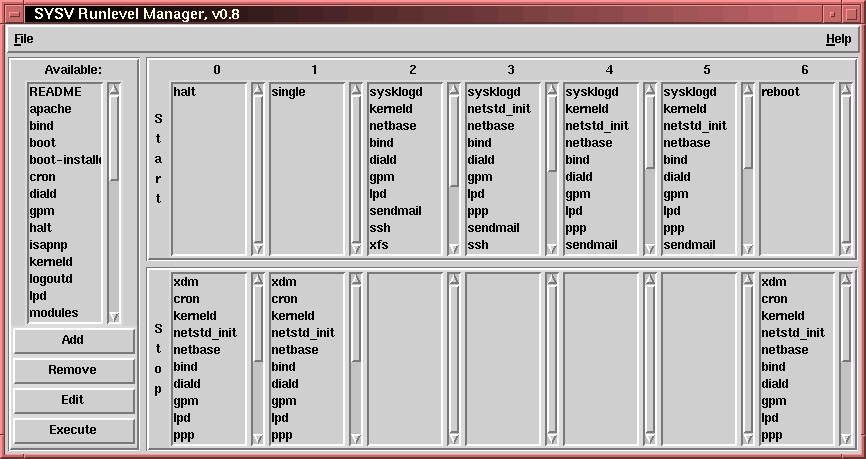
For those who find editing links to add or delete scripts in any particular runlevel a tedious task or who are just not comfortable doing this, Red Hat distributes a program called tksysv. This program uses a graphical interface (using Tcl/Tk) to read the script names in /etc/rc.d/init.d and displays them on the far left side of the application box. If you have a system with init.d in a different location, you can install symbolic links (for each of the rc#.d directories) and it will function just fine, or hack the script and customize it to your system. The system also reads the links in each of the rc#.d subdirectories and displays them for each runlevel from left to right with start scripts above and kill scripts below. (See Figure 1.) You can add, delete and even change the order of execution as you see fit.
Now take a look at the sample Debian inittab. While similar to Red Hat's inittab, it also has some differences. First, you'll notice that while Red Hat used runlevel 3 for non-graphical mode and runlevel 5 for graphical mode, Debian uses runlevel 2 for both (see Listing 4, line 5). The difference is in Debian's use of a start/kill script for XDM.
I'd also like to draw your attention to a very special line, line 12. The line begins with “~~” (two tildes). Note that in single-user mode (state 1 or S), sulogin is called. This prevents someone from just booting the system and becoming root. While it doesn't prevent other tricks from being used to “back door” the system and isn't a substitute for physical security of the system, it does prevent the casual user from obtaining root access simply by rebooting. The use of the command:
boot from c: only, vice boot a: then c:
combined with password protection of the BIOS setup screens, and a lock on the case to prevent someone from resetting the BIOS on the motherboard, and finally setting LILO to 0 seconds, the computer is almost 50% of the way to being secured from unauthorized tampering. (You can get almost another 45% from the system itself, but note that the last 5% is effectively out of reach.)
Just below the script calls for each runlevel is another line to put a login screen up for root in runlevel 6. This is only for emergencies, should something go wrong with the kill scripts in runlevel 6 and the system does not halt properly. It should never run. (See Listing 3, lines 22 to 30).
The Debian inittab also includes some examples to enable gettys on modem and serial lines, should you find a use for them. The line that invokes mgetty, however, will obviously not work unless you've installed the mgetty package.
Following the logic through a boot-up, during a normal boot init knows it will run in state 2. Armed with this information and not overridden during boot-up, init first runs the /etc/init.d/boot script. Once this script has run, init then executes /etc/init.d/rc with an argument of 2. init also runs the commands associated with ca, kb, pf, pn and po. If you read up on powerfail, you'll see that nothing will happen until a change occurs with the power. Next, we see that init spawns gettys on the virtual terminals. In this case (runlevel 2), it will spawn six (see Listing 4, lines 50-55). The rest of the lines are commented out, and not used.
Looking at the /etc/init.d/rc script, you can see how it determines what to run to achieve a state change or to bring the system to the initial state.
Editing inittab or any of the rc scripts requires some degree of caution. Even the best tests cannot simulate a complete system reboot, and a script may appear to function properly after a system has initialized but fail during system initialization. The reasons are diverse, but usually involve getting things out of order.
In Caldera's Network Desktop, which ran on a 1.2.13 kernel and used modules, I had modified a script to start the kerneld process early in the boot sequence. When I upgraded the system to Caldera's OpenLinux v1.0 which ran a 2.0.25 kernel, I made the exact same changes to the same script, tested it and when I was satisfied all was well, I rebooted. Much to my dismay, the boot process hung, and guess where—yes, loading kerneld. I found that in the newer kernels, kerneld needed to know the host name of the computer, which was not yet available. Things like this can happen to anyone. Something as simple as typing the wrong key or forgetting to give the full path name of a file can leave you in the lurch.
Fortunately, you can pass boot-time parameters to init. When the system boots and you see: LILO:, you can press the shift key, then the tab key to see the kernel labels available for booting. You can then add a kernel label and follow it by any required parameters to boot the system. Any parameters the kernel needs are used and discarded. For example, if you have more than 64MB of RAM, you need to pass that information to the kernel in the form mem=96MB. If you pass the -b switch, the kernel won't use it, but will pass it on to init. The same goes for any single-digit number or the letters S or Q in either upper or lower case.
By passing any of the numbers or letters to init, we are overriding the defaults in inittab, as I stated earlier. Most of these numbers or letters do exactly what they would do if passed from a command line on a running system. However, the -b is special: it is the emergency boot parameter. This parameter tells init to read the inittab, but for some special exceptions not to execute any of the commands, just drop into maintenance mode. Thus, no rc scripts will be executed. You may mount the system read-write and fix it. One exception to not executing any inittab commands is the process id ~~ that should have as its process sulogin. This will give you a prompt for root's password so no unauthorized person can alter system files such as /etc/passwd or /etc/shadow.
What if you've made a mistake in the inittab file? Can the system be saved? Yes, but I must warn you not to do this unless absolutely necessary. Coded into the kernel is the instruction to start init once it is completely loaded and in memory. If the /etc/inittab is corrupted to the point that init can't run, not even with the -b switch (I've personally never seen this), it is possible to tell the Linux kernel to run a different program at bootup instead of init. Instead of issuing the -b switch, substitute init=/bin/sh after the kernel name. This will cause the kernel to run the bash shell, and you will be logged in as root. Be careful here, as nothing else is running, e.g., system logging or the update daemon. This is not a normal mode of operation for the system. Fix whatever is necessary and reboot.
Now that I've explained a significant part of how Linux system initialization works, I'll tell you how Linux compares to some of the systems I've worked with.
For BSD-style systems, the first time I saw Slackware, I was amazed at its similarity in boot-up to Ultrix which I was using on some DEC-5000s—it has the same structure with the rc scripts in /etc/rc.d and the same names. If Slackware used any system as a pattern, Ultrix could have been one of them. I haven't used any newer BSD-style systems, so I cannot comment further.
For System V, I can compare the various Linux distributions to several others. The one with the most resemblance seems to be Sun Solaris, which uses the same structure as Debian, but uses runlevel 3 as its default and implements XDM startup as Debian. Also, runlevel 5 is used for system shutdown, and the rc scripts are moved to /sbin. HP-UX 10.20 is also similar, but HP puts the init.d, rc.d and other runlevel directories under /sbin. IBM's AIX uses System V style initialization, but with most of the individual scripts for subprocesses called directly from its inittab. Finally, SCO OpenServer uses a system similar to Debian for its boot-time initialization, but does not use symbolic links to init.d. Instead, all start-kill scripts are located in rc2.d.
The latest Filesystem Hierarchy Standard (FHS) v2.0 for Linux dated 26 October 1997 states either BSD or System V style initialization is acceptable. It stopped short, however, of outlining exactly where the rc scripts would go, except to say they would be below /etc, and future revisions to the standard may provide further guidance. I find that unlikely, since Red Hat and Debian, both very popular distributions, do it a little differently. I have no particular preference, and in fact my system has symbolic links which make each look like the other in case an install process makes an invalid assumption about how my systems are configured. I will tell you that as lazy as I am, less typing to start and stop daemons is more to my liking, so /etc/init.d/ gets my vote.
While this article hasn't been all-encompassing by any means, hopefully you've gained some knowledge of how your Linux system initializes during boot-up. All these tables and scripts are simple ASCII text files easily modified with vi or any text editor of your choice. Just read them and follow their logic. I've shown you how to read and interpret /etc/inittab and provided you with basic information regarding how init works.
I've also shown you how to recover in case you've managed to create a script that hangs the boot process or prevents init from starting. Take a look at your inittab and the scripts it runs to better understand your system and optimize it for your own use.
All listings referred to in this article are available by anonymous download in the file ftp.linuxjournal.com/pub/lj/listings/issue56/3016.tgz.