The Python HTMLgen Module
This article is about using HTMLgen, a Python-class library for generating HTML. Python is an object-oriented scripting language that ships with most Linux distributions. It plays a major role in configuration and management for distributions such as Caldera and Red Hat. HTMLgen is an add-on Python module written by Robin Friedrich, and available from http://starship.python.net/lib.html under a BSD-style freeware license.
HTMLgen provides classes to support all the standard HTML 3.2 tags and attributes. It can be used in any situation where you need to dynamically generate HTML. For example, you might want to format the results of a database query into an HTML table, or generate an HTML order form customized for each client.
I'll introduce HTMLgen by using it to format data found on typical Linux systems. I think the examples are sufficiently straightforward that they can be followed by anyone familiar with HTML and scripting, and without prior knowledge of Python. Just remember that in Python, blocks of statements are indicated by indenting the code—there are no begin/end statements and no curly braces. (In Python, WYSIWYG applies.) Other than this, Python code looks much like that found in any mainstream programming language.
Although Perl is the most commonly used web scripting language, I personally prefer Python. It can achieve results similar to Perl, and I think Python's syntax, coupled with the style established by its user community, leads to a cleaner, simpler style of coding. This is an advantage during both development and maintenance. These same strengths provide a gentler learning curve for new players. Python moves a little away from traditional scripting languages and more toward non-scripting, procedural programming languages. This allows Python scripting to scale well. When a small set of scripts starts to grow to the size of a full-blown application system, the language will support the transition.
Any Python program needing HTMLgen must import it as a module. Starting from bash, here's how I set up and import HTMLgen to create a “Hello World” web page:
bash$ export PYTHONPATH=/local/HTMLgen:$PYTHONPATH
bash$ python
 >>> import HTMLgen
 >>> doc = HTMLgen.SimpleDocument(title="Hello")
 >>> doc.append(HTMLgen.Heading(1, "Hello World"))
 >>> print doc
First, I set the PYTHONPATH to include the directory where the HTMLgen.py module can be found. Then, I start the Python interpreter and use its command-line interface to import the HTMLgen module. I create a document object called doc and add a heading to it.
Finally, I print the doc object which dumps the following HTML to standard output:
<!DOCTYPE HTML PUBLIC "-//W3C//DTD HTML 3.2//EN">
<HTML>
<!-- This file generated using HTMLgen module.
-->
<HEAD>
 <META NAME="GENERATOR" CONTENT="HTMLgen 2.0.6">
 <TITLE>Hello World</TITLE>
</HEAD>
<BODY>
<H1>Hello World</H1>
</BODY> </HTML>
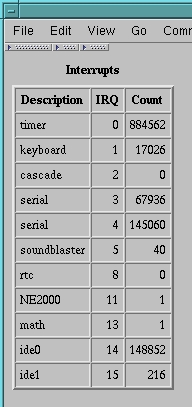
Figure 1. Table—Code in Listing 1
This is a start, although not an exciting one. HTMLgen is a very good tool for generating HTML tables and lists. The table in Figure 1 was created by the Python script in Listing 1. The data in the table comes from the Linux /proc/interrupts file which details the IRQ interrupts for your Linux PC. On my PC, doing a cat of /proc/interrupts yields:
0: 2348528 timer
1: 42481 keyboard
2: 0 cascade
3: 47735 + serial
4: 75428 + serial
5: 48 soundblaster
8: 0 + rtc
11: 1 NE2000
13: 1 math error
14: 175816 + ide0
15: 216 + ide1
The Python script reads the contents of the /proc/interrupts file and copies the data into an HTML table. I'll describe this process step by step. As in the previous example, I first create a simple document. I then add an HTMLgen table to the document:
table = HTMLgen.Table( tabletitle='Interrupts',
 border=2, width=100, cell_align"right",
 heading=[ "Description", "IRQ",
"Count" ])
 doc.append(table)
When creating the table object, I set some optional attributes by supplying them as named arguments. The final headings argument sets the list of column headings that HTMLgen will use. All of the above arguments are optional.
Once I've set up my table, I open the /proc/interrupts file and use the readlines method to read in its entire contents. I use a for loop to step through the lines returned and turn them into table rows. Inside the loop, the string and regular expressions functions are used to strip off leading spaces and split up each line into a list of three data values based on space and colon (:) separators:
data=regsub.split(string.strip(line),'[ :+]+')
Elements of the data list are processed to form a table row by reordering them into a new three-element list consisting of name, number and total calls:
[ HTMLgen.Text(data[2]), data[0], data[1] ]The outer enclosing square brackets construct a list out of the comma-separated arguments. The first list element, data[2], is the interrupt name. The interrupt name is a non-numeric field, so I've taken the precaution of escaping any characters that might be special to HTML by passing it though the HTMLgen Text filter. The resulting list is made into a row of the table by appending the list to the table's body:
table.body.append(
        [ HTMLgen.Text(data[2]), data[0], data[1] ])
Finally, once all lines have been processed, the document is
written to interrupts.html. The result is shown in Figure 1.
The simple Table class is designed for displaying rows of data such as might be returned from a database query. For more sophisticated tables, the TableLite object offers a lower-level table construction facility that includes the ability to do individual row/column customization, column/row spanning and nested tables.
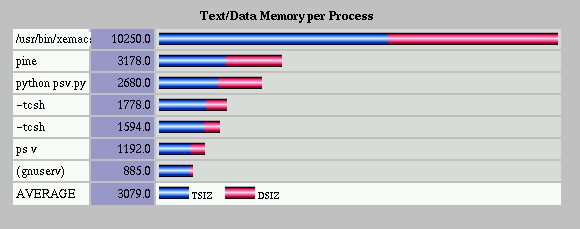
The table facilities have also been extended to create fancy bar charts. Figure 2 shows a bar chart I generated from the output of the Linux ps command. The chart was created by the HTMLgen bar-chart module. The code for psv.py is the 20 lines of Python code shown in Listing 2. The original output from ps v looks something like the following:
PID TTY STAT TIME PAGEIN TSIZ DSIZ RSS LIM %MEM COMMA
 555 p1 S 0:01 232 237 1166 664 xx 2.1 -tcsh
1249 p2 S 0:00 424 514 2613 1676 xx 5.4 xv ps
 ...
I use the Python operating system module's popen function to return a file input pipe for the output stream from the command:
inpipe = os.popen("ps vax", "r");
I then read in the first line from the input pipe and split it into
a list of column names.
colnames = string.split(inpipe.readline())Now, I create the chart object, and the chart object's datalist object:
chart = barchart.StackedBarChart()
...
chart.datalist = barchart.DataList()
Datalists can have multiple data segments per bar, which results in a stacked bar chart such as the one in Figure 2. I need to tell the datalist object how many data segments are present by setting the list of segment_names. I decided the bars on my chart will have two segments, one for TSIZ (program text memory size) and one for DSIZ (program data memory size). To accomplish this, I need to copy the two column names from colnames into segment_names. Because lists in Python are numbered from zero, the two colnames I'm interested in are columns 5 (TSIZ) and 6 (DSIZ). I can extract them from the colnames list with a single slicing statement:
chart.datalist.segment_names = colnames[5:7]
data = chart.datalist
The [5:7] notation is a slicing notation. In Python, you can slice single items and ranges of items out of strings, lists and other sequence data types. The notation [low:high] means slice out a new list from low to high minus 1. On the second line, I assign the variable called “data” to the variable “chart.datalist” to shorten the length of the following lines to fit the column width required in Linux Journal.
After initializing the chart, I use a for loop to read the remaining lines from the ps output pipe. I extract the columns I need by using string.split(line) to break the line into a list of columns. I extract the text of each command by taking all the words from column 10 onward and joining them into a new barname string:
barname = string.join(cols[10:], " " )
I use the string module's atoi function to convert the ASCII strings in the numeric fields to integers. The last statement in the loop assembles the data into a tuple:
( barname, tsize, dsize )A tuple is a Python structure much like a list, except that a tuple is immutable—you cannot insert or delete elements from a tuple. Although the two are similar, their differences lead to quite different implementation efficiencies. Python has both a tuple and a list, because this allows the programmer to choose the one most appropriate to the situation. Many features of Python and its modules are designed to be high-level interfaces to services that are then implemented efficiently in compiled languages such as C. This allows Python to be used for computer graphics programming using OpenGL and for numerical programming using fast numerical libraries.
Back to the example. The last statement in the loop inserts the tuple into the chart's datalist.
data.load_tuple(( barname, tsize, dsize ))
When the last line is processed, the loop terminates and I sort the data in decreasing order of TSIZ:
data.sort(key=colnames[5], direction="decreasing")After that, I create the final document and save it to a file.
doc = HTMLgen.SimpleDocument(title='Memory')
doc.append(chart)
doc.write("psv.html")
Loading psv.html into a browser results in the chart seen in Figure
2. By altering the bar chart's parameters, such as the GIFs used
for the chart's “atoms”, I can build the chart in different
styles.
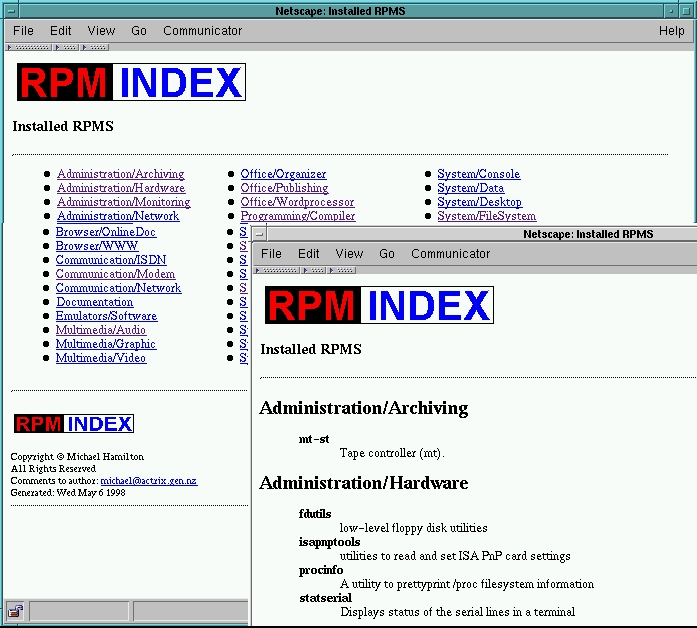
In my next example, I'll show you how a data stream can be processed to produce a series of documents that are interlinked. The script in Listing 3 creates a set of two documents summarizing all the Red Hat packages installed on a Linux system. The resulting HTML page is shown in Figure 3. An index document summarizes the RPM major groups, and a second main document summarizes the RPMs in each group. A link for each group in the index document jumps directly to each group's entries in the main document.
The HTML is generated from the output of the following rpm command:
rpm -q -a --queryformat \
   '%{group} %{name} %{summary}\n'
The output typically looks like this:
System/Base sh-utils GNU shell utilities.
Browser/WWW lynx tty WWW browser
Programming/Tools make GNU Make.
System/Library xpm X11 Pixmap Library
System/Shell pdksh Public Domain Korn Shell
I read this output into a Python list and pre-process it by sorting it into alphabetic order.
I produce two documents, an index document (idoc), and a main document (mdoc), using HTMLgen's SeriesDocument to give both documents the same look-and-feel. By using a SeriesDocument, I can configure standard document headers, footers and navigation buttons via an rcfile and other optional arguments.
The index document (idoc) has only one HTMLgen component: an HTML list of RPM groups. I've used the HTMLgen.List columns option to create a multi-column list:
ilist = HTMLgen.List(style="compact", columns=3)
idoc.append(ilist)
The for loop processes each line from the rpm command and generates both idoc and mdoc text. Each time the group name changes, I add a new list entry to the ilist:
if group != lastgroup:
 lastgroup = group
 title = HTMLgen.Text(group)
 href = HTMLgen.Href(mainfile+"#"+ group,
        title)
 index.append(href)
I've wrapped the list text in an HTML-named HREF, linking it back
into mdoc. I've used the name of the main file
and group title to form the HREF link. For example, in the case of
the “Browser/FTP” RPM group, my code would generate the following
HREF link:
<A HREF="rpmlist.html#Browser/FTP">Browser/FTP</A>The main document (mdoc) has a more complex structure. It consists of a series of HTML definition lists, one per RPM group. Each time the group name changes, I generate the named anchor that is the target for the reference generated above:
anchor = HTMLgen.Name(group, title)I append the anchor to mdoc as a new group heading:
mdoc.append(HTMLgen.Heading(2, anchor))For the “Browser/FTP” group, this would generate the following HTML:
<H2><A NAME="Browser/FTP">Browser/FTP</A></H2>Once the group heading has been appended, I start a list of RPMs in the group:
grplist = HTMLgen.DefinitionList()Once a new group list has been started, my for loop will keep appending RPM summaries to the mdoc until the next change in group name occurs:
grplist.append(
 (HTMLgen.Text(name),HTMLgen.Text(summary)))
When the entire rpmlist has been processed, I generate the two documents you see in Figure 3.
In this example, I simultaneously generated two simple documents and linked one to the other. This example could easily be extended to provide further links to individual documents for each RPM, and from each RPM to the RPMs it depends on.
I've only scratched the surface of what's possible with HTMLgen and Python. I haven't covered the HTMLgen objects for HTML Forms, Image Maps, Nested Tables, Frames, or Netscape Scripts. I also haven't made use of Python's object-oriented nature. For example, I could have sub-classed some of the HTMLgen objects to customize them for specifics of each application. I haven't discussed the Python module for CGI handling. You can read more about these topics by pointing your browser at some of the references accompanying the article (see Resources).
If you're trying to get started with HTMLgen, the HTMLtest.py file distributed with HTMLgen provides some good examples. The HTMLgen documentation is quite good, although in some cases, more examples would help. I don't think my examples require any particular distribution of Linux, libc or Python. All of them were written using HTMLgen 2.0 with Python 1.4 on Caldera OpenLinux Standard version 1.2.