
Linux WAN Routers
Every time I deploy a Linux system for my company, the phrase “Linux in a production environment? It'll never happen,” stills echoes through my head. At a previous employer, this was the pat answer to all of my queries as to when we could try Linux out in our product evaluation lab. I have since had the chance to use Linux to solve real-life problems, and I am ready to report—“It happens every day!”
This article will discuss the advantages of Linux-based WAN routers in terms of total cost of ownership. Although many technicians may find this approach unsavory (it certainly does not appeal to the idealist in me), the truth is that most finance departments are rarely interested in the technical elegance or excellence of their IT departments. In the eyes of those signing the checks, value is more important. Cost includes not just hardware and software, but all related personnel and maintenance costs.
In today's penny-conscious corporate environment, technicians need to be cognizant of the fact many companies offer routing as a service, which may (at least on paper) look less expensive than your salary and equipment. Therefore, it makes good sense for network administrators to remain conscious of the value they are providing their employer. If you are a solutions-provider, this article may help you increase your profit. And for those operating with a limited budget, deploying Linux routers may be the only choice for connecting sites to each other or to the Internet.
Costs aside, in my opinion Linux routers do possess technical elegance and excellence. I will focus on the functional “niceties” of this platform—plus some day-to-day experiences. For those of you already familiar with Linux, it might be interesting to see how it is being used in a 24x7 production environment. For those not yet using Linux, this article will acquaint you with some of the possible applications of this versatile and stable platform.

Figure 1. WANPIPE S508/FT1 Card
From this point on, the term “Linux router” will be used to refer to an x86-based PC running Debian/GNU Linux and outfitted with Sangoma's WANPIPE S508 router card (Figure 1). After using this platform as an alternative to “BigName” traditional routers for more than 18 months for frame-relay and Internet routers, I am a strong proponent of this solution.
Linux routers are economical both in terms of hard costs and the associated hidden costs in providing a routing infrastructure. These costs include:
Telco access (+ usage-based charges where applicable)
Router hardware
Router software, upgrades and support
Personnel costs, including salary, training and maintaining the router during day-to-day operations for both troubleshooting and upgrades
Lost productivity and revenue due to downtime—in the holistic view of your company's management, often quite expensive
For usage-based access methods (e.g., most types of ISDN), monthly costs depend upon the connect-time. In this case, it is beneficial to control when and for what reason a connection is initiated. Many routers cannot provide this sort of control at all; a Linux router comes equipped with schedulers and scripting languages.
Router hardware costs can vary wildly, depending upon the interface types and speeds, protocols supported, capabilities provided (such as packet-filtering) and switching speed. For less than the cost of the least expensive traditional router that supports a V.35 interface, you can have equivalent connectivity with superior functionality and supportability using a Linux router.
An easily overlooked cost of working with digital circuits (other than ISDN) is the CSU/DSU, which is used to interface your router to your telco access. This device understands the signaling on the digital access line, e.g., a T-1, and converts it into a bit stream on a V.35 interface. They can be expensive. The Sangoma S508 is offered with an integrated CSU/DSU which saves money and makes cabling and mounting easier.
The cost of router software, hardware and software upgrades, as well as the cost of yearly support agreements for router hardware and software, can be significant. (Traditional support is often 10 to 15% or more of the new price of the hardware per year.) These costs approach zero for the Linux router solution. The operating system, including tools and upgrades, is free. The PC hardware is inexpensive, and because the requirements are so modest it can often be inherited from others trying to upgrade their desktops for more horsepower. (All of my systems are “hand-me-downs”.)
Even more important than the base hardware costs, Linux routers offer investment protection since you have a clear upgrade path for all aspects of your router. Additional links can be added for cost of another Sangoma card. Mixing links and media types is simple and inexpensive. For example, if you wish to upgrade your LAN backbone to 100Mbps or to ATM, adapters for our BigName router cost about $4000.00 each, but for Linux any decent 100Mbps Ethernet card will work fine. Faster switching is merely a motherboard/CPU upgrade.
Now and then someone will quip that a PC is not fast enough to be a WAN router. I think this statement shows a lack of imagination. If this were true, there would be no point in having 100Mbps Ethernet cards. How can you expect your desktop to send or receive packets at 100Mbps when it is not able to read+send packets arriving at 1/100th of that rate?
Packet-filtering, address translation (IP-masquerading) and proxying are often add-ons for traditional routers. By contrast, adding this functionality to a Linux router is free, and easier to install and manage.
BigName router software upgrades can be time-consuming. Unless you have spare BigName routers, practicing your upgrade is not an option. This is even worse when you have both “BigName X” and “BigName Y” routers. Different procedures, different problems and phone support for any of them can be expensive. Having more than one closed-system router vendor also means more money for training and more “fragmentation” of the skill-sets of your support staff. Instead of three capable generalists, you have one person trained for X, one for Y and a third who tries to keep up.
This leads to another part of the cost of providing routing services. How much does it cost to have people tend to the environment? Salary, training, time spent configuring, developing reports, upgrading and troubleshooting are all part of the total cost of ownership. I would say that this is the most important reason to seriously consider Linux as a router platform. First of all, there is an ever-increasing supply of talent that has experience with Linux. This keeps salaries for support staff reasonable. (Try to find enough money to hire a BigName specialist.) Even salty UNIX administrators feel at home on Linux systems, once again increasing the resource pool, providing backup support and easing cross-training within your IT department. This element of commonality cannot be stressed enough. Secondly, configuring a Linux router uses the same tools as configuring the network card on any UNIX system. Anyone who feels comfortable at a shell prompt and understands TCP/IP is a potential resource. This is important, because at some point, your environment will need support.
Maintenance of WAN networks tends to be infrequent but intense. Problems tend to occur at 2:00AM six months after you last touched your BigName router. (You are most likely at home, sitting in your bathrobe, dialed-in to your office. What are the chances you have the manuals at hand?) By contrast, a Linux router uses many of the same tools you work with every day, and you have all of the documentation on-line in the form of man pages or text files. You may not have worked with the router for a while, but you use ifconfig and look at /var/log/messages each day. Even the hardware-specific tools tend to be more fully featured and easier to use. For instance, Figure 2 is a screen showing Linux PPP statistics as monitored from an attached workstation.
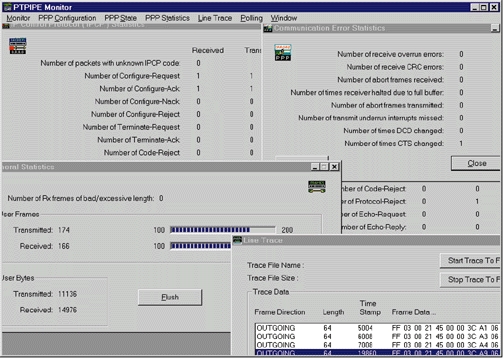
Figure 2. Screenshot of Linux PPP Monitoring on Attached Workstation
For day-to-day troubleshooting, you have a whole suite of tools at your fingertips that you can use to hack your way around the problem. And because these tools are familiar, your problem resolution time is shorter. A keep-alive ping script may not be the prettiest solution, but it will keep you out of reactive mode long enough to research the real problem. When I was younger and very naive, I believed that when you bought a piece of hardware or software from a BigName it was fully debugged. This is ridiculous—all code has bugs in it. The real question is—what options do you have to deal with these bugs?
Another plus for Linux routers is they can run additional services and programs. At your disposal is an entire OS family of services and applications with 20+ years of debugging and fine-tuning. Because UNIX has always promoted a tool box philosophy, the only real limit to what other services your routers can provide is your imagination. Here are some ideas:
Deploy secondary services for more redundancy. For example, a router can act as a secondary DNS server or a secondary SMTP gateway.
Configure the router for a remote site to act as a slave DNS and a caching HTTP proxy—perhaps even Samba for file and print services.
Deploy a “one-stop-shop” Internet router—use the same machine for the external DNS name server, an SMTP mail-exchanger, an NTP server for your site and an Internet firewall.
Linux also provides flexible packet-filtering, SOCKS, proxying solutions, PPTP and IP-masquerading. For those who have special needs, there are modules for shaping traffic patterns (throttling the bandwidth of certain types of traffic or traffic between given hosts).
Deploying multipurpose systems also makes sense in terms of reliability. Having fewer concentrated points of failure typically increases the average uptime of an office, because the possibility of hardware failure is equal to the sum of the possibilities of failure of the individual components. Therefore, fewer multipurpose systems should result in a lower overall chance of failure. Be careful though: lumping services together means that multiple services will be down simultaneously. You should always consider the interaction of the services you are combining and try to combine services that would be useless anyway if the router were to fail.
It is hard to exaggerate the importance of reliability for a routing platform. Unreliable systems do not just cost money: they can utterly kill your business. Worse than that, they can cause you to get paged during non-work-related activities (like sleeping).
You might find some of the following tips helpful. Many of them were learned the hard way.
Back up your system regularly. (I have had good luck with BRU from EST Software.)
/var should be a separate partition because it is going to hold all of your spools and log files.
Make a set of rescue floppies. My rescue floppies include Debian rescue disk, bootable DOS disk with the configuration utilities for my Ethernet cards and bootable DOS disk with Sangoma's snooper.exe (a sniffer utility for their communications cards).
Keep all of your system scripts in a common location, e.g., /us/local/bin or ~sysacct/bin and use a common header format for all of your scripts that includes a history of changes. This saves you time by reminding you of what you did and when, and helps others who may inherit or need to modify your scripts. The first 2-letter field contains initials, when more than one person has access to your environment. All my scripts start like this:
     #!/usr/bin/ksh
     # name_of_script [cmdline args]
     # [description of script, if needed]
     # modification history:
     # tm970612initial release
     # ls970923added functionality X
     # tm980115most recent edit
     MAIL_TO="tmancill@us.lhsgroup.com"
Remain security conscious. Change passwords regularly, and use ssh or a similar program to protect against internal TCP/IP snoopers. Use PGP or a similar program for sharing sensitive information with others.
Have spare components available. Linux is tolerant of changing hardware, so you can move the hard drive to a different system without problems. A spare communications adapter and an IDE hard disk loaded with the base OS plus kernel source should suffice.
Reboot your system after any (major) configuration changes, e.g., changes to the routing tables specified in the start-up scripts. If this cannot be done right away, schedule a time to do it. This is suggested not because Linux needs to be rebooted for the changes to take effect, but more because it runs so long without needing to be rebooted. The “reboot-test” provides some insurance against Murphy's Law. Otherwise, your system will most likely be rebooted when you are not around, by an NT-administrator trying to log in with CTRL-ALT-DEL six months after you have made any changes to it whatsoever. If it cannot restart without intervention, the NT-administrator will be mucking about on your system until you show up and are confused as to why the system is acting funny because you cannot remember the last changes you made.
Understand TCP/IP—ports, routing, variable subnetting, DNS, the differences between TCP and UDP, etc. This cannot be overstated. Downtime statistics for large production environments are alarming in that they often show human-error as the number one cause of failure. (Linux test beds are cheap; practice on a spare system. Because communication adapters under Linux work just like Ethernet devices, you can simulate your WAN environment with extra Ethernet cards and a separate Ethernet segment.)
Keep documentation on your systems. It does not have to be much—just note how each system varies from the base OS load.
Keep your head when things get hectic.
People sometimes tell me that GPL software, because it's free, does not have the quality to be part of a production environment. This is like saying that only authors with publishing contracts write good poetry. When I hear this, I always have to wonder if these people have ever even used GPL software or know how much they depend upon it every time they browse the Web or receive e-mail from the Internet.
There are some very distinct advantages in source code availability for network administrators. As the Internet continues to evolve, along with protocols, security measures and resource conservation techniques, routers will have to keep up.
Five years ago, the shortcomings of IPv4, and the need for protocol encryption and encapsulation might have been far-fetched ideas, suited only for the minds of IETF gurus. Today you deal with them each time you use IP-masquerading or PPTP. Because of its openness and its rich tool set, Linux makes an ideal platform for developing and testing these sorts of protocol extensions (e.g., IPv6 and ENSKIP). As a network administrator running on Linux, these tools will often be available to you sooner than in commercial implementations. And they will be written by someone who not only wants to see the software work, but also uses the software himself; not by someone trying to meet a coding deadline. Because Linux is not in commercial competition, the focus is on interoperability, not on proprietary protocol extensions. Looking forward, it is difficult to say what we will be running in the year 2005. I do, however, feel certain that developing these tools in a robust, open operating system must be substantially easier than developing for proprietary architectures with more limited tools and support. Therefore, I feel better supported.
Good support and vendor stability are essential aspects of any large IT investment. I never have to worry that Linux is going to go out of business or be purchased by another company and then discontinued. As for WAN routing hardware for Linux systems, I have the feeling that it will be around as long as there is a market for it. If my communications hardware vendor does ever go out of business, I'm not left hung out to dry as I would be with a traditional router. I have the source code for the drivers and can continue to adapt and enhance for as long as it is functional and economically feasible to do so.
Just because you paid for support does not mean that you will get it. Arguments to the effect that “we cannot use Linux because we cannot get support” are flawed. Typically, they are made by a management that does not believe employees are capable of performing their jobs. The largest percentage of my experience with vendor support can be categorized in one of these ways:
Completely wasted time trying to explain the problem to someone who has no idea what I'm talking about.
“Have you tried our latest patch/reloading the software?”
“It sounds like it has nothing to do with our system/software.”
Troubleshooting IT problems can be difficult and time-consuming, and no one can afford to staff their help desk with their top programmers and troubleshooters. So since you will have to troubleshoot a large majority of your problems yourself, why pay for support?
My firm has offices in the United States, Europe and Asia. As an international company, WAN connections are an important part of the infrastructure. Because of the time zone differences between our sites, it is critical to have a stable routing platform; midnight in one location is high noon in another, so maintenance windows are small. Just like any other company, we are conscious of costs. To meet these goals, we use Linux/Sangoma routers for:
512Kbps link to the Internet
1.5Mbps frame-relay
56Kbps backup link to the Internet
We intend to deploy three more Linux/Sangoma frame-relay routers this year. In addition, we use Linux as a LAN router, a server platform for all of the standard TCP/IP services (DNS, FTP, HTTP, packet-filtering, IP-masquerading, proxying, SMTP, NTP, NNTP, etc.) and, of course, as a desktop.
The actual configuration of our Linux frame-relay router is GNU/Debian Linux (version 1.2) running on a 486/66 with 8MB RAM, a 850MB IDE hard drive, a Sangoma WANPIPE S508 router card and a SpellCaster DataCommute ISDN card. The ISDN card is used as a backup, in case the frame-relay fails. This system had been up for over 160 days before it was rebooted by a sadly mistaken NT-administrator trying to log into another system that shares the same keyboard and monitor.
If you're wondering why I went to the trouble to write an article about using Linux as a router, maybe the following anecdote will help explain it.
Once upon a time, our Internet link was connected with a BigName router. One day, this router decided to die. In total, it took about an hour to get a technician from BigName on the phone; we whiled away the time scrambling around looking for our support ID, wading through the “press six if you'd like to use our fax-back server” menus, waiting on hold and fending off frantic users. After a short discussion about my abilities to configure a terminal program (peppered with a few curt remarks of my own about what sort of idiot cable was needed to access the console), the technician decided that we needed a new motherboard. Since we had paid copiously for our support contract, a new board was to arrive the next day. We informed our users of the situation and eagerly awaited our package. A package did arrive promptly the next day by the promised time. However, much to our dismay, we had received a new power-supply and case—no motherboard.
Now we were in trouble. BigName was going to send us our part, but that meant at least another 24 hours of downtime. Based on our experience with the Linux frame-relay router, we decided to try our spare Sangoma S508 card for this link. We had Linux loaded and the software configured in about an hour. We started the WANPIPE software and nothing happened. Using the ppipemon utility that comes with the Sangoma product, we were able to tell that the link was failing in the LCP negotiation phase. That is, our router was talking to the ISP's router, but they could not mutually agree on an operating parameter set for the link. It is fortunate that we had these tools. Our ISP was telling us that they were quite certain that we had no routing hardware whatsoever attached to the line. This despite the fact that we could tell them the exact data streams we were receiving from their router.
In desperation, we called Sangoma to see if they were familiar with this sort of behavior. They were not, but offered to look at the output of a data trace. We collected a few seconds of the failing negotiation sequence and mailed this to Sangoma. Less than four hours later, I received a call from an engineer at Sangoma who told me there was a nebulous portion of the PPP RFC which had been implemented by our ISP's port multiplexor. Best of all, Sangoma had already placed a patch on their FTP server. Fifteen minutes later we were up and running. Although the motherboard did arrive from BigName, we have never gone back. This router sits in storage as a backup to our backup. In looking back at the sequence of events, I am impressed by the following:
We were better equipped with tools to troubleshoot problems than our ISP. Maybe we were just more motivated, but I have to question the integrity of either the technician or the tools when I am interrupted while listing the sequence of LCP packets with “Are you sure the router is powered on and attached to the CSU/DSU?”
We were able to get a patch in less than a day.
We were able to turn an outage of at least 48 hours into less than 30, and it would have been even less than that if we had been quicker to consider using the Linux router. (In a production environment that strives to have 99.5% availability, you have 43.8 hours a year for maintenance and downtime.)
The intent of this article is not to say that Linux routers will make traditional routing hardware obsolete. When considering routing hardware, make sure that the tool fits the job at hand. If you have a T-3 to the Internet or want to tie together remote sites with ATM, you probably need to be shopping for equipment designed explicitly to switch and route packets at those speeds. By the same token, why go to the extra expense and trouble to deploy a special-purpose piece of hardware, along with all of the inconveniences that come with it, when you only need to route 128Kbps or even 1.5Mbps?
Because no one can foresee all of the demands that will be placed on their routing environment, flexibility and expandability are desirable in any solution. The Linux kernel is rapidly supporting increasingly more sophisticated types of traffic-shaping and packet monitoring. Routing hardware, including the processor, can be upgraded inexpensively. Furthermore, this same hardware can provide additional functions. Finally, a Linux router comes equipped with a complete set of familiar tools for monitoring and customization.
For a minimal investment in hardware and time, you can try a Linux router for a new link or to act as a backup for your current link(s). If you are new to data communications or need support, you are more likely to find a Linux hacker who can read (which is all it takes to get a Sangoma card running) than to find a BigName router guru. Typically, Linux folks are pretty friendly and willing to help. After all, some of this stuff is just neat. For business environments, the availability of Linux talent is increasing, and training for this environment is substantially less expensive than for closed-systems. Because Linux is open, your investment of time and capital is better protected. Give it a try. You will not regret it!


