Linux in Banking
M-Tech is a computer security products and services company based in Calgary, Alberta, Canada. This article describes our experience developing an Internet banking system for a major financial institution in Western Canada. Since it discusses the computer security infrastructure of this organization, they have asked that we not name them explicitly here. The system is now in production, and allows thousands of users to make financial transactions on-line.
This article will describe:
What components are needed to build an Internet banking system
How Linux made developing the Internet banking system easier
The deployment of Linux servers as key components of the final system
Internet banking may be defined as any system that gives customers of a financial institution the ability to execute financial transactions across the Internet. Since the connection between the customer and the financial institution is electronic, we are limited to transactions that do not require the exchange of money or documents. What remains are the following:
Funds transfers
Account balance and history inquiries
Bill payments
Loan applications
Retrieving information about services, branch locations, etc.
Sending feedback to the financial institution
While a given Internet banking system might not support every one of these features, it is possible to implement any of them. Internet banking is basically a user-friendly, secure and distributed user interface to existing banking systems. With this in mind, we were hired to do the following:
Design and deploy a network and application infrastructure to support the new application.
Help implement a WWW-based user interface in Java.
Help integrate the new system with existing business logic in our customer's mainframe.
As outlined earlier, the Internet banking system must be able to support any transaction type where an exchange of physical items (such as cash) is not required. Since the set of possible transactions will evolve, it should be easy to extend the system to support new transaction types.
The application is intended for use by thousands of users, many of whom have limited experience with computers. Accordingly, the user interface should be suitable for people whose computer skills consist only of having access to a computer, knowing how to start a WWW browser and how to type in a URL.
Additional requirements for the Internet banking system we were hired to construct are:
Different groups in our customer's organization must be able to easily implement different user interfaces to the application with different graphics, advertising and menus.
Our customer must be able to customize and extend the system's functionality in the future.
By far, the most important feature of an Internet banking system is that it should do no harm. In particular, the system must ensure that:
The existing “backend” (a mainframe used to process transactions) should be invulnerable to attack. Most importantly, it must not be vulnerable to denial-of-service attacks.
A third party, connected to the network somewhere between the user on the Internet and the Internet banking system on our client's network, should find it impossible to decipher or alter the communication between those points.
Users should be authenticated using as reliable a mechanism as economically feasible.
As a general rule, the system should be as safe, both for the user and the financial institution, as transactions made by the user in a bank branch.
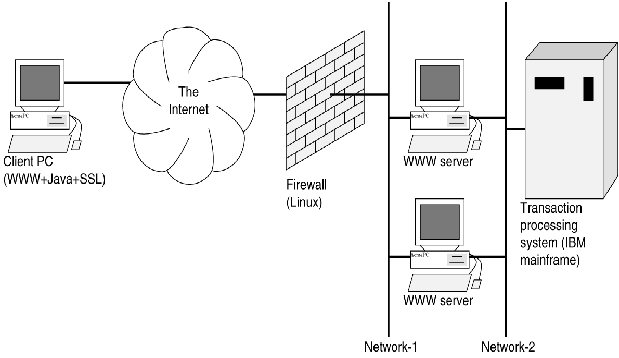
When deployed, the system consists of four physical components:
Client workstations, which include a WWW browser with Java and SSL capabilities
One or more firewall systems to protect the Internet banking servers against external assault
One or more application gateways: the Java user interface applet is downloaded from these and must communicate with the backend through them.
A backend transaction processing system: for most financial institutions, including our customer, an IBM mainframe is used.
There are three conceptual network segments between these hardware components:
The Internet between the client and an external firewall
Network-1 between the external firewall and the application WWW server
Network-2 between the application WWW server and the mainframe
This arrangement is illustrated in Figure 1.
In developing our customer's Internet banking system, we first deployed a Linux-based development environment consisting of a Compaq Prosignia server, 64MB of RAM and a pair of 4.3GB Ultra Wide SCSI disks. We installed a Debian Linux distribution on this system. On the platform we installed a wide range of tools, shown in Table 1.
We used this setup as our primary development environment. Using Apache-SSL, we were able to test various browsers to check the application's behaviour and to adjust its appearance.
Using some customized Makefiles and libraries, we were able to write Java client code, C-language CGI and daemon programs, C-language mainframe programs and COBOL program stubs all on this environment.
By implementing an RPC system, where a code generator translates a master transaction-description file into source code for each target platform, we were able to add new transaction types to the Internet banking application with just a few short commands.
To secure the final system against denial-of-service, eavesdropping and impersonation attacks, we used Linux to implement an external firewall. Since our access control rules are simple and static, we were able to use the Linux kernel's built-in packet filtering features to limit remote access to just the minimum required services—DNS and HTTPS.
As a further precaution against unauthorized access, no system on the Internet can connect to our customer's mainframe without first passing through our application code. There is simply no path for network packets from the Internet to the mainframe. Our application system cannot connect to any computer other than the mainframe; this minimizes the exposure of other systems on our customer's network.
To ensure private communication, we use the SSL protocol, embedded in HTTPS, to protect the communication between the application WWW server and the client machine. We also do not entirely trust the physical connection between the application WWW server and the mainframe, so all communication between our application on the WWW server and our transaction management software on the mainframe is encrypted.
Finally, since users are likely to log in and walk away from their terminals, we implemented a token management system between the client Java applets and the mainframe, where tokens have an implicit timeout of a few minutes. Unattended sessions look exactly like attended ones on the client's machine, but are blocked from making new transactions.
An important concern in a live system of this magnitude is the possibility of down time, caused by power outages, hardware failures or high load. Our system is protected against power outages by uninterruptible power supplies (UPSs). In addition, we implemented two identical application servers, each of which serves as both a DNS and an application server. One system is configured as the primary DNS, and the other is the secondary DNS. If the primary should fail, DNS queries will cause clients to connect to the secondary system instead.
Finally, all connection-state information is stored in a database on the mainframe. Since the application servers are stateless, consecutive transactions can be routed through an arbitrarily large number of application servers, all operating in parallel. And since the application servers are PCs, we can scale the system up to handle an arbitrarily large amount of traffic simply by buying more PC servers, along with an intelligent router.
To take full benefit of Linux's technical advantages, however, our customer had to be open-minded. We have been fortunate to work with this customer, since they judged the merits of this architecture on the grounds of its reliability, features, extensibility, maintainability and cost. We are convinced that the implementation team's open-minded approach to technological alternatives allowed them to implement the best possible solution, rather than just the same technology as their competitors.
We have used Linux as a development platform before and chose it because of the rich set of tools included with most distributions. This project held no surprises—Linux was a convenient, productive and reliable development platform. We never had problems with any of the development tools, and never experienced system downtime.
In the past, we have developed software for Windows NT as well as for other UNIX platforms. Linux compares very favorably with these as a development and deployment platform—it is simply more full-featured and better supported.
Linux is proving its worth as a production environment as well. It runs on inexpensive hardware and, along with Apache SSL, offers excellent WWW server performance. We would be hard-pressed to find comparable systems on which to run our WWW servers, development environment and firewall without spending much more money and settling for a less comprehensive tool set.
In this project, the rich set of network features found in Linux proved especially useful. In particular, the following:
Setting up the firewall was simple, and the resulting system is quite effective.
Our development server uses ssh for secure remote connections, the X Window System for convenient access to source files and tools, and Samba to allow developers to access files directly from their PCs.
BIND made it easy to implement a failover from the primary to a backup server.
Various shell tools make it easy to keep the software on the backup server current.
Linux is not only feature rich, but also well-supported. We have found that whenever new security exposures are discovered, Linux is invariably the first system for which patches or workarounds are available. For instance, the ping-of-death vulnerability was reportedly fixed in three hours, and a Linux patch for a common buffer-overrun vulnerability was released alongside the discovery of the bug itself. We doubt that any vendor could match the response time of the worldwide community of Linux programmers.
In this project, we built just one application—a user interface with which our customer's clients can make financial transactions. However, there is nothing about our technology that is specific to the Internet or even to banking.
Within our customer's organization, the same technology could also be used to enable thin clients to function as teller workstations, process loan applications and support communication with automated teller machines and telephone voice response systems. Beyond the financial sector, this technology could be used for any transaction processing system with a broad or geographically distributed user community. Examples include travel booking systems, libraries, government registries and more.