Linux Print System at Cisco Systems, Inc.
At your office, can you print to the nearest printer, or do you have to use a printer set up just for your desktop machine? If you wanted to send a job to a printer in another department or in another office, could you do it as easily as with your local printer? In most large companies, the answer would be no.
System Administrators seldom want to take care of printing problems, and there is rarely anyone else to turn to for help. Out of desperation, you're determined to fix a problem yourself, only to be told, “My colleague tried that, and broke printing for a week. Don't touch it.” In short, printing has become a Pandora's box no one wants to open. It is surrounded by more folklore and black magic than any other area in modern computing.
In this article, I will describe the general problems with printing in a large corporate environment and the general methods for solving these problems. I will then detail how I solved the particular problems at Cisco. Using software almost entirely downloadable from the Internet, I produced a highly visible, mission-critical, fault-tolerant print system used every day by over 10,000 people worldwide.
In a nutshell, the solution depends on multiple Linux servers which, by communicating with each other, effectively work as a single “distributed machine”. This approach offers one solution to many problems inherent not only in print systems but, more generally, any network resource (e.g., mail, disk space, etc.) in a large corporate network.
A distributed machine may sound complex, but very little magic is involved. As we shall see, the “magic” comes from applying the traditional UNIX method of combining many little pieces into a whole significantly greater than its parts.
First, let's talk about some of the general problems that people face when printing in a corporate environment. Printers are based on mechanical parts that are slower and less reliable than the computers sending jobs to them; thus, queues and frequent status updates are required.
Although vendors are trying to create standards (for example, the work of the Printer Working Group [PWG]), the current standardization is poor, and printer manufacturers are programming their machines to talk to as many different standards (or emulations) as possible. Few of these emulations work well or allow good user control of the printer.
Essentially, there are two main strategies for organizing printing: direct client-to-printer or via a central print server.
The client connects directly to a printer and takes complete control as it sends its print job. Any printer status is sent directly back to the client. Once the printer has finished, the client disconnects and the printer is then available for another client.
This method is simpler for use in small offices. Each person's machine is set up in isolation of everyone else's—no need to think about any larger issues. Since each user is isolated, problems usually affect only a single user. Provided his printer does not fail, an individual user can carry on printing, regardless of problems others may be having.
Each user controls his own queue directly. He can cancel a job on his own machine using whatever tools the operating system provides.
With a direct client-to-printer system, performing any global changes is difficult. If the IP address of the printer changes, the engineers have many client machines to track down and reconfigure.
Each client machine has to compete for the printer. If the printer is already busy when a client tries to print, the client has to keep retrying until the printer is free.
Providing an orderly queue is difficult. Since all clients get control of the printer in a random order, there is no guarantee of when any particular client's job will start printing, or that jobs will be printed in any particular order. It is almost impossible for a client to know that other clients are waiting for the printer.
A client can print only to the printers that support its protocol. For example, an Apple Macintosh can talk only to the printers that support AppleTalk.
Tracking down and canceling unknown jobs is also not easy. For example, if a printer is busy printing a 2,000-page document, the sending client is not apparent, and to actually stop the print job, the system administrator has to get appropriate permissions on that client machine.
A fix to one protocol can break others. Service technicians, who tend to be experts in their own field, can easily break things for other protocols. For example, an engineer may reset a printer to fix a Novell printing problem, and in the process break the TCP/IP setup (which he doesn't understand anyway).
Certain printers cannot switch well between different protocols. Some printers, particularly the older ones, have even been known to crash completely (requiring a reboot) when switching between TCP/IP and AppleTalk.
The client sends its print job to the central print server and disconnects. The print server takes the job and adds it to the queue for the designated printer. The print server then connects to the printer, and sends the job. Any status is sent to the print server, not the client.
Since the print server has significant storage capacity, it can receive jobs at any time, regardless of what the printer is doing. The client machine can send the job, then move on to another job.
The jobs go through a central queue, which prints them in the order received. Each user should be able (operating system permitting) to see all jobs waiting to print on a printer by looking at this print server queue.
A system administrator may kill any job on the print server, regardless of its source.
If a printer fails, it is easy to re-route all the jobs from the broken printer to a working one.
Any printer changes can be made on the central print server alone, since this is the only machine that talks directly to the printer.
A central print server system is more complex. It requires a system administrator to set up the print server and keep it running.
If the print server dies, all printing stops, unless a good backup print server is available.
The users have no queue control. Menial tasks such as print job cancellations fall on the shoulders of system administrators, if the users no longer have the permissions or skills to do it themselves as they do in the direct client-to-printer case.
Most larger companies make a half-hearted attempt at the central server approach. The real problems begin when more than one “central” server is implemented. The UNIX system administrator sets up a UNIX print server, the Windows guy sets up an NT server, and some of the clients skip the servers completely and go directly to the printer. All jobs meet at one printer, where chaos ensues.
You now have all the problems of the central server approach compounded with all the problems of the client-to-printer approach plus a few extra thrown in for good measure. Printer changes must be implemented on multiple servers by multiple system administrators leading to multiple potential errors. Multiple machines (now servers instead of clients) compete for the same printer, there's no orderly queueing and we still don't know where that 2,000-page document is coming from.
To make matters worse, each environment has a different name for the same printer, which makes tracking down printers even more difficult. When a user has a problem, he most likely doesn't know which environment he is trying to print from. He'll call the wrong system administrator, who can't find the user's printer name in his environment. The system administrator will suggest the user call a different group, who will pass the user to another group, and so on. Five system administrators later, the user is back to the first one. Overall, a frustrating experience for everyone. This situation was beginning to occur at Cisco.
After a few months of dealing with these problems, I decided to find a better way. I sat down and detailed what I believed to be the “ideal print system”. It had to have the advantages of the server approach, yet mitigate some of the disadvantages.
Multi-protocol: The server must talk to all the different protocols available to both clients for sending and printers for receiving.
Ultra-reliable: Use redundancy to remove the single point of failure inherent in most central server approaches.
Single point of queueing: No matter where the job comes from or the route it takes, all jobs for a particular printer must land in a single queue handled by one machine.
Expandable and flexible: Cisco is a growing company. Any system has to be able to scale well and allow frequent reorganization.
Centrally, de-centrally and remotely manageable: Cisco has offices worldwide, some of which have local expertise, some of which don't.
Cheap: The system has to be affordable for the small offices, yet expandable for use at headquarters.
Queue management devolved to the users: System administrators don't have time; users want control.
Avoid duplication: Any information duplicated by hand is prone to error. Even entering the IP address into both the printer and the print server should be considered a duplication.
Simple to manage: No matter how many servers are added for redundancy or capacity, the management of these must remain simple.
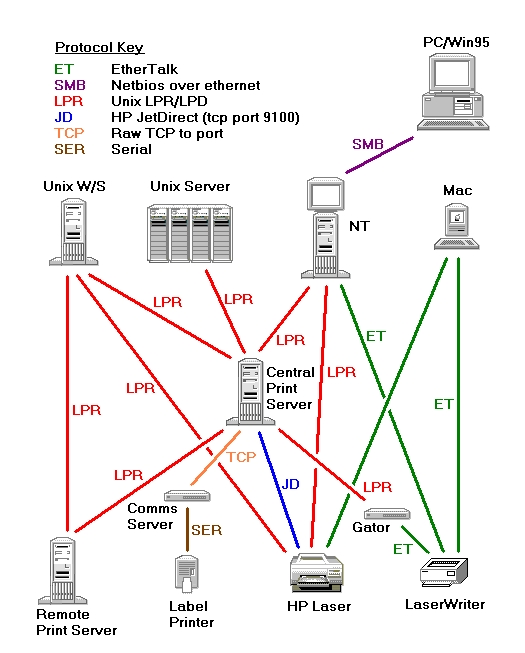
When I started at Cisco, the printing was becoming difficult to manage (see Figure 1). While Cisco was no worse in this respect than most companies, they depended on printing for their manufacturing process. They knew it was very important for the system to work efficiently. Thus, I was taken on to maintain and improve on the existing UNIX printing, which used two small SunOS-based print servers.
Although these two servers by no means controlled the entire printing at Cisco, since I was a dedicated print system administrator, it was widely assumed that I did.
Figure 1. Original Printing Configuration at Cisco
The company's big UNIX servers were sometimes printing to one print server, sometimes to the other. The UNIX workstations were printing either via the print servers or directly to the printer. The Apple Macintoshes (used extensively on the desktop) always printed directly. Most of the printers recognized only AppleTalk, so Gatorboxes (from Caiman Systems) were used to translate UNIX print jobs into AppleTalk.
Caiman Systems had gone out of business and the Gatorboxes were intermittently crashing. My predecessors had started to enable TCP/IP protocols on some of the Hewlett-Packard (HP) printers so that the UNIX print servers could talk to them directly. Doing this required either plugging an IP address into each printer (via the front panel) or setting up a bootptab entry in each print server so that a printer could find its IP address using the BOOTP protocol (see Glossary).
In theory, one print server was the main one and the other was a backup. However, these two servers were substantially different in configuration. Duplication of the setups was manual, i.e., one had to configure the print queue on both machines. Some central UNIX servers were queueing to the “primary” and others to the “backup” print server. A few printers were set up for printing on some of the central UNIX servers and others were not. I spent much of my time tracking down print problems, only to find they usually came down to an incorrect configuration.
Cisco had never directly instructed me to design a new print system. They just asked me to make sure printing worked. They trusted me to do whatever I felt necessary. My motivation for improving it was simply that I find repetitive tasks boring and unfulfilling. I find nothing more frustrating than treating the symptom, while ignoring the disease. I never decided to throw out the old system entirely, I just slowly improved on it—tackling the biggest problem of the moment.
Each printer needed to be individually set up on each UNIX server (the LPR client). This meant a lot of manual work, either when setting up a new UNIX server or creating a new printer. I looked at the client LPR system and realized it had a very simple function: just forward the print job to the print server.
Here is a typical /etc/printcap entry for the printer “foo”, which sends the job straight on to the print server “prntsrv”:
foo:\
    :mx#0:\
    :sh:\
    :sd=/var/spool/lpd/foo:\
    :lf=/var/spool/lpd/foo/log:\
    :lp=/var/spool/lpd/foo/.null:\
    :rm=prntsrv:\
    :rp=foo:
The only item which changed when using a different printer is the word foo.
I took the LPR source and replaced the routines that look for the entry for a particular printer in /etc/printcap with routines that faked the entry. If LPR asked for the printer “bar”, my routines would return a printcap entry much like the one above, but with bar in place of foo. The only other variable was the name of the print server which was looked up in a master configuration file I created for the whole system. There were a few other things to do, such as creating a spool directory, but essentially this is all the work the routines did.
The remainder of the LPR code proceeded as before, not realizing anything had changed. Since I hadn't touched the remainder of the code, I had very few bugs. I had removed a large source of information duplication, and I could now be sure that all the company's printers were available on all the central UNIX servers, with print jobs being sent to the correct print server.
Note that the client will also accept a print job for a non-existent printer (it doesn't know the difference) and send it to the print server. The print server will reject the job, but will not say why (the protocol doesn't allow it). The client keeps retrying for 48 hours before finally rejecting the job and e-mailing the user. This is not an ideal situation but was acceptable at Cisco.
I next tackled the duplication within each print server. Several files were used to control the printers: /etc/printcap and /etc/bootptab as well as some setup files used by each printer. Each file contained the same information in a different format.
There were three different ways of talking to the various printers as set up in the /etc/printcap file:
JetDirect for HP printers using their TCP/IP JetDirect interface
Raw TCP for serial printers attached to TCP/IP-to-serial converters
LPR protocol for EtherTalk printers (attached to Gatorboxes) or to remote print servers not under my control
To eliminate duplication, I needed a master configuration file from which I could generate the various configuration files required for the three protocols. The master configuration file contained all information required by any protocol, such as the name, IP address, Ethernet hardware address, the remote server and remote printer name. I created a script, mkprint, which generated all the other configuration files, created the spool directories and more.
Not only was this method simpler than editing the individual files manually, it was much less prone to error. For example, since the IP address supplied to the LPR system was the same one supplied to the BOOTP system, they had to match. I could not get them wrong.
As I mentioned earlier, the Gatorboxes were causing many problems. Often, an individual print queue on the Gatorbox would stop receiving print jobs and require someone to log on to the Gatorbox and restart it. They had significant “memory leak” problems which would cause them to run out of memory and crash, requiring someone to physically go to the box and press the reset button.
I researched first the Columbia AppleTalk Protocol (CAP) and then Netatalk as possible ways of getting the print servers to use EtherTalk directly. Both seemed to work well, but Netatalk was being more actively developed and required less load on the machine through the use of kernel-level drivers.
By installing Netatalk and modifying the mkprint system to allow for this new type of printer, I could remove the Gatorboxes from the loop. Another duplication had been removed.
Cisco started introducing desktop PCs, and although I did not realize it at the time, this was the beginning of a major push to change from Macintoshes to PCs. The Desktop Technology Group, who managed the PCs, introduced an NT server as the PC print server and I started getting calls to kill print jobs that did not exist on my servers.
I forged some links with the Desktop Technology Group and suggested they redirect the print jobs from their NT server through my print server, rather than going directly to the printers. I could now see and cancel all the print jobs. However, the NT server did a poor implementation of the LPR protocol. For one thing, once it had sent the print job, it considered that job printed, and the users could not see from their PCs either their own job or the total print queue.
To mitigate this loss of visual feedback, I created a simple web page which asks for a printer name and then displays the print queue by using the output of the lpq command. All other information for the page was generated by extending mkprint again.
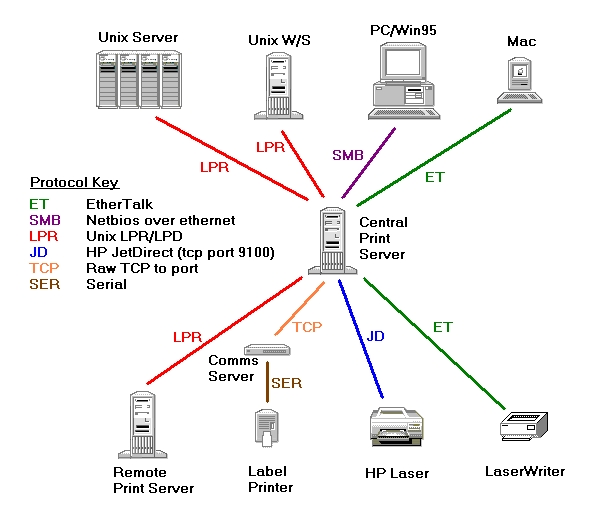
Now I had a much tidier print system, with all jobs following a well-defined path from client to printer. The ideal print system had taken shape (see Figure 2).
Cisco decided to expand its facility in Research Triangle Park (RTP), North Carolina to include a full data-processing center. It seemed sensible to place a print server there to reduce print traffic across the WAN link.
I created a complete duplicate of one of the print servers I had in San Jose for this RTP print server. Recognizing the impending manageability problems with multiple servers and the requirement for quick backup in case of server failure (failover), I decided to organize printers into more manageable groups based on physical location. I called these groups “location codes” or “loccodes”. I assigned each loccode group of printers to a single server, which actually sends jobs to those printers. Any other servers receiving jobs for those printers would simply forward the jobs to that designated server. The advantage of this system was that, in case of a server failure, I could now move these loccodes (and their associated printers) quickly to another operational server, providing failover capability.
The steps I took to implement this system were quite straightforward. I first copied the master configuration files over to each print server using rcp. I then modified mkprint so that it took note of the loccode and its associated server as it created the /etc/printcap entries. For each printer, it extracts its loccode and figures out its assigned server. If that server is the one mkprint is running on, mkprint proceeds to create a printcap entry as before; otherwise, it creates an entry which simply forwards the print job to the appropriate server.
For example, suppose the printer foo had a loccode of SJK2 (San Jose, Building K, 2nd floor), and the loccode is assigned to server “print-sj” in the list. The printcap entry for this printer on the server “print-sj” would be as before:
foo:\
    :mx#0:\
    :sh:\
    :sd=/var/spool/lpd/foo:\
    :lf=/var/spool/lpd/foo/log:\
    :lp=/var/spool/lpd/foo/.null:\
    :if=/usr/local/atalk/ifpap:\
    :of=/usr/local/atalk/ofpap:
However, the entry on any other print server would be:
foo:\
    :mx#0:\
    :sh:\
    :sd=/var/spool/lpd/foo:\
    :lf=/var/spool/lpd/foo/log:\
    :lp=/var/spool/lpd/foo/.null:\
    :rm=print-sj:\
    :rp=foo:
The last two lines tell the lpd
program to forward the job to the print-sj print server.
Thus, it did not matter which print server a job landed on; it would automatically be forwarded to the “correct” print server. Using this scheme, there was no way a printer could receive jobs from more than one print server. This immediately provided the single point of queueing mentioned previously as part of the ideal print system.
I wrote a simple script called allmkprint that would copy the master configuration files and run mkprint using rsh on all print servers. I extended the web interface so it too would realize if it was being asked for a printer residing on a different print server, and forward the user's browser to that print server.
Now, when a server died, I just moved all the loccodes across to another print server and ran allmkprint—a simple failover system was in place.
Every time a new printer was installed, not only did I have to create a queue on my UNIX print servers, but the Desktop Technology Group also had to create a separate queue on their NT servers. To make matters worse, the drivers on the PC had to be carefully matched with the drivers used under NT.
I investigated Samba and was extremely impressed with its ability to provide the same services to PCs using the same protocols NT used. Essentially, one could make a UNIX machine pretend to be an NT server. Samba is also extremely configurable—so much that it is easy to be confused by the enormous array of choices.
Expecting rejection and a passionate argument of NT versus UNIX, I approached the Desktop Technology Group with the idea of taking over PC printing. Their response was, “Really? You'll take over setting up and managing these obnoxious printers for us? Hey, it's all yours!”
The Samba protocol (SMB), however, has a severe limitation: the browsing (which allows the user to get a list of available printers) is done using a single UDP packet, and so is limited to about 8KB worth of printer names and descriptions. In our environment, this translated to about 50 printer names per server. However, I found Samba had the ability to use different configuration files according to the name the PC thinks the server is called. For example, suppose that for one physical server, I register the two pseudo-server names pserver1 and pserver2 in Microsoft's version of DNS, WINS. The PC will see two servers, pserver1 and pserver2, both referring to the same physical Samba server. The Samba server will pick a different configuration file and serve a different set of printers according to which pseudo-server the PC thinks it is talking to. This allows us to effectively break the 8KB barrier by separating printers into smaller groups.
The printing itself is simple. The Samba configuration files specify a program or script to run when a print job is received. Usually, this is a simple lpr command. The PC queue display is done by converting the output of the lpq command.
The print servers could, of course, talk to all the different printer protocols. Add to this the Samba capability of receiving jobs from any PC, and now any PC can send a job to any printer—even an AppleTalk printer.
I could have just associated the pseudo-server names with the loccodes; however, I found this lacked the flexibility I needed. Since the PC printer path (in the form of “\pseudo-server\printer-name”) was fixed in people's PCs, I found that if I moved a printer from one loccode to another, people would have to re-install the printer on their PCs. This caused a problem when I was making administrative changes like splitting a loccode up or joining two together; in this case, I wanted to be able to make these changes without involving the user.
The only way to do this was to associate the pseudo-server name not with the loccode, but directly to another grouping: the “service group” or “sgroup”. I could associate a loccode to one or more of these sgroups. Conversely, each sgroup could have multiple loccodes associated with it. To use database parlance, loccodes and sgroups have a many-to-many relationship. The sgroup concept allows me to split, join or move loccodes without changing the client PCs.
For more information on sgroups and loccodes as well as an example of how they are used, see the “Loccodes and Sgroups” sidebar.
Samba, and all these damn sgroups, were beginning to put a sizable load on the print servers. We had upgraded the print servers at our headquarters in San Jose to two Sun SPARC 20s; however, the growth in PC usage was soon stressing even these two. To make matters worse, Windows 95 has a very short time-out period when asking for a listing of the printer queue (less than three seconds). If it times out, the printer is marked on the PC as “off-line”, and the user is required to go into the settings and put the printer back on-line. This feature was generating too many calls.
I now introduced a couple of Red Hat Linux machines as Samba print servers. The servers were HP XM4s: 120MHz Pentiums, with 32MB RAM and 1GB hard disk. These were the same PCs that were used as the standard desktop machines at Cisco.
I had not ported the entire printing system from SunOS to Linux, so I could not use them as final print servers—that task was left to one of the two SPARC 20s. The Linux print servers would receive the print jobs from the PCs using Samba and then forward them to the SPARC print servers. This was possible due to the sgroup and loccode system I explained earlier.
Due to the growth of Cisco and the sheer amount of day-to-day print administration, I had allowed the engineers access to edit the master configuration file. However, this was creating a problem. Since the file was edited with vi, there was no locking, and I was beginning to have problems with people overwriting each other's changes. Also, the file was getting so big the mkprint program was taking a significant amount of time to run. I needed to put this configuration data into a database.
I wrote what I thought would be a “simple distributed database” (SDDB). I soon discovered the first two words are a contradiction in terms. It is actually more like a “network directory” than a database—it performs a function similar to Sun's NIS (Yellow Pages).
NIS maintains separate domains, each of which has a master server and multiple copy servers. While each NIS server can store the data for multiple domains, the data never merge. A client has to “bind”, or attach, to a particular domain on a particular server and can query data only in that domain.
SDDB also maintains separate domains, each with its own master server and copy servers. Each master server receives record updates for its own domain and propagates these changes to all the other servers across all domains. The data from each domain is merged on each server into a single contiguous database—the original domain being stored on each record. Thus, when a client queries the data, it does so across all domains.
The records are held as a “field=value” list of variable lengths. Only the values defined are stored in the record, and new values can be added at any time.
Indices are held in memory using a “red-black” tree algorithm. All creation and comparing is done by user-supplied functions, so the indices are very flexible. SDDB allows for multiple indices and can detect and reject duplicate entries, unlike NIS which allows only one index on each file or table.
The SDDB servers are completely stateless (i.e., they do not store any information between client requests) and use a fast UDP protocol to perform all transactions. A modification sequence number (which is analogous to a modification time) is held on each record so that a master server can decide what records have been updated and need to be propagated to the other servers. Since only the modified data is transferred, the propagation delay can be made very short—it is currently about 30 seconds.
SDDB has an API for both C and shell scripts. Thus, you can use either script to inquire, update or delete records in the database. The database is not tied to the print system—it can be used to store any sort of record-oriented data.
I installed SDDB on every print server and converted all the master configuration data into SDDB records. SDDB could now provide the configuration data for mkprint, which produced the configuration files (/etc/printcap, et al.). I re-wrote mkprint in C (it was originally written in shell and awk script), which improved its speed enourmously. It no longer had to use rcp, since the data was already present on the local server. I rewrote the web (CGI) programs so that they no longer relied on the output of mkprint, and received their information directly from SDDB.
I wrote a front-end for SDDB, called pradmin, designed for the print system. It uses a simple command-line interface, similar to the Cisco router interface. Now multiple users can update the database simultaneously without fear of clashing.
As more and more programs came to rely on SDDB and the data it contained, SDDB became the glue that tied all the print servers together. A single update would affect many servers, which would all act in unison. Every print server knew about every printer at Cisco and acted accordingly. The “Distributed Machine” had started to take shape.
Cisco started a spree of buying up small companies, particularly in the San Francisco Bay Area, so it was time to start installing more print servers. Linux machines were the best choice, since they are cheap. A Linux print server would cost under $2000 US, less than a third of its commercial rival, Sun's SPARC 5.
I ported and rewrote the remainder of the programs that, until then, had worked only on SunOS. Now the Linux machines could perform the full function of a print server.
A print server was installed a few miles down the road in Scotts Valley. Aside from a few teething problems, it worked. We then shipped one to Sydney, Australia. I preconfigured it with an IP address, so the only thing the system administrator in Sydney had to do was hook up the power and the network. It worked flawlessly. The SDDB server came up, copied its data down, I ran an mkprint and off it went.
rdist is a tool which allows the mirroring of directories between servers. This can be done either by doing an exact mirror (including the deletion of files) or just adding to and replacing directories already present.
Using this tool, we could put together a directory structure on a master distribution server and have it mirrored throughout all the other servers automatically. This was yet another massive timesaver, as the number of servers we managed increased. We even included the /etc/passwd and /etc/group files among those files updated using rdist.
Setting up a new server became straightforward: install a vanilla Red Hat release, then rdist the print system on top.
I did another rework of the web pages. I added the ability to stop and start print queues as well as delete a print job and send a test page.
I discovered that while using SNMP, I could display an HP printer's front panel display, which greatly aided in fixing run-of-the-mill problems such as “Toner Out”.
The web interface became the preferred tool for diagnosing printer problems and was made available to everyone. It allowed users to fix many of their own printer problems and not have to call us.
As I mentioned before, loccodes provided a rudimentary failover procedure. However, it would have been an arduous task to update all those loccode and sgroup records to denote a new server in case of failure. Luckily, I have never had to use it.
I added a backup server field to the loccode and sgroup records and created a new SDDB table called pserver. In it was detailed, among other things, the state of the server (“up” or “down”). I changed mkprint so that when it created the configuration files, it would check the state of the primary server, as designated on each loccode and sgroup record. If a server was marked as “down”, mkprint would direct LPR to use the backup server instead.
Now, failover was simply a matter of marking the dead server as “down” in SDDB and re-running mkprint on all the servers.
The only problem with the mkprint system was that any updates to SDDB records were not instantly reflected in the print servers. Could I make the various programs bypass their configuration files and read SDDB directly?
I pulled open the LPR code and again replaced the routines that read the /etc/printcap file. This time, however, they read an SDDB record and created an in-memory printcap entry accordingly, using the same algorithms that mkprint used. I then did the same thing with BOOTP. It no longer needed to read /etc/bootptab, but rather read its information straight from SDDB.
Now, whenever changes were made in SDDB, print queues were created instantly and the BOOTP server was immediately available to service the BOOTP request. Failover didn't even require mkprint to be run. Samba was the only program left that didn't read its information directly from SDDB.
After an extreme power outage at the San Jose headquarters' data center and general lack of performance due to capacity problems, the visibility of the print system was raised. Suddenly, managers realized that without the print system, nothing got printed and production lines stopped. The order came down to “double the capacity of the print system immediately”. I was given an assistant, Ben Woodard (bwoodard@cisco.com) to provide a much needed extra pair of hands. Although originally employed by Cisco as an MS Windows support line technician, within a few months I had converted him to a die-hard Linux fan.
We installed ten new Linux servers in the San Jose headquarters' data center. Linux print servers were spread around the world:
13 at the San Jose headquarters
3 around Silicon Valley
4 in Europe
2 in RTP, North Carolina
2 in Tokyo, Japan
1 in Sydney, Australia
On August 1, 1997, we retired the SPARC 20s and the other Axil machines. We are now completely reliant on Linux servers—a single line of commercial code cannot be found. We have (or at least have access to) the source code for every program we are running.
We have recently started replacing the print function in the Cisco branch offices. Until now, they have used local NT servers (with their associated problems) to manage their printers. Although the branch offices only have 5% of our printers, they account for about 50% of our calls. We have (as of February 1998) deployed 30 Linux servers to these branch offices, with many more on the way—there are currently about 200 branch offices in all.
There is still plenty of work to do as we expand the system to meet the needs of our printing clients. We have the following goals in mind:
Improve SNMP features. Enable traps so the printers tell us when they have a problem.
Create print queues using Java. The creation of print queues still requires someone who is happy to log onto the system and run pradmin, the printer queue administration program. Why not allow anyone with a browser and the right authorization to create queues?
Replace the LPR program with LPRng or even an implementation of the Internet Printing Protocol (IPP). LPR is showing its age and does not provide many facilities (sending printing options such as duplex, for example).
Extract page counts from the printers, using SNMP. We should be able to schedule regular maintenance visits by engineers.
Implement a DHCP server. Many printers now support DHCP as well as BOOTP. A DHCP server would allow us to avoid allocating IP addresses to printers.
Work on SDDB in order to make it usable as a general purpose Network Directory Service. I also need a new name for it.
Using regular UNIX tools and SDDB, we have created a distributed machine with multiple facets in the form of physically separate servers throughout the world. There has been no magic in doing this. It has been accomplished simply by fixing problems in a general way with an eye to the future. Linux has proved to be quite capable of holding its own in this large, “mission-critical” environment. Nothing is stopping multiple Linux servers from providing “big system” functionality and manageability.
For more information or to download the source for the code discussed in this article, go to http://www.tpp.org/CiscoPrint/.