Open Inventor
Open Inventor is a powerful 3-D graphics library that allows the user to create interactive 3-D applications quickly and easily. It adds object-oriented programming to OpenGL, the most widely available standard 3-D API. This layer of object-oriented abstraction does not come at the expense of losing control of our applications—all the power of programming directly with OpenGL is still available.
One measure of how much detail is needed in order to get things done is the size of the standard reference books. My personal top five essential books on graphics programming are listed in Resources. To be functional in Inventor programming, the most essential one is Josie Wernecke's The Inventor Mentor.
Inventor organizes its data into a scene graph, a structured collection of graphical objects stored as nodes. These nodes can represent many things, from geometric primitives, engines, lights and material properties to transformation nodes that can include scaling, rotation and translation properties.
Inventor efficiently handles many of the graphic operations which would otherwise have to be coded by the user. It has facilities for scene graph management, picking, viewing and user interaction. The standard viewers come in five basic flavors: fly, walk, plane, examiner and render area.
Editors for materials, directional lights, transformations and other node properties can be attached to the scene graph, and changes rendered interactively in any of the standard editor viewers. These editors come in source form, so they can be customized to suit the user's specific needs.
Open Inventor was developed by Silicon Graphics (SGI), a company that builds graphical workstations. It is the second version of Iris Inventor, which encapsulated IrisGL, from which OpenGL is derived. The Inventor/GL API is richly featured and has been maturing for about a decade now. It has proven worthy of the time and effort needed to learn it. Although there is a lot to learn, much can easily be done even by a newbie, as will be demonstrated shortly.
Template Graphics Software (TGS) has a source license to Open Inventor and OpenGL. TGS takes care of porting and distributing Inventor to Linux and other UNIX platforms and Windows NT/95, enhancing and enriching it along the way. In September 1997, the first version of Inventor for Linux appeared on the TGS Internet site (see Resources).
The Inventor file format was chosen as the basis for the VRML version 1.0 file format, commonly distinguished by its .WRL extension. Many of the Inventor nodes were used directly in VRML, and it has often been referred to as “Inventor with all of the good stuff ripped out”. With the new definition of VRML 2.0, the recent releases of Inventor, including the latest Linux version, have been updated to be able to read, write and process VRML files. Actually, I have found the standard Inventor viewers make better VRML model viewers than some of the ones available for Windows and UNIX/Linux. They provide better performance and a better rendering appearance.
Inventor is an ideal environment for creating animations, simulations, data visualizations, VR work and CAD.
At Pratt & Whitney, we use Catia on high-end UNIX workstations for our design/manufacturing process in the development of gas turbine engines for aircraft, industrial and marine applications. Catia is a very powerful 3-D CAD/CAM system, and has its own API for querying drawing models to retrieve geometry and other information.
Using this API, an Open Inventor program xmtriag was written to convert Catia solid models to stereolithography (STL) format, ready for input into an STL machine for rapid prototyping. In addition to the STL format, the program generates an Inventor file for us to visually verify that the part was translated correctly.
My company uses this program as a utility in our design process to take a 3-D snapshot of an engine part, convert it to STL format and send it via FTP to a supplier, who then sends us back a quote and, eventually, a part. These parts can be used for design reviews or for casting purposes to make precision molds. This method saves both money and time in the design/review/manufacture cycle and increases quality. In fact, this process has been so successful we are in the process of installing our own in-house rapid prototyping facility.
Besides those in engineering, many others are interested in seeing and querying our drawing database. To avoid tying up Catia licenses, a viewer was developed to extract the 3-D geometry from the model database and convert it to Inventor format. These new Inventor models can be kept as a light version of the parts instead of storing them in Catia. Using an SQL database, we can select parts from a hierarchical drawing tree regardless of the platform being used and view associated engineering and other data of the selected parts. In addition to Catia, this converter/viewer will process Unigraphics and other CAD drawing formats.
As a result, we have not had to buy new Catia licenses or other expensive third-party viewers. The bulk of the graphics development was done by one person, with some ancillary help from database-oriented personnel over a period of six months. Excluding the price of the Inventor licenses, which are free on SGI workstations, the ratio of prices for third-party viewer licenses to this person's salary was over 100 to 1.
Inventor contains mostly 3-D objects and their associated attributes: geometric shapes, colors, lights and 3-D object manipulators. These are rendered with OpenGL or a similar API, such as Brian Paul's Mesa (see Resources).
The Inventor Xt Component and Utility Library provides widgets and utilities for event handling, rendering, viewers and editors that can manipulate the scene graph directly. These events include selection, picking and highlighting of nodes, keyboard and mouse handling, and processing Xt and Motif callback functions.
For standard GUI design, we can resort to Motif (MFC under Windows NT/95), or whatever happens to be our favorite 2-D GUI API. The standard components such as the predefined viewer classes have been set up to make use of Motif and Xt under UNIX/Linux using the SoXt classes. These classes have been emulated under Windows, so that we have a somewhat easier time of porting code between platforms.
I find Motif to be a little cumbersome to program, so I've been using Viewkit, available from http://www.ics.com/, in conjunction with RapidApp running on Irix to build the GUI and generate the C++ code stubs. Viewkit is freely available for SGI and Linux workstations, and the RapidApp code compiles cleanly under Linux. The GUI could have been built by hand, totally under Linux, but it helps the design process to be able to work interactively. Also, building on both platforms may help to make sure that portability issues spring up earlier in the design process.
Motif is not an absolute prerequisite under UNIX. Mark J. Kilgard, of SGI until recently, illustrates using Open Inventor without Motif in his book Open GL Programming for the X Window System (see Resources).
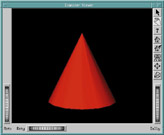
Let's look at a quick illustration of how easy it is to set up a scene graph and viewer. Example 2-4 of The Inventor Mentor presents “Hello Cone” using a standard scene viewer. (See Figure 1.) The figure shows three main areas of the SceneViewer: three thumbwheels, eight side buttons and a render area.
Figure 1. Scene Viewer with “Hello Cone”
The eight buttons handle object selection/picking, viewpoint manipulation, help, returning to home viewpoint, setting a new home viewpoint, executing viewAll to see the whole scene, seeking to a point and toggling the camera type between orthographic and perspective.
The three thumbwheels handle manipulation of the scene's viewpoint by rotating the camera angle about the X and Y axes and traversing along the Z axis to obtain a zoom effect.
The render area is the most interesting. The mouse can be used to get the same effect as the thumbwheels. Mouse button one will allow the user to select the object, and if the mouse is moving when it is released, the object will continue spinning in the direction that the mouse cursor was moving. Mouse button two will allow the user to pan up/down and left/right, and if the control key is pressed, zoom in and out. Mouse button three causes a pop-up menu to appear that allows the user to set various attributes (such as rendering “as-is”, hidden-line, wire frame, points-only and bounding box), preferences and displays of the thumbwheels and side buttons (known as decorations).
Listing 1 shows how simple it is to create this program. The first seven lines are the minimum header files. Inventor has 553 different include files. This may seem like a lot; however, each is very specialized, and selecting only the needed ones will speed up compilation time. If I wanted to, I could have simply included Inventor/So.h and let the compiler process all of the “So” prefixed files.
The first two executing lines after main create the main window widget and invoke SoXt::init. This is an essential part of the program, because here, Inventor is bound to Xt event handling so that its sensors will work properly. SoXT::init is also where the licensing code is called. Failing to invoke init will result in a core dump.
To be visible, each scene graph must have a node to attach to a viewer. In the listing, I am using a SoSeparator which saves the traversal state before being entered and restores it afterwards. This serves to prevent the attributes of its child nodes from affecting other parts of the scene graph that follow. A separator can include lights, cameras, coordinates, normals, bindings and all other properties. Separators also provide caching and culling of their children based on bounding box calculations during picking and rendering.
Once you create a node and pass it to the scene graph, Inventor takes over. Inventor nodes are always created dynamically with the C++ new command—never on the stack. Each node has a reference count, starting with zero when created, and incrementing and decrementing as nodes are added and removed as children to other parent nodes. When this reference count drops from one to zero, Inventor automatically deletes the node.
During traversal, the node is referenced and then dereferenced as the scene graph is traveled over. If we had not done a ref, the first time we traversed the scene graph its reference count would have incremented as it was entered, moving its reference count to one, and then decremented it back to zero as it was left, automatically deleting the node and any children whose reference counts had also dropped to zero. We would have been left wondering where our node(s) went.
Next, we add a material property as a child to the root node. It has a diffuse color or (1.0,0.0,0.0), which corresponds to full red, with red, green and blue (RGB) quantities being expressed as floating-point values between 0.0 and 1.0.
A cone is now added to the root node. Its default values are one unit for base and one for the length. It is located at the origin 0,0,0, and when unrotated, points one unit up from the base along the Y axis. Since the cone comes after the material property specifying the color red mentioned above, the cone inherits its attributes and is also red.
Inventor traverses its scene graph by starting at the root node and traveling down and to the right. Since OpenGL is a state machine, once we set an attribute, it will retain that value until changed.
Now we create the SceneViewer, passing the widget of our parent window, hooking our scene graph to it and setting the window title.
The show and hide methods call XtManageChild and XtUnmanageChild if a sub-widget is passed to it. If the widget is a shell widget, show will call RealizeWidget and XMapWindow, and if it is iconised, it will raise and de-iconify it. The hide method will call XUnmapWindow.
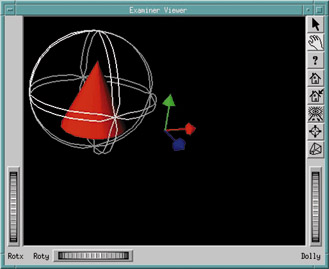
This program can be enhanced to allow more than the viewpoint to change by adding a manipulator. Using SoTrackballManip provides the ability to interactively rotate an object about its own center on any of the three axes, as shown in Figure 2.
Only two lines need to be added to the source code. At the end of the includes section of the program above, add the line:
#include <Inventor/manips/SoTrackballManip.h>
and immediately after the root->ref call, add the line:
root->addChild(new SoTrackballManip);To be sure I was making the cone rotate, I moved it off to the side using mouse button two, and turned on the origin's three axes display using the pop-up menu of mouse button three.
Clicking the top button on the right of the main window changes the mouse to selection mode. Moving the cursor to any intersection of the double rings and selecting it with mouse button one causes it to be highlighted in yellow, allowing us to rotate the cone about its axis. If the mouse is still moving when released, it will continue spinning. Clicking on the hand icon will revert to viewpoint manipulation mode, so that both the cone and its manipulator can be rotated about the viewpoint axis. The cone is now spinning on its own axis and orbiting around the center of the scene.
Other manipulators will perform rotations, scaling and translation (movement) tasks and any combination of these functions.
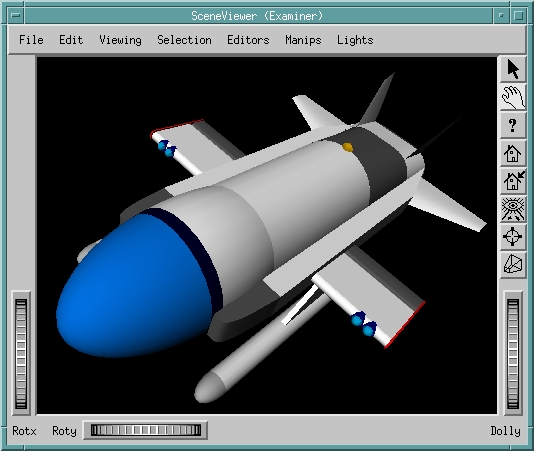
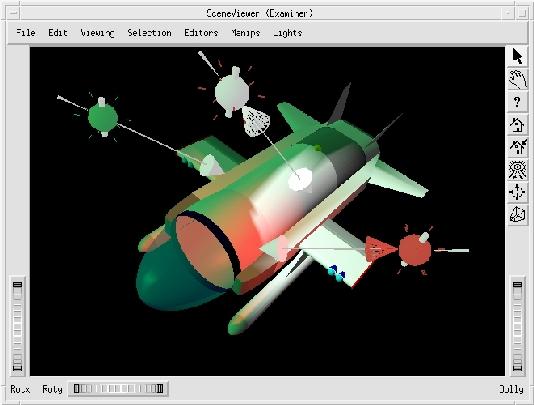
Inventor comes with a number of standard node editors for modifying the scene. Figure 3 is a typical model (without any alterations) in SceneViewer, a demonstration program that comes with the Inventor distribution. For a little more information about the figure, see the sidebar “A Bit About Figure 3”.
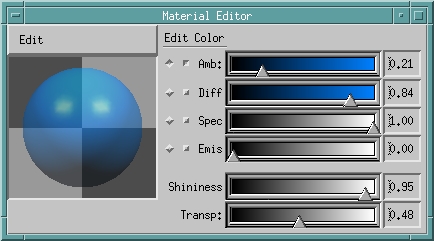
Selecting Editors from the main menu, we can select “Material Editor” and get the dialog shown in Figure 4.
Figure 4. Material Editor Dialog
The blue dome can be selected on the front of the craft and made semi-transparent; a few lights can be added and the viewer's built-in head lamp turned off. Inventor has three types of lights which can be added to a scene:
SoPointLight acts like a light bulb, radiating light equally in all directions.
SoDirectionalLight emits light along a single direction as though it were nearly an infinite distance away, like the sun.
SoSpotLight emits light in a cone, allowing it to be pointed and focused.
Figure 5 is an example of a green SoDirectionalLight and red and white SoSpotLights. Their respective icons have been left on so the manipulators are visible—they would normally be left off during rendering. With the mouse, I can select and move them as well as change their direction. The SoSpotLights have the added cone to allow focusing the light by changing the radius of projection.
Figure 5. Results of Intersecting Color Spotlights
In Figure 5, we see how light behaves when pools of light intersect. Having changed the dome's material properties, we see how the green light appears as a reflection. If fog, other atmospheric effects and texture mapping were added, we would have a highly realistic scene, ready for imaginative animation.
This submarine model is part of a simulator on which I am working. It includes a digital elevation map viewer that reads and renders topographical data to display terrain in which to drive. I used some of John Beale's ideas about making use of government data in rendering landscape images. On his site at http://www.best.com/~beale/, he provides a few useful converters, which he has adapted from others, to turn the one minute elevation maps into PGM file pixmaps.
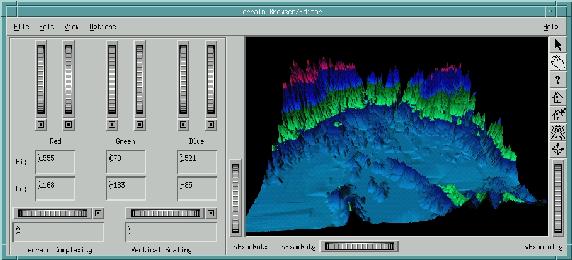
The terrain-handling section of the program is shown in Figure 6. It allows control of terrain resolution and color. The viewer on the right side is standard, so the image can be zoomed, panned and rotated as desired. Depending on machine speed and terrain complexity, the rendering is more or less interactive. Personally, I have found a value of 24 to be an ideal terrain-complexity value.
The elevation data is kept in a 1204 by 1204 integer array representing the heights surveyed in the map. This would be a bit much to try manipulating interactively on a PC, so the terrain-complexity thumbwheel allows us to choose the amount of reduction we want. A very simple algorithm is used. The value of the thumbwheel, two in Figure 6, is used as the length of a square from which we take the maximum height, and then added as a coordinate point to an Inventor SoQuadMesh, basically a grid composed of quadrilaterals. With a value of two, the maximum height is four elevation points. A value of ten provides a maximum height of 100 points, eliminating 99% of the map for rendering purposes. As this works interactively, the value can be changed until a balance is found that combines the amount of needed detail with the desired rendering speed. Within this, the area of interest can be located and only the needed detail rendered.
Each SoQuadMesh node in Figure 6 is defined by a set of four vertices, each shared with its adjacent neighbors. These vertices have an associated color component which is smoothed out over the area of the SoQuadMesh. To give some visual indication of the height and to generally make things more interesting, I have set each elevation to have a different color based on a simple formula specified by the user.
The six vertical wheels handle the assignment of maximum and minimum depths for each color component, so overlapping blue and red results in a purple area of overlap. The amount of color is calculated as follows: from the maximum and minimum ranges the midpoint is found, and the percentage of distance from the color border to this midpoint is the percentage of that color to use. Thus, a vertex at the midpoint has a value of 1.0 for that color component and a vertex three quarters of the way to the edge will have a value of 0.75 of the color.
The file format read in is basically an ASCII PGM file containing three values representing the maximum X, Y and Z values, followed by all elevations. This is handy because the file can be read with the xv command and saved in any other graphical file format needed.
Originally, the terrain represented in Figure 6 was the pixmap shown in Figure 7, with lighter areas having more height.
Joystick drivers are available for Linux. The Inventor Toolmaker book on how to extend Inventor has a section in the back on adding new hardware devices. A lengthy discussion ensues, requiring a knowledge of the details of the windowing system. I found I could bypass it by using an Inventor SoTimerSensor node set to invoke the callback function at almost any time interval with the attached node pointer. The setup for it is as follows:
SoTimerSensor *JS_Sensor =
 new SoTimerSensor(JS_SensorCallback, craft_xf);
JS_Sensor->setInterval(0.005); //scheduled 200/sec ...
JS_Sensor->schedule();
The function, called JS_SensorCallback, checks the joystick driver to see how much it has moved. This is also the place to update the flight state model to change the velocity and heading. We can check for things such as amounts of air and power left, and how deep we are, based on the current XYZ coordinates.
A few things I wish to add to this simulator are:
Networking over the Internet to join two users together
Animated objects such as fish
Direct reading of the terrain data from the Internet
More empirical parameters to ensure the craft responds the same way in the simulator as in life
Tidal and water flow effects
Light attenuation as depth increases
In addition to ease of use and availability of raw power, I like Open Inventor because whatever I develop is totally portable between my Linux machine at home and my SGI workstation at the office. Using Viewkit, Motif and Mesa, I have a tremendous amount of flexibility in choosing where and how I develop software.
Inventor and Viewkit provide the software functionality of an SGI workstation, and with the recent advances in graphics hardware, Linux PCs will be closer tomorrow to where the SGI workstations are today. Tomorrow is already planned—no one has to ask us where we want to go today.
A special thanks goes out to Alexandre Naaman for showing the way, being patient and simplifying things when they got muddled.