Sendmail+IDA
As a Linux (or Unix) user you are certainly familiar with the program you use to read your electronic mail. It may be mail, mailx, elm, mush or pine but it preforms the function of allowing you to access your mailbox in an orderly fashion. This program is called a mail user agent or MUA.
But, how does all that mail get in the mailbox? And when you send mail, how does it get routed properly? That is the job of the mail transport agent or MTA.
It's been said that you aren't a REAL Unix system administrator until you've edited a sendmail.cf file. It's also been said that you're a crazy person if you've attempted to do so twice :-)
Sendmail is an incredibly powerful program. It's also incredibly difficult to learn and understand for most people. Any program whose definitive reference (Sendmail, published by O'Reilly and Associates) is 792 pages long quite justifiably scares most people off.
Sendmail+IDA is different. It removes the need to edit the always-cryptic sendmail.cf file and permits the administrator to define the site-specific routing and addressing configuration through relatively easy-to-understand 'tables'. Switching to sendmail+IDA can save you many hours of work and stress.
Compared to the other major mail transport agents, I've yet to find anything that you can't do faster and simpler with sendmail+IDA. Typical things needed to run a normal UUCP or Internet site are absolutely trivial to accomplish. Normally difficult configurations are simple to create and maintain.
At this writing, the current version of sendmail5.67b+IDA1.5 is available via anonymous ftp from ftp.uiuc.edu. It compiles without any patching required under Linux.
All the configuration files required to get sendmail+IDA sources to compile, install, and run under Linux are included in newspak-2.0.tar.gz which is available via anonymous ftp on sunsite.unc.edu in the directory /pub/Linux/system/Mail.
Traditional sendmail is set up through a system configuration file, typically /etc/sendmail.cf or /usr/lib/sendmail.cf, that is not anything close to any language you've seen before. Editing the sendmail.cf file to provide customized behavior can be a humbling experience.
Sendmail+IDA makes such pain essentially a thing of the past by having all configuration options table-driven with rather easy-to-understand syntax. These options are configured by running m4 (a simple macro processor) or dbm (a simple database processor) on a number of data files via Makefiles supplied with the sources.
The sendmail.cf file defines only the default behavior of the system. Virtually all special customization is done through a number of optional 'tables' rather than by directly editing the sendmail.cf file.
mailertable - define special behavior for a remote host or domain
uucpxtable - force UUCP delivery of mail to a domainized host
pathtable - define the pathalias-style UUCP path to a remote host or domain
uucprelays - short-circuit the pathalias path to well-known remote hosts
genericfrom - convert internal addresses into generic ones visible to the outside world
xaliases - convert generic addresses to/from valid internal ones
decnetxtable - convert SMTP addresses to decnet-style addresses
Description
The sendmail.cf file for sendmail+IDA is not edited directly, but is generated based on an administrator-specified m4 configuration file. This file creates a few definitions and otherwise points to the tables where the 'real work' gets done. In general, it is only necessary to specify the paths used on the local system, the name(s) the site is known by for e-mail purposes, and which default mailer (and perhaps smart relay host) is desired.
There are a large variety of parameters that can be defined to establish the behavior of the local site or to override compiled-in configuration items. These configuration options are identified in detail in the documentation that comes with the sources in the file <IDA_SOURCE_DIR>/ida/cf/OPTIONS.
Example
A m4 file for a minimal configuration (UUCP or SMTP with all non-local mail being relayed to a directly connected smart-host) can be as short as 10 or 15 lines excluding comments.
A typical sendmail.m4 file for a UUCP-only site who talks to an Internet relay host is shown below.
Virtually all systems should set the DEFAULT_HOST, DEFAULT_MAILER, and PSEUDONYMS.
UUCP hosts will probably also need to define the UUCPNAME, RELAY_MAILER, and RELAY_HOST parameters.
If your site is SMTP-only and talks 'Domain Name Service', you would change the DEFAULT_MAILER to TCP-A and probably delete the RELAY_MAILER and RELAY_HOST lines.
Most operating systems provide a program to handle local delivery of mail. Typical programs for the major variants of Unix have defaults in the sendmail+IDA binary. In Linux, it is necessary to explicitly define the appropriate local mailer since a local delivery program is not necessarily present in the distribution you've installed. This is done by specifying the LOCAL_MAILER_DEF in the sendmail.m4 file.
The following example is how you would set the local mail delivery program to be the commonly available (and ported to Linux) program 'deliver' to provide this function.

EXAMPLE
There is a also built-in default for 'deliver' in the sendmail+IDA Sendmail.mc file that gets included into the sendmail.cf file. To specify it, you would not need a mailers.linux file and would instead define the following in your sendmail.m4 file:
dnl -- (in sendmail.m4) --
define(LOCAL_MAILER_DEF, DELIVER)dnl
# mailer for local delivery
Unfortunately, Sendmail.mc assumes deliver is installed in /bin, which is not the case with Slackware1.1.1 (which installs it in /usr/bin). In that case you'd need to either fake it with a link or rebuild deliver from sources so that it resides in /bin.
Sendmail+IDA provides a number of tables to provide the ability to override the default behavior of sendmail (specified in the sendmail.m4 file) and define special behavior for unique situations, remote systems, and networks. These tables are post-processed with dbm using the provided Makefile.
Most sites will need few, if any, of these tables. If your site does not require these tables, the easiest thing is probably to make them zero length files (with 'touch') and use the default Makefile in $LIBDIR rather than editing the provided Makefile.
A generic site that is on Internet and speaks Domain Name Service (or one that is UUCP-only and forwards all mail via UUCP through a smart RELAY_HOST) probably does not need any specific table entries at all.
Description
The mailertable defines special treatment for specific hosts or domains based on the remote host or network name.
It is frequently used on Internet sites to use a particular protocol (uucp/smtp) to forward to an intermediate mail relay host or gateway in order to reach a remote network.
UUCP sites will generally not need to use this file.
Order is important. Entries match based on a top-down interpretation of the rulesets so it is generally wise to place the most explicit rules at the top of the file and the more generic rules below.
Example
Suppose you want to forward all mail for a mythical JoeUniversity via UUCP to a relay host 'sysA'. To do so, you would have a mailertable entry that looked like the following:
# (in mailertable)
#
# forward all mail for the domain .joe-u.edu via uucp to sysA

UUCP-A,sysA .joe-u.edu
Suppose you want all mail to the larger .edu domain to go to a different relayhost 'sysB' for address resolution and delivery. The expanded mailertable entries would look quite similar.
# (in mailertable)
#
# forward all mail for the domain .joe-u.edu via uucp to sysA

UUCP-A,sysA .joe-u.edu
#
# forward all mail for the domain .edu via uucp to sysB
UUCP-A,sysB .edu
As mentioned above, order is important. Reversing the order of the two rules shown above will result in all mail to joe-u.edu going through the more generic 'sysB' path through the explicit 'sysA' path that is really desired.
# (in mailertable)
#
# forward all mail for the domain .edu via uucp to sysB

UUCP-A,sysB .edu

#
# no mail for joe-u will go through sysA because the above
# rule was matched and used by sendmail

UUCP-A,sysA .joe-u.edu

#
In the mailertable examples above, the UUCP-A mailer means use UUCP delivery with domainized headers. The comma between the mailer and remote system tells sendmail to merely forward the message to 'sysA' for address resolution and delivery. Mailertable entries are of the format:
MAILER DELIMITER RELAYHOST HOST_OR_DOMAIN
There are a number or possible mailers. The differences are generally in how they treat addresses.
Typical mailers are TCP-A (tcp/ip with Internet-style addresses), TCP-U (tcp/ip with UUCP-style addresses), UUCP-A (uucp with Internet-style addresses).
The choice of the character separating the mailer from the host portion on the left-hand-side of a mailertable line defines how the address is modified by the mailertable.
! - (exclamation point) means strip off the recipient hostname before forwarding to the mailer
, - (comma) means do not change the address in any way. Merely forward via the specified mailer to the specified relay host
: - (colon) means remove the recipient hostname only if there are intermediate hosts between you and the destination
Usually, mail to hosts with fully-qualified-domain-names is delivered via Internet-style (SMTP) delivery based on the domain name server (DNS) configuration. The uucpxtable forces delivery via UUCP routing by converting the domainized name into a UUCP-style un-domainized remote hostname.
It is frequently used when you're a MX forwarder for a site or (sub)domain or when you wish to send mail via a direct and reliable UUCP link rather than potentially multiple hops through the default mailer and any intermediate systems and networks.
UUCP sites that talk to UUCP neighbors who use domainized mail headers would use this file to force delivery of the mail through the direct UUCP point-to-point link between the two systems rather than using the less direct route of through the RELAY_MAILER and RELAY_HOST or through the DEFAULT_MAILER.
Internet sites who do not talk UUCP probably would not use the uucpxtable.
Example
Suppose you provide MX forwarding service to a system called 'foo.bar.com' in DNS and 'foobarcom' in the UUCP maps. You would need the following uucpxtable entry to force incoming mail for their host to go through your direct UUCP connection.
#======= /usr/local/lib/mail/uucpxtable  ==========
#Mail sent to joe@foo.bar.com is rewritten to foobarcom!joe and
#therefore delivered via UUCP
#
foobarcom foo.bar.com
#
#-------------------------
Description
The pathtable is used to define explicit routing to remote hosts or networks. The pathtable file should be in pathalias-style syntax, sorted alphabetically.
Most systems will not need any pathtable entries.
Example pathtable
#======== /usr/local/lib/mail/pathtable ==========
#
# this is a pathalias-style paths file to let you kick mail to
# uucp neighbors to the direct uucp path so you don't have to
# go the long way through your smart host that takes other traffic
#
# you want real tabs on each line or m4 might complain...
#
# pathalias-style routing through a system
foo!bar!%s bar
#
# mixed mode address
foo!%s@bar.com foo
#
#
# all mail for a network to a gateway (see the leading '.' ?)

%s@gateway.host.name.domain .UUCP
relayhost!%s@othergate.domain .BITNET
#
#
#============ end of pathtable ===============
Description
The domaintable is generally used to force certain behavior to occur after a DNS lookup has occurred. It permits the administrator to make shorthand names available for commonly referenced systems or domains by replacing the shorthand name with the proper one automatically. It can also be used to replace incorrect host.domain information with 'correct' information.
Most sites will not need any domaintable entries.
Example
#========= /usr/local/lib/mail/domaintable =======
#
#replace a wrong domain people are mailing to with the correct one
#
brokenhost.correct.domain brokenhost.wrong.domain
#
#
#============ end of domaintable =============
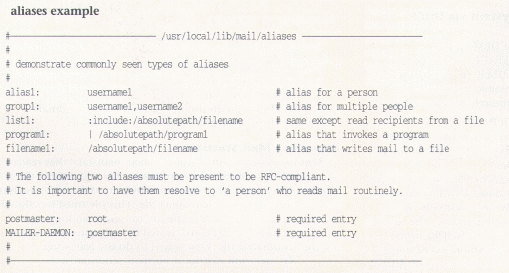
Aliases permit a number of things to happen:
provide a shorthand or well-known name for mail to be addressed to in order to go to one or more persons
invoke a program with the mail message as the input to the program
send mail to a file
All systems require aliases for Postmaster and MAILER- DAEMON to be RFC-compliant. Always be extremely aware of security when defining aliases that invoke programs or write to programs since sendmail generally runs setuid-root.
Changes to the aliases file do not take effect until the '/usr/lib/sendmail -bi' command is executed to build the required dbm tables. This can also be done by executing the 'newaliases' command, usually from cron.
Details concerning mail aliases may be found in the aliases(5) manual page.
The following tables are available, but rather infrequently used. Consult with the documentation that comes with the sendmail+IDA sources for details.
uucprelays
The uucprelays file is used to 'short-circuit' the uucp path to especially well-known sites rather than using a multi-hop or unreliable path generated by processing the UUCP maps with pathalias.
genericfrom and xaliases
The genericfrom file hides local usernames and addresses from the outside world by automatically converting inside usernames to generic 'From' addresses that do not match internal usernames.
The associated 'xalparse' utility automates the generation of the genericfrom and aliases file so that both incoming and outgoing username translations occur from a master xaliases file.
decnetxtable
The decnetxtable rewrites domainized addresses into decnet-style addresses much like the domaintable rewrites undomainized addresses into domainized SMTP-style addresses.
There are many places (see the Linux MAIL HOWTO in comp.answers or on rtfm.mit.edu for a list), but the definitive place is in the sendmail+IDA sources. Look in the directory <IDA_SRC_PATH>/ida/cf for the files DBM-GUIDE, OPTIONS, and Sendmail.mc.
Thanks go to Neil Rickert and Paul Pomes for lots of help over the years regarding the care and feeding of sendmail+IDA and to Rich Braun for doing the initial port of sendmail+IDA to Linux.
There is no “true standard configuration” of electronic mail transport and delivery agents and there is no “one true directory structure”.
Accordingly, it is necessary to ensure that all the various pieces of the system (Usenet news, mail, tcp/ip) agree on the location of the local mail delivery program (lmail, deliver, etc.), remote mail delivery program (rmail), and the mail transport program (sendmail or smail). Such assumptions are not generally documented, although use of the 'strings' command can help determine what files and directories are expected. The following are some problems we've seen in the past with some of the commonly available Linux binary distributions and sources.
Some versions of the NET-2 distribution of tcp/ip have services defined for a program called 'umail' rather than sendmail.
There are various ports of Elm and mailx that look for a delivery agent of /usr/bin/smail rather than sendmail.
Sendmail+IDA has a built-in local mailer for 'deliver', but expects it to be located in /bin rather than the more typical Linux location of /usr/bin.
Rather than go to the trouble of building all the mail clients from sources, we generally fake it with the appropriate soft links...
You set the default smart host via the RELAY_HOST and RELAY_MAILER parameters in the sendmail.m4 file that is processed into sendmail.cf.
To forward mail to a particular host or domain to a designated relay system, generally use the mailertable.
For example, to forward mail for relayhost.com to their uucp gateway system 'uucpgate'.
(in mailertable)UUCP-A,uucpgate relayhost.com
Frequently, Internet hosts will have trouble getting mail into misconfigured remote sites. There are several variants of this problem, but the general symptom is that mail is bounced by the remote system or never gets there at all.
These problems can put the local system administrator in a bad position because your users generally don't care that you don't personally administer every system worldwide (or know how to get the remote administrator to fix the problem). They just know that their mail didn't get through to the desired recipient on the other end and that you're a likely person to compain to.
A remote site's configuration is their problem, not yours. In all cases, be certain to NOT break your site in order to communicate with a misconfigured remote site. If you can't get in touch with the Postmaster at the remote site to get them to fix their configuration in a timely manner, you have two options.
It is generally possible to force mail into the remote system successfully, although since the remote system is misconfigured, replies on the remote end might not work...but then that's the remote administrator's problem.
You can fix the bad headers in the envelope on your outgoing messages only by putting a domaintable entry for their host/domain that results in the invalid information being corrected in mail originating from your site:
# (in domaintable)
braindead_site.correct.domain.com braindead_site.wrong.domain.com
or.....
Treat them as totally brain-dead and strip off all hostname.domain information in the envelope of messages to them from your site.
The '!' in the following results in mail being delivered to their remote site and appearing to be locally originated (for sendmail purposes). The return address for your site will not be changed, so the proper return address will still show up in the message.
# (in mailertable)
TCP!braindead_site.correct.domain.com braindead_site.wrong.domain.com
Regardless, even if you get mail into their system, there is no guarantee that they can reply to your message (they're broken, remember...) but then their users are yelling at their administrators rather than your users yelling at you.
Without use of any of the optional DBM tables, sendmail+IDA delivers mail via the DEFAULT_MAILER (and possibly RELAY_HOST and RELAY_MAILER) in the m4 file used to generate sendmail.cf. It is easily possible to override this behavior through entries in the domaintable or uucpxtable.
Forcing mail to be transferred via UUCP
In an ideal world (from the Internet perspective), all hosts have records in the Domain Name Service (DNS) and will send mail with fully qualified domain names.
If you happen to talk via UUCP to such a site, you can force mail to go through the point-to-point direct UUCP connection rather than through your default mailer by essentially 'undomainizing' their hostname through the uucpxtable. The result is that sendmail will then determine (via UUCPNODES in the sendmail.cf m4 file) that you are directly connected to the remote system and will queue the mail for delivery with UUCP.
# (in the uucpxtable)
# un-domainize sys2.com to force UUCP delivery
sys2 sys2.com
Preventing mail from being delivered via UUCP
The opposite condition also occurs. Frequently, systems may have a number of direct UUCP connections that are used infrequently or that are not as reliable and always available as the default mailer or relay host.
For example, in the Seattle area there are a number of systems that exchange the various Linux distributions via anonymous uucp when the distributions are released. These systems talk UUCP only when necessary, so it is generally faster and more reliable to send mail through multiple very reliable hops and common (and always available) relay hosts rather than through unreliable direct point-to-point UUCP links.
It is easily possible to prevent UUCP delivery of mail to a host that you are directly connected to. If the remote system is domainized, you can add an entry in the domaintable that will fully domainize the hostname, and prevent a match by the UUCPNODES line in the sendmail.cf m4 file. The result is generally that mail will go via the relay_mailer and relay_host (or default_mailer).
# (in domaintable)
# prevent mail delivery via uucp to a neighbor
uucp_neighbor.domain.com uucp_neighbor
To process queued messages immediately, merely type '/usr/lib/runq' which will invoke sendmail with the appropriate options to cause sendmail to run through the queue of pending jobs immediately rather than waiting for the next scheduled run.
Building and testing sendmail.cf
cd to $LIBDIR/CF (generally /usr/local/lib/mail/CF)
copy the example.m4 file to yourhostname.m4
edit it to do the right thing (set your relay, hostname,pseudonymns, etc.)
'make yourhostname.cf'
test that dude...
/usr/lib/sendmail -bt -Cyourhostname.cf
at the '>' prompt, try:"3,0 me" "3,0 my-uucp-neighbor!foo" "3,0 me@mynode.mydomain" "3,0 mynode!me" "3,0 me@somenode.com"
(all should “do the right thing” hopefully)put it into place as /etc/sendmail.cf
start up sendmail as a daemon
/usr/lib/sendmail -bd -q1h
put the above line in the /etc/rc.local file so sendmailstarts up routinely when the system boots.
Sendmail comes with a utility called 'mailstats' that reads a file called /usr/local/lib/mail/sendmail.st file and reports the number of messages and number of bytes transferred by each of the mailers used in the senmail.cf file. This file must be created by the local administrator manually for sendmail logging to occur. The running totals are cleared by removing and recreating the sendmail.st file. One way is to do the following:
cp /dev/null /usr/local/lib/mail/sendmail.st
Probably the best way to do quality reporting regarding who uses mail and how much volume passes to, from, and through the local system is to turn on mail debugging with syslogd. Generally, this means running the /etc/syslogd daemon from your system startup file with a line in /etc/syslog.conf that looks something like the following:
mail.debug /usr/adm/syslog.mail
The sendmail.st file does not grow enough to be a concern. If you use mail.debug and get any medium to high mail volume, the syslog output can get quite large. Output files from syslogd generally need to be rotated or purged on a routine basis from cron.
There are a number of commonly available utilities that can summarize the output of mail logging from syslog. One of the more well known utilities is the syslog-stat.pl file that is distributed with the sendmail+IDA sources.