
Linux and the PalmPilot

My brother and I share many things, not the least of which is an interest in electronic gadgets. I tend to go big—new computers, new monitors, new expenses. My brother thinks small—Personal Digital Assistants, also known as PDAs. He's collected a few different models over the past couple of years. Right now I think he's working on a PSION or possibly one of those Redmond atrocities known as Win/CE PDAs. My brother says of these that “wince” is about right.
I had mentioned sometime back that I wanted to get a PDA and thought a U.S. Robotics PalmPilot (now 3Com) would be the one to get. I had read somewhere that there was Linux software for use with the Pilot and that meant I could download and upload data directly to my Linux system. Fortunately, my little brother was listening that particular day. For Christmas this year he gave me his old PalmPilot. Okay, it's used—but it's still a cool gift.
The PalmPilot actually comes in four different configurations. The earlier versions are the Pilot 1000 (the version I now have) and the Pilot 5000. The newer versions are the Pilot Personal and the Pilot Professional. The older versions don't have a backlit display and come with significantly less memory. They can, however, be upgraded. My brother had upgraded the 1000 to 1MB of memory prior to giving it to me. Besides more memory, the new models have version 2.0 of the operating system, and the Professional has a TCP/IP stack and e-mail tools.
If you're going to use a PalmPilot with Linux, you need to start with its HOWTO document. The PalmPilot HOWTO is available from the Linux Documentation Project (LDP) as well as from its official site. The HOWTO, written by David H. Silber, is quite easy to follow and offers all the information you need to get started. I should note that I managed to get the software working using only the HOWTO—I didn't need to subscribe to any mailing lists or scan weeks of newsgroup archives. This is a credit to both the HOWTO author and the simplicity of the PalmPilot.
The HOWTO points the reader to the primary software archives from which you can download a variety of packages. The packages of interest to the new user are:
pilot-link: The main package of interest, it includes the pilot-xfer program for transferring programs and data to and from the Pilot and Linux along with a host of other tools. The current revision of this software is 0.8.9. Note that the HOWTO links directly to the 0.8.2 version. The software archives list this package as pilot-link.x.y.z.tar.gz, where x.y.z is the version number.
PilotManager: Graphical interface to the Pilot for UNIX/X systems. Handles most of the tasks that the pilot-xfer software does from the command line, but uses an X-based interface. This is a Perl/Tk application.
MakeDoc: Turns text files into a document format better suited for the Pilot.
prc-tools: The package you need in order to develop software for the Pilot.
The first package to retrieve is the pilot-link software, which contains a collection of about 30 programs. Most of them have very specific tasks such as uploading or retrieving “Memos” or “ToDo” lists. Of these programs, the most useful is pilot-xfer. This program is used to back up and restore complete programs and databases, even the entire Pilot system. It can even do incremental backups automatically. All of the programs in the pilot-link package are command-line programs.
PilotManager is a Perl/Tk graphical interface to the Pilot. It apparently works with CDE's Calendar applications, but since I don't run CDE I didn't try this feature out. The list of features states the PilotManager has four primary features: uploading new applications and databases, synchronizing the Pilot with the CDE Calendar application, uploading text files as Pilot Memos, and backing up the Pilot to your UNIX system.
MakeDoc is a tool for converting ordinary text files into a compressed format. This format can be read by Rick Bram's PilotDOC reader, which is now a shareware product known as AportisDoc Trialware 2.0. Rick developed this reader because the Pilot's document handling was limited to relatively small documents.
Finally, prc-tools are a set of tools for building applications for the PalmPilot. This package is necessary only if you intend to do development work. If you go this route, you'll need to get the GNU gcc, gdb and binutils packages as well. All of this is explained in the HOWTO.
Building the pilot-link software is quite simple. After you've unpacked the package (tar xvzf pilot-link.tar.gz), decide where you want to install it. I installed it under /usr/local/pilot/. You must tell the configure script where the installation directory is; it assumes /usr/local. Should you also decide to install the man pages somewhere unusual, you should tell the configure script that as well.
To build the package, run the configure script, followed by make and make install. Here is the configure command I used:
 configure --prefix=/usr/local/pilot\
     --mandir=/usr/local/man\
     --with-java=/usr/lib/java
The Java option was necessary to get a clean run in the configure step. It doesn't actually cause the Java extensions to be built—that has to be done manually, although these extensions are not required. You can use pilot-xfer and the other tools without the Java extensions.
After the make install was complete, I added /usr/local/pilot/bin to my path as:
PATH=$PATH:/usr/lib/pilot/bin
export PATH
At this point the pilot-link tools are ready for use with your Pilot. There are man pages for only a few of the programs in pilot-link, but most provide help if invoked without options or command-line arguments.
The Makedoc utility is a single C++ file. You can compile it using the following command line:
g++ -DUNIX makedoc7.cpp -o makedoc

Testing the Setup
Once built, you need to test that the tools are working properly. The first thing to do is connect your PalmPilot HotSync cradle to your Linux box. To do this, connect the serial cable on the cradle to one of the serial ports on your computer. The cable on the cradle has a female connector, so you may need a gender changer to make the connection. I use an A/B switch box to connect both my external modem and Pilot to the same serial port (/dev/cua1) while using the other serial port for my mouse. This seems to work just fine, but be careful. If you switch between the two devices while one is running it can cause you to either have to manually reset the modem (turn it off and then on again) or reload your Pilot. So, be careful not to change the switch box setting while using either the modem or the Pilot.
Another thing you might want to do before trying the software is to make a symbolic link from the serial port to which the Pilot is connected to /dev/pilot. Most, if not all, of the tools in the pilot-link software use /dev/pilot as the default device, although they all take the port device as a command-line argument. Having the /dev/pilot symbolic link makes life a little easier.
You should also make sure that the serial device has the correct read/write permissions for whatever user ID you use while reading and writing to the Pilot. On my system /dev/cua1 has 666 permissions so that an ordinary user can access it. I don't know if this is a security violation or not, but it's my box—I'm the only user and I'm not too worried about security on it.
Now that the hardware is connected, you should test that the software can communicate with your Pilot. Place the Pilot in the cradle, making certain that it is properly seated. (See the instructions that come with the Pilot.) The first test you should run is:
% pilot-xfer /dev/cua1 -l
where /dev/cua1 is the port the Pilot is connected to. If you aren't familiar with the serial port devices, /dev/cua0 is generally the first serial port and /dev/cua1 is the second. There may be others configured for your system. Once you've typed this command you will be prompted to press the HotSync button on the Pilot's cradle to begin the data transfer process.
The -l option for pilot-xfer will simply list the applications currently installed on the Pilot. If this works, you're in business. If not, check that the cable connectors are properly fastened together. Don't forget to press the HotSync button on the cradle once you've started the pilot-xfer command.
If the communication between pilot-xfer and the Pilot is working, you will get a list of the applications and databases installed on the Pilot. The results of this command vary depending on what else you have installed on the Pilot, but my stock configuration looks like this:
% pilot-xfer /dev/cua1 -l
 Waiting for connection on /dev/pilot (press
     the HotSync button now)...
 Connected
 Reading list of databases...
 'System Preferences'
 'Graffiti ShortCuts'
 'AddressDB'
 'MemoDB'
 'ToDoDB'
 'DatebookDB'
 List done.
Once you get this command working, do a backup of your Pilot data by typing:
pilot-xfer /dev/pilot -b `date +%Y%m%d`I do this in my ~/lib/pilot directory. The “date” is actually the name of the directory where I want my backups placed. I use the format YYYYMMDD so that the directories sort correctly when listed using the ls command.
Now verify the programs and databases you just backed up:
pilot-xfer /dev/pilot -u `date +%Y%m%d`
The pilot-xfer program should recognize that the data has not changed and indicate that no changes are being made. That's what you want.
Pilot programs have a .prc extension. Pilot databases have a .pdb extension. Much of the HOWTO documentation refers to all of the files (programs and data) as “databases”. Unless you're going to do development work the difference isn't important. When you upload a .prc file to the Pilot, you've loaded a program that it will run. The .pdb file is the data the programs will use.
There are no user programs or databases included in the pilot-link package that you can upload to your Pilot. You can find these at one of the many shareware sites on the Internet. The place to start your search for Pilot applications is 3Com's official PalmPilot site: http://palmpilot.3com.com/, which includes links to a number of shareware and freeware sites. c|net also carries a collection of Pilot applications you can retrieve from their DOWNLOAD.COM site. This site also provides descriptions of the packages, which I find very helpful.
At the 3Com site, you will also find a collection of four games: Hardball, Minehunt, Subhunt and Puzzle. These are archived into a zip file. 3Com refers to this as a Windows file, but it can be used on Linux. Download it, taking care to specify a binary file transfer if you're using FTP. (Netscape and the other browsers should download it using a binary transfer automatically.) Once retrieved, use unzip to unpackage it. You should have four .prc files (file names are in uppercase) and a README.TXT. Be sure to read the text file. Now, let's take a look at how to upload these games to your Pilot using the pilot-xfer program.
You've already made a backup, so you are now ready to try making changes to your Pilot. Change directories to wherever you unpacked the games.zip file and run:
pilot-xfer /dev/pilot -i *.PRC
The -i option is used to install new files into the Pilot. This command initiates the transfer of all four of the games in the package to the Pilot. The pilot-xfer program prompts you to press the HotSync button on the Pilot's cradle. Once you've pressed this button, the uploads will begin. Each of the applications uploaded will be listed by pilot-xfer. If you watch the Pilot's screen, you'll see the real name of the package as it is uploaded. This is the name the Pilot uses to reference the uploaded program.
When the upload is completed you should hear an audible signal, after which pilot-xfer exits. The programs are now ready to use. You can pull the Pilot out of its cradle to check that the new games are there. Try them to make sure they are working properly.
That's all there is to it! See how easy it is to use the pilot-link software? As well written and easy to use as so much of the software for Linux is, I am still amazed and impressed at the true simplicity of the Pilot software.
Now it's time to look around for some decent applications. Below is a list of some programs you may wish to look into:
HackMaster (shareware)
AppHack (shareware)
DinkyPad (shareware)
ClockHack (freeware)
LaunchPad (shareware)
SelectHack (shareware)
utilBas (freeware)
Pilot Stopwatch (shareware)
SketchPad (freeware)
All of these programs are available via links from the DOWNLOAD.COM site, as well as from a number of other Pilot shareware sites.
I highly recommend the HackMaster tool. It is needed in order to use the AppHack, MenuHack and a few others. The AppHack allows you to use the four real buttons (as opposed to the “silk screen” buttons) on the Pilot to launch applications. The MenuHack allows you to bring up the menu bars for applications by clicking on the top line of the window. Normally you need to click on the Menu silk screen button. LaunchPad is also a neat application. It provides a set of user-definable notebook tabs in which you can place the application icons. Consider it a file manager—not bad for a tiny device like the Pilot.
MakeDoc is a Linux-side tool for converting text files into a format that can be used by the AportisDoc reader. To use MakeDoc, run it with a command that looks similar to the following:
makedoc data.txt data.prc "Data to display"
where data.txt is the name of the text file you want to convert and data.prc is the name of the file you will create. The text enclosed in double quotes will be used as the document title in AportisDoc's list of documents. Again, once you've converted the text file to the proper Doc format, you can upload it with pilot-xfer as
pilot-xfer /dev/pilot -i data.txt
Once you've begun using your Pilot on a regular basis, you will want to do backups to your Linux box. Referring to the backup command we ran earlier,
pilot-xfer /dev/pilot -b directory-name
will do a complete backup of your Pilot. To do an incremental backup, give the command:
pilot-xfer /dev/pilot -u directory-nameThe incremental backup should be done on an existing directory, but the complete backup should be done into a new directory. Like managing your Linux box, a good regimen of complete and incremental backups is recommended. Currently I do complete backups weekly and incremental backups whenever I add important data I don't want to lose.
Restoring lost data is fairly straightforward as well. The command
pilot-xfer /dev/pilot -r directory-name
will upload the backed up data from directory-name to your Pilot. Pretty simple, isn't it? The pilot-xfer program can also delete and merge databases and purge unwanted data and programs from the Pilot.
U.S. Robotics' PalmPilot has an advantage over other PDAs because of its open architecture, which means it's easier for the general public to create applications for this PDA than for some of the other popular PDAs. Because of this openness, there are quite a few freeware, shareware and commercial applications available for the Pilot.
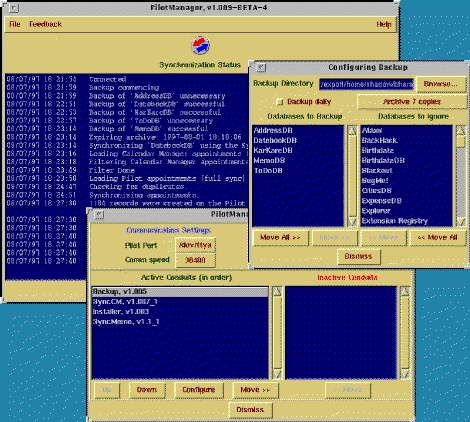
Pilot Manager Screen Shot
The PalmPilot software available for Linux may have the best configuration-to-usefulness ratio of any Linux software. It's a breeze to get running and makes management of the Pilot from your Linux box, or other UNIX systems, very simple. Since the tools are simple in nature they can easily be incorporated into other tools. This makes the PalmPilot a terrific addition to the ever-increasing range of tools available for your personal and business use of Linux.


