Magick with Images
Ever since the first computers with graphical displays, computer editing and transformation of images has been one of the most popular application areas. There should be little surprise that there is a multiplicity of free graphic software available under Linux.
Many of the available packages are targeted towards specific applications: there are many graphics libraries available for programmers which address reading and writing specific file formats. There are also image viewers available which allow interactive editing as well. ImageMagick is different in that it provides a comprehensive set of tools which can be used interactively in the X Window System or command-line driven. These tools are based around a common library, written in C.
For those who want to go beyond the capabilities of the precompiled programs (see the sidebar “Getting ImageMagick”), the library is extensible to allow the addition of different image file formats. The library can also be used from your own programs through its well documented API. In addition, both Perl and Python interfaces are available to allow image manipulation from scripts.
If you want to try out some of the features of the ImageMagick tools, many of them can be used on-line via the Imaging Machine at http://www.vrl.com/Imaging/.
It is impossible for an article such as this to cover every aspect of ImageMagick; therefore, I have written a short description of each of the major programs. A very good set of on-line documentation can be found at the ImageMagick web site—it covers all aspects of using and programming the system.
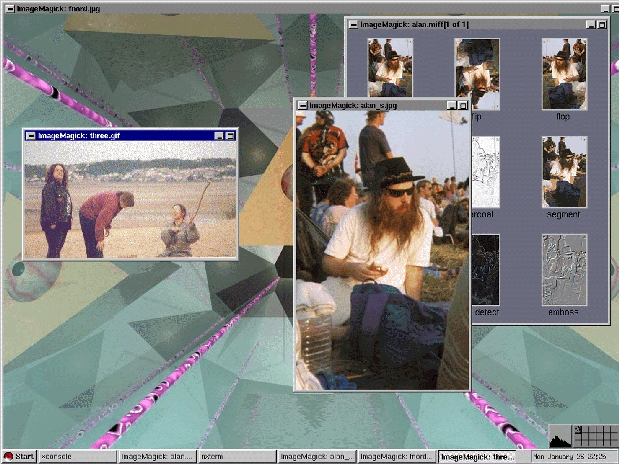
Figure 1. Display of File Images
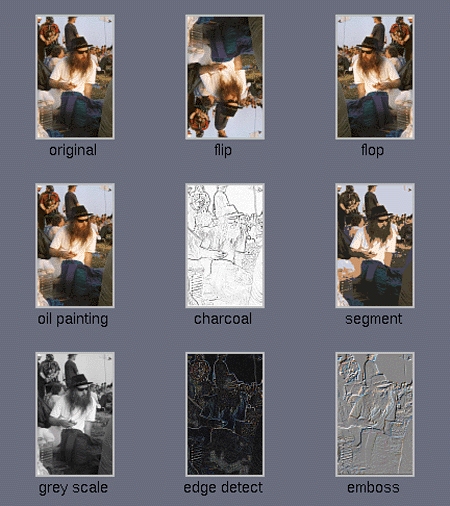
The display program loads images from a file and displays them on the screen (see Figure 1). It has a large number of command-line options which make it very flexible. Display is ideal for running from a script for a presentation or demonstration and will show video as well as still images. Images can be manipulated in a variety of ways, either from the command line or interactively. Figure 2 shows a set of images (the original is in the top left hand corner) that illustrate some of the effects available. In each case, the settings used are the default settings for that effect.
Figure 2. Display of Thumbnail Images
The display program is quite similar to John Bradley's xv image viewer. To display an image, you can either select one interactively from the menus (see Figure 3) or at the prompt type the command:
$ display image.gif
In my research I work with many images in a raw format called YUV 4:1:1. This represents an image as a number of bytes. The YUV representation of an image is a combination of the luminance information in the image (a black and white version) called the Y component, and the chrominance information (the extra information required to make the black and white image into a colour image) called the U and V components. The Y component is thus made up of one unsigned byte per pixel in the image. Since the human eye is less sensitive to colour than luminance, the U and V components, each consisting of a number of signed bytes, are included at half the rate of the Y component. This gives a rather primitive form of lossy image compression compared to the more usual RGB representation where three unsigned bytes are used for every pixel in the image. In the examples here I will use a 176 by 144 pixel image. In order to display such an image, the following command can be used:
$ display -size 176x144\
image.yuv
In addition, if your image file has a header which is not among the supported types and you know that the image is in YUV format (this also applies to other raw formats), you can display it if you know the size of the header. For example, the following command:
$ display -size 176x144+16 image.yuvdisplays a raw YUV image, with a 16-byte header.
Import is an X image-capture program. It captures the contents of a target window, which may be specified in a variety of ways and stores it in a file. The captured image can then be viewed and manipulated with the following tools.
Animate, as its title suggests, displays an image sequence, which can be an MPEG file or a multi-image TIFF or MIFF file. The program works out the number of colours required to display the sequence before starting to play it so that the same palette can be used throughout to avoid interactions with colour schemes of the X Window System.
Montage combines several images into a single image. It is useful in preparing figures for papers and magazine articles, for example. There are options to annotate each image with text and to specify the background texture and colour and the border size. Figure 2 was created from the individual images by use of the montage program. The layout of the tiles and the labels were specified on the command line, and all other settings kept their default values.
Convert allows command-line conversion of images to and from many different formats. Its most common use is to convert to, and from, the ImageMagick MIFF format.
Mogrify provides a variety of different transforms which can be applied to images. A command-line interface to the transforms is available in the menus of the display program.
Identify prints all sorts of useful information about images, including a check on the completeness of the image and whether it is corrupt or not. Here is some example output:
$ identify image.gif
image.gif 106x80+0+0 PseudoClass 256c 13453b GIF 2s
In this case the image is in GIF format image, 106 by 80 pixels in size, has a PseudoClass colour map with 256 colours, is 13453 bytes in size and took 2 seconds to process. The -verbose option prints a more comprehensive list of information including the colour map.
Combine allows you to combine images in all manner of different ways. It can also be used to create difference images from two input images to see how they differ. There are a variety of ways in which images can be combined in addition to these two.
While there are many packages available with some or all of the functions listed above, the real strength of ImageMagick lies in the ability to write programs using its library functions.
Included in the distribution is a simple program to demonstrate how to write your own image manipulation programs. It loads an image in JPEG format and creates a thumbnail in GIF format. I have changed the program slightly from its form in the distribution and presented it below. The thumbnail version will look something like the original image in Figure 1.
The C API to the ImageMagick library is documented through a set of web pages, which are also included in the distribution.
To compile the example code in Listing 1, you will need to give a command such as:
gcc -o example example.c -lMagick\
        -lX11 -lXext -ltiff -lpng\<\n>
        -I/usr/include/X11/magick -L/usr/X11/lib
The exact number of libraries required and the location of the libraries and include files will depend on the configuration of your system. The example given here works on my Red Hat 4.2 system installed from the RPM ImageMagick distribution.
To use the program, create a file called image.jpg and run the program in the same directory. The result will be a thumbnail-sized version of the original image called image.gif.
Using the included documentation, it is easy to see how this example can be extended and modified to form the basis of a wide variety of different functions. The same calls may also be made from Perl using the PerlMagick interface. Since I am not a Perl programmer, I have not investigated this interface.
ImageMagick is a complex package to use to its full potential; it is also very powerful. It offers a wealth of features in a flexible manner. It is easy to use the basic features without worrying about the more esoteric options available. I suspect that many people will use the basic options combined with only one or two of the more advanced options according to their application.
I consider ImageMagick a package well worth investigating for anyone needing anything from a basic image viewer to a full-fledged custom image manipulation system.
Pictures of Alan Cox are courtesy of Justin Mitchell and the ray-traced background image in Figure 1 was produced by David Beynon.