
GUI Development with Java
If you looked at the earliest versions of Java and concluded that its GUI development toolkit wasn't quite ready for prime time, it's time to look again.
The Java Foundation Classes (JFC) introduced with Java Version 1.2 bring Java forward to the point where it can easily compete head-on with Motif and MFC for professional GUI development. If you already know the Java language, JFC can beat both Motif and MFC hands down for ease of programming. In this article, I will show code that was developed “by hand” using just vi and the Java Development Kit (JDK). Many higher-level development tools and GUI builders are available to make this job even easier.
Portability is one of the holy grails of system designers. The UCSD Pascal System of 1980 compiled into portable P-Code that could be interpreted on most of the microcomputer systems common in its day. The C language and the UNIX operating system Linux is based upon both became popular because they could run on a variety of platforms. The latest newcomer is Java. Java programs compile from source code into “byte code”, a portable and compact machine representation of the executable statements the programmer wrote.
C and C++ are well-known languages in the developer community. To help developers come up to speed quickly and easily, Java borrows most of the syntax of C and quite a bit of the syntax of C++. All the basic syntax operators such as +, -, *=, (), {} and others work. For C programmers who wish to understand Java's OO syntax, think of objects as structs with functions associated with them. Note that all methods (functions) are part of objects, so the syntax
objectName.function(args);
is normally used. One of the most notable differences from C is the lack of pointers, malloc and free.
Pointers were necessary in the days when we needed to access words in particular locations in memory, but have led to a lot of unreadable and hard-to-maintain code. The functions malloc and free provide C with a low-level paradigm for allocating and freeing memory. Java does away with both; since Java programs are compiled for the Java Virtual Machine, in which the addresses are unknown at compile time, there are no pointers. This has the beneficial side effect of ruling out viruses based on jumping into the BIOS or system disk-formatting routines; no syntax is present in the language or in the underlying virtual machine for referring to a particular location in real memory.
As in C++, allocation of memory is handled by the operator new, which is similar to malloc but can be used only to allocate objects and arrays. Freeing of memory, however, is automatic; no free or delete is available, and memory is reclaimed by a “garbage collector” routine at runtime. Sounds like it gives you less control, but if you write C, you probably don't bemoan the fact that local variables are allocated and freed when you enter and leave a function. Java simply extends this notion to arrays and objects, which makes for more reliable programs.
int foo() {
int i;   i is allocated "someplace" in
         memory (or register)
         do something with i
}        i is automatically reclaimed
Java is an object-oriented language in the traditions of C++ and Smalltalk. Java eliminates a few C++ operators, but experienced C++ programmers have little trouble upgrading their skills to the new language.
Instead of C++'s multiple inheritance, Java provides “interfaces” with multiple inheritance of specification but not implementation. This may be more powerful than C++, since it allows multiple views on an object; that is, a class can implement several interfaces and can be passed by any of those type names, exposing only the methods known to objects implementing that interface. This can provide greater type safety than traditional C++ multiple inheritance.
If it's a complete programming environment you want, Java has it. Instead of using the native C library, for example, Java programs use classes and methods in java.lang, the package of classes for Java language features. One example is String—normal quoted strings like “Hello, world” compile to String objects, and the String class has methods such as compareTo, equals, substring, startsWith/endsWith, etc. No more worry about bcmp versus memcmp; Java provides a single set of methods that works everywhere. AWT, which is the subject of most of this article, provides a portable Graphical User Interface layer. Java.util is a package of utility routines such as random numbers, collection classes and others.
In today's global village, it's important that software be able to function in any locale. Internationalization is basic to “Java, the programming language for the Internet”. Strings and characters are therefore 16-bit Unicode rather than 8-bit ASCII, which is not too surprising (see http://www.unicode.org/). What may surprise you is that Java identifiers can be written in Unicode characters, so that programmers in any language can write identifiers which make sense to them (assuming they have a way of typing the characters).
If it is database access you want, Java provides the Java Database Connectivity (JDBC) to access relational databases. It's patterned loosely on Microsoft ODBC, but operates at a somewhat higher level. There is even a bridge to ODBC, so you can access an ODBC database even if a Java driver is not yet available for it. (See “Database Connectivity Using Java” by Manu Konchady, LJ November 1998.)
To meet the needs of rapid application development, JavaBeans supports composition of programs out of reusable components in GUI builders. Not just the GUI's arrangement but the entire application can, in many cases, be “written” by visually indicating the relationship between events such as a button press and software components such as spreadsheets, graphing Beans or HTML viewers. Since the ActiveX market didn't grow as expected, many ActiveX developers are converting their components into portable JavaBeans. And since Beans and applications based on them can run on any UNIX, Linux or *BSD system, this can be only good news for Linux developers.
But isn't Java proprietary? Well, although Sun invented Java and many of the pieces of technology that accompany it, it can be called an “open” technology. Old-timers will remember how Sun dominated the UNIX distributed file system by making its NFS a public specification, even giving away the source for the RPC and XDR layers that underlie NFS. From the beginning, the specification of the Java language and the specification and format of the compiled class files have been publicly available and the source code of the public API has been included with the freely-downloadable JDK. The source for everything—compiler, runtime interpreter and the internal parts of the API—has been available for free under a non-disclosure agreement that permits free redistribution of binaries. Without this, there would most likely not be a Java for Linux, SunOS4.1 or *BSD. In fact, there are several: JDK ports, Kaffe ports and others. Further, the licensing is designed to encourage the “open API” concept. Read this extract from Clause 2 of the JDK license, which every Java developer who uses Sun's JDK or any derivative must agree to:
In the event that Licensee creates any Java-related API and distributes such API to others for applet or application development, Licensee must promptly publish an accurate specification for such API for free use by all developers of Java-based software.
Because of this, members of the free software community have responded as enthusiastically to Java as they did to Linux. Several free compilers, at least one free interpreter and many free libraries are available. Even commercial companies are making some libraries free. A good place to explore Java freeware (and payware) is Gamelan (pronounced Gamma-LOHN), at http://www.developer.com/. My own contributions include Jabadex, a Rolodex-like application, a set of X Color names (Java's AWT has only 13 named colors) and others (see http://www.darwinsys.com/freeware/).
Most recently, Sun announced easier licensing—the Sun Community Source License—presumably patterned after the Mozilla license. It's not the BSD Copyright or the GPL, but it's a step closer. See http:java.sun.com/ and look for licensing.
Java's developers wanted everything about Java to be portable, including how to deal with the X Window System, MS Windows, Macintosh and other window systems. The Abstract Window Toolkit is the solution they provide. Instead of starting by writing components that work everywhere, they wrote a library of GUI components that is a least common denominator to what the big three systems offer. It used the underlying native components on each platform, so that it would “look and feel” like a native application. This is an important aspect of user acceptance—if users have to learn a whole new GUI just to use your software, they probably won't bother. This approach limited what you could do with the early versions of Java's AWT, but with more recent versions, this is no longer true. The JFC components bring Java to the forefront of fully functional GUI development environments.
Java has been increasing in popularity since its first public release in 1995. Version 1.0 incorporated the Applet API, a basic window toolkit (AWT) and numerous other APIs. Version 1.1, released in the fall of 1996, added a tremendous amount of new functionality including internationalization, better coupling between GUI controls and their action-handling code, text formatting and hundreds of new classes. JDK1.2 has just been released at the time of this writing (January 1999). Version 1.2 of the JDK, which is also being called “Java 2”, includes the Java Foundation Classes (JFC). JFC includes the Swing GUI classes which are the focus of this article, some accessibility features to make computing usage easier for persons with various disadvantages, the 2-D graphics package and the original AWT.
The 2-D graphics can be thought of as PostScript for Java. If you've done any PostScript, you'll know it is really two things: a scripting language and a marking engine. Since Java already provides a powerful programming language, the 2-D developers needed to provide only the “marking engine” (putting marks on paper), transforms, composites and other fancy graphics and a much-expanded set of fonts. However, it is implemented in a backward-compatible way: a Graphics2D object is subclassed from a Graphics object. This provides Java developers and users with all the fancy graphics capabilities invented over a decade of desktop publishing, all in a platform-independent way.
The Swing Set portion of JFC is named after the musical style which revolutionized popular music in the 1940's with such greats as Duke Ellington (Hint: a penguin-like creature named Duke is Java's mascot and logo). Swing has many features, including:
Customizable look and feel
More choice items, ComboBoxes, etc.
More layout managers, panels with borders, etc.
Tabbed folders
Table View widget
Tree View widget
Tooltips
Easy to make all standard types of Dialogs with one call
Color, Font, and other chooser dialogs
Figures 1 and 2 are UNIX screen shots of the color chooser (with tool tips) and the TreeView program; the source for these and all other examples shown here is on the FTP site.
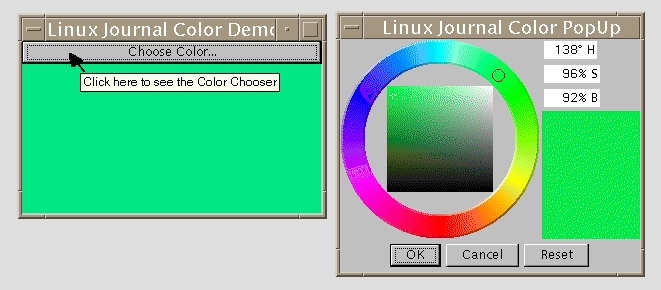
Figure 1. Color Chooser
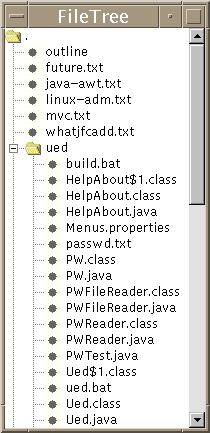
Figure 2. TreeView Program
Java 1.1's look and feel was that of the underlying operating system. On Motif, its menus and buttons look like Motif widgets; on MS Windows, they look like Microsoft widgets; on the Macintosh, like Macintosh widgets. They truly are the native platform's widgets. Using a Java interface called “Peers”, a 1.1 program constructs and uses native toolkit components, but the developer never has to think about it. You simply write in terms of AWT components.
After 1.1 had been in use for a while, somebody at JavaSoft decided to poll the developers. Apparently 50% were happy with the status quo, another 30% favored a platform-independent look and feel, while the remaining 20% wanted to be able to provide their own corporate look and feel, to be the same across all platforms. The Swing set UIFactory was the result. All Swing components have a settable look and feel. The look and feel is provided by a combined View-Controller object generated by a class called UIFactory. UIFactory is powerful—it can make up and apply new UI objects on the fly, resulting in programs that can change their look and feel on demand. Our demo program (see below) has a button that lets you choose between several “look-and-feel” styles. The Motif emulation is included in the JDK. The “Metal” style is a crisper look developed by JavaSoft. Implementations of the proprietary look-and-feel of MS Windows 95 and the Macintosh UI are available, but only on those platforms (for licensing, not technical, reasons).
When you switch, the entire UI is repainted in the new look without losing any of the choices you have made so far. It is quite an impressive operation. Other look-and-feel classes such as an OPEN LOOK or NextStep are also possible, even probable. The only downside I have seen to Swing is its performance. Don't expect Swing applications to be quite as snappy as native C/C++ Motif/MS-Windows/Macintosh applications, particularly in startup time. Once the application is up, though, Swing applications run acceptably fast on modern computers with adequate memory.
Java can be used to create many kinds of programs. One of the first to garner widespread attention was Web Applets, which dynamically extend the behaviour of the web browser by being embedded in a web page. Java can also be used to make Web Servlets, background TCP or UDP servers, or ordinary GUI-based desktop applications. The latter are easiest to demonstrate, so we'll use them for our example. Most of what we say here applies to the GUI part of an Applet as well.
The simplest application is probably a window with a quit button that exits when you run it. The simplest form of the program is shown in Listing 1.
In this listing, the class ButtonDemo1 is both the “model” (data handling code) and the “action listener”, the code that responds to user events such as pushed buttons. The class “extends JFrame” so that it can be a top-level window. Also, it “implements ActionListener” so that it can provide the actionPerformed method called by the button when it is pressed.

Figure 3. Button

Figure 4. Demo Button
Having a GUI layout be its own action listener works adequately for toy applications. The actionPerformed method has to figure out somehow which button was pressed. It's not hard here, but doesn't scale well: as the code gets larger and larger, it becomes difficult to manage all the interactions among the GUI components. Thus, it is preferable for each component to have its own action listener. One way of doing this is to use Java's “inner classes”: write one class inside another. The inner class is syntactically analogous to nested procedures in languages like Pascal. In Listing 2, I have simply added a second button and recast the code so that each button has its own listener.
Listing 2. Demo Button with Inner Class ActionListener
Now we can write a third version (not shown, but available in the archive file on the FTP site) that uses CheckButtons instead of JButtons. This version will not quit, but will change the GUI among those listed.
The action listener for each button just calls the UIManager class' setLookAndFeel method with the correct full class name and a utility class' updateComponentTreeUI passing in the top-level window (the JFrame subclass). This changes all components in the tree to display in the newly selected look and feel. Since some components may need a different size, we again call the JFrame pack routine, which computes the sizes of all components and makes the main window large enough to hold them all.
This, along with a working knowledge of the other “action” components, is enough to begin writing portable Java-based GUI applications. However, before we can approach large-scale applications, we must consider the organization and partitioning of the code, and the ideal way to handle this is with a paradigm known as MVC, or Model-View-Controller.
Model-View-Controller provides a powerful model for separating the functionality of a GUI-based application into three constituent parts. Putting it simply, the model is the code that keeps track of the data. The view is the code that displays the model on screen. The controller is the code that responds to user actions such as mouse clicks, button presses and the like. This separation, first formalized in 1988 for use with Smalltalk-80, has become the dominant model for object-oriented developers building GUI-based applications. And with good reason: it partitions the code into three (or more) reasonably small modules. It provides maximum flexibility—there can be more than one view and more than one controller. In a slide show program, for example, you might have a Slide Show view and a Slide Sorter view. Either or both would be visible, each in its own window. With MVC, a change to either would immediately be reflected in all the views. So a results-oriented way of looking at MVC is a way of making all the views on your data be dynamically self-updating as the data changes.
Let's take that slide show program as a simple example, which I've called JabberPoint (no relation at all to PowerPoint). The main program (see Listing 3) simply creates the model, the view and the controllers, then connects them together.
The data or model is maintained by a class called JPModel. It is little more than an array of Strings, except that each line has a Style associated with it. The model also has certain other data, such as the current slide number. Plus, it has methods for updating the data. This version of the program doesn't have any slide-editing capabilities (I still use vi to edit the show's text), but it does have methods—in the model—to change the current slide number.
Note that this is not the full source code, but only the fragments needed to show the MVC architecture. If you want the full source code to compile or use, go to the course author's web site (see sidebar) and follow the link to Free Software.
The model contains the data and functionality, and can be displayed by many views. It commonly includes a main program and may subclass java.util.Observable.
The view is the GUI or display of the model's data. It commonly creates a frame, or is an applet, and adds listeners. It may implement java.util.Observer.
The controller handles events for the model and the view. It commonly implements listener interfaces and responds to events by calling methods in the model.
Part of the model, Model.java, is shown in Listing 4.
The simplest view is a SlideShow view, which simply paints the current page in large letters. This view is a Component that can be embedded in a Frame or an Applet.
How does it know when its data has changed? Note the method update. This is not the update method of AWT, but is part of the Observable interface. This update simply saves the data that was passed in as a Slide and calls AWT's repaint, which will call the paint method a few lines below it in the listing.
There can be more than one view. A slide-show program usually has three: the slide show (which we implement), the Outline and the Sorter (which we do not yet provide). Each of these would be a different view and would be registered as an Observer for the model as above. You would switch between them with a CardLayout or some kind of Tab Layout manager, or they could each be in a Frame. Since they use Observable/Observer, when you update the data in one window it would immediately be updated in all of them.
The controllers are called when the user does something. The KeyController.java is a simple controller that responds to PageUp and PageDown (or Enter) and moves the current page up or down as appropriate. It is “connected” with
frame.addKeyListener(new KeyController(model));
A Controller does not have to be an explicit listener. We might, for example, use a MenuBar as a listener and connect it with the statement
frame.setMenuBar(new MenuController(view,model));after the instantiation of KeyController in our main program. It then calls methods on the Model, such as nextPage.
We can add additional functionality such as loadFile. When we get around to writing the editing part of this program, we can add methods such as saveFile, newFile, etc., to the model and call them from here.
One complication is that the MenuController may need access to the top-level frame (just for purposes of Dialog creation), but the view is a component inside the frame, and we don't wish View to know too much about its environment. One way around this is to pass the frame into the MenuController's constructor; another is for the view to have a getFrame method.
The model, view and controller are usually tied together with a main program; the part of JabberPoint.java that sets this up is shown in the method JPMain, a “Constructor” in Listing 3.
MVC can be more complex than this, although we've covered the basics here. For an extremely powerful (and wonderful) example, see the JFC/Swing components JTable and TableDataModel. In fact, we'll use these in our simple UNIX Administration Tool.
Here we present a simple example of a Linux/UNIX administration tool, a program for viewing password and group file information. It may seem strange to write system-specific administration tools in a portable language—this tool will work on most UNIX variants. And anyway, Java is a nice language to write in, and the JFC GUI components bring the creation of powerful tools to a wider audience. In particular, this tool will let us showcase the JTable widget, which provides most of the screen functionality of a spreadsheet, including dynamically-arrangeable columns and other nice options.
Since Java is portable, it doesn't provide an API for reading the system password file. We designed and wrote a class PW that has the same public members as the C-language structure returned by the system password resolvers. We also provide a “PWReader” class to read them and provide a sample implementation that just reads from a traditional format password file. This is not suitable for production use on most systems, but serves as a simple demonstration. Since these readers don't affect the GUI, we won't discuss them in detail here, but the code for both is on-line.
Since we want this to be a “good” application and maybe the basis for a general UNIX user database editor (read, write, validate) later on, we'll design it according to the model-view-controller paradigm from the start. I called this program Ued, originally in tribute to a much older program written at the University of Toronto around 1982 and maintained for a time by my colleague Geoffrey Collyer. My program has no code in common with that older ued. The class UedModel (see UedModel.java) is the user data portion of the program. UedView displays a list of users or groups on the screen. UedControl responds to user requests to modify the data. The main thing to note is the look-and-feel it presents (see Figure 5).

Figure 5. Ued Screenshot
Note that you can drag columns around. If we wanted the user to be able to sort by user ID, for example, we'd have our sort routine interrogate the “table model” to see the current column order and use that for sorting. You can select a column by clicking on its title. (This feature isn't used here, but would be in a spreadsheet.) Or you can select all the fields in a row (one user) by clicking anywhere. This would be used in a menu-based “Delete” operator, for example.
How does the data get into the table? The nice thing about JTable is that it specifies a helper class called a JTableModel, which is the interface between your data model and the JTable. Once we have a data model based on PW objects as described above, the JTableModel need only obtain the individual fields for the table and return them to the JTable upon request. See source file UedTableModel.java, which is only about 40 lines long, most of it is just a switch statement. Again, JFC's object model makes code development easy.
Note also that the main program is in a tabbed layout. Group and Properties tabs are also present and not yet implemented, but they do show how easy it is to use the JTabLayout. We just write:
JTabbedPane mainPane = new JTabbedPane();
 add tabbed pane to Frame
cp.add(BorderLayout.CENTER, mainPane);
 add user view to tab
mainPane.addTab("Users", uv);
mainPane.addTab("Groups",
 new JLabel("Not Written Yet", JLabel.CENTER));
mainPane.addTab("Properties",
 new JLabel("Not Written Yet", JLabel.CENTER));
From then on, management of the tab view is automatic—when the user clicks on a tab, its content is brought to the fore and displayed.
The neat thing about JTable/JTableModel is that you can easily make any table editable just by following these three steps:
Write a routine isEditable that returns true.
Provide a CellEditor, which can be a wrapper on a TextField (then you need only double-click in a cell to start editing it).
Write a setValueAt routine for the TableModel to call to set the values in your program when the user changes them on-screen.
That's all you need, although in a real application you would also do some error checking and set a “save needed” flag. The password editor in the Ued program does this. In effect, the JTable widget gives you almost all of the user interface portion of a spreadsheet, and it is just one of the many great widgets included in the Swing Set of JFC. And that's just one piece of the new functionality included in Java 1.2.
The near future for Java shows no letup in the rapid rate of innovation. JFC has just been released, with the 1.2 version of Java. Many promising technologies are just on the horizon, including 3-D, JTAPI, Java Sound, Java Speech and many others. Since there is far too much alphabet soup to remember, please check out the JavaSoft API page at http://java.sun.com/products/api-overview.html. The 3-D API tries to provide a comprehensive imaging model for three-dimensional graphics with some of the best features of PEX, GL and friends. JTAPI lets Java programs control telephony equipment at all scales, from a single voice-mail modem up to a large Private Branch Exchange (PBX). Java Media Framework gives access to all kinds of image, audio and video recording/playback, including Java Sound. Java Sound will provide several sound formats from simply playing sound files (available in 1.2), to recording, to full control over synthesizers such as MIDI. Java Speech will include both speech synthesis and speech recognition.
Many contact tracker systems are available from the simple (my own freeware JabaDex) to the fancy ones limited to MS-Windows, such as Symantec ACT. When Java Sound and JTAPI are released, developers of contact tracker systems can write code to dial the phone, answer it and incorporate voice mail, maybe even add bidirectional FAX support. We will no longer have to write it once for Linux, again for MS-Windows, again for Macintosh and again for Solaris. We will be able, as JavaSoft's slogan promises, to “write once, run anywhere”.
Ian Darwin has used UNIX systems since 1980 (mostly Solaris and OpenBSD in the last few years) and used Java heavily since 1995. He is the author of JabaDex (a 5,000-line Rolodex application entirely in Java), two textbooks (Checking C Programs with Lint, published by O'Reilly, and X User's Guide Volume 3: OPEN LOOK Edition, available on CD-ROM) and more recently, two four-day Java Programming courses through Learning Tree International. E-mail him at ian@darwinsys.com.

