WWWsmith: Installation and Configuration of FreeBSD
FreeBSD is a popular (and free) Unix-like operating system, available from the Internet and on CD-ROM (chiefly from Walnut Creek CD-ROM). In this respect, it shares much with Linux, which is admittedly more popular and better documented.
Unlike Linux, FreeBSD is (as the name implies) derived from the popular BSD variant of Unix; many features considered standard with Unix these days originated at the University of California, Berkeley. These features include (among others) networking and long file names; the networking code, in particular, is mature and high performance. (One of the busiest sites on the Internet is http://wcarchive.cdrom.com/, aka ftp://ftp.cdrom.com/ aka ftp://ftp.freebsd.org/ aka http://www.freebsd.org/; it runs FreeBSD and pumps out data at an average of more than 2.5MB per second, every second of every day.)
In this article, I will describe the process of installing FreeBSD on a LAN, and configuring it to work as a web server, all using free software. Although Unix is not traditionally a user-friendly operating system, FreeBSD does have a usable installation process (provided you read the documentation and have a rough idea what you are doing) and requires very little maintenance.
Before installing FreeBSD, you need to be prepared. First, you need to know how you will choose to install the system: via CD-ROM, NFS or FTP. CD-ROM installs are the easiest and fastest; FTP is the most commonly-used. This requires that the computer you are installing on have access to the Internet (either via LAN or PPP/SLIP).
FreeBSD needs at least an 80386-level processor, with at least 4MB of RAM and about 150MB of disk space. Note that FreeBSD currently requires at least 5MB of RAM for installation—but can get by with 4MB post-install. Most popular disk controllers are supported, including (E)IDE and several SCSI controllers. The machine I am using is a 33MHz 80486, with 16MB of RAM and a 202MB IDE drive. It also has an UltraStor 34f VLB SCSI controller with a CD-ROM drive attached, and a Novell NE2000+ Ethernet card, configured at IRQ 5 and 0x280.
For PCI systems, almost any DEC 21x40 and 21x41-based Ethernet card will suffice, and both the Adaptec and NCR SCSI controllers are well-supported. The NCR is considerably cheaper and is well-suited to low-load systems. There is some debate as to whether the new versions of Adaptec's SCSI cards are worth the money for high-end systems, due to recent changes Adaptec has made. There is also new support for DPT SCSI cards, including their RAID controller, which may be desirable in some circumstances.
Some IDE CD-ROM drives, and proprietary CD-ROM interfaces, are also supported. The support for those is not as good as for the SCSI. This is true because while a SCSI driver may be quite complex, the command set is very standard, which is not yet the case for IDE CD-ROM drives.
You will also need a boot floppy. The boot image is available at ftp://ftp.freebsd.org/pub/FreeBSD/<release>/floppies/boot.flp and on the CD-ROM as /floppies/boot.flp. The release I used was 3.0-970522-SNAP. If you are creating the boot floppy under a Unix-like system, you would use dd to create the image. For example, under FreeBSD, type:
dd if=boot.flp of=/dev/rfd0a bs=18k
A similar command is used on other Unix systems. If you are creating the floppy under MS-DOS, you will need the rawrite.exe file, which is located in .../tools/rawrite.exe on both the FTP site and CD-ROM. Create the floppy by typing:
.. ools\rawrite boot.flp a:I installed the 3.0-SNAP release, which is available on CD-ROM; it is essentially a development snapshot, and hence isn't as stable or mature as the other releases.
Before beginning the installation, at least read the release notes. The recommended files to read are INSTALL.TXT, README.TXT and RELNOTES.TXT, all in the release's root directory.
Write down hardware information, such as the disk geometry (heads, sectors, and cylinders)—although this is not truly necessary, it can be useful. Also the configuration of any ISA cards, such as SCSI and Ethernet. Last, since the machine is going to be on a LAN, you should write down the host name, domain name, IP address, default router IP address and name server (DNS) IP address; this will save you a lot of frantic searching later. Note that if you are doing an FTP or NFS install, you need the same information.
Installation is begun in the same way as any other equivalent system: put the boot floppy or CD-ROM in the drive. Press enter at the Boot: prompt; if you don't type anything, it will time out and boot automatically.
First a scrollable menu is presented to let you decide whether or not to configure the kernel. You can choose to skip the configuration step, or you can enter either a visual or line-oriented configuration program. (I recommend the visual mode, of course.)
The kernel configuration process allows you to disable or reconfigure most device drivers; this is invaluable if you have a device card that is configured slightly different from what FreeBSD has been told to expect. Some devices require destructive probes (meaning that probing for one may confuse or disable another device); if you know which devices are not in your system and disable all of those, probes will be less of a concern. Please note that PCI devices are not, currently, configurable—since they are configured on the fly, there is no conflict, and do not need to be re-configured or deleted.
In my case, I disabled all of the mass-storage devices that I did not have, including the Adaptec 154x driver and the second Western Digital controller. The Western Digital driver, wdc, controls (E)IDE, ESDI, MFM and RLL hard disk drives. The probe sequence for one of these controllers takes a considerable amount of time, so disabling the second one, _wdc1_, speeds up the boot process measurably.
The visual configuration process is fairly self-explanatory and takes only a few seconds to go through. However, it is not, in most cases, truly necessary. An example of when it would be necessary: if my Ethernet card had not been configured at IRQ 5, I/O port 0x280, memory address 0x0d8000, I would need to either reconfigure the card or change what the FreeBSD kernel expected. If you accidently delete a driver, you can reconfigure it by switching to the “Inactive Drivers” section by pressing tab and pressing enter to re-enable it.
After you've finished the kernel configuration, press Q, answer the question that appears and watch the system boot. On a slow system, you can watch the kernel messages being issued and ensure that all of the desired devices have been found. Or, you can press the scroll-lock key when they begin to scroll, and when the kernel is done probing, you will be able to scroll the display up and down using the arrow keys and page up/page down.
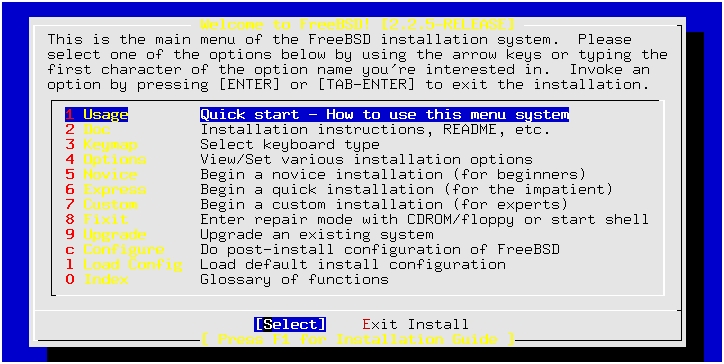
You will now be presented with a text menu (in color, if you are on a color CGA or VGA monitor). (See Figure 1.)
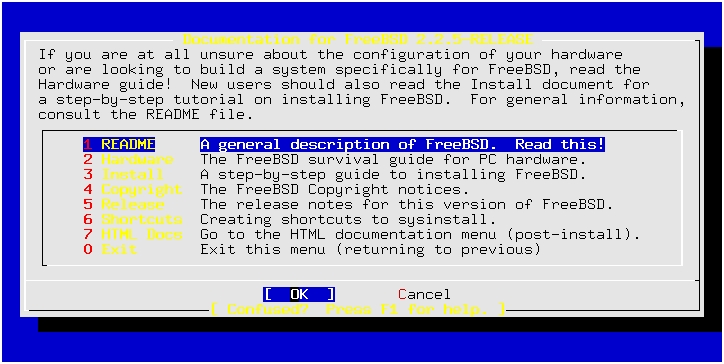
The first item in the menu is “Usage”, which explains how to move through the menu system and which keys do what. This is a must-read for any first-time installer. Press enter, and you will be presented with the “HOW TO USE THIS SYSTEM” screen. (See Figure 2.)
Figure 2. Selecting Item 1 in the initial menu brings up this screen.
The next menu item is “Documentation”, which provides a brief overview of FreeBSD, the supported hardware, installation guide, etc. These files are available on the CD-ROM's root directory, as well as in the release's root directory in the FTP location.
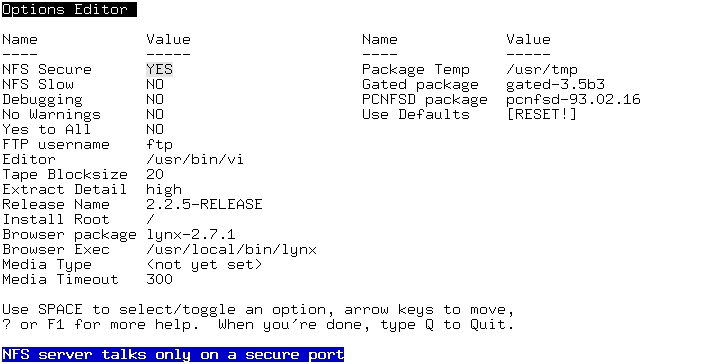
The third menu item is “Options”, and mostly applies to non-CD-ROM installs—NFS and FTP. In particular, if you need to use an FTP name other than ftp (e.g., anonymous or even a non-anonymous account name). (See Figure 3.)
Figure 3. Installation Process Options
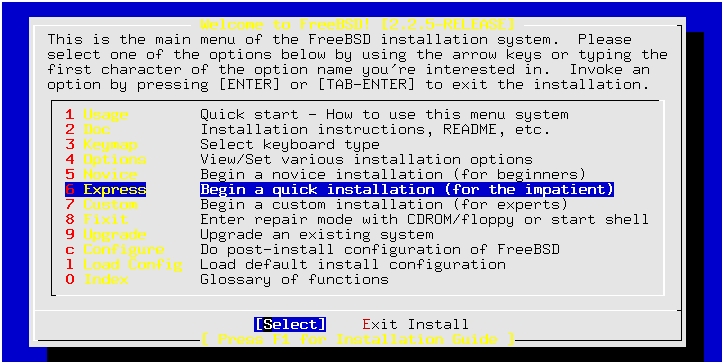
The easiest way to get started is to choose the “Novice” installation method (the fourth item of the main menu). The first thing this does is partition the disk for you, using a screen-oriented fdisk program. The “Express” method isn't as verbose with explanations—and is probably the best way to install if you've done FreeBSD installs before. (See Figure 4.)
Figure 4. Express Install Screen
For simplicity's sake, I chose to use the entire disk for FreeBSD by typing A—it then asked if I wanted to have a “true partition” entry. This is necessary if the disk will be used in a mixed-OS, dual boot machine (e.g., both DOS and FreeBSD). Since the machine in question will only be used as a web server, I answered no. (See Figure 5.) Note that if you are using BIOS geometry mapping, this may very well be required. As always, type Q when done.
FreeBSD can work with DOS-style partitions, and it can use its own partitions as well. FreeBSD calls the former “slices” in order to avoid confusion, although it doesn't necessarily succeed. In general, BSD partitions reside inside DOS-style partitions (aka “slices”). The normal name for a disk is <device><unit><partition>, e.g., wd0a; the slice is added after the unit, and before the petition. For example, wd0s1e would be the first slice (starting at 1, not 0), fifth partition within that slice, of the first IDE drive. FreeBSD can automatically partition the slice for you; on my 202MB drive, it chose:
/       32MB
swap    41MB
/var    30MB
/usr    98MB
You can choose your own sizes, of course. I chose the defaults which are quite reasonable.
After deciding on the layout of the disk, the next step is to choose which type of system to install. The options range from minimal to complete, with most people selecting something in between. For this install, the most likely type would have been “Basic”, which would install the basic FreeBSD system; however, I also prefer to configure my kernel to edit out unnecessary devices, so I chose the “kernel developer” package—this is the basic package, with compiler tools and the kernel sources. When installed, it used up approximately 130MB of disk space.
When selecting the package (by pressing the space bar), you are immediately asked if you want to install the DES packages. This is desirable, as you can share password file entries with traditional Unix systems this way. However, the default FreeBSD password encryption scheme (MD5 checksumming, actually) appears to be stronger than DES. Note that you are not supposed to install DES unless you are in the USA or Canada due to export restrictions, although the packages are included on the CD-ROM.
In addition to the basic DES package (the static and shared libraries), you can choose to install Kerberos (an authentication suite developed at MIT), as well as the sources to each. Although I generally use Kerberos, I did not install it on this machine, as space was getting tight and configuring Kerberos is not easy.
The install program then asks if you want to install the ports collection; this is fairly small (about 10MB), but since space was so tight I did not install it. There is more about ports and packages later later.
At this point, you are presented with the “Choose Distributions” menu again; if you are satisfied with your choices, press return to continue, otherwise, choose the distribution type you wish and continue.
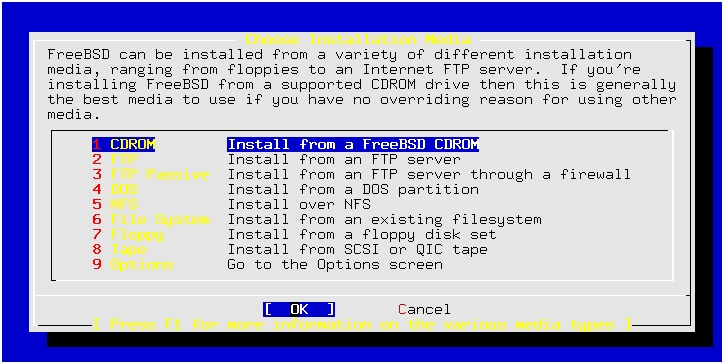
The next choice is what kind of media to use for the install. (See Figure 6.) I chose to use the CD-ROM method, as it is faster, easier and more convenient than the others. However, you can also install via NFS and FTP (and passive FTP—this is required if you are behind a firewall that has been configured by a paranoid administrator). For FTP installs, it uses the account name chosen in the “Options” section mentioned previously. Last, you can also install via an existing file system (e.g., an MS-DOS file system), floppy or tape. To use tape, you must have one of the tape drives supported by FreeBSD—mostly SCSI tapes, but also Wangtek and a couple of others.
If you choose to do an FTP install, you have to select the site to grab the files from—the default is the “Primary Site”, which is ftp://ftp.freebsd.org (aka http://wcarchive.cdrom.com/). There are also mirrors around the world.
When doing an FTP or NFS install, you also need to configure the networking interface. You're presented with all of the networking interfaces that the system found—any networking cards it recognized, as well as SLIP, PPP and the parallel-port IP interface (PLIP). Help is available at the “Network interface information required” menu by pressing f1. One quick note: the SLIP and PLIP options assume that the connection will be a hard-wired connection—if you need to connect using a modem, PPP is the only possible method.
After selecting the network interface (e.g., ed0), you will need to tell the install program the host name and domain name, default router (aka the “gateway”), name server, IP address and any extra options. Note that the gateway and name server fields need to be IP addresses, not host names. You will need to enter this information again, when doing post-install configuration.
If you selected the PPP interface, you will be asked to configure it. This requires knowing what baud rate to use (it defaults to 115200) and the IP address of the remote side. By default, it uses the gateway address, if you supplied it; you can also tell it to use “0”, which will allow it to be negotiated as part of the PPP connection setup. After you've done all this, you are then told to switch to VTY3 (the third virtual console screen), where the PPP program has been started. From there, you need to connect to the PPP server you are using (e.g., dialing the modem, entering account and password information, etc.).
After that, all that was necessary was to wait while the system installed. On my slow 486DX-33, with an IDE drive and a double-speed SCSI CD-ROM drive, it took 16 minutes to install all of the packages.
The install program then asks if you'd like to configure the network devices and, if so, which ones. This is identical to what was done if a network installation of any sort was done. In the case of the install I did, there was only one interface to configure: ed0. FreeBSD prompts for host and domain names, network gateway, name server and IP address. The netmask defaulted correctly, although you can change it if necessary. There is also a box for “Extra options”—some cards may require link-level options to choose which interface pair, e.g., BNC or Twisted, to use.
The next questions asked are about, Samba, IP forwarding, anonymous FTP, and NFS configuration. Of these, the only one I chose to configure was anonymous FTP, as this is sometimes useful for a web server. If my network had more (or, for that matter, any) Windows systems, Samba would allow file and printer sharing. If the machine were going to be my router, I would have enabled IP forwarding.
The last three system configuration questions are system console configuration (e.g., screen saver, font, keyboard map, etc.), time zone and mouse. This particular machine does not have a mouse; if it did, it would be possible to enable text cutting and pasting.
The last thing to do is install any desired packages. FreeBSD has quite a considerable set of packages and ports; this is, in fact, one of the most attractive attributes of FreeBSD, in addition to its high performance.
Ports and packages are very similar; the only difference is in what is included in the file. A package is a gzipped tar file containing all of the files needed, along with some description and checksum files. A port, on the other hand, consists of patches, and a pointer to the location on the Internet of the main files. Many ports are built on the local system after applying source patches. Some, however, are “ports” because they are commercial programs and cannot be distributed via CD-ROM or Walnut Creek's FTP site.
The only package I chose to install was the Apache package in the WWW category. This took only a few seconds to install from CD-ROM, and it then went on to finish system configuration: additional accounts, setting the root password and registering. (Registering sends e-mail to the FreeBSD project and is not necessary. It does help the project, though.)
Once all that is done, the installation process is complete, and you can exit to reboot. When your machine comes back up, your FreeBSD system should now be on the network.
As mentioned above, I always configure my kernels to trim away any unneeded devices. This is similar to what was done during the visual configuration process but is done by compiling the kernel, it results in a smaller kernel, requiring less memory.
The FreeBSD Handbook describes this process in detail. The Handbook is available on the FreeBSD web page, at http://www.freebsd.org/ and is also installed in /usr/share/doc/, in HTML. In simplest terms, you do the following commands:
cd /sys/i386/conf
cp GENERIC <machine name>
vi <machine name> #edit the file and exit vi
config <machine name>
cd ../../compile/<machine name>
make depend all
cp kernel /kernel
reboot
The complicated part is in the editing of the configuration file. After dealing with the visual configuration utility, the configuration file should not be all that complicated. (It is documented in the Handbook.) You can use the dmesg command to see which devices were found and which were not. By default, the installation leaves a copy of the generic kernel in /kernel.GENERIC; you can boot this, or any other kernel, by typing the name of the kernel at the Boot: prompt.
In addition to removing or configuring devices, system parameters can also be configured this way. One such parameter, maxusers, controls how much memory the kernel allocates to certain resources—the maximum number of processes, open files, and time events are all calculated based on maxusers. Another parameter that may need to be changed is MAXMEM—due to BIOS limitations, FreeBSD only recognizes up to 64MB of RAM by default (or 16MB on some very old systems), and MAXMEM (specified in KB) tells it to use more.
For example, on a machine with 256MB of RAM, which is expected to have a heavy load, the following lines in the configuration file might be used:
maxusers        100
options         MAXMEM="(256*1024)"   # 256MB
Once again, after editing the appropriate configuration file, run config and then make.
The Apache package installs the configuration files into /usr/local/etc/apache, and the default configuration files have a document root of /usr/local/www/data. By creating an index.html file in that directory, the web server is now up.
For me, the machine was completely installed, configured and acting as a web server on my LAN in about two hours. Most of that time was spent waiting for the kernel to recompile; it took 90 minutes on this machine (it takes about six and a half minutes on my 133MHz Pentium)—and the system was working as a web server during that period.
I have installed FreeBSD several times. The process is fairly painless, largely intuitive and very quick when done from a CD-ROM. My main objection is that it lacks a help option for many of the dialog boxes or menus; this can make it difficult to know what to do if you are new to Unix. However, ignoring that, the install went smoothly and required no knowledge of Apache configuration or installation on my part. If I hadn't chosen to reconfigure the kernel, I would have had a fully-functioning web server within about 30 minutes of beginning installation.
Sean Fagan has been a BSD contributor for many years. He lives in San Jose with a psychotic cat who insisted on being mentioned in this article. He can be reached at sef@kithrup.com.