
UNIX for the Hyper-Impatient (CD-ROM only version)

Authors: Paul W. Abrahams and Bruce R. Larson
Publisher: Addison-Wesley
URL: http://www.awl.com/
Price: $28.95 US for the book or the CD-ROM and $49.95 US for both
ISBN: 0-201-41991-2
Reviewer: Daniel Lazenby
Looking for an on-line reference that cuts to the chase and is written toward the technically oriented and somewhat Unix aware? If so, UNIX for the Hyper-Impatient may be worth your consideration.
The book is actually a hypertext repackaging of UNIX for the Impatient, Second Edition. The content of the original book contained many internal cross references and pointers to related information. I believe the existence of these “links” is one of the reasons the book was released in an all-electronic hypertext format. There seems to be little difference between the content of the electronic and hard copy versions of the book.
The book is organized functionally and divided into fourteen chapters and six appendices. You might want to read the Introduction and Concept chapters sequentially. Then again, you may find yourself randomly skipping in and out of the other chapters. Chapters 3, 4 and 5 are functionally arranged to answer the question “What command(s) can I use to ___” (you fill in the blank). Chapter 3 focuses on operations that may be performed on files. Chapter 4 addresses data manipulation using filter commands. Chapter 5 discusses utility programs used to monitor and manage your Unix environment. Titles of the remaining chapters include Chapter 6 “The KORN and POSIX Shells”, Chapter 7 “Other Shells”, Chapter 8 “Standard Editors”, Chapter 9 “The GNU Emacs Editor”, Chapter 10 “Emacs Utilities”, Chapter 11 “Mailers and Newsreaders”, Chapter 12 “Communicating with Remote Computers”, Chapter 13 “The X Window System” and Chapter 14 “Managing Your System”. The Appendix contains an Alphabetical Summary of Commands, Comparison of MS-DOS and Unix, a Resource list, a Glossary and an Index.
Chapters 6 through 14 are largely factual in nature. These chapters often state the basic facts, concepts and identify the relevant files. To me, these chapters seem to present the “what”, “where” and a little of the “why” of the selected topic. An example of this approach is the X chapter, which opens with an explanation of what the X Window System is and what it does for you. It continues by describing how the various parts of X look and what they do. This chapter then describes the high level flow of events that initiate an X session, including the role the X initialization files play in the initialization process. Descriptions often contain information as to why one would be interested in the particular X file, or would want to use the particular X feature or function being discussed. This chapter on X is a complete walk through the X environment, files and file contents. From a user's perspective, few stones have been left unturned. This type of reference would have saved me a lot of angst when I encountered my first X environment.
The Alphabetical Summary of Commands is divided into an alphabetical listing and a summary of the commands. There are two hypertext links for each command in the alphabetical listing. One link jumps to a summary of the command and the other jumps to a detailed explanation of the command. The command summary provides the level of detail I associate with O'Reilly's Linux (or Unix) in a Nutshell book. Detailed command explanations are well written descriptions that include examples.
Addison-Wesley's web site provides access to the preface of this book. Reading the on-line preface will give you a feel for reading an entire book on-line. It is also a good example of the authors' style.
A product called DynaText displays the hypertext book and provides the user interface (see Figure 1, Reader Window). In addition to the expected read, browse, search and print functions, DynaText provides the user with the ability to define his own bookmarks, notes, and cross references. A journal feature allows the user to record and retrace his path through a series of topics.
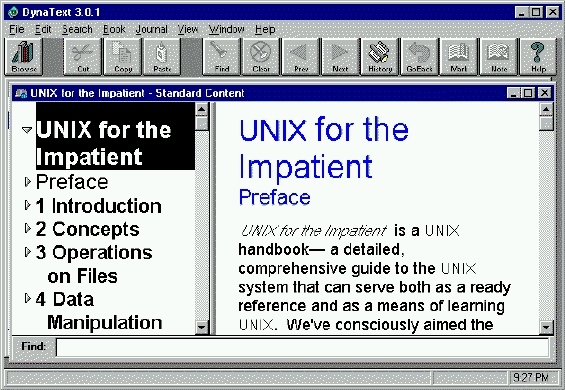
Figure 1. Reader Window
About ten short pages describe how to use the DynaText software and supply the meaning of the various icons. The DynaText on-line User's Guide is also useful, as some of the interface features work a bit differently than what you might expect. For example, the “Bookmark” button remains greyed out—until you actually highlight some text. Clicking on the active Bookmark button produces a dialog box to record your bookmark. The button greys out again after the bookmark is defined. The same process is true for the “Notes” button. User-specified names are assigned to bookmarks and notes at the time of creation. DynaText did not allow me to use the same name for a bookmark and a note I associated with it. Buttons on the tool bar are nice, yet I got more utility out of the bookmark and notes accelerator keys. The appropriate “Annotation Manager” menu option must be used to access any user-created bookmarks or notes.
Most of the hypertext links are colored green and quite obvious. These green hypertext links may be a title, a Chapter section number, a page number or an Appendix reference number. Another set of hypertext links is indicated with one of several icons. A third type of hypertext link presents no immediate visual indication of its existence. If a pointing finger cursor appears when you place the cursor over a word, then there is an active hypertext link. This style of a hypertext link is used with glossary words. Clicking on any one of these hypertext links opens another window containing the referenced content.
Every predefined hypertext link opens a new window. This technique makes it easy to see text at both the point of origin and destination. On the other hand, this technique can quickly cause the screen to become cluttered with windows. With several windows open, I found it difficult for me to tell which window belonged to which hyperlink jump.
Considering the keyword search capability of the browser, I was disappointed not to find an accelerator key that placed the cursor into the on-screen search field. I found one other search characteristic annoying. The browser left the search word in the search field upon completion of the search. Since each jump opens a new window, as soon as a new window opened, the browser would search for the word in the previous window's search field. I received several “not found” dialog boxes that I had to clear after making a jump.
A VCR style button panel is used to represent the “Journal”. A Journal is created by clicking on the “Record” button and navigating through the book. There is no need to worry about wrong turns or jumps. The Copy, Paste and Cut buttons allow you to re-sequence or remove topics. You can even add topics you may have missed. Once established, this journal may then be used to retrace the same path or to guide another person through the same set of topics. There are two journal playback modes: continuous and frame by frame. Out of the box, the continuous playback interval is set to three seconds, but can be adjusted. Frame by frame uses the VCR fast forward and reverse buttons to page forward or page backward, one page at a time. The VCR panel is a bit large for my tastes. I found myself moving it around the screen to get it out of the way while recording and during the playback.
If you do not feel the predefined links meet your needs, you can add your own one- or two-way hyperlink to the book. A hyperlink simply jumps from one book location to another. Creating a user hyperlink is as simple as marking text at the starting point, the ending point, indicating one- or two-way link and naming the link. A user-created hyperlink does not open a new window. This type of link jumps directly, within the same window, to the destination point. As with Bookmarks and Notes, you may have to use the Annotation Manager to locate user-created hyperlinks.
Printing excerpts produced some odd results. I selected two short chapter topics to print (Chapter 6.5 and 13.1). Each of these sections happens to have a “Page Icon” on it. These sections were printed across two pages. The first few lines of the section were printed on one page and the remainder was printed on another page. Several words were dropped from the sentence split between the two pages. Selections and chapter sections did not contain a Page Icon printed as expected.
I had a Win95 installation glitch that did not make sense. The hypertext links would not display properly. A large majority of the hypertext links kept appearing as a green “fred.” I repeated the installation a couple of times to make sure I wasn't missing anything in the instructions. (Yes, I really do read them.) After a couple of reinstalls the glitch remained, and it was time to seek assistance.
The book's Installation and User's Guide published the e-mail address help@qsep.com for installation assistance along with a voice and a FAX number. A Web search for Quickscan produced a web site hit (http://www.qsep.com/). I was unable to reach any of these choices. I later learned that QSEP was having major difficulties with their web server and support line at the time I was reviewing this product. Prior to making contact with QSEP I had stumbled my way through the hyperlink display glitch by installing the program to run directly from the CD-ROM. It seems a couple of other people encountered a similar symptom. Not having had a chance to work through this problem directly with QSEP, I am unable to comment on their quality or level of support.
Buried in Addison-Wesley's list of titles for Mr. Abraham's web page is a URL pointing to browser update information (http://www.qsep.com/unixbook.htm). Other than this URL, I was unable to locate any form of software support for this specific title on the Addison-Wesley web site. I did locate an “Ask/Tell Us” web page that provided the means for sending Addison-Wesley a comment and the ability to indicate the comment was technical support related. While Addison-Wesley maintains a link to QSEP, I would not count on Addison-Wesley for UNIX for the Hyper-Impatient technical support.
Inso Corporation's technical support for DynaText is password protected and specifically directed toward individuals who have purchased the DynaText product directly from Inso, or have purchased a maintenance contract. Inso clearly states that persons who are seeking DynaText support and did not buy it directly from Inso need to contact the “third party” vendor who sold them the DynaText-based product. I was also informed that any of the updated browsers would have to come from the “third party” vendor as well. So it seemed one can't even get a copy of the browser's current release from Inso. In spite of Inso's “We didn't sell you the product so don't ask us for the latest browser policy,” Inso was very helpful. They provided prompt responses to any question regarding DynaText product plans and Unix OS compatibility.
I liked the book's no nonsense approach and content. Each chapter seems to be focused on “What do I need to know to do this task.” Whenever I read a book, I'm always making notes and inserting cross references and notes of my own. This book is rich with internal cross references and footnotes.
I'm not really sure about the DynaText browser though. The lack of a supported Linux browser for this review was disappointing. I did have limited access to an AIX 4.1 client machine. That avenue of review was a dead end as well, since the browser for AIX 4.1 was still in the works. I would have liked to see how the DynaText product behaved in a supported X or Common Desktop Environment. Before purchasing this CD-ROM, I'd suggest checking the above sites to verify that there is an available DynaText browser for your flavor and version of Unix. Downloading a browser could be a lengthy endeavor. One browser reference indicated it was close to 17MB.
Daniel Lazenby lives in Arlington, Virginia. For a living he supports and works with AIX and RS/6000 systems. In early 1995 he discovered Linux and began using and tinkering with it in the evenings. He may be reached at dlazenby@ix.netcom.com.
