The Qddb Database Suite
Have you ever needed a program to manage some data? Perhaps you have tried one of the many relational database products that require a significant amount of effort to set up a few simple tables and wondered why there isn't one that is easy to use.
When looking at the design of the available database products, notice that most of the tools are very cumbersome. You must carefully define your fields, select those that require a separate table, define link fields between the tables, choose the important fields for searching, then finally build some sort of interface. In many cases, people decide to use flat files because a real database is too time consuming. There are many tasks that can benefit greatly from a program that makes it easy to design simple databases.
Qddb is a multi-user database suite that allows you to quickly design custom databases. If you know the data your database should contain, you can design your database and be up and running almost as fast as you can type the field names. Skeptical? Let's work through an example.
There are two basic steps to building a Qddb database. First, you must create a blank database with Qddb's qnewdb() command:
bash$ qnewdb Properties
qnewdb() builds a new database directory (named Properties in this case) and populates it with several files for Qddb's use. Next, you must edit the file Properties/Schema and define the format of the individual records:
# This is a comment
# Qddb Schema file for a landlord's property
# database
 Street City State ZipCode
 Apartments (
 AptNumber type integer
 Rented defaultvalue "N"
 Lease (
 Begin type date # start date of lease
 End type date  # end date of lease
 )
 Person (
 First Middle Last ID
 PrimaryRenter defaultvalue "Y"
 )*
 Comments*
 )*
The first thing you notice about the Schema file is its free-style format. Each word (other than the keywords type and defaultvalue followed by a data type or string) defines a field in a record. By default, each field's value in a record may contain an arbitrary-length string. You can also explicitly assign data types of string, real, integer and date to each field.
Some fields are structured, that is, they contain other fields. For example, Apartments contains the subfields AptNumber, Rented, Lease, Person and Comments. Apartments.Lease and Apartments.Person are also structured and contain subfields.
Some fields are expandable, meaning each record in the database can contain multiple values for that field. Expandable fields are denoted by an asterisk (*) at the end of its definition.
The sample Schema above defines a database that contains one record for each property owned by a landlord. Each property contains multiple apartments. Each apartment has a number, whether it is rented, lease dates, a list of people living there and a list of comments.
Now, you are ready to use your Properties database with Qddb's generic X-based application nxqddb.
nxqddb Properties
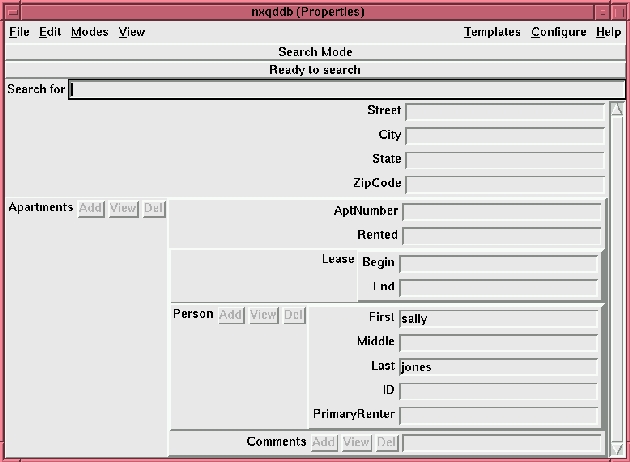
Figure 1. Standard nxqddb Screen
Figure 1 shows the standard nxqddb screen for the Properties database. Once started, nxqddb() allows you to:
Add new records
Search for records and view the results
Modify records
Delete records
Generate letters, postcards, e-mail, reports, barcharts and graphs
To add records, select the Modes menu button and choose Add Mode. Once in Add Mode, you can simply fill in the fields. If you want to add multiple values for an expandable field, you click the mouse on the Add button next to the field's label. You can also view all the values in an expandable field by clicking the View button. When you are ready to save a record, select the File menu button and choose Save. Now you are ready to add another record. Note that Qddb does not clear the entry boxes for the next record by default; you can choose auto-clear under the configuration menu if that is the behavior you want.
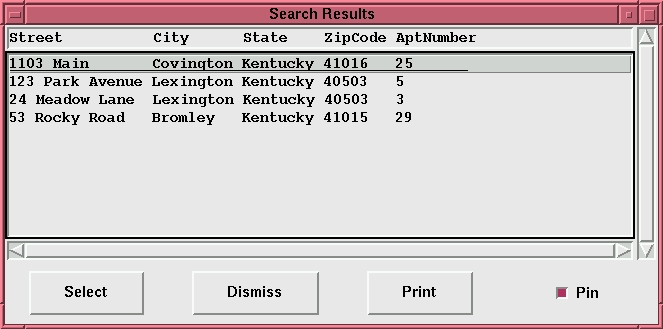
Once you have added some records, you can go to Search Mode and perform simple, fast database queries. For example, let's say you want to find all the people renting apartments whose first name is Sally. Just type “sally” in the Apartments.Person.First entry box and press return. If you want to confine your search further, to the last name “Jones”, type “jones” in the Apartments.Person.Last field and press return. A list of all the properties matching the criteria will appear in a Search Results window as shown in Figure 2. If you want to edit one of the records, click the mouse on the entry and you will be switched to Change Mode for that record.
Figure 2. Search Results Window
You will quickly find that Qddb, by default, splits field values into searchable components. A separator is a character that separates the searchable components in a field. You can specify your own set of separators for any field in the schema:
MyField separators ",.;"
The separators schema option above tells Qddb to index the field MyField using only the separators “,” (comma), “.”(period) and “;” (semicolon). The default list of separators includes all ASCII non-alphanumeric characters. (Note that only fields of type string use separators.)
Qddb's simple search mechanism supports ranges, regular expressions, numbers and dates. A fully functional expert search and report generator round out the searching facilities of Qddb.
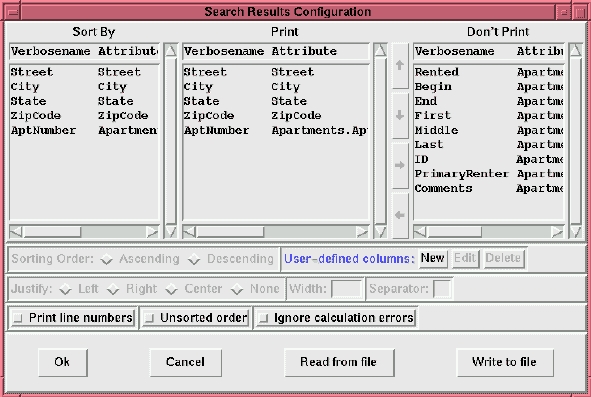
Now, that you know how to perform simple searches, you may want to add or omit certain fields from your results. By default, nxqddb displays only the first five fields in the search results window.
If you click the Configure menu button, you will notice many configuration options. This is the current state of all your nxqddb settings. The search results configuration (see Figure 3) determines what fields are present in the search results, how those fields are displayed, and in what order. You can also add user-defined columns to the search results.
Figure 3. Search Results Configuration Window
After configuring the search results, you may choose to save the configuration. nxqddb recognizes two configurations on startup: the global configuration and the personal configuration. The global configuration is the default for any user of a particular database. The personal configuration overrides any global settings for an individual user.
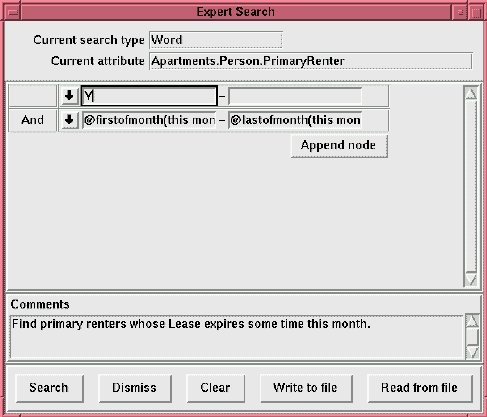
While the simple search mechanism is extremely handy for quick lookups, it cannot perform all types of searches. The expert search is designed to handle generic searches and includes the ability to save the search criteria for later use. Figure 4 shows the expert search window. From this window, you can combine and nest queries in any way you like. Ranges use two entry boxes; other search types use only the leftmost entry.
Figure 4. Expert Search Window
Suppose you want to find all the primary renters whose lease expires this month. The idea is to provide a list of the search criteria to the expert search engine. Our search then should be all Apartments.Person.PrimaryRenter == “Y” and Apartments.Lease.End == “@firstofmonth(this month)-@lastofmonth(this month)”.
The expert search window always contains at least one field for search criteria. To restrict our search to the particular fields specified above, we click the down arrow next to the entry box, choose Apartments.Person.PrimaryRenter as the attribute name and dismiss the pull-down menu, then type Y in the entry. Now we have to specify a second criterion, so we:
Click the Append Node button to add a new entry.
Click the down arrow to select a date range search on the Apartments.Lease.End attribute.
Dismiss the menu.
Type @firstofmonth(this month) in the left entry and @lastofmonth(this month) in the right entry.
Now, we can click the Search button, and we will see a search results window that contains all the matching rows using the current search results format.
Ad-hoc reports can be easily produced by executing these two steps:
Configuring the search results.
Performing a simple or expert search.
More detailed reports require the Qddb report generator. The Qddb report generator can produce postcards, letters, e-mail, summaries of numeric fields, graphs, bar charts and tables. The basic idea is the same as producing an ad-hoc report, but you generally want to save the settings for both the search criteria and results format for later use.
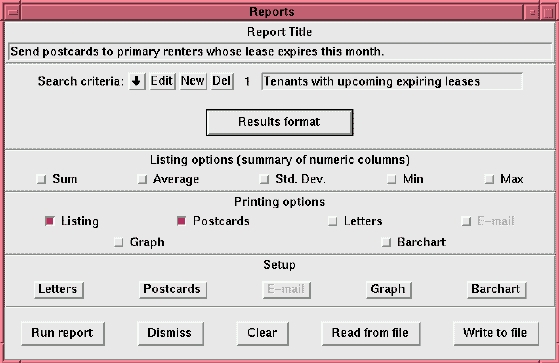
Figure 5. Report Generator's Window
Figure 5 shows the report generator's main window. From this window you can define multiple expert searches and a search results configuration. After defining what you want to see and how you want to see it, you can choose any combination of the six output formats.
For example, suppose we want to send a postcard to each renter whose lease expires this month. First, we need to configure the format of our return and destination addresses. Choose the Report Format Defaults option under the Configure menu button. You will notice two options in the cascaded menu: Return Address and Destination Address. Choose Return Address and fill in the return address as you want it to appear on postcards and letters. Next, choose Destination Address. This option will format arbitrary fields for the destination address on all postcards and letters. Once you have configured the addresses, you may wish to save your configuration so these options become the default.
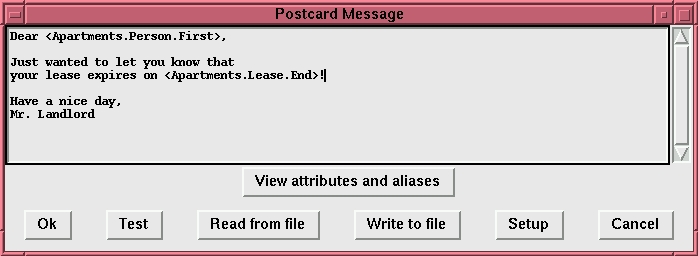
We have already seen how to perform the expert search, so let's just use the previous example for defining what you want to see in your report. Next, we have to define the relevant fields for the report via the Results Format button. To generate a postcard, we must include all address information, plus we probably want to include the lease's expiration date for inclusion in the message. Now, we can choose the type of reports we wish to generate. If you want a listing as well as postcards, you can choose both options and click the Run Report button. Since we chose listing as well as postcards, the listing appears first and can be printed out. After printing the listing, we are prompted for the postcard message as shown in Figure 6. Notice that the postcard message is personalized for the recipient by using data from each record.
In the simple case, Qddb uses a single set of tuple trees instead of flat tables. A tuple tree is simply the collection of prejoined rows from the relational tables in a one-many relationship. That is, each record represents some entity, and each entity can have an arbitrary number of values for some subset of the fields. More complex cases (such as many-many relationships) can be handled with a set of Qddb schemas.
We can use standard relational tables to model any Qddb schema. For example, our Properties schema requires four tables: one table for the address information and one table for each expandable field. The tables require a plethora of link information for the purpose of joining the rows.
It is the complexity of managing these tables that prevents normal users from building their own databases with standard relational tools. Even programmers avoid fields that can have multiple values because a separate table is required for each such field. With Qddb, users and programmers can allow multiple values for any field by simply appending an asterisk to the field's definition in the schema.
The relational model requires that field values be atomic. That is, when searching, field values cannot be broken into smaller searchable components. By default, Qddb disobeys this rule by breaking field values of type string at the separators. Most users do not care about the relational model, they simply want to do their work. Sometimes this work involves searching the database for a particular record. By relaxing this restriction, Qddb can search for words in textual fields such as comments or abstracts. For string fields where atomicity is important, you can specify an empty list of separators for that particular field.
Qddb uses several interesting storage techniques. If you look at the contents of the files in your database directory, you will see that all Qddb data and index files are stored as readable text. The Database file contains the field values for each record in the stable part of the database. Empty fields require no storage and are omitted from the Database file.
If you browse the Database file, you will also notice that each record is stored contiguously. Qddb's records are prejoined rows from the relational tables defined in the schema. When you perform a search, the matching tuple trees in the Database file are expanded into the equivalent relational rows for viewing purposes.
Qddb uses inverted indices for searching. When you perform a search, the criteria are quickly translated into the file offsets for the corresponding tuple trees. Each matching tuple tree can then be read from the disk with one disk read per tuple tree.
Since Qddb currently uses inverted indices for indexing, you should periodically reindex the database so Qddb can retain its speed. Only changes and additions are stored in a secondary location and can be reindexed on the fly. The qstall command is used for this purpose:
qstall Properties
After stabilization, all changes, additions, and deletions are committed to the Database file.