
CDE Plug-and-Play
ToolTalk, in the Common Desktop Environment (CDE), is a message brokering system that enables applications to communicate with each other without having direct knowledge of one another. Client and server applications can be developed independently, mixed and matched, and upgraded separately through plug-and-play. In addition, the Desktop Service can be called to perform methods on file and buffer objects on behalf of ToolTalk.
Figure 1 shows the ToolTalk Service listening for TtChmod client requests. ToolTalk Service brokers pattern-matched Chmod messages to the registered mock change-mode application server (ttchmodd) that is waiting to handle the incoming messages.
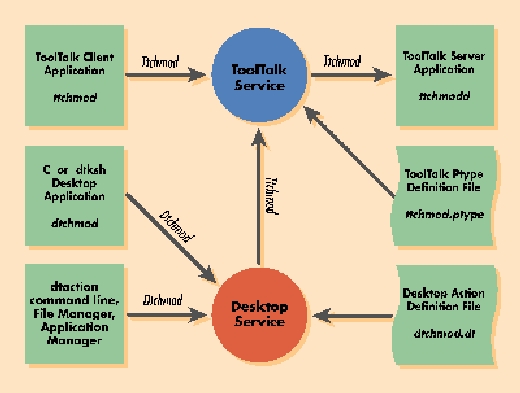
Figure 1.
ToolTalk brokers the requests from the client to the server application. The Desktop Service can forward CDE object method invocations to the ToolTalk Service. With the Desktop, both C programs and dtksh scripts can initiate actions that are transmitted to the ToolTalk Service. Consequently, client invocations from the dtaction command line, application manager icons, and file manager icons can be directed through the Desktop Service to ToolTalk application services. Therefore, double clicking on a file icon in the file manager can be plugged into a ToolTalk registered application by first routing through the Desktop action and data-type service.
The key to the ToolTalk message brokering system is its ability to define process-type identifiers with specific operations and arguments. In Listing 1, the process-type (ptype) TtChmod will execute the ToolTalk change-mode daemon application ttchmodd. This occurs when the session operation Chmod with file name and mode arguments are matched from a request. Compiling the ptype definition with the tt_type_comp utility will register services for ToolTalk client applications to call. Consider the ptype as a C header file describing an application programming interface (API) and the compiled suite of ToolTalk Services definitions as a library of methods to call. For the list of installed process-type identifiers, try running tt_type_comp -P at the command line to dump the database to the screen.
The file change-mode application (ttchmod) described in Listing 2 is simply the Motif command widget. In Figure 2, the ttchmodd server application graphically prompts the user for a command, then calls the callback command callCB to execute it; however, for this example, the application just prints the command. The file change-mode application quickly becomes a plug-and-play service when it registers itself with the ToolTalk Service, then listens for messages to be handled by its ToolTalkCB receiver routine.

Figure 2. ttchmodd
An application must first locate the ToolTalk session associated with the X display to register itself as a service, as shown in Listing 3. After the application sets its default session to the display session, the application can initiate itself as a ToolTalk process and obtain a ToolTalk file descriptor. When the ttchmodd application gets a handle on the ToolTalk session, then it can register the TtChmod process type and join the session to listen for requests.
ToolTalk sends a message to a registered service; the service listens on its ToolTalk file descriptor for input. When input is observed, the ToolTalkCB routine is triggered, and the message is read and analyzed. (See Listing 4.) The message's operation is checked, then the arguments are read from the message. ToolTalk messages are similar to a reentrant version of an ordinary C program's command-line arguments. The ttchmodd service is no longer needed after it reads the message, so the recipient tells the ToolTalk service to discard the message.
The ttchmod ToolTalk client (see Listing 5) is much simpler than the ttchmodd ToolTalk server. The client opens a ToolTalk process and locates the session. The TtChmod process-type message request consists of the Chmod operation with the file name and mode input arguments. It is sent to the ToolTalk Service to be brokered to a registered server application accepting the ptype pattern. However, note that this example omits error checking and garbage collection with tt_mark and tt_release.
The Desktop Action database in CDE describes methods and objects for applications to act upon. CDE's Desktop Service can describe an action like DtChmod, shown in Listing 6, that can be forwarded through the ToolTalk Service to ttchmodd. If the action does not receive the appropriate arguments, then the Desktop can prompt the user, as shown in Figure 3.

Figure 3. dtaction
The relationship of the Desktop Action definitions to CDE methods is similar to the relationship of ptype definitions to ToolTalk processes. For an example of Desktop actions and data types, run dttypes at the command line to dump the database to the screen.
The APIs of the Desktop Service can invoke actions registered in the Desktop database either from a C program or from a dtksh script, as shown in Listing 7. The dtchmod.ds dtksh script prompts the user, with the message dialogue, as shown in Figure 4, to confirm with the user before requesting changes to the file's mode.

Figure 4. dtchmod
In addition to calling Desktop actions from C programs and dtksh shell scripts, users can initiate requests from the command line, as shown here:
dtaction DtChmod /etc/motd 644
If the appropriate arguments are given, then the action is forwarded to ToolTalk; otherwise, the user is first queried, as shown in Figure 3.
We have seen how the ttchmodd service registered with ToolTalk can receive messages matching the TtChmod ptype pattern from ToolTalk clients, from Desktop clients written in either C or dtksh, from the command line and from double clicking on file object icons. These examples demonstrate how client and server applications can be developed independently, mixed and matched, and upgraded separately through plug-and-play. A ToolTalk-enabled application service registered with its ptype definition can be developed without specific knowledge of its counterpart.
CDE defines a message dictionary of desktop-specific ToolTalk process types, operations and arguments as seen from viewing the database. Others, such as Computer-Aided Design (CAD) and Electronic Design Automation (EDA) services have developed supplemental dictionaries. You can use existing ptypes or define your own, but the important point to know is how to register the process-type identifier, operation and arguments.

