Linux Network Programming, Part 2
Daemon processes are servers which run in the background servicing various clients. You should be aware of the following few issues when creating daemon processes. During development, it is always advisable to run the server in the foreground in order to use printf or write for debugging. Also, if the server happens to go berserk, it can be killed by sending the interrupt character (typically ctrl-c). While being deployed for use, the server should be coded to act like a daemon. Daemon programs in Unix typically end in the letter d, e.g., httpd for the HTTP daemon (web server).
It is always nice to have a daemon automatically put itself in the background when run. This is quite easy to achieve using the fork() call. A well-behaved daemon will close all the open file descriptors it inherited from its parent after the fork. This is especially important if the files are terminal devices, as they must be closed to allow the terminal state to reset when the user who starts the daemon logs out. Use the getrlimit() call to determine the maximum number of open file descriptors and to close them.
The process must then change its process group. Process groups are used in distributing signals—those processes with the same group as the terminal are in the foreground and are allowed to read from the terminal. Those in a different group are considered in the background (and will be blocked if they attempt to read).
Closing the controlling terminal and changing the session group prevents the daemon process from receiving implicit (i.e., not sent by the user with the kill command) signals from the previous group leader (commonly a shell).
Processes are organized within process groups and process groups within sessions. With the setsid() system call, a new session (and thus, a new process group) is then created with the process as the new session leader.
Once the daemon is without a controlling terminal, it must not re-acquire one. Controlling terminals are automatically acquired when a process group leader opens a terminal device. The easiest way to prevent this is to fork again after calling setsid(). The daemon runs in this second child. Since the parent (the session and process group leader) will terminate, the second child will obtain a new process group of zero (since it becomes a child of init). Therefore, it cannot acquire a new controlling terminal, since it is not a process leader. Many standard library routines may assume the three standard I/O descriptors are open. As a result, servers commonly open all three descriptors, connected to a harmless I/O device such as /dev/null.
Daemons are typically started at boot-up and remain running throughout the uptime life of the system. If a daemon was started from a mounted file system, it would be impossible to unmount the file system until the daemon was killed. As a result, it is a sensible daemon programming practice to perform a chdir() to / (or perhaps to a file system which holds files relevant to the operation of the daemon). Daemons inherit umask information from the process which created them. To prevent problems with file creation later within the daemon, it is commonly set to zero using umask(). Listing 1 illustrates these points with some sample code.
For systems that do not support sessions (e.g., some systems other than Linux and Solaris), you can achieve the same result as setsid() using the code from Listing 2.
When the forked children of the main server code exit, their memory is deallocated but their entries in the process table are not removed. In other words, the processes are dead, i.e., they do not consume system resources, but they have not been reaped yet. The reason they stay around in this zombie-like form is to allow the parent to gather statistics from the child if necessary (such as CPU usage, etc). Obviously, a daemon does not want to fill the process table with zombie processes.
When a child dies, it sends its parent a SIGCHLD signal. The default handler of this signal causes the child to turn into a zombie, unless it is explicitly reaped by its parent, as in Listing 3. Alternatively, as shown in Listing 4, you can ignore the signal and allow the zombie to die.
It is also quite common for daemons to ignore most other signals or to re-read any configuration files and restart after being sent SIGHUP. Many daemons save their PID (process identification) to a log file, typically called /var/run/foobar.pid (where foobar is the name of the daemon), which can aid in stopping the daemon.
When the system is being shut down (or changing from multi-user to single-user), the SIGTERM signal is sent to notify all processes. The init process then waits a specific amount of time (20 seconds for SVR4, 5 seconds for BSD, 5 seconds for Linux init, 3 seconds or a passed command-line argument Linux shutdown). If the process is still alive, a SIGKILL signal which cannot be ignored is sent to it. Therefore, daemon processes should catch the SIGTERM signal to ensure they shut down gracefully.
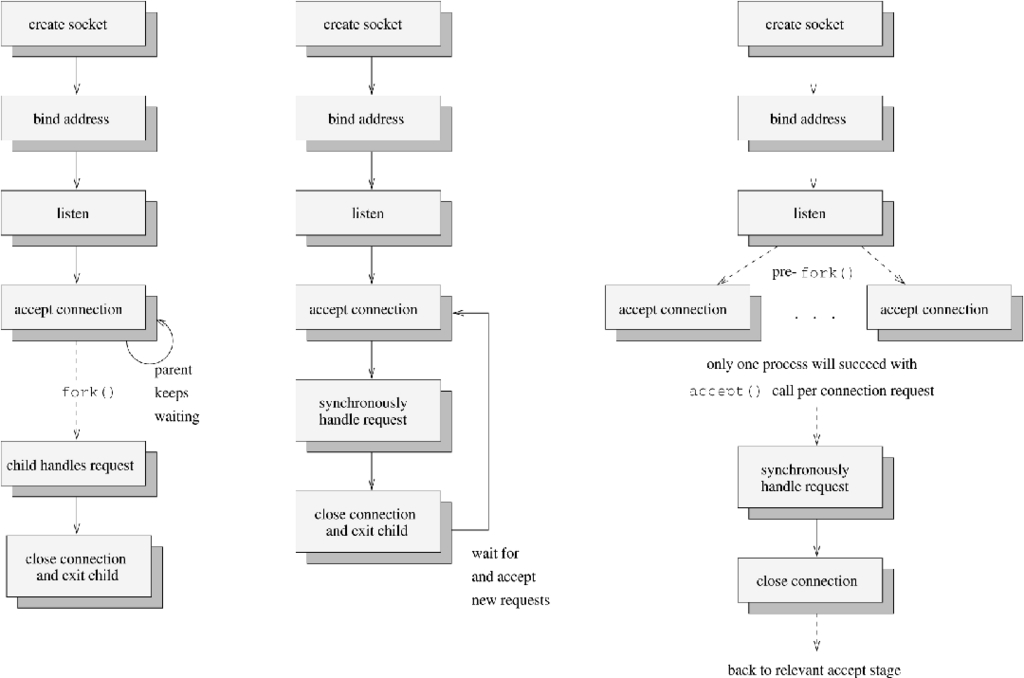
Figure 1. Three Designs for a Network Service Daemon
In Figure 1, the diagrams show three potential designs for a daemon providing a network service to prospective clients. In the first picture, the daemon follows the most common technique of forking off a separate process to handle the request, while the parent continues to accept new connection requests. This concurrent processing technique has the advantage that requests are constantly being serviced and may perform better than serializing and iteratively servicing requests. Unfortunately, forks and potential context-switches are involved, making this approach unsuited to servers with very high demand.
The second diagram shows the iterative, synchronous, accepting and handling of a request within a single context of execution, before another request is handled. This approach has the drawback that requests which occur during the handling of the request will either get blocked or rejected. If blocked, they will be blocked for at most the duration of the request processing and communication. Depending on this duration, a significant number of requests could potentially get rejected due to the listen queue backlog having filled. Therefore, this approach is perhaps best suited to handling requests of a very short duration. It is also better suited to UDP network daemons rather than TCP daemons.
The third diagram (Figure 1) is the most complicated—it shows a daemon which pre-allocates new contexts of execution (in this case, new processes) to handle the requests. Note that the master calls fork() after listen(), but before an accept() call. The slave processes call accept(). This scenario will leave a pool of potential server processes blocking an accept() call at the same time. However, the kernel guarantees that only one of the slaves will succeed in its accept() call for a given connection request. It will then service the request before returning to the accept state. The master process can either exit (with SIGCHLD being ignored) or continually call wait() to reap exiting slave processes.
It is quite common for the slave processes to accept only a certain number of requests before committing suicide to prevent memory-leaks from accumulating. The process with the lowest number of accepted requests (or perhaps a special manager parent) would then create new processes as necessary. Many popular web servers implement pools of pre-forked server threads (e.g., Netscape, Apache).
If the server process time of a request is very short (the usual case), concurrent processing is not always necessary. An iterative server may perform better by avoiding the overhead of context-switching. One hybrid solution between concurrent and iterative designs is to delay the allocation of new server processes. The server will begin processing requests iteratively. It will create a separate slave process to finish handling a request if the processing time for that request is substantial. Thus, a master process can check the validity of requests, or handle short requests, before creating a new slave.
To use delayed process allocation, use the alarm() system call, as shown in Listing 5. A timer is established in the master, and when the timer expires, a signal handler is called. A fork() system call is performed inside the handler. The parent closes the request connection and returns to an accepting state, whereas the child handles the request. The setjmp() system call records the state of the process's stack environment. When the longjmp() is later invoked, the process will be restored to exactly the same state as saved by the setjmp(). The second parameter to longjmp() is the value that setjmp() will return when the stack is restored.
All of the forking in these examples could be replaced with calls to pthread_create() to create a new thread of execution rather than a full heavyweight process. As mentioned previously, the threads should be kernel-level threads to ensure that a block on I/O in one thread does not starve others of CPU attention. This involves using Xavier Leroy's excellent kernel-level Linux Threads package (http://pauillac.inria.fr/~xleroy/linuxthreads/), which is based on the clone() system call.
Implementing with threads introduces more complications than using the fork() model. Granted, the use of threads gives great savings in context-switching time and memory usage. Other issues come into play, such as availability of file descriptors and protection of critical sections.
Most operating systems limit the number of open file descriptors a process is allowed to hold. Although the process can use getrlimit() and setrlimit() calls to increase this up to a system-wide maximum, this value is usually set to 256 by NOFILE in the /usr/include/sys/param.h file.
Even tweaking NOFILE and the values NR_OPEN and NR_FILE in the /usr/src/linux/include/linux/fs.h file and recompiling the kernel may not help here. While in Linux the fileno element of the FILE struct (actually called _fileno in Linux) is of type int, it is commonly unsigned char in other systems, limiting file descriptors to 255 for buffered I/O commands (fopen(), fprintf(), etc). This difference affects the portability of the finished application.
Because threads use a common memory space, care must be taken to ensure this space is always in a consistent state and does not get corrupted. This may involve serializing writes (and possibly reads) to shared data accessed by more than one thread (critical sections). This can be achieved by the use of locks, but care must be taken to avoid entering a state of deadlock.
init's primary role is to create processes from information stored in the /etc/inittab file. It is either directly or indirectly responsible for all the user-created processes running on a system. It can respawn processes it starts if they die.
The respawning capabilities of init will get quite confused if the daemon forks as per the code in Listing 1. The original daemon process will immediately exit (with a child daemon continuing to run), and init will take this to mean the daemon has died. A simple solution is to add a command-line switch to the daemon (perhaps -init) to inform it to avoid the forking code. A better solution is to start the daemon from /etc/rc scripts rather than from the /etc/inittab.
The System V layout of /etc/rc is used in the popular Red Hat and Debian distributions of Linux. In this system, each daemon that must be started/stopped has a script in /etc/rc/init.d for Red Hat and in /etc/init.d for Debian. This script is invoked with a single command-line argument start to start the daemon, and a single command-line argument stop to stop the daemon. The script is typically named after the daemon.
If you want to start the daemon in a particular run level, you will need a link from the run-level directory to the appropriate script in /etc/rc/init.d. You must name this start link Sxxfoobar, where foobar is the name of the daemon and xx is a two digit number. The number is used to arrange the order in which the scripts are run.
Similarly, if you want the daemon to die when changing out of a particular run level, you will need a corresponding link from the run-level directory to the /etc/rc/init.d script. The kill link must be named Kxxfoobar, following the same naming convention as the start link.
Allowing system administrators to start/stop daemons (by calling the appropriate script from /etc/rc/init.d, with the appropriate command- line argument) is one of the nicer advantages of the SysV structure as well as its greater flexibility over the previous BSD-style /etc/rc.d layout.
The shell script in Listing 6 shows a typical Red Hat style example in /etc/rc/init.d for a daemon called foobar.
It is often useful for a daemon to log its activities for debugging and system administration/maintenance purposes. It does this by opening a file and writing events to this file as they happen. Many Linux daemons use the syslog() call to log daemon status information etc. The syslog is a client-server logging facility, originating from BSD 4.2. I am not aware of any SVR4 or POSIX equivalent. Messages to the syslog service are generally sent to text files described in /etc/syslog.conf, but may be sent to remote machines running a syslogd daemon.
Using the Linux syslog interface is quite simple. Three function calls are prototyped in /usr/include/syslog.h (see the syslog.3 man page):
void openlog(char *ident, int option, int
        facility);
void syslog(int priority, char *format, ...);
void closelog(void);
openlog() creates a connection to the system logger. The ident string is added to each message logged and is generally the name of the daemon. The option parameter allows for logging to the console in case of error, logging to stderr as well as the console, logging of the PID and so on. The facility argument classifies the type of program or daemon logging the message and this defaults to LOG_USER.
The syslog() call does the actual logging. Values for format and the variable arguments are similar to printf(), with the exception that %m will be replaced by the error message corresponding to the current value of errno. The priority parameter indicates the type and relative importance of the message being logged.
To break the connection with the system logger and close any associated file descriptor or socket, use closelog(). The use of openlog() and closelog() is optional. More detailed information on these functions is available in the syslog (3) man page.

Dr. John Nelson is a senior lecturer in Computer Engineering at the University of Limerick. His interests include mobile communications, intelligent networks, Software Engineering and VLSI design. His e-mail address is john.nelson@ul.ie.