BRU 2000 for X11
Manufacturer: Enhanced Software Technologies, Inc.
E-mail: lj-info@estinc.com
URL: http://www.estinc.com/
Price: $89 US (personal edition) Free for xbru only
Reviewer: Garrett Smith
While not the most flashy area of computing, proper backups are essential. BRU 2000 for X11 (xbru) is a user-friendly graphical interface for EST's BRU backup software. It is targeted for users who want to easily back up their computer without having to learn the command-line interface for their backup software. To use the more complex options of BRU 2000, you still need to learn BRU's command-line interface.
xbru came with BRU 2000; however, I downloaded the newest version (as of July 1997) of xbru from EST's web site. xbru is freely available, but it does require BRU 15.0 which is sold by EST Inc. xbru also requires Tcl 7.6 and tk 4.2, which are freely available (see Resources).
I had one problem during the installation procedure for xbru—it wanted to install its files into the /usr/local/lib/bru directory, but, unfortunately, on my computer, /usr/local is mounted read-only from the NFS server. I sent e-mail to support@estinc.com asking how to install into a directory other than /usr/local/lib/bru. I later got a reply to my question, but before the reply came, I had obtained permission to install xbru on the NFS server.
Once I had root access on the server, the rest of the installation was straightforward. I ran bru, which was already installed, on the X11 package from the command line using the following command:
bru -xvf bru4X11.bru
Executing this command produced an install script to do the installation, which I then ran.
When you start up xbru, it asks you which device you wish to use for backup. You can chose from the devices in your /etc/brutab file, or you can select a file. I used a file for testing at first, and later I tried it on a 4GB SCSI 4mm DAT tape drive. The main screen gives a few default options that make standard backups very easy: Full, Level 1 and Level 2. If you are root, Full does a full backup of the entire system; otherwise, it does a full backup of your home directory. The Level 1 and Level 2 options are more complicated. Level 1 backs up files modified since the last Full backup. Level 2 backs up files modified since the last Level-1 backup.
BRU comes with a hefty manual for its command-line software which I didn't have time to look through thoroughly. There is a 25-page booklet for the X11 interface that is very basic and generally easy to understand—a little more detail might have been helpful. There is context help for the backup and restore operations which was helpful, but would have been even more helpful if it had included other operations and dialog boxes.
The main on-line help was more troublesome—it launched a web browser (Netscape, by default) to look at EST's web page. Starting the browser suspended xbru until you exited the browser. As a result, you can't easily refer to the help page while using xbru. You can start a web browser independent of xbru and go to EST's page, but, of course, this solution is less convenient. Also, xbru points the browser at EST's main web page, not a page dedicated to help for BRU and not to a local help file. This last can be particularly bothersome, if you are not always connected to the Internet.
After resolving my problems with the /usr/local directory, I had no other major problems. Mainly, xbru just showed a general lack of polish—as if it had been rushed out the door in order to be able to advertise the inclusion of a user-friendly GUI. Some of the little problems I had were:
I received several Tcl error messages when xbru got confused.
xbru locked up every time I did a search through the backup listings.
Whenever I created a new backup, the buttons to restore, verify or list the backup were disabled until I restarted the program.
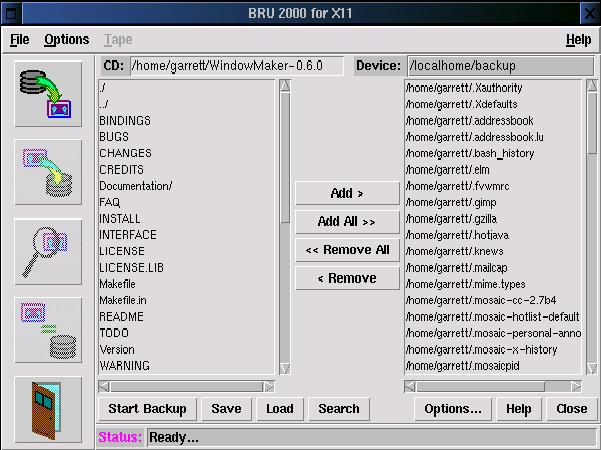
The whole point of xbru is to supply an easy-to-use front end for BRU, so the interface is a big part of the package. Overall I liked the interface. The front screen was simple, with only a few options. Unfortunately, the Full, Level 1 and Level 2 buttons are slightly confusing to a new user who hasn't looked at the documentation closely. The little message bar at the bottom of the screen does explain the buttons more thoroughly; however, since there is a lot of unused space on the front screen, labeling the buttons “Full Backup”, “Level 1 Backup” and “Level 2 Backup” would be less confusing. Also, substituting an explanatory paragraph next to the buttons for the large EST logo would certainly be more helpful to the new user.
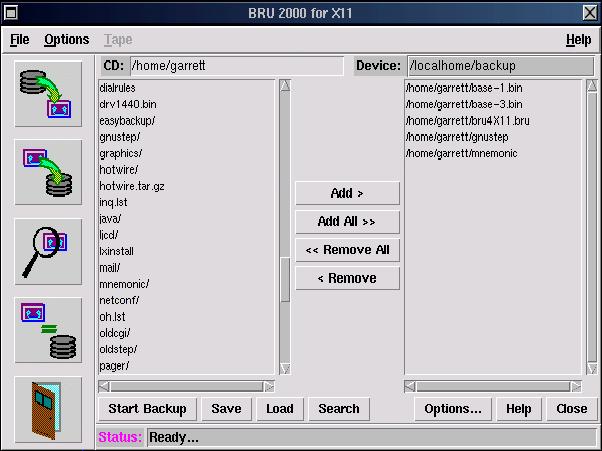
The backup page was similar to other backup programs I have used, and I found it generally intuitive.
The restore page was not quite so easy to understand. The confusing thing about the restore page was that on the left it gave a listing of files labeled as the current directory, but it listed only those files I had backed up, not all of the files on my hard drive. I could move these files to a listing labeled as the backup device to restore the files. While it worked as I expected from using other backup products, the labels just seemed confusing.
The verify and list operations were relatively simple and understandable.
Along with the ability to do backups on the spot, you can also save backup definitions and schedule them to be run at any time. This ability is essential for any long-term backup strategy. The xbru interface for this option was very easy to understand. Another nice option that came with xbru was a utility to configure the /etc/brutab file. This is beta software so it isn't mentioned in the documentation. Hopefully, by the time this review is published, a final version of this software will be available.
I would recommend xbru for someone who wants to do backups of a home computer but nothing much more complicated. (Don't get xbru confused with BRU 2000's command-line interface which is quite powerful and robust—see below.) It is easy to use and doesn't require you to go digging through lots of documentation before you use it. I managed to use nearly all of its features without having to look in the manual.
xbru is an interface to the original, command-line BRU backup software. BRU is a very flexible and powerful backup program. It is much more reliable than tar and friends, supporting CRC error detection and automatic verification after backup to ensure that you don't have a bad tape. You can schedule backups to run automatically and even change the tapes in an auto-loading tape drive for multi-tape backups. BRU backs up all types of files: device files, sparse files, pipes, soft and hard links, etc. The list of features is too long for me to cover here. For a full review of BRU, see “BRU—Backup & Restore Utility”, Linux Journal, March 1995, Issue 11.