Mathematica v3.0
Manufacturer: Wolfram Research
E-mail: info@wolfram.com
URL: http://www.wolfram.com/
Price: $1,495.00 US
Platform: Caldera OpenLinux 1.2, i486/100, kernel 2.0.33, ATI Mach32 video
Reviewer: Patrick Galbraith
About three years ago, I was taking various math courses—different levels of calculus and differential equations. I actually enjoyed both, finding them a constant challenge to master. At that time, I was also working on mastering another exciting puzzle—Linux. Back then, there weren't a lot of commercial applications or even books on Linux. I had just spent a whole night downloading and copying to floppies, and migrated from Sunsite to ordering the InfoMagic set and printing out all the FAQs and HOWTOs I possibly could. I also had to maintain a MS Windows/DOS partition to run my math software, which was then Maple V. I wasn't happy to have to reboot to use the software, but when projects requiring Maple were due, I had to do it.
Today, many commercial products are available for Linux. One of them is Mathematica, a full-featured, powerful, math lover's paradise. I would have loved to have had it three years ago.
Recently, I had the privilege of reviewing this product and will look at as many features as possible in such a brief forum.
Wolfram states, “Mathematica is the world's only fully integrated environment for technical computing.” Instead of having various packages or tools for a variety of mathematical functions, Wolfram has integrated them all into one package. For this review, I tested the mathematical capabilities and ease of use of this integrated package, using the many math examples given in the huge book by Stephen Wolfram that is included with the package.
There is no limit to the things one can do with Mathematica; each would take an entire book in itself to review. I will stick to simple uses here, and keep the beginner in mind.
Mathematica comes in a big box that includes the following:
The Mathematica Book by Stephen Wolfram, which is 1403 pages of excellent examples, applications and colorful illustrations of Mathematica in action.
Getting Started Guide
Standard Add-On Packages Book
Mathematica System Administrators Guide
License Certificate
Installation media on CD
The installation of Mathematica was quite smooth. The installer is a simple shell script that asks various questions, such as directory and program password. The password can be obtained at Wolfram's web site upon product registration and is required in order to have a fully functioning program. Other options for registering are via fax or mail. The registration links the copy of Mathematica to the host name on which you are installing. Once the installation is performed and the password obtained and included in the installation step that asks for it, you can begin using Mathematica. It is possible to install the password at a later time, but you will be able to run in MathReader Mode only.
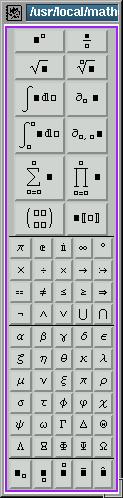
There are two ways to run Mathematica: via X, using the notebook and palette window (see Figure 1) or via the command line. The benefits of using the notebook and palette are the point-and-click interaction and the ability to save each session as a worksheet.
The benefit of the command line is quick computations. Note that graphics are a separate process. If you are running from the command line in an xterm, any graphics you generate will go to Mathematica's graphics output window. If you are running from a virtual terminal, the graphics will be plain ASCII.
The language to interact with Mathematica is quite simple and intuitive and also well-documented. If you have any rudimentary programming experience, it will be even easier to use. When using the worksheet window, it checks syntax and gives a system bell if you use the wrong type of bracket.
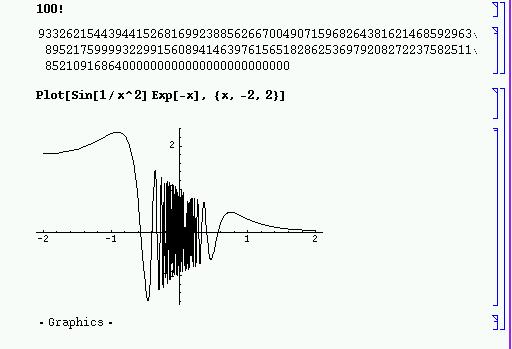
The first two examples of this are plotting (sin 1/x2)(e-x) (Figure 2) and power series (Figure 3):
I was running the equations in Figures 2 and 3 on a 486/100, and all of the computations ran quite fast.
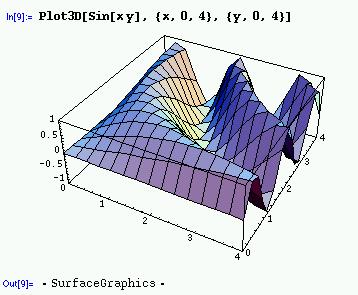
One of the major parts of one math course I took was power series. One such equation done with Mathematica is shown in Figures 4 through 6.
Figure 4. Differential Equations
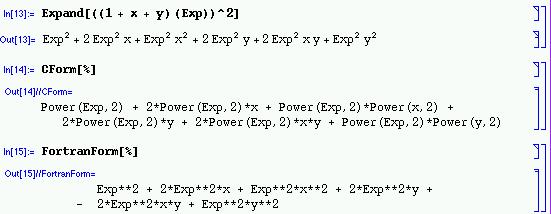
This is just the tip of the iceberg in regard to the many mathematical equations you can perform with Mathematica. You can also program Button Boxes to perform specific actions when you click on them. This option enables you to create interactive worksheets (see Figure 7). Other capabilities include sound, animation and transforming input files (such as an image file) or external sounds. Mathematica's language can be used to read in files, output to files, read directory contents (explicitly and type-globbing), change to a different working directory and delete files, all of which I found to be quite useful. Any programmer will appreciate the Mathematica feature that converts a Mathematica expression to a C or FORTRAN expression—an extremely useful feature (Figure 8).
Mathematica has an external function which converts Mathematica worksheets to HTML or TeX.
I tested the HTML conversion, and it basically produced an HTML document with links to images containing all of the worksheet contents, both text and graphics (see Listing 1). Output from Mathematica can be sent to an external file, or one file can be combined (spliced) with another. External commands can be launched from Mathematica, e.g., to start Netscape or any one of the various word processing packages.
Mathematica is an excellent tool with limitless features. I was impressed at how smoothly it ran with both Netscape and StarOffice running at the same time. I truly wish this had been available when I was in school, not only because it is available for Linux, but because of all the useful features and the fun I have using it. I like the flexible language Mathematica uses, and the documentation is excellent. I found The Mathematica Book to be full of great examples and explanations on usage. Best of all, it runs on Linux and takes full advantage of Linux's speed, both in computations and graphics rendering.
Users of this product could be engineers, scientists, chemists, teachers, students and general math enthusiasts. I highly recommend Mathematica to anyone who is involved in the sciences. This is one tool you will always find invaluable, and it is well worth the price.