
Designing a Safe Network Using Firewalls
A firewall can be your best friend; it can also be the cause of a lot of unforeseen problems. When should you consider placing a firewall into your network? And if you are sure you need one, where in the network do you put it? Too often, firewall policy results from a non-technical board meeting, on the basis of the chairman's “I think we want a firewall to secure our network” remark. An organization needs to think about its reasons for installing a firewall—what is it meant to protect against, and how should it go about doing its job? This article aims to clarify some of the issues that require consideration.
Although this question seems easy to answer, it is not. The security experts say a firewall is a dedicated machine that checks every network packet passing through, and that either drops or rejects certain packets based on rules set by the system administrator. However, today we also encounter firewalls running web servers (Firewall-1 and various NT and Unix machines) and web servers running a firewall application. It is now common practice to call anything that filters network packets a firewall. Thus, the word firewall usually refers to the function of filtering packets, or to the software that carries out that function—and less often to the hardware that runs the application.
It is by no means necessary to purchase specialized firewall hardware or even software. A Linux server—running on a $400 386 PC—provides as much protection as most commercial firewalls, with much greater flexibility and easier configuration.
A few years ago I attended a Dutch Unix Users Group (NLUUG) conference. One of the topics was “Using Firewalls to Secure Your Network”. After listening to a few speakers, I had not found a single argument that justified the necessity of a firewall. I still believe this is basically true. A good network doesn't need a firewall to filter out nonsense; all machines should be able to cope with bad data. However, theory and practice are two different things.
Unless you have incredibly tight control over your network, your users are likely to install a wide variety of software on their workstations, and to use that software in ways you probably haven't anticipated. In addition, new security holes are discovered all the time in common operating systems, and it's very difficult to make sure each machine has the latest version with all the bugs fixed.
For both of these reasons, a centrally-controlled firewall is a valuable line of defense. Yes, you should control the software your users install. Yes, you should make sure the security controls on their workstations are as up-to-date as possible. But since you can't rely on this being true all the time, firewalls must always be a consideration and nearly always a reality.
A few months ago, a small crisis arose in the Internet security world—the infamous “Ping of Death”. Somewhere in the BSD socket code, there was a check missing on the size of certain fragmented network packets. The result was that after reassembling a fragmented packet, the packet could end up being a few bytes larger than the maximum allowed packet size. Since the code assumed this could never happen, the internal variables were not made larger than this maximum. The result was a very nasty buffer overflow causing arbitrary code to be generated, usually crashing the machine. This bug affected a large community, because it was present in the BSD socket code. Since this code has often been used as a base for new software (and firmware), a wide variety of systems were susceptible to this bug. A list of all operating systems vulnerable to the “Ping of Death” can be found on Mike Bremford's page, located at http://prospect.epresence.com/ping/. A lot of devices other than operating systems were susceptible to this problem—Ethernet switches, routers, modems, printers, hubs and firewalls as well. The busier the machine, the more fatal the buffer overrun would be.
A second reason this bug was so incredibly dangerous was that it was trivial to abuse. The Microsoft Windows operating systems contain an implementation of the ICMP ping program that miscalculates the size of a packet. The maximum packet you can tell it to use is 65527, which is indeed the maximum allowed IP packet. But this implementation created a data segment of 65527 bytes and then put an IP header on it. Obviously, you end up with a packet that is larger than 65535. So all you had to do was type:
ping -l 65527 victim.com
Once this method was known, servers were crashing around the world as people happily pinged the globe.
As you can see from the list on Mike's page, patches are not available for all the known vulnerable devices. And even if they were, the system administration staff would need at least a few days to fix all the equipment. This is a situation where a firewall has a very valid role. If a security problem of this magnitude is found, you can disable it at the access point of your network. If you had a firewall at the time, most likely you filtered out all ICMP packets until you had confirmed that your database servers were not vulnerable. Even though not a single one of these machines should have been vulnerable, the truth is that a lot of them were.
The conclusion we draw from this experience is that the speed and power of response a firewall gives us can be an invaluable tool.
These are the basic questions you should ask:
What do we need to protect?
Against whom do we need to protect?
Where do we place the firewall(s) in the network?
How do we configure the firewall?
How do we monitor what is going on?
To answer these questions correctly, it is of vital importance that you map your entire network. You don't need to map every single device in the network, since that changes often anyway. Try to map the separate subnets, the routers, the hubs and the physical locations (floors, offices, classrooms). Include the important parts of the network that you wish to secure the most.
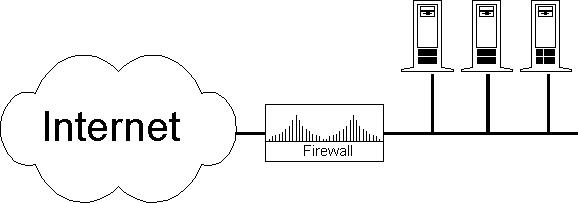
Firewall Placement
Most firewalls are used to protect the entire Local Area Network (LAN). In this case, the Internet router usually acts as the firewall. A properly configured Internet router filters out the IP numbers used locally (for instance 10.*, 127.* ,192.x.y.*) to prevent IP spoofing. It should also filter out all packets from the outside with an IP number that normally can come only from the inside. Any packet in this category can only be an attempt to trick your machines, and it should be denied access immediately. Next, filter out any outgoing IP traffic that doesn't have your registered class of IP numbers. This is not only to prevent sending out bogus packets (or to keep your people from spoofing the Internet), it's also for your own security. In particular, Windows products tend to disregard RFCs. One day I found a Windows 95 machine that shared its local printer by giving it the IP number 6.6.6.6. If your Internet router doesn't filter out these packets, you might be routing your printed documents onto the Internet.
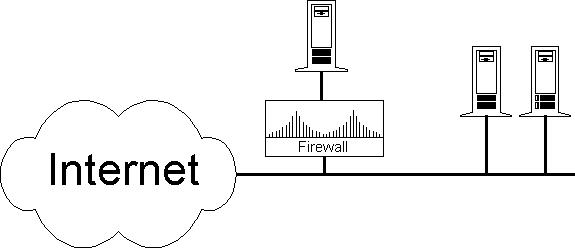
Another frequent use for firewalls is to protect a single machine. If you want to protect a single machine with a firewall, you must make sure it doesn't depend on anything outside the firewall; otherwise, your firewall serves no purpose apart from giving a false sense of security. If the protected server is using data from an unprotected PC, someone can falsify the information on the PC in order to do potentially serious damage to your server's data. Someone gaining access to the PC could also reach the server by pretending to be the trusted PC user. If the machine relies on other machines, you want to place your firewall a bit further upstream, so that it can protect those machines as well. NFS is a good example of an application you would not want to allow through the firewall in this setup. This type of firewall is easy to configure. Block all protocols not in use on the sensitive server, forward only those packets with the server's IP, and don't forget to prevent IP spoofing of your server's IP number from the outside.
A script to set up typical firewall rules to protect a single machine or small subnet is shown in Listing 1. Script for Typical Firewall Rules.
Obviously, real networks aren't as simple as the above examples. Most networks have various machines which are multi-homed and part of different subnets. Larger organizations, like schools, have a problem in that a lot of people have physical access to the Ethernet. The best way to protect portions of these networks is to use subnets on physically separate cables. For example, it would be an excellent policy to give the system administration office a separate subnet, since system administrators often need to use the privileged accounts.
Quite often a network you wish to protect does only a few limited tasks. On a typical administration network, people want to use the Web, e-mail, POP and quite often a telnet connection to the administrative database server (hidden in a Windows application). Masquerading works best for these networks. It makes sure the individual machines in the administrative network are not reachable (unless the masquerading host itself is compromised, which is next to impossible if it doesn't run any services), while keeping all the basic functionality of being connected to the Internet. This has an additional advantage. Often access to database servers is protected through a TCP wrapper, which allows only a certain set of hosts to access the database. For each new client machine added to the network, an entry into the appropriate /etc/hosts.* files must be made. With masquerading, this entry isn't necessary, since the new machine will be masqueraded and the IP number of the masquerading host is already known to the database server.
If you cannot physically separate the administrative network, you might want to consider using some form of encryption. Kerberos is often used in these cases, but you could also use an ssh-PPP tunnel (ssh is a key-pair encryption algorithm). With ssh you can easily create a virtual private (encrypted) network between your masquerading host(s) and your database server. That should take care of any eavesdropping risks from students booting rogue Linux machines on the network.
With complex networks, it is important to know who the threat is. The threat typically comes from the inside and not the outside, which is protected by the Internet Router/Firewall machine. Also, don't forget to protect yourself against your modem pool—IP spoofing can occur from there as well.
There are basically two ways of configuring your firewall. The first and most secure setup is “Deny everything unless we explicitly allow it.” The disadvantage is that you will have a lot of users wondering why certain things don't work. You might consider this approach in a setup where your firewall protects a very small subnet containing only servers and no clients. A script for setting up this type of firewall is shown in Listing 2. “Deny Everything..” Firewall. This type of firewall requires quite a bit of knowledge about how certain protocols work. Do not attempt it unless you have proper documentation and plenty of time to devote to it.
The second, and easier setup is “Allow everything unless we explicitly deny it.” This one makes your network fairly open, but controls a few dangerous or unwanted protocols. For example, some ISPs use this feature to block all “CU-SeeMe” traffic, as this type of traffic can congest their entire network. A script setting up this type of firewall is shown in Listing 3. “Allow Everything...” Firewall.
As you might have noticed in the two previous examples, all deny rules have the option -o set to instruct the Linux kernel to explicitly log all denied packets using the syslog facility. If you deny packets without logging them, someday you will be bug hunting for hours before you realize the problem was a packet filter. Depending on how you have configured the syslog daemon (/etc/syslog.conf), these messages will show up in either the /var/log/messages file or the /var/log/syslog file. You should regularly check these log files on your firewall machines. Make sure there is enough disk space to log even an attack that floods you with messages. If possible, use a separate partition for your log files.
Here are a few log entries from our syslog to demonstrate some common problems. These log entries come from our Livingston router, as well as our Linux machine.
Jan  2 15:17:57 unreachable.xtdnet.nl 15 deny: UDP from 130.244.101.74.137
to 194.229.18.53.137
This is perhaps the most frequent hit our firewall rules get. Port 137 is the NetBios name-service port used by Microsoft Windows machines to look up names in the local network. However, poor implementation and bad configuration often lead to Windows machines making NetBios requests to another machine. These requests might have been generated by a user's telnet, FTP or even WWW request. You might want to enable your deny rule without the -o flag, so that your log file is not filled up with these very common errors. One of our clients had his root partition entirely filled with netbios logs, stopping his genuine logging from operating and almost crashing the server.
Jan  2 17:12:34 unreachable.xtdnet.nl  2 deny: TCP from 10.0.3.1.61007 to
194.229.18.29.80 seq 1471CB0, ack 0x0, win 8192, SYN
This message is caused by a badly configured host. The IP numbers in the 10.*.*.* range are reserved for local area networks. We found out this host was a misconfigured masquerading host on the Internet, which used its IP number from the local masqueraded network instead of its real Internet IP number. This misconfiguration traveled through many other routers before being caught by our firewall. Large backbone ISPs don't filter out bogus packets, resulting in easy IP spoofing from almost anywhere on the Internet to anywhere else. Don't trust your ISP to filter out anything; do it yourself.
Jan 20 06:57:33 unreachable.xtdnet.nl 14 deny: UDP from xx.yy.zz.aa.904
to 194.229.18.27.1112
Our firewall proved its value on this attack. Someone tried to ask our RPC daemon (udp port 111) which daemons we are running. Even though an attacker can still find most RPC services by doing a total port scan, it is still a good idea not to give them the information so readily. There is almost never a need to have RPC services exchanged with a server on the Internet. Port scans are easily spotted because they leave a giant trace of occurrences of all your filter rules in your log files.
Jan  3 22:16:55 unreachable.xtdnet.nl 44 deny: TCP from xx.yy.zz.aa.17231
to 194.229.18.27.23 seq 7A3731D0, ack 0x0, win 49152, SYN
This is another true firewall hit. We banned this host after we received a couple of the above attacks on our RPC server. Since the postmaster of this particular site didn't respond, we blocked access for the host on all ports.
Feb  4 09:10:17 polly.xtdnet.nl kernel: IP fw-in deny eth1 UDP 0.0.0.0:68
255.255.255.255:67 L=328 S=0x00 I=4 F=0x0000 T=60
Port 68 is bootp (DHCP). Some machine was broadcasting and asking for a bootp server. This could be a Win95 computer or even some intelligent HUB which needs an IP number to support SNMP. (This one had us puzzled for months.)
Jan 27 09:47:00 masq.xtdnet.nl kernel: IP fw-in deny eth1 TCP 10.0.4.6:1992
204.162.96.21:80 L=48 S=0x00 I=2993 F=0x0040 T=255
This machine didn't define the masquerading host as router, so it tried to be smart—but it still didn't find the right gateway.
Jan 28 12:23:50 masq.xtdnet.nl kernel: IP fw-in deny eth0 TCP 194.229.18.2:3128
194.229.18.36:2049 L=44 S=0x00 I=23859 F=0x0000 T=63
To understand what happened, we need to dig a little into the inner workings of TCP/IP. All connections are identified by a unique combination of source IP, source port, destination IP and destination port. However, to find well-known services, such as telnet, WWW or cache, it is a common practice to use specific ports. To uniquely identify connections to such a well-known service, a random but unique port is allocated on the local machine. If this machine now makes a connection to a well-known service on another machine, it is guaranteed to have a distinguishable TCP/IP connection. Port numbers below 1024 are normally not assigned as random ports, because they're often used or reserved for the well-known services.
Now, let us look back at the log entry. The computer 194.229.18.36 wanted to set up a connection to the machine 194.229.18.2 on port 3128 (the cache server). It first asked the operating system for a unique random port and was given port 2049. It then initiated the connection to the cache server (194.229.18.2 port 3128). The cache server responded by sending its answer back in a packet to 194.229.18.36 port 2049. But 194.229.18.36 is also using firewall rules, and one of its rules is to block all attempts to connect to the NFS service, which, unlike many other well-known services, is not located on a port below 1024, but on port 2049. Thus, the cache server's response is filtered out. You can solve this problem of distinguishing the connection based on whether or not it originated from your site. You can determine the point of origin by whether the SYN or ACK flag in the TCP header is set. The correct way of filtering out connections to port 2049, while still allowing connections to be initiated from it, is as follows:
/sbin/ipfwadm -I -i deny -S 0.0.0.0/0 \
 -D 0.0.0.0/0 2049 -P tcp -y -Weth0 -o
Jan  2 11:22:58 unreachable.xtdnet.nl 38 deny: TCP from 193.78.240.90.8080
to 194.229.18.2.1642 seq F72DA7C6, ack 0xED8FDEA1, win 31744, SYN ACK
A similar situation happened here. Port 1642 was assigned by some machine as the random unique port, but the firewall decided that port 1642 was bad. Livingston Portmaster software uses this port to communicate between a Unix host and their routers/firewalls, so that is why we filter these ports for the outside.
In general, try to avoid blocking high ports, and if you do block out a high port, block that port only for the machine that needs the protection. For example, block port 1642 only for your routers and terminal servers, but leave it open for Unix servers. Then, if the router/firewall receives a packet destined for port 1642 on an internal machine, it will pass it to that internal machine even if port 1642 on the router itself is blocked.
A minor drawback is that we are giving away a bit of information to potential hackers. They can check all your IP numbers to see which ones are routers, firewalls or Unix hosts that talk to the routers or firewalls; however, they can usually find that same information through other means as well. For example, the traceroute command yields a lot of information about which machines are used for packet transfer and are therefore either a router, a firewall or both. You can also use the -y option mentioned in the previous example. Not all hardware routers/firewalls offer these options.
Most attacks on your firewall are simple probing. This is analogous to a person trying your door handle to see if the door is locked. The above firewall rules should protect you against these without much of a problem.
What if a person is trying to find out more than simply whether your door is locked? What if someone appears to have a true interest in you? The first sign of this will be a sudden increase in the number of hits on your firewall from a small set of hosts or networks. Your first step should be to contact the system administrator of those systems. If you are really feeling paranoid at this stage, don't e-mail postmaster and don't trust the technical support phone number on their web site. Look up the general number of the company in a paper phone book or dial an operator to assist you. Once you get through to the company, tell them what is going on and offer them as much information as possible. If you can trust the administration of the sites, this usually guarantees that the attacks will stop.
Only rarely does this approach fail—either because the company's administrators are colluding in the attack, or because the attack is coming from a large provider who gives its users access to a Unix shell. For these providers, it is impossible to trace the abuser just from the timestamp of your firewall logs because dozens of people would have been logged on at the time.
So far, this has happened to us only once. We suspected that the administration itself was responsible for the probes and hacking attempts to our sites. We decided to let the hacker through our firewall temporarily, so we could gather more information on what they were doing.
We used two tools to gather information. First, we replaced the normal Internet super server (inetd) with xinetd. This version of inetd has the option to log an incredible amount of valuable information. Second, we needed to run a special version of our nologin program to make sure the connection stayed up long enough for us to send out an ident probe.
/* nologin.c */
main() {
  printf("You have no login on this machine.\n");
  sleep(60);
}
We enabled the services to be probed in /etc/xinetd.conf. For example to set up the remote login shell rsh:
service shell
{
   socket_type     = stream
   protocol        = tcp
   wait            = no
   user            = nobody
   server          = /bin/nologin
}
And we enabled ident lookups and remote host
logging for all services:
defaults
{
   log_type            = FILE /var/log/xinetd.log
   log_on_success      = HOST USERID
   log_on_failure      = HOST RECORD USERID ATTEMPT
   instances           = 10
}
And finally we were ready to open our firewall for these pseudo
services on our host.
Be aware that the described level of logging is very high—your log files will be extremely large. But don't be tempted to disable the logging for real services. For example, we logged a few apparently harmless finger requests which were followed by probes from another machine on several occasions. The machines responsible for the probes were very uninformative. But this hacker made the mistake of using his normal machine for a finger command first, to see if any system administrator was logged on, before he started his probes from the secure system. And his regular machine was running an ident daemon, so our logs recorded his user name.
As can be seen by the “Ping of Death” example, firewalls can be a life saver. Furthermore, we have seen that it is fairly easy to configure the firewall, once you have some knowledge about how the TCP/IP protocol works.
When visiting one of our clients recently, I peeked at their two firewalls briefly. Both firewalls had an uptime of 108 days. They had been up ever since installation of Alan Cox's ping patched Linux kernel version 2.0.23. One firewall, protecting the main Internet server, logged four attempts to send oversized ping packets. It also prevented access by some students trying to use illegal IP numbers (whether by mistake or on purpose was not known). It also logged various misconfigured machines sending out bogus IP traffic. The firewall that protects their main Internet server (which also handles a full Usenet news-feed) had routed close to a terrabyte of IP traffic. Their firewalls have proven to be a very stable and valuable addition to their network security, where they have to be concerned about not trusting internal machines as well as external machines and where total control of the Ethernet cables is not guaranteed throughout the entire complex.

