
A Non-Technical Look inside the EXT2 File System
Everyone wants a fast computer; however, not everyone realizes that one of the most important factors of computer performance is the speed of the file system. Regardless of how fast your CPU is, if the file system is slow, then the whole computer will seem slow. Many people who have very fast Pentium Pros with slow disk drives and even slower networked file systems rediscover this fact daily.
Linux has a very fast file system called the Extended File System Version 2 (EXT2). The EXT2 file system was created by Remy Card (card@masi.ibp.fr).
There are several objectives when deciding how to lay out data on a disk.
First and foremost, the data structure should be recoverable. If there is an error while writing data to the disk (like a user pulling the power cord), the entire file system should not be lost. Although losing the data currently being written is sometimes acceptable, losing all the data on the disk is not.
Second, the data structure must allow for an efficient implementation of all needed operations. The hardest operation to implement is normally the hard link. When using a hard link, there is more than one directory entry (i.e., file name) that points to the same file data. Accessing the data by any of the valid file names should produce the same data.
Another hard operation involves deleting an open file. If an application has a file open for access at the same time that a user deletes the file, the application should still be able to access the file's data. The data should not be cleared off the disk until the last application closes the file. This sort of behavior is quite unlike DOS/Windows, where deleting a file results in immediate loss of access to that file by any application in the process of reading/writing to it. Applications exhibiting this type of Unix behavior are more common than one might think, and changing it would cause many applications to break.
Third, a disk layout should minimize seek times by clustering data on the disk. A drive needs more time to read two pieces of data that are widely separated on the disk than the same sized pieces located close to each other. A good disk layout can minimize disk seek time (and maximize performance) by clustering related data close together. For example, parts of the same file should be close together on disk and, also, near the directory containing the file's name.
Finally, the disk layout should conserve disk space. Conserving disk space was more important in the past, when hard drives were small and expensive. These days, conserving disk space is not so important; however, one should not waste disk space.
Partitions are the first level of disk layout. Each disk must have one or more partitions. The operating system pretends each partition is a separate logical disk, even though they may share the same physical disk. The most common use of partitioning is to place more than one file system on the same physical disk, each in its own partition. Each partition has its own device file in the /dev directory (e.g., /dev/hda1, /dev/hda2, etc.). Every EXT2 file system occupies one partition, and completely fills it.
The EXT2 file system is divided into groups, which are sections of a partition. The division into groups is done at the time the file system is formatted and cannot change without reformatting. Each group contains related data. A group is the unit of clustering in the EXT2 file system. Each group contains a superblock, a group descriptor, a block bitmap, an inode bitmap, an inode table and finally data blocks, all in that order.
Some information about a file system belongs to the file system as a whole and not to any particular file or group. This information is stored in the superblock, and includes the total number of blocks within the file system, the time it was last checked for errors and so on.
The first superblock is the most important one, since it is the first one read when the file system is mounted. The information in the superblock is so important that the file system cannot be mounted without it. If a disk error occurred while updating the superblock, the entire file system would be ruined; therefore, a copy of the superblock is kept in each group. If the first superblock becomes corrupted, the redundant copies can be used to fix the error by using the command e2fsck.
The next block of each group is the group descriptor. The group descriptor stores information on each group. Within each group descriptor is a pointer to the table of inodes (more on inodes in a moment) and allocation bitmaps for inodes and data blocks.
An allocation bitmap is simply a list of bits describing which blocks or inodes are in use. For example, data block number 123 is in use if bit number 123 in the data bitmap is set. Using the data and inode bitmaps, the file system can determine which blocks and inodes are in current use and which are available for future use.
Each file on disk is associated with exactly one inode. The inode stores important information about the file including the create and modify times, the permissions on the file and the owner of the file. The inode also contains the type of the file (regular file, directory, device file like /dev/ttyS1, etc.) and the location of the file on disk.
The data in the file is not stored in the inode itself. Instead, the inode points to the location of the data on disk. There are fifteen pointers to data blocks within each inode. However, this does not mean that a file can only be fifteen blocks long. Instead, a file can be millions of blocks long, thanks to the indirect way that data pointers point to data.
The first thirteen pointers point directly to blocks containing file data. If the file is thirteen or fewer blocks long, then the file's data is pointed to directly by pointers within each inode and can be accessed quickly. The fourteenth pointer is called the indirect pointer and points to a block of pointers, each one of which points to data on the disk. The fifteenth pointer is called the doubly indirect pointer and points at a block containing many pointers to blocks each of which points at data on the disk. The picture shown in Figure 1 should make things clear.
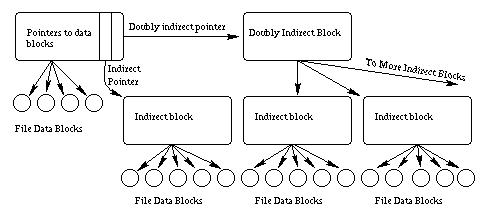
Figure 1. The pointers between an inode and its associated data.
This scheme allows direct access to all the data of small files (files less than fourteen blocks long) and still allows for very large files with only a few extra accesses. As Table 1 shows, almost all files are actually quite small; therefore, almost all files can be accessed quickly using this scheme.
Table 1. Occurrence of Various File Sizes
Inodes are stored in the inode table, which is at a location pointed to by the group descriptor within each group. The location and size of the inode table is set at format time and cannot be changed without reformatting. This means that the maximum number of files in the file system is also fixed at format time. However, each time you format the file system you can set the maximum number of inodes with the -i option to mke2fs.
No one would like a file system where files were accessed by inode number. Instead, people want to give textual names to files. Directories associate these textual names with the inode numbers used internally by the file system. Most people don't realize that directories are just files where the data is in a special directory format. In fact, on some older Unix systems, you could run editors on the directories, just to see what they looked like internally (imagine running vi /tmp).
Each directory is a list of directory entries. Each directory entry associates one file name with one inode number and consists of the inode number, the length of the file name and the actual text of the file name.
The root directory is always stored in inode number two, so that the file system code can find it at mount time. Subdirectories are implemented by storing the name of the subdirectory in the name field and the inode number of the subdirectory in the inode field. Hard links are implemented by storing the same inode number with more than one file name. Accessing the file by either name results in the same inode number, and therefore, the same data.
The special directories “.” and “..” are implemented by storing the names “.” and “..” in the directory and the inode number of the current and parent directories in the inode field. The only special treatment these two entries receive is that they are automatically created when any new directory is made, and that they cannot be deleted.
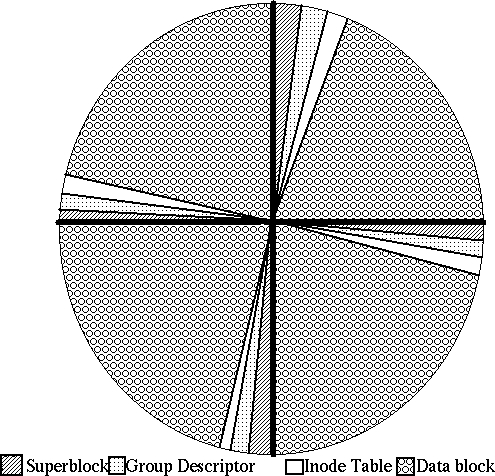
Figure 2. Layout of a disk with one partition and four groups.
The easiest way to understand the EXT2 file system is to watch it in action.
To explain the EXT2 file system in action, we will need two things: a variable named DIR that holds directories, and a path name to look up. Some path names have many components (e.g., /usr/X11/bin/Xrefresh) and others do not (e.g., /vmlinuz).
Assume that a process wants to open a file. Each process is associated with a current working directory. All file names that do not start with “/” are resolved relative to this current working directory and DIR begins with the current working directory. File names that start with “/” are resolved relative to the root directory (see chroot for the one exception), and DIR begins with the root directory.
Each directory name in the path to be resolved is looked up in DIR in turn. This lookup yields the inode number of the subdirectory we're interested in.
Next, the inode of the subdirectory is accessed. The permissions are checked, and if you have access permissions, this new directory becomes DIR. Each subdirectory in the path is treated in this fashion, until only the last component of the path remains.
When the last component of the pathname is reached, the variable DIR contains the directory which contains the file name we've been searching for. Looking in DIR we find the inode number of the file. Accessing this final inode tells us the location of the data. After checking permissions, you can access the data.
How many disk accesses were needed to access the data you wanted? A reasonable maximum is two per subdirectory (one to look up the name, the other to find the inode) and two more for the actual file name. This effort is expended only at file open time. After a file has been opened, subsequent accesses can use the inode's data without looking it up again. Further, caching eliminates many of the accesses needed to look up a file (more later).
When a new file or directory is created, the EXT2 file system must decide where to store the data. If the disk is mostly empty, data can be stored almost anywhere. However, performance is maximized if the data are clustered with other related data to minimize seek times.
The EXT2 file system attempts to allocate each new directory in the group containing its parent directory, on the theory that accesses to parent and children directories will be closely related. The EXT2 file system also attempts to place files in the same group as their directory entries, because directory accesses often lead to file accesses. However, if the group is full, the new file or new directory is placed in some other non-full group.
The data blocks needed to store directories and files can be found by looking in the data allocation bitmap. Any needed space in the inode table can be found by looking in the inode allocation bitmap.
Like most file systems, the EXT2 system relies very heavily on caching. A cache is a part of RAM dedicated to holding file system data. The cache holds directory information inode information and actual file contents. Whenever an application (like a text editor or a compiler) tries to look up a file name or requests file data, the EXT2 system first checks the cache. If the answer can be found in the cache, the request can be answered very quickly indeed without using the disk.
The cache is filled with data from prior requests. If you request data that you have never requested before, the data must first be retrieved from disk. Most of the time most people ask for data they have used before. These repeat requests are answered quickly from the cache, saving the disk drive much effort while providing the user quick access.
Of course, each computer has a limited amount of RAM available. Most of that RAM is used for other things like running applications, leaving perhaps 10% to 30% of total RAM available for the cache. When the cache becomes full, the oldest unused data (least recently used data) is thrown out. Only recently used data remains in the cache.
Since larger caches can hold more data, they can also satisfy a larger number of requests. The figure below shows a typical curve of the total cache size versus the percent of all requests that can be satisfied from the cache. As you can see in Figure 3, using more RAM for caching increases the number of requests answered from the cache, and therefore increases the apparent speed of the file system.

Figure 3. A typical curve of total cache size versus the number of requests satisfied from the cache.
As has been said before, one should make things as simple as possible, but no simpler. The EXT2 file system is rather more complex than most people realize, but this complexity results in both the full set of Unix operations working correctly, and good performance. The code is robust and well tested and serves the Linux community well. We all owe a debt of thanks to M. Card.
Randy Appleton is a professor of Computer Science at Northern Michigan University. He got his Ph.D. at the University of Kentucky. He has been involved with Linux since before version 0.9. Current research includes high performance pre-fetching file systems, with a coming port to the 2.X version of Linux. Other interests include airplanes, especially home-built ones. He can be reached via e-mail at randy@euclid.acs.nmu.edu.
