Satellite Tracking with Linux
Looking for something fun to do with your Linux box? One of the most impressive applications I've seen available for Linux is SatTrack 3.1 for Unix by Manfred Bester. SatTrack is a very powerful tool for satellite tracking and orbit prediction. It can tell you when a satellite, the Mir Space Station, or a space shuttle will be overhead, where they are at any time and when you might be able to see them. It can even control some external tracking hardware, such as antenna rotors or telescopes. The program can run from the console or a terminal window, or if launched inside an xterm, it can bring up a world map showing the current position of any satellite or group of satellites. It can do all this, and best of all, SatTrack 3.1 is free for private, non-commercial use.
As an amateur radio operator, I first became interested in using SatTrack to track the many amateur radio satellite in low-earth orbit. These satellites receive an amateur radio signal on one frequency, amplify it, and retransmit it on another frequency. Two stations on opposite sides of a continent or an ocean can communicate through one of these satellites using radios that ordinarily wouldn't be able to reach each other. Since most of these satellites are in low earth orbit, however, they pass overhead infrequently, and then only for several minutes at a time. Knowing when they will appear where is imperative to successful communication. To solve this tracking problem, it's Linux and SatTrack to the rescue!
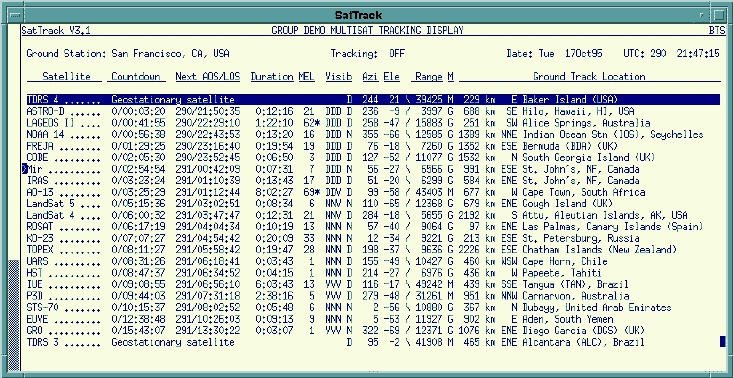
Figure 2. SatTrack v3.1 Multi-Satellite Line Display
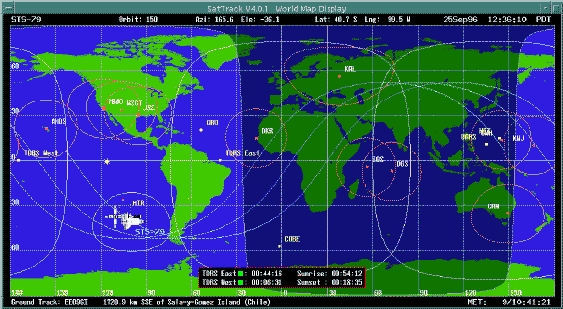
SatTrack was designed to compile and run on most Unix operating systems, and it runs quite nicely under Linux. One really nice feature of the program is that it can operate from a terminal window, such as a VT100 terminal, or from a Linux virtual console, if you can't or don't want to use X. On the other hand, if you do run X, you can pull up a full-color world map that will show you where any satellite or group of satellites is at the moment, where the sun is, where the gray line separating the sunlit side of the planet from the dark side of the planet is, and a graphical projection the path of the next several orbits of a satellite. Tools that come with SatTrack can automate the process of downloading fresh Keplerian two-line elements—the files that describe a satellite's orbit—directly from the Air Force Institute of Technology's FTP server.
Figure 3. SatTrack v3.1 Graphic Tracking Display
SatTrack is widely used in the space community. According to the program's home page:
Users of SatTrack V3.1 include NASA's Jet Propulsion Laboratory (JPL), Johnson Space Center (JSC), Goddard Space Flight Center (GSFC) and Marshall Space Flight Center (MSFC), the European Space Agency (ESA), the German Aerospace Research Establishment (DLR), the National Aerospace Laboratory (NLR) of The Netherlands, the Los Alamos National Laboratory (LANL), the Amundsen-Scott South Pole Station, a large number of universities and other institutions, as well as thousands of private users all over the world.
You can find more information about SatTrack, including its copyright and licensing information and the latest version of the SatTrack 3.1 distribution at http://www.primenet.com/~bester/sattrack.html.
Compiling SatTrack in a Linux system is fairly straightforward. Instructions on how to compile the program are included in the file SatTrack/src/README_MAKE, and I won't repeat all of them here. The most important options to choose, though, are in SatTrack/src/Makefile and SatTrack/src/include/sattrack.h. (These will make sense if you look at the files in question.) In the Makefile, the machine type I chose is (yes, I actually do have a 486)
# i486          (i486 with Linux)
#
CPU             = i486/Linux
CC_CMACH        = -O2 -m486
CC_LMACH        =
CC              = gcc
The user compile-time options I chose were:
CC_CUSR     = -DREVERSEVIDEO -DSUNTRANSITS
-DXWINDOW
I used the following options for compiling and linking:
X11         = /usr/include/X11
LX11            = -L/usr/X11R6/lib -lX11 -lXt
-lICE -lSM
# X11R6
In SatTrack/src/include/sattrack.h, the only changes I made were to define the home directory:
#define SATDIR "/usr/local/bin/X11" /* directory where SatTrack */
and to change the print command (you might choose to use nenscript or some other ascii to postscript utility):
#define PRINTCMD              "a2ps"
#define PRINTOPT              "-nL -nu -c"
After these changes, SatTrack should compile successfully. One final thing to check after compiling is the write privileges on the SatTrack/pred/ directory; if you install SatTrack in a common bin directory, you might want to make that directory world writable or SatTrack may not be able to write an orbit prediction to a file (or print it). For simplicity in calling the program, I've defined a choice in one of my pull-down fvwm menus as follows:
        Exec    "SatTrack"      exec
/usr/bin/X11/color-xterm -sb -sl 500 -j
-ls -fn 7x14 -geometry 132x26 -T 'SatTrack
for Unix 3.1' -n 'SatTrack' -e
/usr/local/bin/X11/SatTrack/run/sattrack &
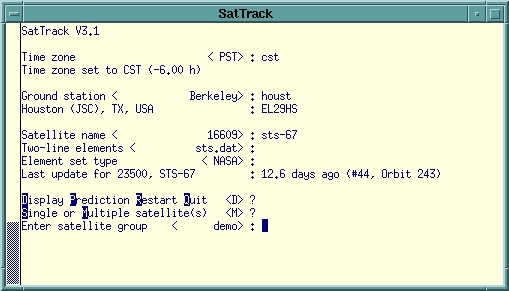
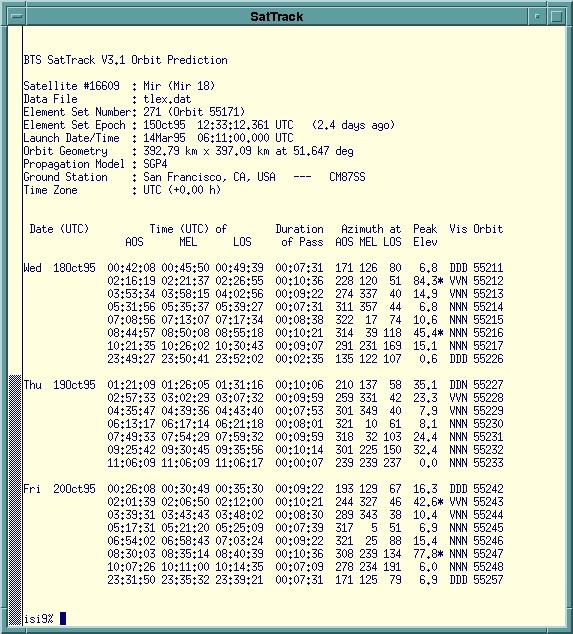
Using SatTrack is straightforward. After telling the program your location and the satellite you're interested in, you are presented with a list of options. You can compute an orbit projection over several days. SatTrack will succinctly describe every pass over your location including times and durations of each pass, the peak elevation the satellite will reach, and whether it will be visible. Another option is to display the current position of the satellite. You can display one satellite at a time or a whole group of satellites (such as all the amateur radio satellites). SatTrack will tell you which satellites are currently over your horizon and how long it will be until satellites enter or leave your field of view. When appropriate, SatTrack can even tell you the radio frequency uplink and/or downlink of a satellite, and dynamically compensate for the Doppler shift! More advanced users can integrate SatTrack with antenna or telescope pointing hardware to track an object precisely as it passes overhead. SatTrack is on of very few satellite tracking program commonly available for any operating system that can show satellite visibility or actively control tracking hardware.
The following are SatTrack Stellite Icons

U.S. Space Shuttle Icon

Space Shuttle Icon

MIR Icon

International Space Station Icon
SatTrack is an absolute wonder for tracking satellites. With the help of SatTrack, I've made my first two-way communication with another ham radio operator over 1000 miles away using the Russian amateur radio satellite RS-15, and I look forward to making many more. Those who are not ham radio operators can find fun uses for SatTrack as well. Weather satellites, geological survey satellites, and others are constantly sending image and telemetry data to the earth. SatTrack can also tell you when satellites might be visible. Ever seen a space shuttle fly overhead? The Mir Space Station? The Hubble Space Telescope? With binoculars or a telescope, you might even see smaller satellites, once SatTrack has told you where and when to look. Doing a presentation on the Global Positioning System? Show your audience exactly where the GPS satellites are in orbit. Need a compelling computer display for that sci-fi epic you're producing for Film Studies 101? SatTrack can provide ever-changing graphic disply windows.
Information about SatTrack for Unix is available at http://www.primenet.com/~bester/sattrack.html.
SatTrack 3.1 can be downloaded and used free for private, non-commercial purposes, and the author, Manfred Bester, offers version 4.0 of SatTrack with more options and a more graphical interface for commercial use.
Figure 5: SatTrack Orbit Prediction Short Form
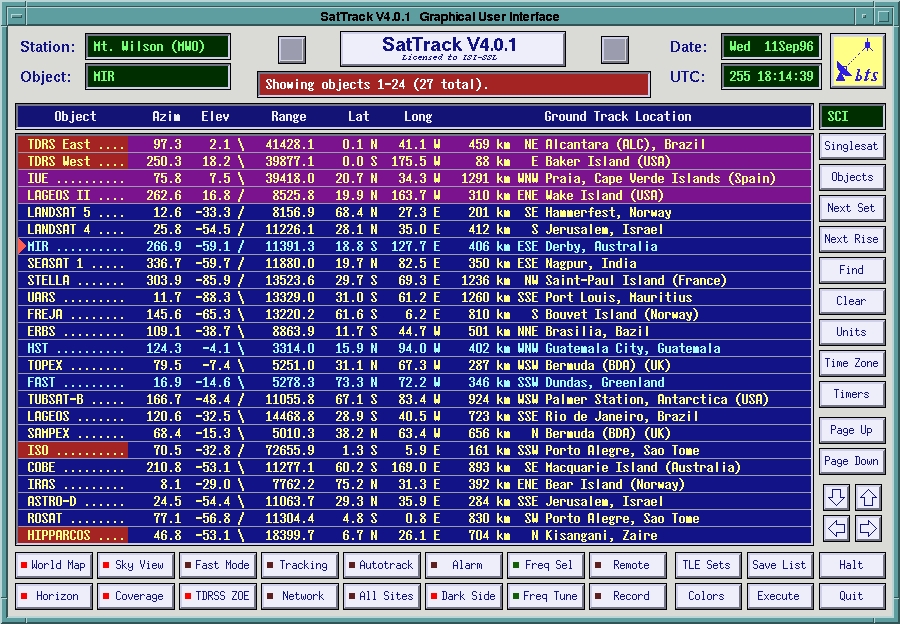
Figure 6. SatTrack v4.0.1 GUI for Multi-Satellite Line Display
To get a taste of using SatTrack to predict times of visibility in a satellite's orbit, check out http://ssl.berkeley.edu/isi_www/satpasses.html.
For more information about amateur radio, see the home page of the American Radio Relay League: http://www.arrl.org/.
For information about Amateur Radio satellites in particular, see the home page of AMSAT, the National Amateur Radio Satellite Corporation: http://www.amsat.org/.
For information about the Shuttle Amateur Radio Experiment, see http://www.nasa.gov/sarex/sarex.html.
Ken Harker, N1PVB has been a licensed radio amateur since October,1993, and an avid Linux user since June 1995. He's currently a graduate student in the Computer Sciences at the University of Texas at Austin.