
CyanogenMod 7.0—Gingerbread in the House
In order to run the latest version of Android, users normally have to be using the “flagship” Google handset. Unfortunately, that often requires using a different cell-phone provider, and it limits purchasing options significantly. In fact, it limits options to a specific handful of devices like the Nexus One and Nexus S. Because the Nexus devices don't have a slider keyboard and come on the T-Mobile network, they're not a viable option for me.
Enter CyanogenMod.
For users comfortable with rooting their phones, CyanogenMod offers many, many more features than the stock ROMs available for supported handsets. I have an original Motorola Droid from Verizon, and if I stick with the stock ROM, I will be stuck with Android 2.2. The current version of CyanogenMod, version 7, includes the Android 2.3 operating system. Code-named “Gingerbread”, Android 2.3 includes all the latest bells and whistles from Google that normally would be available only on the Nexus S. Thanks to the CyanogenMod team, we can have those features now—features like:
New on-screen keyboard with better responsiveness and a cleaner layout.
Easier selection tools for copying and pasting.
A new Marketplace application with a Web-based companion for installing apps from your desktop browser.
Integrated VoIP calling.
Although the new 2.3 features are great, the real beauty behind CyanogenMod is the customization options. Some of the same functionality can be added to the stock ROM for your phone by adding a replacement launcher, but CyanogenMod includes most of the bells and whistles by default. Some of the more exciting features include:
The ability to change the lock screen's layout.
Highly customizable ADWLauncher installed by default.
Improved pull-down status bar with power options.
Visual improvements like screen snapping shut when powering off, customizable virtual desktops, resizable widgets and more.
CyanogenMod is so customizable, it's often frustrating to show off, because it can look so drastically different from install to install. To answer the question, “What does CyanogenMod 7 look like?”, the best answer is truly, “However you want it to look!”
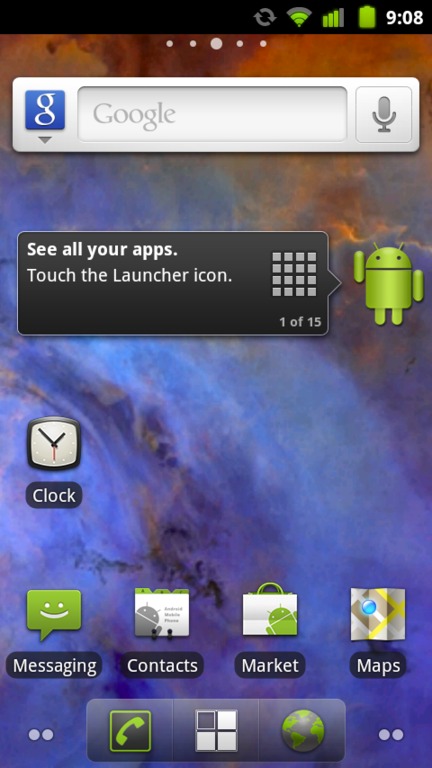
Figure 1. This is the default home screen in CyanogenMod 7. The background is my own, from NASA's Astronomy Pic of the Day Web site.
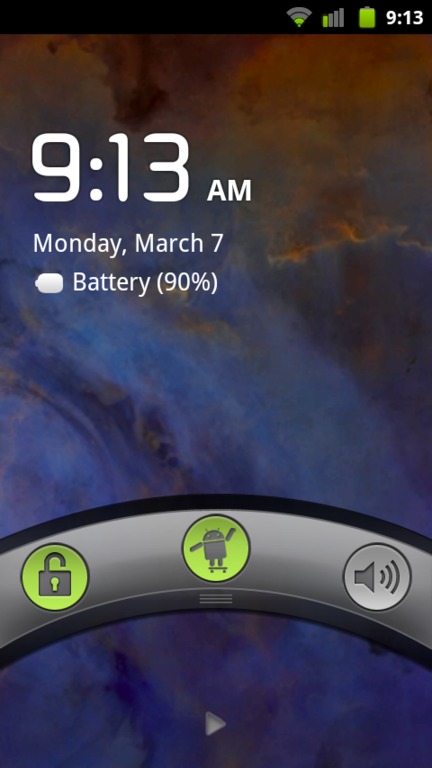
Figure 2. The lock screen is extremely customizable, and it can be themed to look like SenseUI, Honeycomb or completely custom with added functionality.
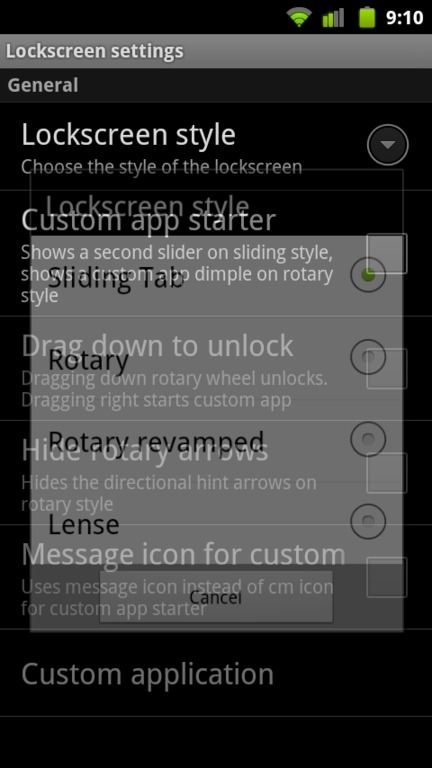
Figure 3. CyanogenMod has so many customizable options, it's easy to become overwhelmed. Thankfully, the default is beautiful.
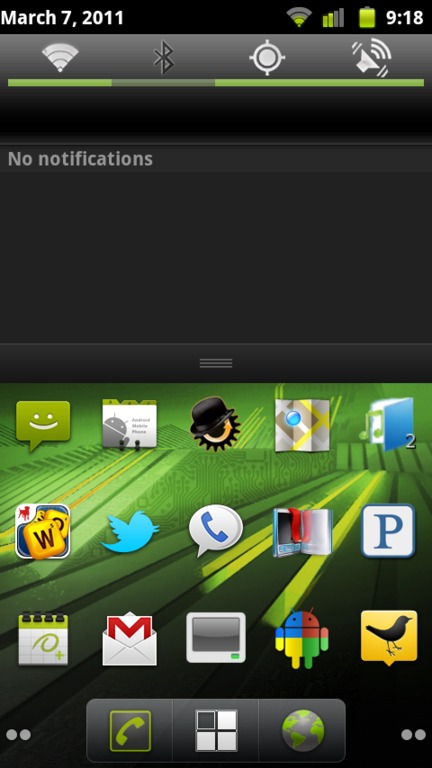
Figure 4. The pull-down menu has power modification tools available. Wi-Fi, Bluetooth, GPS and so on can be toggled quickly to save battery life.

Figure 5. With a few simple tweaks, the CyanogenMod home screen has a new theme, tightly packed icons, removed labels and more. If the included themes aren't to your liking, more are available on-line.
If you want to have the latest version of Android on your phone, but you don't want to wait for the cell-phone provider to release an update, or if you have an older handset (like my original Droid) that likely never will see an update beyond Android 2.2, CyanogenMod is the tool for you. Most phones are supported after rooting, and even older phones perform well with Android 2.3, especially if you overclock them. For more details or to download the latest version of CyanogenMod, check out www.cyanogenmod.com. The easiest way to install it on your rooted phone is with ROM Manager, however. It's a simple download from the Marketplace, and the free version includes support for the stable version of CyanogenMod.
Got Root?
The first step to installing a custom ROM like CyanogenMod is to “root” your phone. Rooting doesn't change the way your phone behaves; instead it gives you superuser (sudo-like) access to the system. Once your phone is rooted, you can do things like install a custom ROM, overclock your CPU, set up wireless tethering (which may violate your cell-phone contract) and even do simple things that shouldn't require root, like take screenshots.
Rooting an Android phone is usually extremely simple. Typically, all it takes is a simple search on Google for the model of Android phone you have along with the word “root”. For instructions on how to root several different model phones, sites like www.droid-life.com can be helpful as well.
Remember, “rooting” your phone doesn't change very much on its own. It just gives you the ability to change things. With great power comes great responsibility, however, so be careful with your rooted phone. Just like with a desktop version of Linux, the power of root can get you into trouble!
While I explored CyanogenMod version 7, I got really excited about how quickly development in the Android world was progressing. I decided to contact Steve Kondik, CyanogenMod's creator, and ask him a few questions. (Thanks to my programmer friend Russ Ryba for helping me come up with some of the more programming-centric questions.)
SP: CyanogenMod is one of, if not the, most popular custom ROMs for Android phones. What motivated you to start the project?
SK: I've always tried to customize desktop Linux, trying to make things smoother and faster. When I learned about how the G1 worked, and that I was able to change anything I wanted, I started off with rebuilding the kernel with different tweaks. Then I realized that I could rebuild the whole system from source and flash it to the phone with everything working perfectly—that's when the doors opened up.
SP: Installing a custom ROM requires a rooted phone. Rooting your phone is something that cell-phone companies generally frown upon. Have you gotten any unfriendly correspondence from either a cell-phone provider or Google?
SK: Yeah, and it's still a gray area with regard to firmware and proprietary drivers. When CM started to get big, Google made me very aware of the line between the open-source code and the closed portions (like the Google apps, such as Gmail), so I had to stop including those. CM doesn't ship with those parts now, so we leave it in the users' hands on how to get that functionality back.
It seems like carriers and manufacturers are starting to realize that these are more than just phones, and some even are embracing the community by releasing their own code as open source. T-Mobile recently open-sourced its theme engine, which we are using in CM7. Qualcomm and TI release code for their reference boards. Now we are finally starting to see more devices that are unlockable out of the box.
SP: You support a huge number of devices; I'm curious to know how much of CyanogenMod needs to be ported specifically to an individual handset, and how much is generic across the board. Does the wide variety of devices make releases difficult?
SK: A lot of devices are similar, but there always are subtle differences. Usually it has to do with the secondary processors on these devices and offloading media encoding/decoding, or special hardware like cameras and GPS. In some cases, we've had to reverse-engineer various parts, but the major manufacturers have been providing open-source code that we can learn from or use outright, like Qualcomm's CodeAurora Project.
With CM, each device has a “maintainer”, which is one or more people who work with that specific device and handle the issues.
SP: Once a handset is rooted, is installing custom ROMs simple, or do manufacturers try to prevent you from running custom code in other ways?
SK: It depends on the device. Some are wide open, and some are “rooted” but only in userspace—nothing can be changed in the boot process so things like custom kernels can't be used easily.
SP: How does the development process work with so many different developers and different handsets? Are there any unique frustrations with working on a project like yours?
SK: Keeping device-specific changes from breaking things on other devices is the tricky part. Most of this is handled by device “overlays” that customize the build for the hardware. Android has done a good job with making most of this relatively easy with its abstraction layers, but it also evolves rapidly. The extensible parts are where vendors often add their proprietary code and Android doesn't do anything for backward compatibility. In CM, we've actually had to re-add support for some of these older drivers in order to move to newer versions of Android.
There's also the issue of the way Google does development internally. It releases the source code for new versions after doing all the development behind the doors, so when it gets into our hands, it takes a lot of time to figure out what's changed and how to re-integrate our custom features back into it.
SP: Would any of what you do be possible without the GPL requiring Google to release its source code?
SK: Android isn't GPL; it's Apache-licensed. The only code Google's required to release is the Linux kernel. But no, without the source code, the kind of things we are doing wouldn't be possible.
SP: What are your most favorite and least favorite hardware devices to work with? What makes them awesome or horrible?
SK: The Motorola devices have been the most difficult because of the huge amount of proprietary code they include, not to mention the signed bootloader. The Samsung phones also have been a challenge because they've done a lot of things differently. HTC devices are what we have the best support for, partially because they are all similar to devices that Google has worked on directly (G1, Nexus One). The HTC Evo has been my personal favorite to work on, because the hardware is unique and it was the first to include things nothing else had like dual cameras and HDMI video.
SP: How much and what kind of experience do people need to begin creating their own custom ROM?
SK: If you want to build CM yourself for a device, we provide detailed documentation. You just check out the source code and with a few simple commands, you'll have a flashable ROM. That was the goal—to ease the barrier to entry. If you have an idea for a feature, it's very easy to dive in and start coding.
SP: I'm not a programmer at all, but I love CyanogenMod, and I would like to help. How can someone like me contribute?
SK: Helping out on our forums, writing documentation and tutorials on our wiki, and telling everyone you know about it.
SP: What makes CyanogenMod different from the other custom ROMs?
SK: I can't even call it a “custom ROM” anymore; it's become more like an Android distribution. We have a whole infrastructure for submitting code and a great support network. I want it to be as easy as possible for people to get involved and add their own ideas. CM is really about the community. Although we do have a core team of developers, many of the best parts in CM just came from out of nowhere because somebody thought it would be a neat idea, and we've made it easy to run the code on your own device.
SP: Do you plan to expand CyanogenMod to tablet computers as they become more common?
SK: We're already supporting a few tablets like the Nook and Viewsonic G-Tablet. As more become available and Android 3.0 is released, you can be sure that we will be trying to make them better.
For more details on CyanogenMod, and how you can contribute, visit www.cyanogenmod.com.
Shawn Powers is the Associate Editor for Linux Journal. He's also the Gadget Guy for LinuxJournal.com, and he has an interesting collection of vintage Garfield coffee mugs. Don't let his silly hairdo fool you, he's a pretty ordinary guy and can be reached via e-mail at shawn@linuxjournal.com. Or, swing by the #linuxjournal IRC channel on Freenode.net.
