
Barnes and Noble's NOOKcolor
The march of technology never ends. Not long ago (in the December 2010 issue of Linux Journal, actually), I reviewed the Android-powered NOOK e-reader from Barnes & Noble. That product was an E Ink-based product, running Android 1.5. What a difference a few months can bring. Barnes & Noble has just released its second-generation e-reader, the NOOKcolor. As one can gather from the name, the NOOKcolor's immediate distinguishing factor is a 7" color touchscreen, while the original NOOK had a 6" black-and-white E Ink screen.
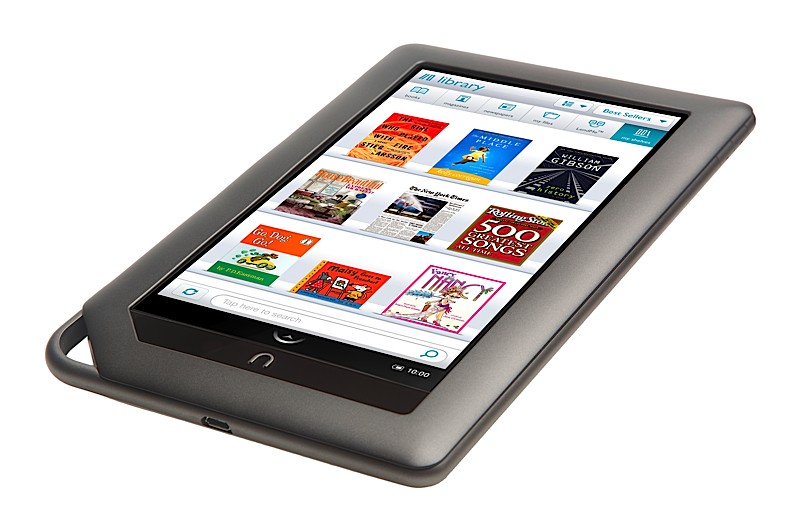
Figure 1. The NOOKcolor
Although the original NOOK was a decent enough e-reader and could be hacked to add additional functionality, the NOOKcolor borders on being an actual Android-powered tablet. Table 1 compares the specifications for the two units.
Table 1. NOOK vs. NOOKcolor
| NOOK | NOOKcolor | |
|---|---|---|
| CPU | Samsung S3C6410 (533MHz) | TI OMAP 3621 (800MHz) |
| RAM | 256MB | 512MB |
| Storage | 2GB int., ext. MicroSD | 8GB int (5GB usable), ext. MicroSD |
| Network | Wi-Fi (Wi-Fi + 3G on 3G NOOK) | Wi-Fi only |
| Screen | 600x800 E Ink 6", 480x144 color | 600x1024 7" color IPS |
| OS | Android 1.5 | Android 2.1 |
| Kernel | Linux 2.6.27 | Linux 2.6.29 |
| Size | 7.7" x 4.9" x 0.5" | 8.1" x 5.0" x 0.48" |
| Weight | 12.1 oz | 15.8 oz |
| Audio | Mono speaker and headphones | Mono speaker and headphones |
Looking at the specs, you can see that the NOOKcolor is a much more capable device. Unlike the original NOOK, the NOOKcolor is much hungrier for battery life—that excellent color IPS screen gobbles a lot of power. The NOOKcolor can run for 8–10 hours on a charge, while the original NOOK was good for a couple days if I kept the wireless radios off. The NOOKcolor charges via the Micro USB connector on the bottom edge of the unit, much like the original NOOK did. However, unlike the original NOOK, the NOOKcolor must be plugged in to its wall charger to charge fully. A computer's USB port will supply only 500ma, which isn't enough to charge the NOOKcolor under operating conditions and will only slightly trickle-charge the unit when it's asleep. The NOOKcolor's wall charger puts out 2000ma, which is enough to charge the unit fully in about three hours. There is a little “n” logo embossed in the Micro USB cord end that glows with the charging status of the NOOKcolor (yellow for charging, green for fully charged), which is a nice touch.
As with the original NOOK, the NOOKcolor can read several media types:
EPUB e-books (with and without DRM).
Mobi/eReader e-books (with and without DRM).
PDF, XLS, DOC, PPT and other office-related formats.
MP3 and AAC audio files (can be played in the background while reading).
JPEG, GIF, PNG and BMP image types.
MP4 video playback (new to NOOKcolor).
The NOOKcolor also includes a fairly capable, much improved Web browser over the original NOOK, and it ships with Pandora Internet Radio, a chess game, a sudoku game and a crossword puzzle game.
I've never covered an “unboxing” ritual before, but I feel compelled to mention it with the NOOKcolor. Your first impression of the NOOKcolor is when you open the box, and Barnes & Noble really did a great job on the packaging. It's a cardboard box that utilizes a magnetic closure to hold the lower one-third of the box closed. You pivot the lower one-third back, and it'll bend back and is held against the back of the box by another magnet, where you can reach inside the box and pull the NOOKcolor out of its recycled cardboard sarcophagus. It's wholly unnecessary, but absolutely awesome in its execution, and it gives you a clue as to what Barnes & Noble is thinking: the NOOKcolor is no device to be trifled with.
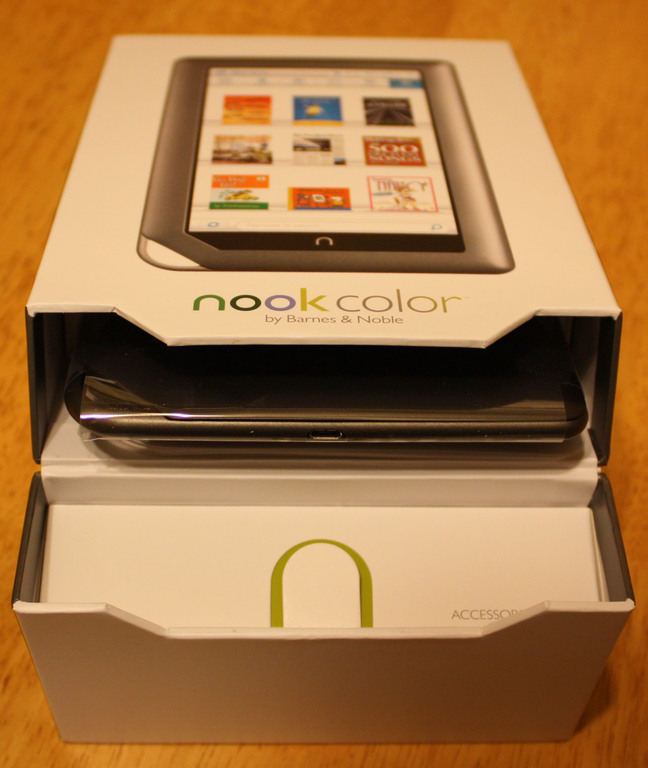
Figure 2. Unboxing the NOOKcolor
The initial boot of the NOOKcolor drops you into a wizard that walks you through your Barnes & Noble store account and initial Wi-Fi access point setup. The unit also displays a short video that shows you the NOOKcolor's features. The NOOKcolor doesn't have much in the way of hardware buttons—only a power button on the left edge, volume rocker on the right edge and an n button at the bottom center of the screen. If you push the n button, you'll be taken back to the home screen, where you can select any books on the NOOKcolor's desktop.
There's also a little arrow on the screen, right above the n button. Its normal mode is up, but when pressed, it rotates down, and a pop-up menu is exposed. This is the NOOKcolor's main menu. From here, you can select Library where you can choose your reading material. The Shop button connects you to the Barnes & Noble on-line store. The Search button is, well, a search. Extras is where the other NOOK programs are, such as Pandora, sudoku and chess. Web launches the Web browser, and Settings is where you can adjust system settings like Wi-Fi, screen brightness and so on.
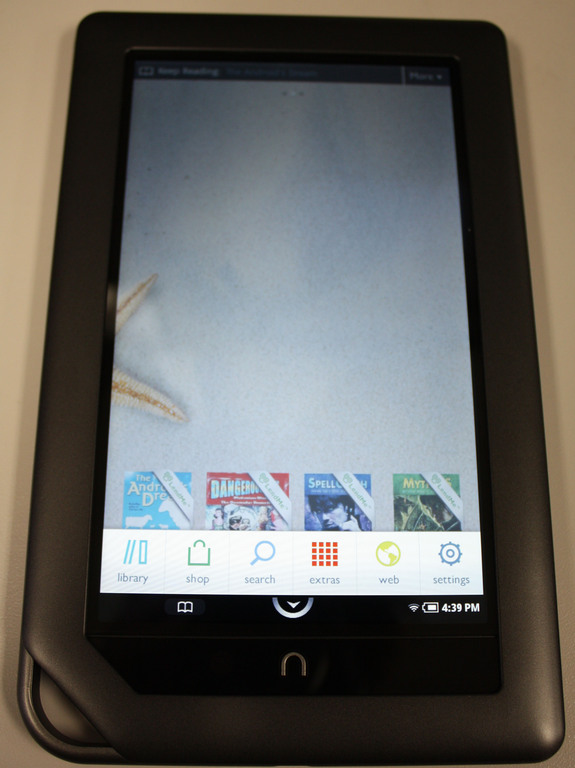
Figure 3. NOOKcolor's Main Menu
As good as a reading experience as I found the original NOOK, the NOOKcolor is better in almost every way. The instantaneous response of the IPS color touchscreen is a treat after the perceptible wait of the E Ink screen of the original NOOK. Although I found the original NOOK acceptable, not having the flash of the screen and the page flipping delay is quite nice. I'm fortunate in that I'm not prone to eye strain, so looking at the NOOKcolor's screen wasn't an issue for me, but if you're prone to that, you might want to test-drive a NOOKcolor at your local Barnes & Noble for a bit. The one place the color screen is a liability is in bright light or sunlight. It just can't compete with the E Ink screen of the original NOOK under those conditions. Personally, I prefer the vivid, backlit screen of the NOOKcolor. You can see it in Figure 4, with John Scalzi's excellent book The Android's Dream displayed (get it if you haven't already!). All the original NOOK features for highlighting, bookmarking and instant dictionary lookup are present and accounted for.

Figure 4. Reading The Android's Dream
Page flipping on the NOOKcolor is a completely different experience from the original NOOK too, as the unit has no hardware page forward/reverse buttons. Instead, you use the touchscreen to swipe across the screen, like you are turning the pages of a book. Alternatively, tapping the right side of the screen advances the page, and tapping the left side of the screen flips a page back. Unfortunately, there is no “page-flipping” animation—the screen simply displays the next page. I'd like to see a page-flipping animation while using the swipe gesture and have the current behavior on screen taps, as the shorter gesture implies a faster page turn.
The NOOKcolor's on-line store experience is similar to the original NOOK, however, the vivid color screen really helps make the act of shopping a breeze. Again, Barnes & Noble built on its earlier technology and polished the edges of the on-line store, while keeping all of the good things about it, like automatic downloading of content in the event you replace your NOOK.
The Web browser is one area in which the old NOOK needed lots of work, and Barnes & Noble delivered. In fairness, it's the stock browser from Android 2.1, but the old NOOK's browser was so bad, the new browser beats it hands down. The new browser also scores 93/100 on the Acid3 test—not fully compliant, but it works a lot better than the browser in the original NOOK. It's this browser that makes you think the NOOKcolor may have more to it than meets the eye.

Figure 5. Linux Journal on the NOOKcolor
If you've been following along, you'll see that the NOOKcolor's a very capable device, hardware-speaking, and it runs Android. The folks at NookDevs thought the same thing, and they started poking at the NOOKcolor. They decided to attempt to root, or gain control of the hardware outside any blocks put on it by the manufacturer. They found that the device can be booted off a properly formatted MicroSD card. If they put their own OS on it, they could, in theory, boot off the card, mount the NOOKcolor's internal disk and make changes to it, allowing for installation of other software and modification of the unit. This is exactly what they did, and it turns out the NOOKcolor makes a very capable Internet tablet. Because this is a highly moving target at the time of this writing—literally, advances are being made almost on an hourly basis—I'm not going to do a step-by-step account of the method. Rather, I touch on the concepts here, and for current details, check out the NookDevs portal Web site (see Resources).
The method to root the NOOKcolor at the time of this writing is to use a specially prepared image of a MicroSD card. Once you get that image, you dd write it to a MicroSD card, then boot the NOOKcolor off the card. The NOOKcolor will not have anything on its display during the boot, so you need to have a bit of faith and wait a while, then pull the card and reboot the unit. If all goes well, once the NOOKcolor reboots, you should be able to talk to it using the adb command found in the Android SDK. If the result of adb devices shows a serial number, you're talking to your NOOKcolor via the debugger, and you can sideload programs in the Android .apk format to it! Anything you add to the NOOKcolor appears in the Extras menu, so it's easy to get to and launch those new programs.
At this point, you can start pushing software to the NOOKcolor. Quite a few sites host Android freeware on the Internet (one of them is in the Resources section of this article). You even can get the ad-supported free version of the hit game Angry Birds running on the NOOKcolor. It runs flawlessly, and it's an excellent time killer. At this point, the sky's the limit. You can swap out launchers for alternate launchers and modify the system further (see NookDevs for examples of what you can do).

Figure 6. Angry Birds Running on the NOOKcolor
So there you have it—the NOOKcolor is a good e-reader and a very hackable device. If you're in the market for something fun to play with that has good build quality and lots of potential, check out the NOOKcolor at your local Barnes & Noble. It's a very nice device.
Dangers of Rooting Your NOOKcolor
Obviously, anything you do to modify the NOOKcolor voids your warranty instantly. Do not try to return it or pass off anything you've done as a factory issue. If you break it, you keep both pieces. You should be technically adept and have a good working knowledge of Linux before attempting any rooting processes. If you have any data on the unit, back it up, as you run the risk of erasing that data.
Having said all that, 90% of all the things that can go wrong with rooting a NOOKcolor can be fixed by doing a factory restore of the firmware. To do that, simply turn the unit off, then press and hold the Volume Up key, n button, and power button until the NOOKcolor turns on. You'll then be prompted with a Factory Reset wizard. Follow the steps to confirm the reset, and the NOOK will restore its firmware from a .zip file on a hidden partition of the internal Flash.
Please be sure to read the current instructions at NookDevs before attempting anything, as things are likely to change dramatically by the time this article is printed.
Breaking News
At the time of this writing, many things still are being discovered about the NOOKcolor. It appears that the chipsets inside the unit have Bluetooth functionality, and that it's simply disabled in the kernel and OS. There's strong evidence of that, but I was unable to get the reported Bluetooth operating, although others have claimed success with basic pairing to other Bluetooth devices. Check in on the crew at NookDevs for the latest news on what's going on with the NOOKcolor.
Resources
Barnes & Noble's NOOK Portal: www.nook.com
NookDevs NOOKcolor Portal: nookdevs.com/Portal:NookColor
Android SDK Download Page: developer.android.com/sdk/index.html
Android Freeware: www.freewarelovers.com/android
Bill Childers is an IT Manager in Silicon Valley, where he lives with his wife and two children. He enjoys Linux far too much, and probably should get more sun from time to time. In his spare time, he does work with the Gilroy Garlic Festival, but he does not smell like garlic.
