
Run with MeeGo
The MeeGo Project has had multiple releases and has progressed significantly since its announcement in February 2010. This article provides an overview of the MeeGo Project for newcomers, a review of the benefits MeeGo provides to the players in the mobile ecosystem, and discusses the features in the latest MeeGo 1.1 release, announced October 28, 2010.
MeeGo is an open, collaborative project between the project founders (Nokia and Intel), the Open Source community and various commercial and noncommercial partners with the goals of accelerating the adoption of Linux on a magnitude of client devices and enriching the technical Linux platform as the platform of choice for mobile computing devices.
MeeGo is a Linux-based operating system built for the next generation of computing devices across multiple hardware architectures. Different from other mobile operating systems, MeeGo is an open-source platform governed by best practices of open-source development. It includes the following:
Core operating system.
User Interface (UI) libraries and tools.
References user experiences for multiple devices.
Standard set of application programming interfaces (APIs) across all target device types.
A software development kit (SDK) that enables application developers to develop, install, debug and run applications either on reference devices or in an emulated environment.
MeeGo supports a magnitude of mobile client devices (handsets, connected TVs, in-vehicle infotainment, Netbooks and tablets). It provides choice and flexibility to create and deliver a uniquely differentiated service offering. It's an unusual project in that it is aligned closely with upstream projects, as MeeGo requires that submitted patches also are submitted to the appropriate upstream project and are on a path for acceptance. This development model has the great effect of improving all upstream open-source projects used in MeeGo, and it guarantees a unified technical approach led by the upstream projects.
MeeGo and Connected Devices
We all use mobile devices every day (such as Netbooks, connected TVs, tablets, in-vehicle infotainment and handsets). The power of these devices has reached astounding levels with unheard of performance and capabilities. The goal of the MeeGo Project is to develop the best software platform to go with these devices.
If you are an open-source developer, you will enjoy working on an open-source mobile platform project that follows open-source development practices. You will have full access to everything MeeGo, and you can rest assured that any code contributed by MeeGo will be submitted to the appropriate upstream open-source projects. From this perspective, every other Linux mobile and desktop effort will benefit from MeeGo's work and contributions.
If you are an application developer, you will enjoy working with a single set of APIs across a number of client devices (handsets, tablets, Netbooks, in-vehicle infotainment systems and connected TVs). You have access to polished and easy-to-get-and-use developer tools and infrastructure. In addition, there are open forums where you can engage in discussions directly with the platform and tool creators, exchange ideas and best practices and even participate in the evolution of the platform. Plus, you will enjoy the flexibility of hosting your applications in more than one application store.
If you are a device manufacturer or a wireless operator looking to build and/or deploy devices with MeeGo, the project offers tremendous opportunities. MeeGo is a democratic project with open access to all, at all times. It is the only platform of its kind built with unparalleled openness in the industry. It will accelerate your time to market, lower the complexities involved in targeting multiple device types, allow you to optimize the software stack and, most important, grant you an equal right to participate in the evolution of the software platform.
Since the project announcement in February 2010, MeeGo has delivered the core software platform in addition to three user experience implementations (Netbook, handset and in-vehicle infotainment), with several updates in between. Figure 1 provides the roadmap of releases since the project's inception and Figure 2 offers the roadmap of the release updates and what they included.

Figure 1. MeeGo Releases Since the Project's Announcement
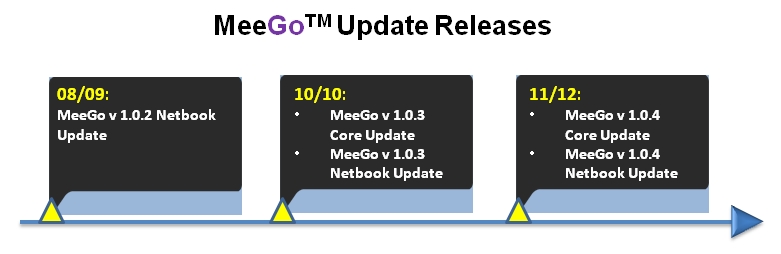
Figure 2. MeeGo Release Updates
Between major releases, MeeGo offers updates that usually include general operating system fixes to enhance the stability, compatibility, security and visual quality of the devices running MeeGo. Between MeeGo 1.0 (05/2010) and MeeGo 1.1 (10/2010), the MeeGo Project provided three update releases that featured improvements to the MeeGo core stack and the Netbook release.
The releases follow the six-month cycle promised by the project and are being delivered on time. The MeeGo source code repository is open for people to pull the source code anytime they like, if they don't want to be restricted to the six-month release cycle. The release updates are available as necessary, depending on the security/stability/compatibility updates. However, you don't need to wait for the official update to become available, because you have access to the code repository, and you can create an updated image from scratch for your target device.
Any device that will run MeeGo needs two things: the MeeGo core software stack and the MeeGo User eXperience (UX) for that specific device, although you are not limited to using the MeeGo UX, and you can create and deploy your own branded UX. Currently, MeeGo is available for Netbooks, IVI and handsets.
The MeeGo Core 1.1 release provides a common base operating system for the user experiences of all supported device categories. It provides a complete set of enabling technologies for mobile computing. The MeeGo stack contains Linux kernel 2.6.35, X.org server 1.9.0, Web Runtime, Qt 4.7 and Qt Mobility 1.0.2, supporting the contacts, location, messaging, multimedia, and sensor and service frameworks. It also includes a number of leading-edge components, such as the oFono telephony stack, the ConnMan connection manager, the Tracker data indexer, the Telepathy real-time communications framework, the Buteo sync framework and many more.
These technologies are brought to application developers through the MeeGo API, which is based on Qt and other technologies, such as the MeeGo Touch Framework. With the latest Qt version 4.7, the MeeGo developer experience is now enhanced with the introduction of QML, the easy-to-use scripting technology for animated touch-enabled GUI apps.
Table 1. MeeGo v1.1 Core Software Platform Key Feature List
| Key Feature | Description | Related Upstream Project |
|---|---|---|
| Complete MeeGo-compliant packages | Ensures compatibility. | N/A |
| GCC 4.5.0 toolchain | Includes support for the Intel Atom microarchitecture and runtime library functions optimized for the Intel SSSE3 instruction set. | gcc.gnu.org/gcc-4.5 |
| Linux kernel 2.6.35 | Includes support for the Intel Atom processor Z6xx series family. | kernel.org |
| X.org Server 1.9.0 and Mesa 7.9 | Improves 2-D and 3-D graphics. | www.x.org/wiki and www.mesa3d.org |
| Qt 4.7 and Qt-mobility 1.0.2 | Provides a rich set of APIs for creating compelling applications that include location, sensors, contacts and messaging. | qt.nokia.com |
| QtWebKit 2.1 | Qt port of WebKit. | developer.qt.nokia.com/wiki/QtWebKit |
| BTRFS | Next-generation filesystem aimed at implementing advanced features while focusing on fault tolerance, repair and easy administration. | https://btrfs.wiki.kernel.org |
| ConnMan connection manager | Provides support for static IPv6, dhcp-lib and VPN. | connman.net |
| New oFono telephony stack | Provides support for the telephony functionality. | ofono.org |
| PulseAudio | Provides support for the audio functionality. | www.pulseaudio.org |
| GStreamer 0.10.30 with liborc support | General performance improvements. | www.gstreamer.net |
| Zypper/libzypp package management. | Provides full package management functionalities, such as repository access, dependency solving, package installation and so on. | en.opensuse.org/Portal:Zypper |
| Udisks and upower | Replaces the deprecated devicekit-disks and devicekit-power. | freedesktop.org/wiki/Software/udisks and upower.freedesktop.org |
| Buteo synchronization framework and Personal Information Management | Based on Tracker. | projects.gnome.org/tracker |
| DeviceKit and udev | Used for interacting with hardware devices. | fedoraproject/wiki/Features/DeviceKit and git.kernel.org/?p=linux/hotplug/udev.git |
| Sensor Framework | Allows developers to take advantage of platform sensors, such as accelerometers, compasses and gyroscopes. | Part of Qt |
| Universal Plug and Play (gUPnP) | Support for gUPnP providing an easy-to-use, efficient and flexible framework for creating devices and control points. | gupnp.org |
The MeeGo v1.1 Netbook UX provides a complete set of core applications and offers a visually rich Netbook user experience that is optimized for power and performance, all built on the latest open-source technologies. Some of the key features include:
Integrated touch support.
Easy-to-use applications.
Instant access to the core applications from the MeeGo home screen (aka Myzone).
Aggregation of social-networking content, which allows you to view your social-networking activities on one screen as they occur, easily interact with friends and update your status and site information.
For a fast and rich Internet experience, the MeeGo Netbook UX integrates Google Chrome or, if you prefer, a fully open-source browser solution. Google Chromium also is provided.
MeeGo on Netbooks
Experiencing MeeGo on Netbooks is very accessible given their popularity and availability. All you need is a Netbook with an Intel Atom or Intel Core 2 CPU, a USB drive (stick) for saving the MeeGo image and booting with it, and the MeeGo image. Step-by-step instructions are available from meego.com/devices/netbook. Instructions are available for Linux, Windows and Mac OS X users, so you have no excuse not to take it for a test-drive.
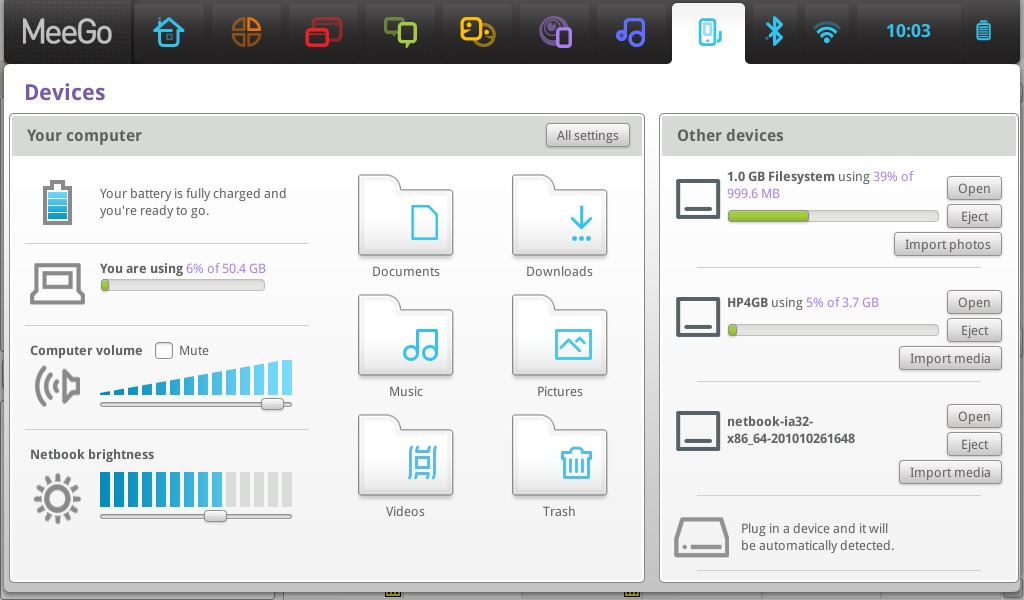
Figure 3. The Devices screen with three connected USB devices, including an Olympus camera showing as a 1GB filesystem, an HP USB device used to copy the screenshots and the USB device that holds the MeeGo Netbook image used to install MeeGo 1.1.
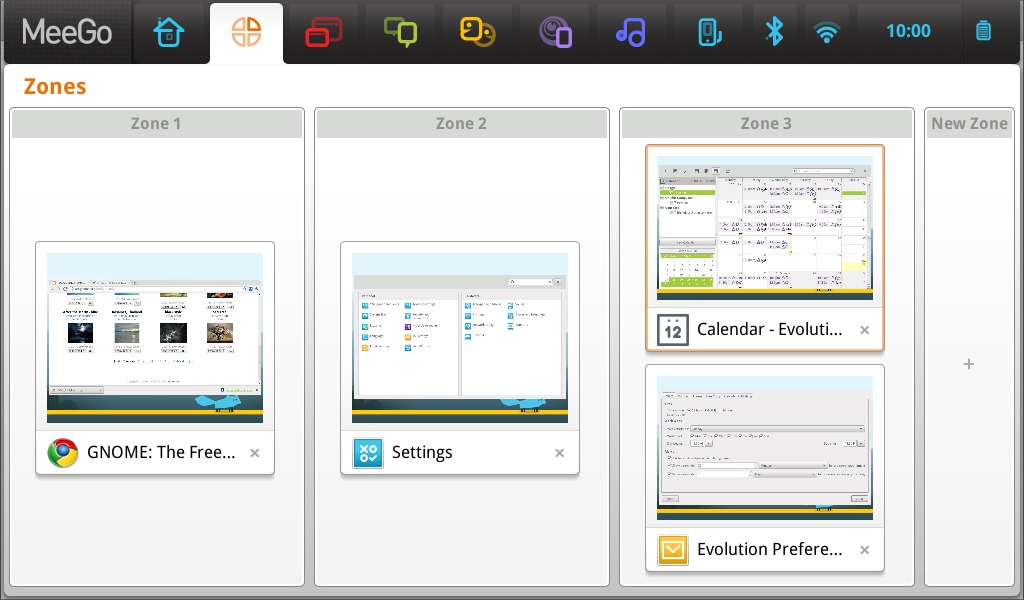
Figure 4. The Zones screen showing three different active zones or work areas.
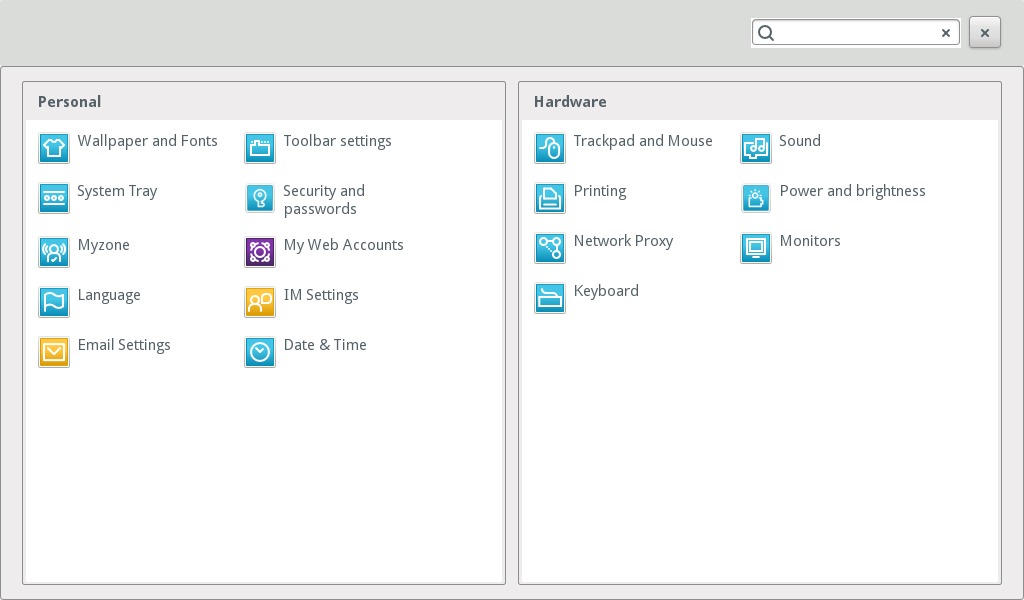
Figure 5. The Settings screen where users can configure various aspects of their MeeGo Netbook setup.
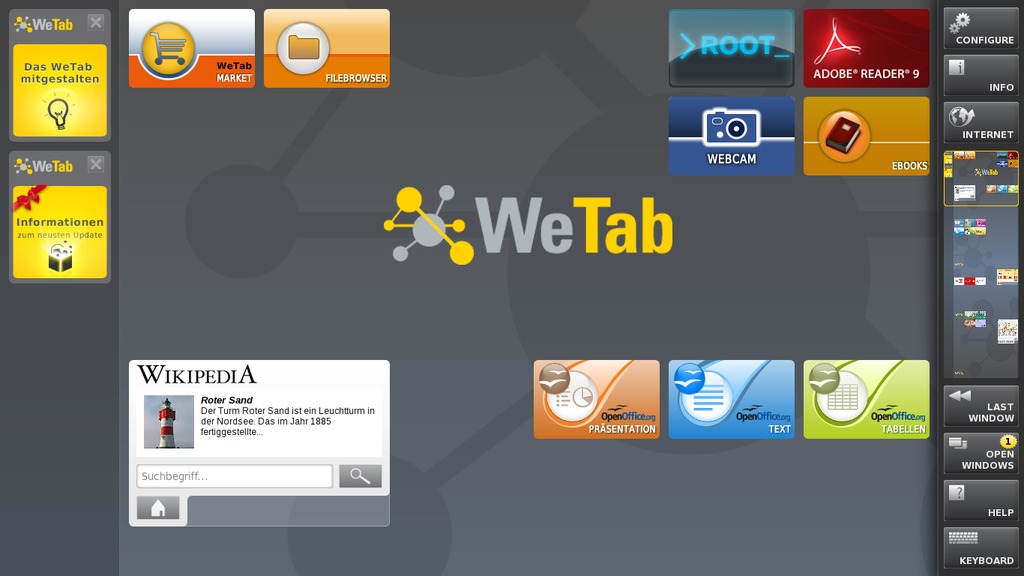
Figure 6. A user-modified home screen of the WeTab with some direct shortcuts to the author's most-used applications. The WeTab used the MeeGo Netbook stack as a base for development purposes.
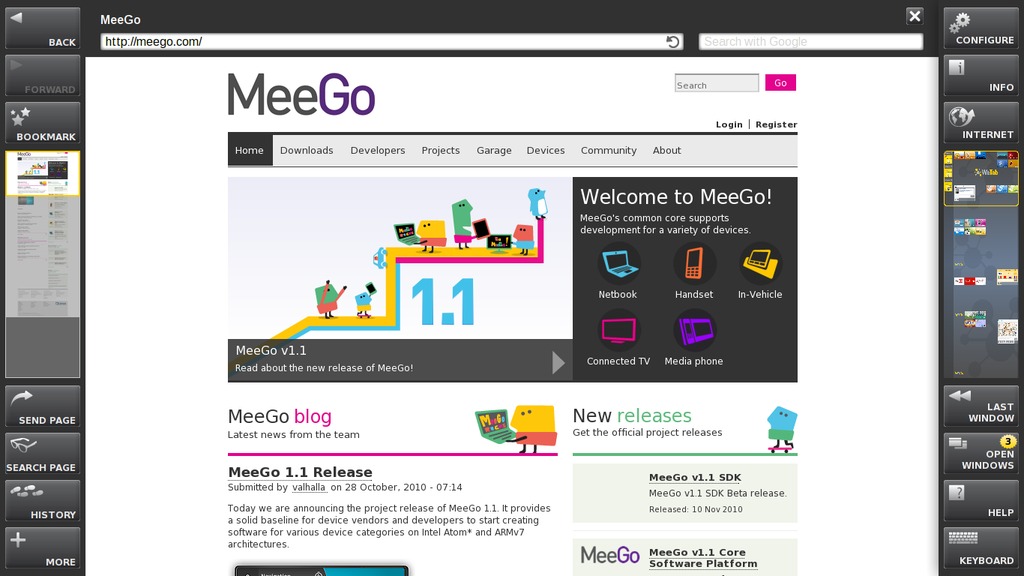
Figure 7. The Web browser on the WeTab with the MeeGo home page and the virtual touchscreen keyboard. Four different virtual work areas are on the right, and basic browser menu items are on the left.
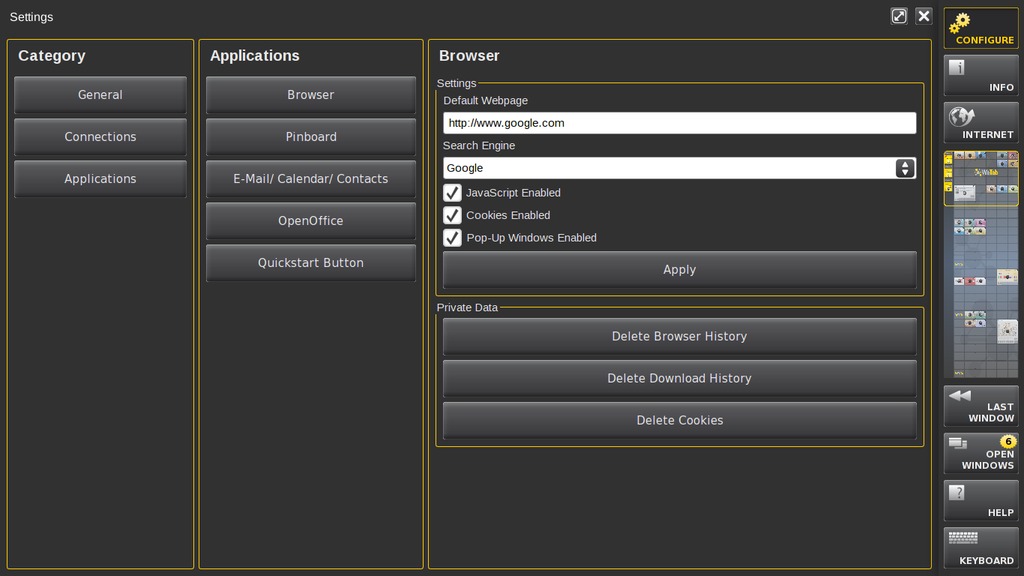
Figure 8. The WeTab Setting showcasing the browser settings.
In-Vehicle Infotainment (IVI) systems are devices that deliver navigation, entertainment and networked computing services in vehicles, such as cars, trucks, planes, boats and buses.
Automotive manufacturers in particular are increasingly viewing IVI systems as key differentiators in their products. Drivers and passengers are coming to expect the same type of innovations they see in other devices, such as mobile computers and handsets, in their vehicles. As vehicles become connected to the Internet, the demand for Internet-based entertainment applications and services increases, and MeeGo strives to accelerate the pace of innovation in IVI. The MeeGo IVI software platform is designed to enable rich Internet and multimedia consumer experiences for vehicles. Table 2 provides a quick overview of the key features available in the MeeGo 1.1 IVI release.
Table 2. MeeGo IVI v1.1 Key Feature List
| Key Feature | Description |
|---|---|
| Sample IVI home screen and taskbar | The taskbar is designed with Automotive Center Console HMI requirements in mind. |
| Text-to-speech (TTS) | TTS is supported using Festival Speech Synthesis and is enabled by default in the ivihome menu navigation. |
| Speech recognition | Initial speech recognition has been added to ivihome using the integrated PocketSphinx 0.6.1 package. It's a lightweight, cross-platform engine that's built using the latest Sphinx speech recognition toolkit. PocketSphinx provides a GStreamer plugin, allowing the application to create a pipeline to parse the human voice, based on words defined in the dictionary. Voice commands for ivihome have been predefined for navigating the scroll menus. |
| MeeGo Touch Framework (MTF) | The MTF integration features sample applications, which include, but are not limited to, the following: video player, song player, photo viewer, hands-free dialer and settings management. |
| Open-source automotive projects | Several packages from open-source automotive projects are available from the repository for audio management, resource management, persistent storage management, CE device management and system health. |
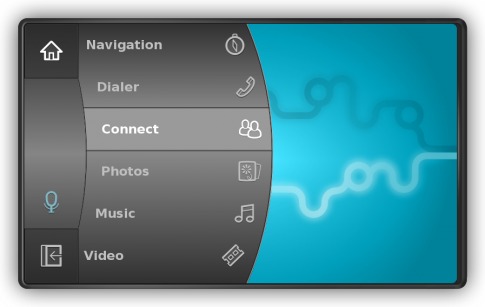
Figure 9. The MeeGo IVI home screen with the taskbar as it appears on the left side of the screen. The taskbar, with some easy customizations, can be moved to the right side of the screen to optimize access for the driver or passenger, as desired. It can be controlled by a Contour ShuttleXpress scroll wheel, touchscreen or mouse, and it's designed to reflect the scroll-wheel usage, with the ability to spin through the menu options and make selections or go back, by pressing two buttons or tapping the touchscreen (photo credit: meego.com).
Today's users are demanding more powerful and feature-rich devices to take with them on the go. Next-generation smartphones allow users to enjoy a rich and dynamic Internet experience, watch HD movies and multitask like never before on a small-form-factor device. The MeeGo platform is specifically designed to enable the application and services ecosystem for these mobile, rich Internet and media-centric devices.
The MeeGo v1.1 Handsets UX (Figure 10) provides a technology snapshot that offers key handset technologies, such as cellular, connectivity, sensors and mobile browsing, as well as a basic development UX for voice calling, SMS messaging, Web browsing, music and video playback, photo viewing and connection management.
With this project release, developers will be able to work on future device and user experience software development, while simultaneously participating in the MeeGo Project to complete the Handset UX in the upcoming 1.2 release.
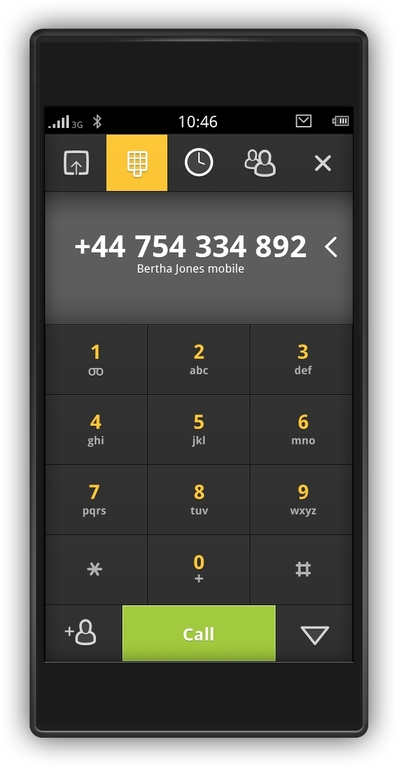
Figure 10. The MeeGo Handset Dialer (photo credit: meego.com)
MeeGo on Handsets
If you have access to a Nokia N900 handset or an Aava Handset, you can find step-by-step instructions on how to install and run MeeGo on those devices from meego.com/devices/handset. The instructions will guide you through installing the root filesystem on an external micro-SD card. Give it a try, and have fun experimenting with it.
The MeeGo SDK 1.1 beta was released on November 10, 2010, and it's available for download along instructions from meego.com/developers. It enables application developers to develop, install and debug applications, as well as run applications on the Nokia N900, Netbook and Aava devices with MeeGo. For developers without reference hardware, QEMU (qemu.org) provides an emulated environment for debugging and testing applications.
The MeeGo Project encourages developers to use the MeeGo API, which currently consists of Qt 4.7 and Qt Mobility 1.0. The MeeGo API comes with a forward-compatibility promise and will be extended in future releases. The final nonbeta version of the SDK will be aligned with the MeeGo compliance specification (being finalized at the time of this writing). More information on MeeGo compliance is available at wiki.meego.com/Quality/Compliance.
MeeGo is an open-source project developed in public under the auspices of the Linux Foundation. Since it was announced in February 2010, the world has been able to watch and participate as the project builds up and delivers the core software stack in addition to three reference user experiences for handsets, IVI systems and Netbooks, with more to come as MeeGo also targets connected TVs and tablets.
The development continues following a six-month release schedule. MeeGo 1.2 is scheduled for April 2011. Currently, there are hundreds of features targeting MeeGo 1.2 that already have been filed in the MeeGo Featurezilla (a tool that tracks feature development). The development tree of MeeGo 1.2 is open, and development is ongoing.
Resources
MeeGo Project: www.meego.com
Developer Resources: meego.com/developers
Mailing Lists: meego.com/community/mailing-lists
IRC Discussions: meego.com/community/irc-channel
MeeGo Source Code: meego.gitorious.org
MeeGo Bugzilla: bugs.meego.com
MeeGo Forums: meego.com/community/forum
Precompiled Images: meego.com/downloads
MeeGo Releases: meego.com/downloads/releases
MeeGo OBS: wiki.meego.com/Build_Infrastructure
Ibrahim Haddad manages the Linux Foundation's Mobile Linux initiatives and works with the community to facilitate a vendor-neutral environment for advancing the Linux platform for next-generation mobile computing devices. Ibrahim is a Contributing Editor at Linux Journal.

