
Installing an Alternate SSL Provider on Android
The Android platform quickly has become one of the most popular mobile operating systems for both developers and end users. As such, security is a high priority, but so is the sometimes-conflicting goal of minimizing resource usage. By default, the Android platform uses OpenSSL to provide Java developers with SSL functionality, but by using CyaSSL instead, developers gain a smaller footprint as well as a faster SSL implementation.
The intent of this article is to provide insight and instruction on how to install an alternative SSL provider on the Android platform, specifically using CyaSSL as an example. After doing so, developers will have the option of using CyaSSL for SSL functionality and will gain the advantages in size and speed that an embedded SSL library offers. Users interested in replacing other pre-installed libraries on Android or developers porting C libraries over from other systems to Android also may find this information useful as a recipe for their own development efforts.
TLS (Transport Layer Security) and its predecessor SSL (Secure Socket Layer) are cryptographic protocols that provide security for communications over networks. Originally created by Netscape, these protocols allow client/server applications to create an encrypted link and ensure that all traffic being sent and received is both private and secure.
TLS and SSL provide this secure layer through the use of public/private key encryption, symmetric encryption, hashing and trusted certificates. A message (the pre-master secret for SSL/TLS) encrypted with a public key can be decrypted only using the associated private key. The public key is usually publicly available, allowing anyone with this key to encrypt a message. Only the owner of that public key may decrypt the message once encrypted with the associated private key. There are multiple cipher suites that may be used by TLS and SSL to create a secure socket.
The Java platform contains a set of security APIs (public key infrastructure, authentication, secure communication and access control), all of which are only interfaces defining a “contract” for provider implementations to meet. This gives Java programmers the ability to use a single API while allowing any desired implementation to be plugged in underneath.
Under this architecture, multiple providers for a service may be installed side by side. In the case of having multiple providers for a service, each provider is given an order of priority in which it should be used by the Java platform. By default, Java will use higher-priority providers first if they offer the desired functionality.
The javax.net.ssl Java API package is responsible for supplying SSL functionality to the Java platform. The diagram in Figure 1 gives a general overview of how SSL providers—or more generally, providers—are organized within the Java platform. Because Android is based heavily on the Java framework and supports this provider design, we are able to install CyaSSL as an SSL provider for Android.
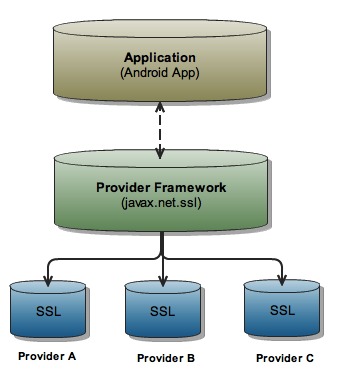
Figure 1. The structure of the Java provider framework, showing specifically the javax.net.ssl package and how individual providers are “plugged in” to the provider framework.
Java security providers are listed and prioritized in a file named java.security on OS X and Linux, or java.properties on the Android platform. On Android, this file is located at /libcore/security/src/main/java/java/security/security.properties. This file is the primary configuration file for Java providers and will be key in the CyaSSL installation process.
First, you need to set up the local build environment to accommodate for the Android build system as well as download the Android platform source code.
To build the Android source files, you should have either Linux or OS X installed on your development machine. At the time of this writing, Windows is not currently supported. Further, the most current version of OS X, Snow Leopard, is not supported due to incompatibilities with Java 6. The remainder of this article assumes that the operating system of choice is 32-bit Linux. Because of the speed at which the Android platform evolves, check the Android Developer Web site for the most current host operating system support.
Instructions for setting up your local work environment for Android development as well as instructions for getting the Android source code can be found in the Android documentation titled “Get Android Source Code”, located on the Android Developer Web site. Before continuing, make sure you are able to build the Android platform as is without modifications by following the steps outlined on-line.
Working with and contributing to the Android platform is done through the use of Git and Repo. In Android, Git is used for local operations, such as local branching, commits, diffs and edits. Repo, on the other hand, is a tool built by Google on top of Git. According to Google, “Repo helps manage the many Git repositories, does the uploads to the revision control system, and automates parts of the Android development workflow. Repo is not meant to replace Git, only to make it easier to work with Git in the context of Android.”
To make testing and debugging modifications to the Android platform easier, Google has created the Android emulator. This emulator is highly customizable, allowing custom hardware configurations, providing a log output, allowing shell access and much more.
Before using the emulator, you need to download it. It comes bundled with the Android SDK. Once you download the SDK, you will find a variety of tools in the <Android-SDK>/tools directory, where <Android-SDK> is the root directory of the SDK. These tools will include the emulator and the Android Debug Bridge (adb).
The CyaSSL Java SSL provider is composed of two parts: the CyaSSL shared library and the Java provider code. The provider code uses JNI (Java Native Interface) to communicate between Java and the CyaSSL C library. The Android platform is divided into several layers, which are shown in Figure 2. The two layers affected during the SSL provider installation are the libraries and Android runtime layers. In order to continue, download the CyaSSL Java SSL provider for Android from the yaSSL Web site. A download also is offered for Linux and Mac, so make sure you download the provider for Android.

Figure 2. Android Platform Layer Composition
CyaSSL is a C-language-based SSL library targeted for embedded and RTOS environments, primarily because of its small size and speed. It supports the industry standards up to the current TLS 1.2 level, is fully functional and is optimized for embedded environments, making it an ideal choice for Android. There are two main components of the CyaSSL SSL provider: a shared library written in C and the SSL provider code, which contains both Java and native code.
The CyaSSL shared library is compiled by the Android build system into the shared library named libcyassl.so. This library contains all the functions that would be found in the CyaSSL library on a regular desktop installation and is the foundation of the CyaSSL Java SSL provider.
The shared library source files are found in the CyaSSL provider download under the /external/cyassl directory.
The provider code uses JNI to communicate between Java and native C and C++ code. Because of this, there are two separate parts that need to be installed: the Java code and the native C++ code. These source files are in the provider download under the /libcore/yassl directory.
In this article, <Android-Platform> represents the Android platform source root on the development machine. The Android platform has a monolithic build system, meaning that the entire platform is built at once. Google has built a custom build system for Android in which each component is required to have an Android.mk file. This file is not a makefile by itself, but instead ties the component into the overall build system.
Because we are installing a new library, we're going to create a new folder for it under the /external directory in the Android platform. Most third-party shared libraries being placed into the Android platform should be installed under the /external directory. To do this, copy the cyassl directory from src/external/cyassl of the CyaSSL provider download to the /external directory of the Android platform. After copying, this folder should be located at <Android-Platform>/external/cyassl.
These source files will be compiled into libcyassl.so by the Android build system using the rules in the /external/cyassl/src/Android.mk file.
Open <Android-Platform>/build/core/prelink-linux-map.map, and add a new entry for libcyassl.so under the heading # libraries for specific apps or temporary libraries. The prelink-linux-map.map file is for used for providing addresses so that the loading of all registered libraries can be done faster. It should look similar to the following (note that libraries should be aligned on 1MB boundaries):
libcyassl.so 0x9C500000 # [~1M] for external/cyassl
Open the file <Android-Platform>/dalvik/libnativehelper/Android.mk, and add libcyassl.so to the shared_libraries list.
Now that the shared library has been installed, it's time to install the JNI provider code.
The existing SSL provider in Android (Apache Harmony using OpenSSL) is located in the /libcore directory. The CyaSSL provider will be installed there as well for consistency. To begin, copy the yassl directory from src/libcore/yassl of the provider source to the /libcore directory of the Android platform. This folder should now be located at <Android-Platform>/libcore/yassl.
The CyaSSL SSL provider contains an initialization method (in the native C++ code), which needs to be registered with the Android platform so that the native methods can be registered with the Dalvik VM at runtime. Dalvik is Android's modified version of the Java Virtual Machine. Unlike a desktop Java installation, Dalvik handles JNI differently in that it requires a function to be written (within the JNI code) to register explicitly every native method that needs to be made available to the JVM. This method needs to be added to libnativehelper's Register.c file.
Open the file <Android-Platform>/dalvik/libnativehelper/Register.c, and add the register_com_yassl_xnet_provider_jsse_NativeCrypto method under the entry for the existing provider. When added, it should resemble the following (note the existing Apache Harmony installation):
if (register_org_apache_harmony_xnet_provider_jsse_
↪NativeCrypto(env) != 0)
      goto bail;
if (register_com_yassl_xnet_provider_jsse_
↪NativeCrypto(env) != 0)
       goto bail;
The configuration file for the Java provider framework is the security.properties file. This will allow you to set CyaSSL as the default SSL provider. Open the security.properties file (<Android-Platform>/libcore/security/src/main/java/java/security/security.properties), and make the following changes to configure the CyaSSL provider.
Add the following line above the default org.apache.harmony.xnet.provider.jsse.JSSEProvider provider. Note the numbers beside each provider. These reflect the priority of the provider. It might be necessary to renumber this list after inserting the new provider:
security.provider.3=com.yassl.xnet.provider.jsse.JSSEProvider
Change the ssl.SocketFactory.provider entry to point to the new CyaSSL Provider:
ssl.SocketFactory.provider=com.yassl.xnet.provider.jsse.
↪SocketFactoryImpl
At this point, the CyaSSL provider is fully installed into the Android platform. You can move on to building and testing the platform with the new provider installed. If no errors arise during the platform build, the provider can be loaded into the emulator to make sure the platform runs correctly with the new provider installed.
The build process can take a significant amount of time depending on the build environment. All commands should be run from the Android platform root:
$ source build/envsetup.sh   [Sets environment variables]
$ lunch 1                    [Builds the emulator]
$ make                       [Builds the Android Platform]
Keep in mind that it is possible to rebuild a single project (such as the CyaSSL shared library) to test that the shared library builds correctly using the mm command (shown below), but before testing in the emulator, a full platform build needs to be done:
$ cd external/cyassl
$ mm
The Android platform build process results in three image files: <Android-Platform>/out/target/product/generic/ramdisk.img, <Android-Platform>/out/target/product/generic/system.img and <Android-Platform>/out/target/product/generic/userdata.img:
ramdisk.img — a small partition that is mounted as read-only by the kernel at boot time. It contains only /init and a few configuration files. It is used to start /init, which will boot the rest of the system images and run the init procedure.
system.img — a partition image that will be mounted as / and contains all system binaries. This is the image file that contains all of the changes that were made above.
userdata.img — this image is used only when the -wipe-data option is used with the emulator. In a normal emulator execution, a default userdata image will be used.
Of these, system.img is of the highest concern. It contains the majority of the system and all of the changes that have been made with the addition of the CyaSSL SSL provider.
Before you can use the Android Emulator, you must create an Android Virtual Device. Android Virtual Devices are configurations of emulator options that allow developers to model a physical Android device better. They hold configuration information, such as a hardware profile, a mapping to a system image and a dedicated storage area. To create an Android Virtual Device, the android application is used. This application is found under the tools directory of the SDK. Create a new Virtual Device using the following command (issued from the SDK /tools directory):
$ android create avd -n <desired-name> -t <target-version>
where <desired-name> is the name of the Android Virtual Device and <target-version> is the desired target platform. Run the following command to view available targets:
$ android list targets
After the Android Virtual Device has been created, load the emulator with the built images:
$ emulator -avd <virtual-device-name> -system
<Android-Platform>/out/target/product/generic/system.img -data
<Android-Platform>/out/target/product/generic/userdata.img -ramdisk
<Android-Platform>/out/target/product/generic/ramdisk.img
There are other useful emulator options that may be added to the above command. A few are listed below, but for a complete list see the official Android Emulator Web page:
-verbose — verbose output.
-nocache — don't use a cache.
-show-kernel — print kernel messages to the terminal window.
Once the emulator is running, the logcat output can be viewed in a new terminal window (assuming the current directory is <Android-SDK>/tools):
$ adb logcat
In this article, installing an alternative SSL provider into the Android platform is explained using CyaSSL. By using CyaSSL in the Android platform instead of OpenSSL, developers are able to leverage both the speed and size advantages of the CyaSSL library. Making use of both a shared library and JNI, the same general process could apply to installing other third-party libraries into the Android platform and could provide a good reference for developers moving C libraries over to Android from other operating environments.
Resources
An In-depth Look at TLS and SSL: en.wikipedia.org/wiki/Transport_Layer_Security
Android Developer Web Site: source.android.com/source/download.html
Android SDK Download: developer.android.com/sdk/index.html
CyaSSL Java SSL Provider for Android from the yaSSL Web Site: www.yassl.com/yaSSL/Download_More.html
Android Emulator Web Page: developer.android.com/guide/developing/tools/emulator.html
Chris Conlon is a developer at yaSSL. Finding a balance between outdoor adventures and computing, Chris enjoys continually learning and strives to bring new and helpful things to the technology community. Chris welcomes comments at chris@yassl.com.

