
ZOTAC ZBOX HD-ID11
For years I have toyed with the idea of setting up a media server for my entertainment center. The challenges in my way included cost, features, aesthetics, background noise and user-friendliness. All of those things are important because I'm not the only person who will be using the system I build. Hardware and software technologies are coming together to address all these challenges. With the advent of the Intel Atom processor and the NVIDIA ION GPU, affordable hardware now is available that allows for an HDTV media server. Likewise, software, such as XBMC and Boxee, has matured and provides a fun and friendly user experience for all levels of users.
For $249.99, the HD-ID11 is small, quiet and looks slick. The chassis is all plastic and feels a bit flimsy when deconstructed. However, the plastic is fairly thick and has tight tolerances. When the cover is in place and set screws tightened, it feels solid.
The front of the HD-ID11 has a 3.5mm headphone jack, a 3.5mm microphone jack, a USB port, an SD card reader, a power button and activity LEDs. The top of the case has a large blue O that lights up while the machine is on. It looks nice, but it can be turned off in the BIOS if it is bothersome. On the side, there is a USB port with a rubber stopper, and on the back, there are four more USB ports. The back also sports HDMI and DVI outputs, 10/100/1000 Ethernet, eSATA, optical out and a port for the power brick.
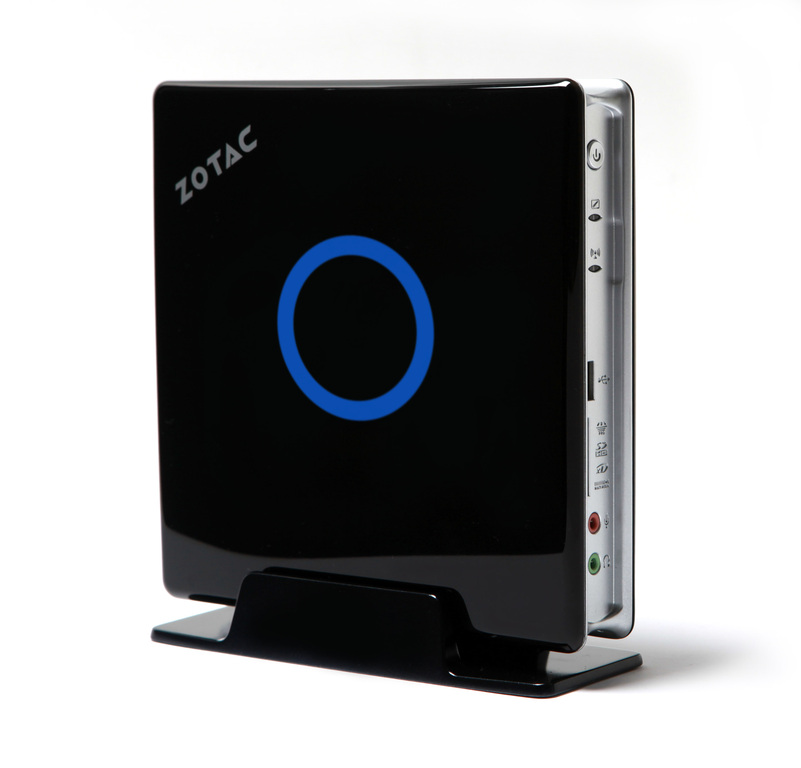
Figure 1. The ZOTAC ZBOX HD-ID11 with dual-core Atom D510 CPU, NVIDIA ION GPU and HDMI output makes a great low-cost home-theater media box.

Figure 2. Back panel of the HD-ID11 has eSATA, four USB, 10/100/1000 Ethernet, DVI and HDMI outputs, optical out and a connector for power.
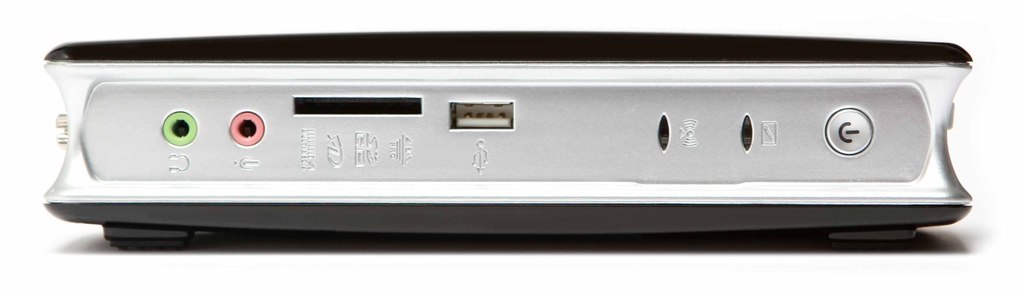
Figure 3. The front of the HD-ID11 has a 3.5mm headphone jack, 3.5mm microphone jack, SD card reader, USB port, activity LEDs and power button.
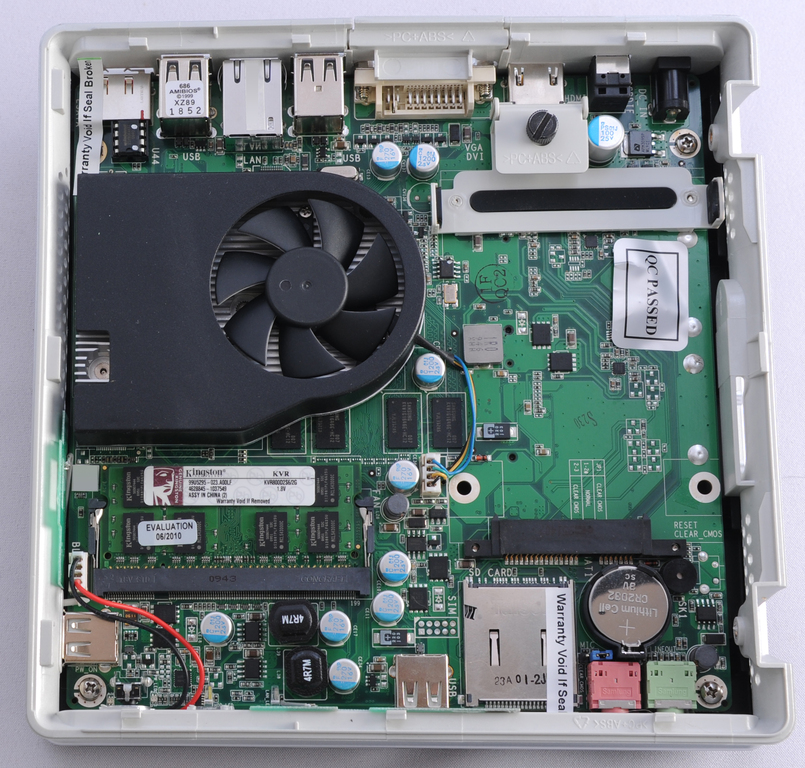
Figure 4. HD-ID11 motherboard with 2GB of Kingston RAM installed. Mount and thumbscrew is for the 2.5" HDD/SSD.
What makes the ZOTAC ZBOX HD-ID11 special is all the power that's packed into the small package. The machine is only 7.4" x 7.4" x 1.73" (188mm x 188mm x 44mm). Here are some of the main technical specs:
CPU: Intel ATOM D510 (dual-core, 1.66GHz), 667MHz front-side bus.
Chipset: Intel NM10 Express chipset.
GPU: NVIDIA ION GPU (with 512MB DDR3 memory).
Networking: Gigabit (10/1000/10000 Mbps), 802.11b/g/n.
Audio: onboard 8-channel digital audio, stereo analog audio.
I/O: HDMI, DVI (DVI-to-VGA dongle included), S/PDIF, mic/headphone, 6 x USB 2.0, RJ45, eSata.
Memory slot: 1 x 200-pin DDR2-800 SO-DIMM slot.
Hard drive slot: 1 x 2.5" hard drive (SATA 3.0Gb/s).
One thing separating the ZBOX from the competition is that it does not ship with memory or a hard drive. This allows you to tailor the computer to your needs without buying too much hardware or paying an inflated price for those components.
The HD-ID11 has support for up to 4GB of memory by using a single 200-pin DDR2-800 memory module. I installed 2GB of Kingston DDR2 RAM, which performed flawlessly. If you plan on using the ZBOX for playback only, 1GB of RAM should be sufficient. With the extra RAM available, I decided to use a 640GB hard drive and went with local management for the media. The Intel Atom processor is powerful enough to do a good job with video playback (via the NVIDIA ION GPU) and manage the library at the same time.
The ZBOX uses a standard American Megatrends BIOS that can be entered by pressing the Delete key during the boot phase. The settings I felt worth changing included the boot priority, turning off the ZBOX logo at boot time and having the ZBOX restart after a power failure. The other BIOS settings had sane defaults.
The first thing I noticed when I booted the ZBOX with Ubuntu was it did not take long before the CPU fan would spin up to maximum and start to sound like a jet engine. This was worrisome, as I intended to keep the ZBOX in my living room. Fortunately, there is a BIOS update available to fix this problem. As with most BIOS updaters, the updater used by the ZBOX requires a DOS boot disk to run. See wiki.fdos.org/Installation/BootDiskCreateUSB for some easy-to-follow instructions for creating a free DOS USB boot drive. Once the free DOS image is booted, you can switch to the drive with your BIOS flasher and follow the updater instructions.
Installing Debian on the box was the only time the Intel Atom processor felt slow. This step took more than twice as long as I was expecting. After booting into Ubuntu via the USB memory stick, I formatted my internal hard drive and ran debbootstrap to install Debian Squeeze on the hard drive. Once debbootstrap is complete, do not forget to fix the fstab, networking and install GRUB before rebooting.
The main reason to opt for a Atom/ION box is for watching high-definition content. The ION GPU supports full hardware decode acceleration of all H.264 content (1080i/p) with HDMI out. With the right software, you can watch both Blu-ray and ripped BD content.
I installed both XBMC and Boxee on the HD-ID11 to access my content. Both software packages provide a great user experience and give you the ability to play virtually any type of content. They both provide easy-to-use interfaces into your own content and give you access to content available on the Internet. Boxee is a fork of XBMC, adding social networking to your home-theater experience.
My greatest struggle with my HD-ID11 was getting the digital 8-channel audio to work over HDMI. Although instructions are located several places on the Web (including ubuntuforums.org/showthread.php?p=6589810), I was not able to get the audio over HDMI to function properly. This was not a deal-breaker, as the box does support audio out via the 3.5mm headphone jack.
I have used the HD-ID11 for about a month to play back my local content and to stream content from the Web. I must admit, I love the experience. With few exceptions, the ZBOX has been able to handle any type of content I've thrown at it from inside XBMC and Boxee.
The only content the ION GPU struggles with is Flash video. According to Anadtech.com, the problem stems from the NVIDIA driver requiring too much data to be copied back and forth between the system memory and the GPU framebuffer. There is not enough bandwidth over the single PCIx1 lane to handle this load, which leads to the video stuttering. Even a 480p window does not play smoothly once full-screened. The good news is that NVIDIA is working on an updated driver to fix this problem.
When I started looking at the ZOTAC ZBOX HD-ID11, I wanted to build an affordable system to watch my high-definition content—one that looked nice, was quiet and user-friendly. With a little work, the HD-ID11 fits the bill. Its sleek design and quiet fans allow it to fit into my entertainment center without being noticed. The combination of the Intel Atom processor with the NVIDIA ION GPU provide all the power necessary to make for an enjoyable entertainment experience. Although I would prefer the sound going over HDMI and better Flash video playback, those are issues that should be addressed via driver updates in the future. I'm enjoying the media box so much, I am planning on purchasing a second ZBOX for my bedroom to give me more access to my content.
Steven Evatt is an IT manager in Houston, Texas, and has been using Linux for more than 16 years. He is active in the local technology community and regularly can be found at barcamps in Texas and Louisiana. In his spare time, he enjoys playing with Ruby on Rails on his site: pricechirp.com.
