
Command-Line Application Roundup
The Linux graphical desktop has improved vastly since its inception some 18 years ago. Gone are the days in which system configuration necessitated use of the command line. The Ubuntu generation has come to age in a world where using the command line is optional. Although many people still choose to hone their console skills, just as many do not.
The command line, however, is far from irrelevant. Whether you are trying to get the most out of an older system or wanting to access your applications from anywhere over SSH, the console still remains one of the most powerful tools in the Linux user's toolbox. From traditional system utilities to Web and multimedia applications, there are many CLI (command-line interface) versions of our desktop staples. Here's a small selection of my favorites that are still in popular use today.
A wide selection of Web applications run on the Linux shell. Dedicated downloading and torrenting applications are a natural choice for running at the command line. With the addition of a tool such as screen or dtach, long downloads can be run remotely on an always-on machine. Likewise, text-based browsers can be used for executing downloads that are too deeply buried behind redirects for curl or wget. Console browsers also are invaluable as tools for testing Web site accessibility or avoiding noxious advertising—especially on machines with limited resources.
rTorrent (libtorrent.rakshasa.no)
A popular text-based BitTorrent client, rTorrent boasts an impressive feature set. It supports partial downloading of multifile torrents and session saving, and it can be used with screen or dtach. rTorrent also has a built-in XMLRPC interface with a number of third-party Web-based front ends available. This combined with rTorrent's ability to watch a specified directory for the appearance of torrent files—and when found, execute them—allows users to create a powerful remote torrenting tool with ease.
Wget (www.gnu.org/software/wget)
Of course, a torrenting server with a Web-based front end is over-engineering the solution just a little if you need to download only an ISO or two without interruption. Wget is a simple utility for downloading files over HTTP, HTTPS and FTP. It is included in most Linux distributions. Wget can be used to download individual files or mirror entire Web sites. It supports downloading through proxies, resuming partial downloads and various forms of authentication.
Curl (curl.haxx.se)
Another simple downloader, Curl is both a tool and a library for transferring data over a range of protocols. Curl, of course, supports HTTP, HTTPS and FTP, but it differs from Wget in also supporting LDAP, POP3 and DICT, among others. Curl also supports downloading through proxies, resuming partial downloads and various forms of authentication.
w3m (w3m.sourceforge.net)
A pager like less or more for HTML files, w3m supports rendering both local HTML files and remote URLs. It supports operating through a proxy, cookies and SSL. As it is designed to act as a file pager or viewer, w3m must be invoked either with a remote URL or a local file as an argument.
ELinks (elinks.or.cz)
If you are looking for something with a little more functionality, ELinks is an extremely feature-rich text-mode browser. It's capable of displaying tables and frames, and as of version 0.10, ELinks can render CSS and supports up to 256 colors. ELinks makes for a powerful downloading tool. It's able to download multiple files at once and perform background file transfers while you are browsing.
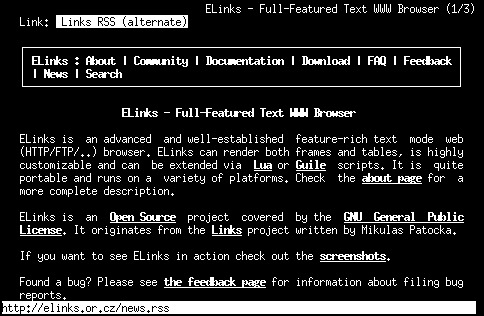
Figure 1. ELinks, a Text-Mode Browser
Running a client in a screen session still is extremely popular among IRC users. Running IRC on a remote server accessed via SSH provides access to IRC from restricted networks and allows for messages to be left with your client for you to read on your return. Chat logs are kept in one place, instead of being spread across every computer you use. And, instant messaging can benefit from being run at the console for all of the same reasons.
Irssi (www.irssi.org)
Irssi is a very popular IRC client for the console. Features include logging, custom formatting and themes, configurable key bindings and many, many others. Irssi provides a powerful Perl scripting interface, with many contributed scripts available from Irssi.org. Irssi uses a windowing interface that allows for dozens of server connections, channels and messaging windows to be open and accessible at once.

Figure 2. IRSSI IRC Client
Finch (pidgin.im)
If you've used Pidgin, you'll find Finch hauntingly familiar. Finch is a CLI instant-messaging program that is part of the Pidgin codebase and uses the libpurple instant-messaging libraries. Finch's user interface is modeled as closely to Pidgin as ncurses will allow. They both will save their configuration to the same directory (~/.libpurple), and if Pidgin already is configured on your machine, Finch will pick up its settings automatically. Finch supports chatting on all of the protocols included with libpurple: AIM, MSN, Yahoo! and Jabber, just to name a few.
naim (naim.n.ml.org)
Supporting AIM, ICQ, Lily and IRC, naim is an elegantly designed alternative to Finch if you don't need all of libpurple's protocols. naim uses a very simple command-driven interface. All text entered with a preceding / is considered a command, and all other text is sent as a message to the current active window. naim supports simultaneous connections to multiple networks and IRC servers, with each “window” displayed in a slide-out list that can be called up with the Tab key.
The cloud notwithstanding, a small but fervent minority still prefers to access e-mail via the console. Whether it's the celebrated speed of text-mode clients or the ability to access one's e-mail and calendar over SSH, command-line productivity applications still have a surprisingly strong following.
Mutt (www.mutt.org)
Mutt is an e-mail client that supports both reading local UNIX mail spools and retrieving remote mail over POP or IMAP. It's capable of handling everything one would expect from an e-mail client and more. Some notable features include the ability to customize fully the information contained in the mail header and the ability to store different configuration settings depending on the current folder or e-mail recipient.
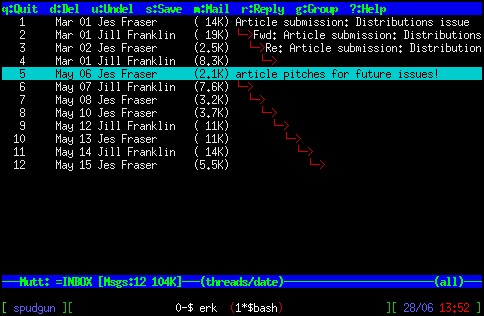
Figure 3. The Mutt E-mail Client
Alpine (www.washington.edu/alpine)
Alpine is a complete rewrite of the popular Pine e-mail client by the original authors, the University of Washington. It adds support for Unicode among other new features, and it's released under an open-source instead of a freeware license. Alpine supports POP, IMAP, SMTP and LDAP. Unlike Mutt, Alpine is configured using a menu-driven interface that some may find easier to use. People who use Nano as their editor will have a head start, as Nano is a port of the Pico editor, which was included with Pine and has been re-implemented with Alpine. Of course, any other UNIX editor can be set as the composing interface for Alpine.
pal (palcal.sourceforge.net)
pal is a powerful calendaring program. It makes full use of terminal color support to highlight events. To-do-style events are supported, and HTML and LaTeX generation allows you to create calendar files for printing. A nifty tip suggested by the author is to add pal to the shellrc file so that it displays every time you open a terminal.
Somewhat unintuitively, console-based multimedia players enjoy wide popularity. Command-line music players can be used to take advantage of better speakers on another machine or to provide the base of a large, multisystem, distributed home-media solution. Even image editing at the console is surprisingly full-featured with tools designed to manipulate batches of images from scripts.
MOC (moc.daper.net)
MOC (Music on Console) is a CLI music player that will have a familiar interface to users of Midnight Commander. MOC supports, among others, Ogg Vorbis, MP3 and FLAC. It outputs to ALSA, OSS or JACK and can create and load M3U playlists. MOC utilizes a client/server architecture that allows the user to detach MOC from its graphical interface to reclaim its controlling terminal for other uses, while leaving the playlist still running in the background.
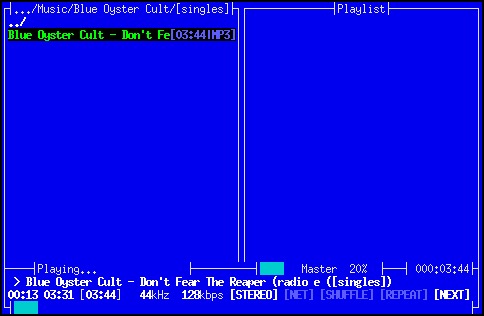
Figure 4. Music On Console
cdparanoia (xiph.org/paranoia)
cdparanoia is a CD-ripping tool that subscribes to the UNIX philosophy of doing one task and doing it very well. Designed to be a high-quality ripper that has excellent knowledge of CD hardware, cdparanoia and those tools based on it have a reputation for succeeding where others have failed. cdparanoia will read raw data from a music CD and output it as WAV or 16-bit PCM to either a file or stdout. Encoding to a more usable format and populating that format's metadata will need to be achieved with a different tool. cdparanoia makes up for this minimalism by including smilie characters meaningfully in its status output. So cute!
Music Player Dæmon (freshmeat.net/projects/mpd)
Music Player Dæmon (MPD) is a network-aware music server. It acts as a back-end service for a range of clients to access locally or over a network. It also can act as a music converter, able to utilize various audio input plugins and output to a different output plugin. MPD maintains a music database or library. Playback of local files not in the database is supported only by local clients for reasons of security.
No command-line roundup would be complete without a look at traditional UNIX text editors. Whether you're keeping notes, building a Web site, editing system configuration files or writing Linux kernel patches, there is a console editor fit for the task.
Vi/Vim (www.vim.org)
Voted as the favorite editor of Linux Journal users in the 2009 Readers' Choice awards, the Vi family of editors has been around since the mid-1970s. Vim's design suits system administration tasks with a focus on ease of moving around complex files and making small precise edits. Vim-specific enhancements turn the humble editor into a powerful programming tool with support for context-sensitive completion, syntax highlighting and comparison and merging features. Vi also serves as the core precept of religion for many UNIX users, whose holy doctrine speaks of the coming of the Vim-im-again, who will vanquish the false GNU-headed god, Emacs.
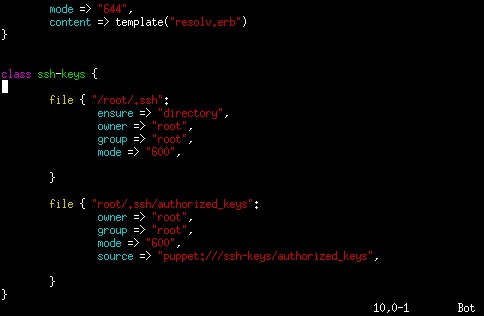
Figure 5. The Vim Editor
GNU Emacs (www.gnu.org/software/emacs)
The Emacs family of editors also can claim a long heritage, and their development also started in the 1970s. Although most users utilize X11, Emacs is fully functional at the command line. Emacs is strongly extensible, with a powerful recorded macro capability, and it includes an interpreter for its own dialect of the Lisp programming language. Emacs is not content to stop at being a capable programmer's editor with plugins available to use Emacs for IRC, Web browsing, e-mail and news, just to name a few. Emacs has often been featured as a combatant in the holy editor war against its arch nemesis Vi. Emacs users quite often are bewildered by this, as most of them are prepared to admit that Vi is an exceptional text editor, but that it should be just as clear to Vi users that Emacs is the better operating system.
Nano (www.nano-editor.org)
Based on Pico, the editor included with the Pine e-mail client, Nano has earned its wide popularity by being one of the most user-friendly console editors around. Nano supports syntax highlighting for many languages, customizable key bindings and a soothing display of the key bindings for the most commonly used commands at the bottom of the screen. The only way Nano could be any friendlier is if it displayed the words “Don't Panic” in large, friendly letters on the top of the screen.
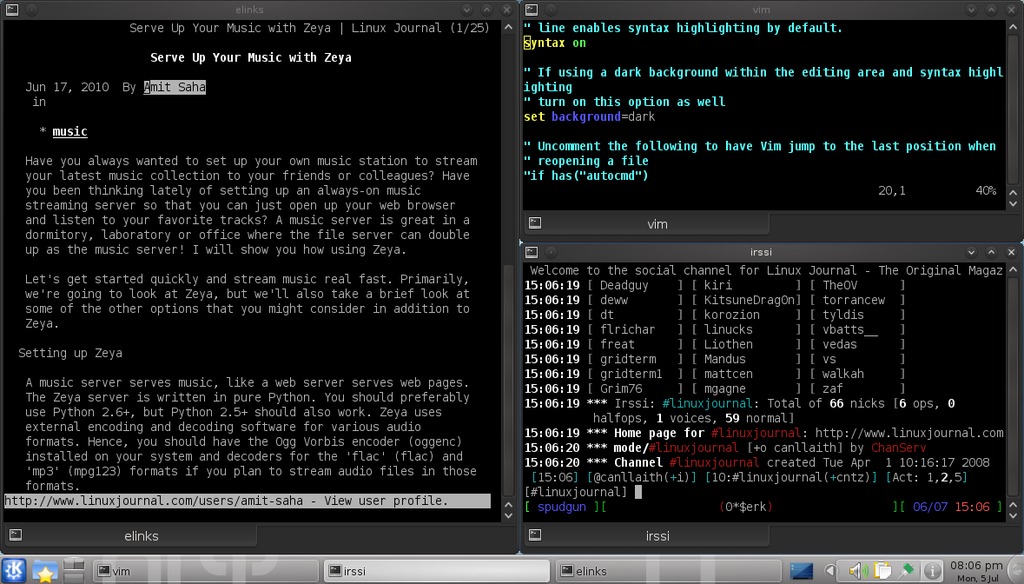
Figure 6. A Modern Desktop
Hopefully, I've inspired some purely GUI users to investigate the world at the command line, and perhaps I've reminded the already-console-savvy about applications they may have forgotten. Many other popular command-line applications exist that haven't been included here. To get a listing of other applications available for your distribution, try searching your distribution's packaging system for “console”, “ncurses” or “cli”.
Jes Fraser is an IT Consultant from Open Systems Specialists in New Zealand. She's passionate about promoting open source and Linux in the enterprise.
