
Roll Your Own Embedded Linux System with Buildroot
It all started when I ordered an ARM-based development board for my FemtoLinux project, which is a Linux flavor specifically designed for ultra-small systems. Initially, I played with the idea of simply using a Linksys WRT router supported by an OpenWrt open-source project for development. But eventually, I decided that because it is a commercial project and development time is important, I was going to spend an extra $100–$200 for a real development board with official Linux support, which would come with everything that an embedded Linux developer would need: cross-compiler toolchain, Linux sources and embedded Linux distribution (at least, that's what I thought I would be getting). If you're on a budget and looking for a cheap embedded board for your hobby project, using a Linksys WRT router is not such a bad idea.
Choosing the right embedded Linux development board deserves an article of its own, but for now, suffice it to say that when you decide to use WRT, you should be prepared to build your software development environment yourself and expect to get support from the community. With a commercial board, I was expecting to receive it from the vendor, but I didn't. The vendor's idea of Linux support turned out to be just a list of kernel patches, forcing me to evaluate, choose and configure an embedded Linux development environment for this board by myself, which turned out to be quite an interesting and educational experience.
First, let's start with some basic terminology. An embedded Linux distribution is quite different from the PC distributions you are used to, such as Ubuntu or Fedora Core. It typically includes at least the following components:
Cross-compiler toolchain for your target architecture, which is at least gcc, g++ and ld. It usually runs on one architecture, but produces binaries for a different architecture—x86 and ARM, respectively, in my case, hence the term cross-compiler toolchain.
Kernel sources with a BSP (Board Support Package) for your board.
Filesystem skeleton—that is, /bin, /etc with all the standard configuration files, such as /etc/fstab, /etc/inittabe and so on.
Applications—init and shell as a bare minimum, but most people will need more in order to do something useful.
Currently, the two most widely used embedded Linux distributions are OpenEmbedded and Buildroot. This article is about Buildroot, as that's the one I am most familiar with and naturally the one I used in my project. Buildroot's biggest advantage is its simplicity and flexibility, which are important if you are going to do some kernel hacking or other low-level development. If, on the other hand, you are an embedded application developer, OpenEmbedded certainly is a viable choice as well.
Even though you may not have heard of Buildroot before, it's actually not a new project. It has been around for many years, most of the time under the name of uClinux. Initially, uClinux was an effort to port the Linux kernel to processors without an MMU, such as the Motorola MC68328. However, it eventually expanded beyond that, adding support for more processors, a binary format for MMU-less systems and more userland capabilities, including a libc flavor specifically designed for low memory systems—uClibc. Eventually, it evolved into one of the more-advanced and easy-to-use embedded Linux distributions.
This is where the confusion started, as people used the name uClinux to refer both to the MMU-less CPU kernel support and the embedded distribution, which were two quite different things. The fact that many MMU-less patches (the whole armnommu architecture support, for instance) eventually were included in the standard kernel tree added to the confusion as well. Finally, the embedded Linux distribution part was split into a different project called Buildroot. uClibc development continued separately, and the parent uClinux Project somewhat lost its momentum.
From the Buildroot Web site: “Buildroot is a set of Makefiles and patches that makes it easy to generate a cross-compilation toolchain and root filesystem for your target Linux system using the uClibc C library.” This is not entirely correct, as it also supports (to some extent, as you will see later) other libc flavors, such as glibc. It works with many embedded CPUs, including ARM, MIPS and PowerPC.
If you want to get started with Buildroot, download the tarball, extract it and run make help from its root directory. If this all looks familiar to you, wait till you run make menuconfig.
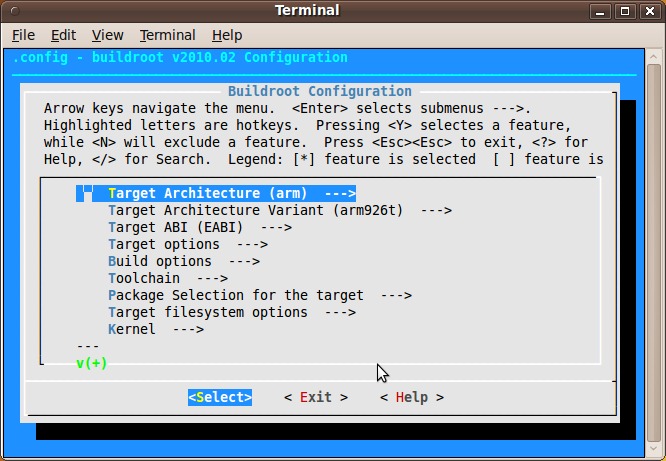
Figure 1. Buildroot Main Menu
As you already may have guessed, Buildroot uses the same Makefile infrastructure as the Linux kernel to configure and build everything, including applications and libraries. The usual sequence of commands is:
make clean
make menuconfig
make
The first one is important if you are going to change some configuration parameters—incremental building may or may not work in this case. Initially, I was going to recommend that you start working with some default configuration, by running, for instance, make integrator926_defconfig, which should configure Buildroot for the Integrator ARM reference board. However, it turns out that as Buildroot development moved forward, most of the default configurations somehow lagged behind and currently do not work out of the box. I suggest you run make menuconfig, and choose the following options manually:
Target architecture: arm.
Target Architecture Variant: arm926t.
Kernel: same version as Linux headers.
And, go over the other parameters and check for others that you may want or need to modify. Be careful when you do so, and always save your latest working configuration (the .config file). It is very easy to end up with a nonworking configuration.
Buildroot configuration options can be divided roughly into hardware-, build-process- and software-related, while software-related options can be divided further into kernel, toolchain and packages.
Hardware options are the “Target Architecture” that defines your CPU core (ARM, MIPS and so on). “Target Architecture Variant” defines the exact CPU you are using, and “Target Options” defines board-related parameters, such as UART baud rate and so on. You hopefully should know your hardware parameters, and there is not much to add here, except that for the ARM architecture, I suggest using EABI and making sure you use the same ABI convention everywhere.
If you are running Buildroot for the first time, you probably should avoid changing the “Build options”. These options probably are okay the way they are; the only thing you may want to change is the “Number of jobs to run simultaneously” if your build PC is a multicore system. Also, choose “build packages with debugging symbols” if you want to debug some of the pre-installed applications.
Remember, in order to build the kernel and software packages, Buildroot first needs to build the cross-compiler toolchain for your hardware. The Toolchain menu allows you to choose the gcc version and other toolchain-related parameters. The wrong toolchain configuration can lead to some very weird errors, so be careful. By default, Buildroot builds its own toolchain and works with uClibc. There is an option to work with an external toolchain, which can be glibc-based, but that's beyond the scope of this article, so you should set “Toolchain type” to “Buildroot toolchain”. You can change the gcc, binutils, uClibc and kernel headers (but not the kernel itself) versions from this menu. You also can decide to compile the C++ (g++) compiler and gdb support (gdbserver for the target and gdb client for the host or a standalone gdb for the target), which is probably something you are going to need. All the other options are better left alone at this stage.
“Package selection for the target” is where you get to choose what software components you want as part of your embedded filesystem image. This is where you can experiment relatively freely—even if you select an application that's not supported on your hardware or with the particular Linux and gcc versions that you chose, it's easy to find the problematic application and disable it.
First, there is BusyBox. It deserves an article of its own, but basically, it's a collection of standard Linux utilities (such as shell and init), optimized for low memory footprint systems. You can start by creating a filesystem with just BusyBox. It contains everything you need in order to boot and verify that your system is working. Later, you can add more packages, ranging from the MySQL or SQLite databases to the VLC and MPlayer media players, as well as Perl, Python and many others.
The “Target filesystem options” allow you to choose the type of filesystem image. Pretty much all the commonly used (in the embedded world) filesystems are supported, including: cramfs, squashfs, jffs2, romfs and ext2.
If you just want to experiment or prefer to create the filesystem image manually (if you are using some rare unsupported filesystem, such as yaffs2), you can choose the “tar the root filesystem” option, which will create a tar archive with your filesystem. For some unknown reason, bootloader configuration also is found under this menu (only Das U-Boot is supported for now), but I'll skip this one, assuming you have a working bootloader already.
The last menu is “Kernel”, which is optional. In case you are interested only in application development, choosing the right kernel headers (see above) is enough. If you decide to modify the kernel, remember to keep the kernel version and the kernel headers version (in the Toolchain menu) in sync.
When you are finished, exit menuconfig, and run make. Buildroot automatically will download everything it needs, compile it and eventually create the filesystem image in the output/images/ directory. If you want to modify something in the filesystem image, for example, to change the IP address of your system, you can modify the filesystem skeleton directory tree, which is usually located in target/generic/target_busybox_skeleton. Note that if you are not using BusyBox, or if your hardware platform has its own filesystem tree skeleton, this location can be different.
When you gain enough experience with Buildroot and decide you are brave enough to modify some of the uClibc, BusyBox and/or kernel parameters, the way to do it is to compile Buildroot with default settings for all three, and after that, run the following commands to modify the parameters and eventually recompile everything:
make uclibc-menuconfig
make busybox-menuconfig
make linux26-menuconfig
Note that the last one will work only after you enable the Linux kernel option in the main Buildroot configuration menu. Chances are that you already know how to configure the kernel, and uClibc configuration rarely requires tweaking, unless you want to compile out some functionality in order to save memory, so I'm going to look at BusyBox configuration only.
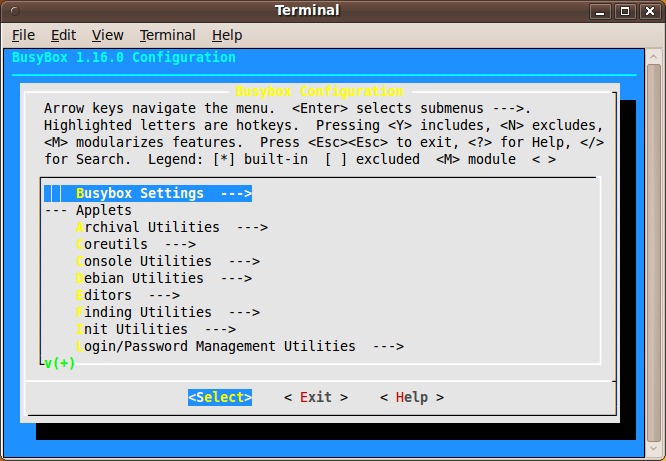
Figure 2. BusyBox Configuration Menu
The BusyBox menu can be divided into settings and applets. I concentrate on the latter, as that's probably what you would want to modify first. Applets are applications in BusyBox parlance, with one small difference. In order to save space, BusyBox usually is installed as a single binary that includes all the utilities you decided to compile: shell, ping, gzip and so on. You can launch an individual applet either by giving its name as an argument to BusyBox—busybox ping, for instance—or you can create a symbolic link, ln -s /bin/ping /bin/busybox, and BusyBox will choose the correct applet automatically, depending on the link from which it was executed. BusyBox installation automatically creates links for all the compiled applets. If you are curious, you can run it without any parameters to see what applets were compiled in. You should have no difficulty in choosing the right set of applets for your project. The only thing worth mentioning is the shell. BusyBox does not support standard shells such as bash or tcsh; instead, you get to choose between ash, hush and msh with ash being the closest to bash and the one I always work with. Note that even though standard bash is not part of BusyBox, it is supported by Buildroot if you need it.
When you are finished configuring your embedded system, run make to compile everything. Now you are ready to program your newly compiled kernel and filesystem images to your board and boot. Actual Flash programming depends on your system, bootloader, type of Flash and so on, and it is beyond the scope of this article.
If you want to compile your own applications, you can (and should) use the toolchain created by Buildroot. You can get (or build) a different toolchain, but if it is not based on uClibc or if it was compiled with different kernel headers, it may not work. All you have to do in order to use the Buildroot toolchain is add the output/staging/usr/bin/ directory to your path and then simply run arm-linux-uclibcgnueabi-gcc.
The important point to remember is that Buildroot is not fool-proof in the sense that it is relatively easy to create a configuration that won't work or even compile. You should not expect every parameter combination to work, and always keep your last working configuration file. The upside is that there is a large and active community behind this project, which will be happy to help.
BSP
BSP stands for Board Support Package. The term is somehow associated with RTOSes, such as VxWorks. Therefore, some people prefer the more “politically correct” LSP (Linux Support Package). Anyhow, the BSP is a set of usually small kernel and bootloader modifications specific to your hardware. Intel x86 developers take for granted that all x86 systems have the same basic hardware and peripheral interface, which is not the case on embedded systems. BSP development usually includes fixing memory mappings, configuring interrupt controllers and development of at least the following basic drivers: serial (for console), network and Flash.
ARM ABI
An Application Binary Interface (ABI) describes the low-level interface between an application and an operating system and hardware. ARM Linux supports Old ABI (OABI) and Embedded ABI (EABI). OABI is deprecated, and it is recommended that you use EABI. As this parameter affects the kernel, the compiler and the standard libraries, it is important to use the same ABI everywhere, even though mixing ABIs may be supported. Compared to OABI, EABI defines a more-efficient system call convention, improves floating-point performance, changes structure packing, removes the minimal four-byte size limitation and some other minor improvements.
Resources
FemtoLinux: femtolinux.com
uClinux: www.uclinux.org
uClibc: www.uclibc.org
Buildroot: buildroot.uclibc.org
OpenEmbedded: www.openembedded.org
Alexander (Sasha) Sirotkin has been an active Linux user and developer for more then 15 years. One of the projects he's worked on is FemtoLinux, which improves performance on low-end embedded systems and eases porting from legacy RTOSes. He lives in Tel-Aviv, Israel, and can be reached at “sasha AT femtolinux.com”.


