
Finding Your Phone, the Linux Way
During the years, I've misplaced my phone more times than I like to admit. Whenever it happens, I get a sinking feeling, much like when I misplace my keys or pull into the driveway and realize the groceries are still sitting in the cart...back at the grocery store.
When I notice my phone is missing, I don't automatically assume it has been stolen. Instead, I know I probably have just set it down somewhere. If I think it's likely that I left it somewhere other than home, my first order of business is trying to locate it as quickly as possible to prevent it from actually being stolen.
Other phone platforms have techniques to help you find your phone, but they are proprietary, and end users usually have no control over how they work. There also is the option of “bricking” your phone, where your service provider sends a signal to the phone that erases and disables it. I would rather try everything I can to find my phone before resorting to that option.
So, how do you go about finding your lost phone? The obvious thing to do is to try calling it. But, what if the ringer is on silent mode or the phone is out of earshot? If calling doesn't yield any results, and you're using a proprietary phone platform, you may need to jump directly to the bricking option, if that option is open to you.
My current cell phone is a Nokia N900, which was reviewed recently in Linux Journal (see Kyle Rankin's review in the May 2010 issue). Because the N900 is built on Linux and comes fully unlocked (with a terminal application and easy root access), you can do some cool things to find it that you can do on other phones only by voiding warranties (if you can do them at all).
First, here are a few packages that should be installed:
The rootsh package enables root access to the N900 via the sudo gainroot command.
The OpenSSH Client and OpenSSH Server packages.
These are available from the Maemo Extras package repository. To enable it, launch the App Manager, click on the title bar to bring up the menu, and select Application catalogs. Select maemo.org (it might be called Maemo Extras on some phones), uncheck the Disabled check box, and tap the Save button (Figure 1).
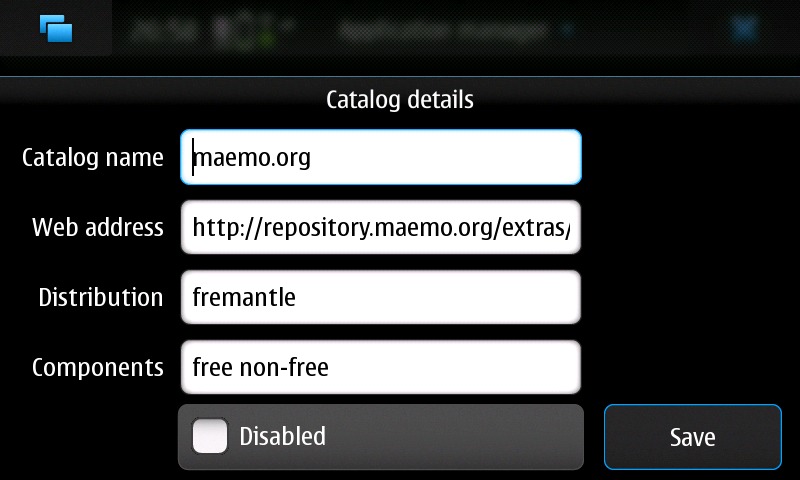
Figure 1. Settings for the maemo.org Maemo Extras Repository
If the repository isn't there, you can add it by tapping on the New button on the Application catalogs screen. The details are as follows:
Catalog Name: maemo.org.
Web address: repository.maemo.org/extras.
Distribution: fremantle.
Components: free, nonfree.
Once you have the repository enabled, tap Download on the main screen of the Application manager and install the three packages.
With these packages installed, I launched the terminal application on the N900 and copied over my public SSH key from my desktop, like so:
$ mkdir .ssh
$ scp me@desktop:.ssh/id_rsa.pub .ssh/authorized_keys
Now, when my N900 is connected to my home network, I can ssh in to it from my desktop without needing a password, like so:
$ ssh user@n900.ip.addr.here
In theory, I also should be able to ssh to the phone when it is connected to the cell-phone network; however, my cell-phone provider does not appear to allow it—even when I configure alternate ports, all my attempts to log in fail.
Another minor issue is that the SSH dæmon binds to whatever network interface is up when it starts, and it won't respond after you switch between networks because it still is listening on the other network. To fix this, I created a tiny shell script and placed it at /etc/network/if-up.d/01_ssh. To create it, I used vi, as root:
$ sudo gainroot
$ vi /etc/network/if-up.d/01_ssh
The script itself is only two lines:
#!/bin/sh
/etc/init.d/ssh restart
After creating it, I chmodded it:
$ chmod 755 /etc/network/if-up.d/01_ssh
Any script in the /etc/network/if-up.d/ folder is run when an interface is brought up, so when that happens, the SSH dæmon will be restarted, and SSH always will be listening on the correct interface.
Now that I have reliable SSH access (when connected to a network other than the cell network), I can ssh in to the phone, assuming I know the IP address. At my house, knowing the IP address is easy, because my DHCP server is configured always to give the N900 the same address whenever it connects. But when I'm not at home, I might not know, so my first task is to make sure the N900 tells me what its IP address is. To do this, I simply add the following to the 01_ssh script I created earlier:
/sbin/ifconfig -a \
    | awk '/inet addr/ { print $2 }' \
    | awk -F: '{ print $2 }' \
        > /tmp/n900.ipaddr
This one-line script parses the output of ifconfig -a to extract all of the IP addresses, and it stores them in a file called N900.ipaddr in the /tmp/ folder. Then, I add the following line to upload the file to a special user I created on my home server:
/usr/bin/scp -i /home/user/.ssh/id_rsa \
    /tmp/n900.ipaddr n900user@home.example.net:
Prior to setting this up, I needed to generate an SSH key on the N900 with the ssh-keygen command and then copy the .ssh/id_rsa.pub file into the ~/.ssh/authorized_keys file of the unprivileged user I created to receive the file on my server.
Now every time the N900 goes on-line or connects to a new network, it uploads the IP address to my home server. Wherever I am, I simply log in to my server and look in the home folder of my N900 user, and I know what the current IP address is.
If I can ssh in to my phone, I can make it do several things.
For one, I can use MPlayer (easily installed from the App manager) to play a ringtone (or any other supported audio file):
$ mplayer /home/user/MyDocs/.sounds/Ringtones/OuterSpace.aac
This works even if the phone is in silent mode. Speaking of which, I can turn silent mode off with:
$ dbus-send --type=method_call --dest=com.nokia.profiled \
     /com/nokia/profiled \
         com.nokia.profiled.set_profile \
             string:"general"
With silent mode off, I can try calling the phone again.
One issue that may come up is if I have headphones plugged in. In this case, it might make more sense for me to vibrate the phone. To make the phone vibrate, I do this:
$ dbus-send --print-reply --system --dest=com.nokia.mce \
     /com/nokia/mce/request \
         com.nokia.mce.request.req_vibrator_pattern_activate \
             string:PatternIncomingCall
The phone vibrates until I shut it off with:
$ dbus-send --print-reply --system --dest=com.nokia.mce \
     /com/nokia/mce/request \
         com.nokia.mce.request.req_vibrator_pattern_deactivate \
             string:PatternIncomingCall
If I still can't locate the phone at this point, it's time to get fancy.
The N900 has an accelerometer and a front-facing camera. Both of these can be triggered from the command line. The camera can be told to take a picture like this:
$ /usr/bin/gst-launch v4l2src \
      device=/dev/video1 \
          num-buffers=1 ! \
          ffmpegcolorspace ! \
          jpegenc ! \
          filesink location=/tmp/front-camera.jpg
The resulting front-camera.jpg photo then can be uploaded to my server, or some other device, and I can look at the picture and see whether I can tell from it where the phone is. Unfortunately, the front camera is a typical cell-phone camera (not very good). If the camera lens is not blocked by anything, and there is excellent lighting, you might get a decent shot, but probably not (Figure 2).

Figure 2. Pictures from the N900 front camera are not the best, but with luck, they might help you find the phone. Here I can see that the phone is sitting somewhere on my desk.
The accelerometer can tell me whether the phone is moving. I can view the output with:
$ watch cat /sys/class/i2c-adapter/i2c-3/3-001d/coord
If the numbers change by a lot every two seconds, the phone is in motion. If they aren't changing much (or not at all), the phone is just sitting somewhere.
One thing that might help at this point is to have the phone call me so I can listen in on what is going on where the phone is. To have the phone call me, I do this:
$ dbus-send --system --dest=com.nokia.csd.Call \
      --type=method_call \
      --print-reply /com/nokia/csd/call \
          com.nokia.csd.Call.CreateWith \
              string:"3215551212" \
              uint32:0
The 3215551212 should be replaced with the phone number to call. If I left the phone in a place with a distinctive sound (like a movie theater or coffee shop), I might be able to tell where it is sitting.
If I still can't figure it out, it's time to check the GPS. I saved this method until now because it requires a Python library that is available only in the maemo.org extras-devel repository. extras-devel is a repository for developers, and it contains a lot of packages that aren't quite ready for general consumption (Figure 3).
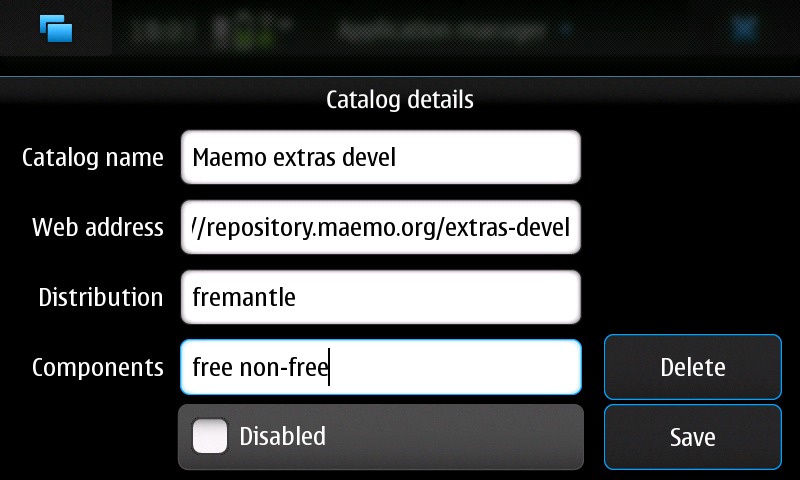
Figure 3. Settings for the extras-devel Repository
To enable extras-devel, follow the instructions at wiki.maemo.org/Extras-devel (see the “How to activate Extras-devel” section).
Once the repository is enabled, I install the python-location package, like so:
$ sudo gainroot
$ apt-get install python-location
After installing the package, I disabled the extras-devel repository so that I didn't accidentally upgrade any of my stable software with potentially unstable versions. I do this by opening the App manager application, clicking on the title bar and choosing Application catalogs. Then I tap on the extras-devel entry I created earlier, select the Disabled check box and click Save. I also could have just deleted it, but I decided to save it for later, just in case.
With the python-location package installed, I now could talk to the GPS using Python. There was only one problem with that plan. I don't know Python. It's been on my list of “Languages to Learn” for a long time now, and I promise I'll learn it one day, but the mythical “one day” hasn't arrived yet.
Thankfully, an N900 user who knew Python wrote a script that did exactly what I needed: talk.maemo.org/showpost.php?p=566224&postcount=1. The script is toward the bottom of the post. Apart from the script, the post contains many helpful ideas for recovering an N900 (many similar to what I described here), and it is well worth a read. Run the script like so:
$ python gps.py
Assuming the phone is in a place where it can get a GPS fix, it will output the phone's latitude and longitude. You can enter those coordinates into Google Maps (or any other mapping tool that lets you input latitude and longitude), and you easily can see where the phone is to within a few feet.
There is one problem with all of the above techniques. They all rely on the phone being accessible via SSH. As I stated earlier, my service provider blocks me from logging in when the phone is connected to the cell network. Additionally, any time my phone is connected to a Wi-Fi network, it is behind a router, which also blocks me from logging in using SSH.
The way around this is to make the phone perform as many of the above actions as it can without me telling it to.
The first problem to solve is how to let the phone know that it is lost. I could do this by putting a specially named file on a public Web server. An example would be http://example.net/~me/my-n900-is-lost.txt. For security reasons, this file should have a name that is hard to guess (so don't use my example).
If I make the phone try to wget the file, and it succeeds, the phone will know it is lost and can try to tell me where it is. If the phone tries to wget the file and fails, it will know that it is not lost (in my case, at least not yet).
Then, the trick is how to make the N900 periodically check to see whether it is lost. On a regular Linux machine, I would do this with cron, but the N900 doesn't have cron (battery life is the reason). The N900 does have an alarm dæmon, but interfacing with it requires Python knowledge. A few projects are in the works that are trying to bring cron-like functionality to the N900, but they're not quite ready (at the time of this writing) for public consumption.
I did find one package that works well enough as a stopgap until other solutions mature. It's called dbus-scripts, and it is a dbus-monitoring dæmon that allows you to execute scripts when certain things happen on the N900. Like the python-location package, dbus-scripts is available (at the time of this writing) only in the extras-devel repository. After re-enabling the repository, I installed the package, along with a GUI configuration program, like so:
$ sudo gainroot
$ apt-get install dbus-scripts dbus-scripts-settings
After installing the packages, I disabled extras-devel again. The GUI took some of the trial and error out of configuring the triggers, so I recommend it (Figure 4). I put the commands I wanted to execute into a shell script called lost.sh and then set up the triggers in the /etc/dbus-scripts.d/dbus-scripts-settings file (Listing 1).
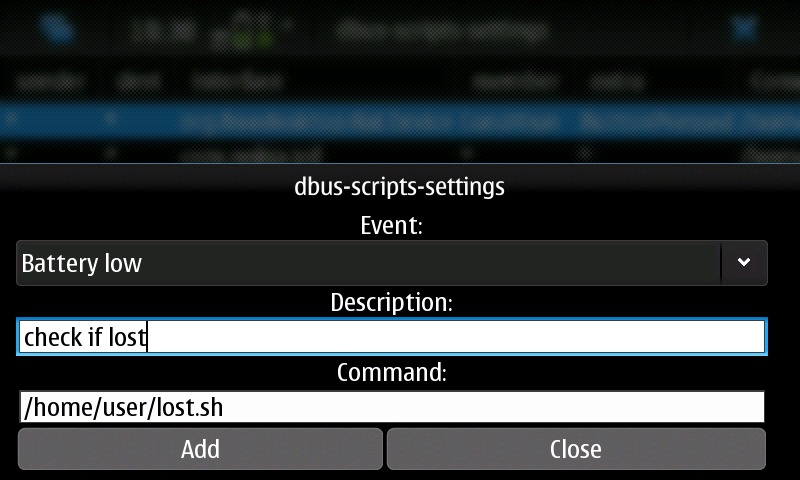
Figure 4. Adding an Item to /etc/dbus-scripts.d/dbus-scripts-settings Using the GUI Configuration Program
Listing 1. lost.sh
#!/bin/sh
# A script to help you find your phone.
# by Daniel Bartholomew, May 2010
#
# This script is licensed under the terms of the
# GNU General Public License, version 3 or later.
# See <http://www.gnu.org/licenses/> for details.

# Some variables you need to set:
amilost="http://example.net/my-n900-is-lost.txt" # CHANGE THIS!

username="username"       # the username at your ssh host
sshhost="hostname"
backupnumber="3215551212" # backup phone that can receive SMS messages

# A timestamp variable you can alter if you want to:
timestamp=$(/bin/date +%Y-%m-%d-%H.%M.%S-%Z)

# With the vars out of the way, we can begin:

# The first step is to check for the file on the webserver.
# If it exists, we collect data and send it,
# if not, we print a message and exit.
if wget --output-document=/tmp/${timestamp}.txt \
        ${amilost} 2>/dev/null;  then
  # If we're here, the file exists and the phone is lost.
  # Get the current IP address and send it using the
  # sendsms.py script:
  /sbin/ifconfig -a \
      | awk '/inet addr/ { print $2 }' \
      | awk -F: '{ print $2 }' \
           > /tmp/${timestamp}.ip

  # sendsms.py from:
  # http://talk.maemo.org/showpost.php?p=558430&postcount=57
  /home/user/sendsms.py ${backupnumber} \
                        "$(/bin/cat /tmp/${timestamp}.ip)"

  # take a picture with the front-facing camera
  /usr/bin/gst-launch v4l2src \
      device=/dev/video1 \
      num-buffers=1 ! \
      ffmpegcolorspace ! \
      jpegenc ! \
          filesink location=/tmp/${timestamp}.jpg

  # get the location and send it
  # gps.py from: http://talk.maemo.org/showthread.php?t=47301
  /usr/bin/python2.5 /home/user/gps.py 2>&1 > /tmp/${timestamp}.gps
  /home/user/sendsms.py ${backupnumber} \
                        "$(/bin/cat /tmp/${timestamp}.gps)"

  # More things can be done.
  # See http://wiki.maemo.org/Phone_control for
  # ideas. Experiment and have fun!
  # (But don't blame me if you accidentally brick your phone.)

  # We've gathered the data we want, now copy everything to the sshhost
  # server
  # (need to have ssh-keys set up for this to work).
  /usr/bin/scp -i /home/user/.ssh/id_rsa /tmp/${timestamp}.* \
      ${username}@${sshhost}:

  # What if I want to run more commands than are listed above,
  # such as making the phone vibrate or having it call me?
  # The file I downloaded from the server can contain special
  # commands. If the file is empty, nothing will happen.
  # This probably is not the most secure thing to do, but if the
  # phone really has been stolen, this will allow you to pull
  # data off of it and/or brick the phone on purpose. Be careful!
  # Only uncomment the following line if you know what you are doing
  # and are comfortable with the consequences. I am not responsible
  # if you break your phone.

  #/bin/sh /tmp/${timestamp}.txt

else
  # if the file on the server doesn't exist the phone is not lost:
  echo "I am not lost."
fi
# That's it! We're done.
exit 0
I decided it would make the most sense to watch for three different actions:
The phone changing networks.
The keyboard being opened or closed.
Low power.
If the network changes, that probably means the phone is on the move (maybe I left it in a car). If the keyboard is opened or closed, someone is using or looking at the phone. Finally, if the phone is just sitting there, eventually the batteries will drain away (and I'd like to find the phone before all power is gone).
The three lines in dbus-scripts-settings that watch for those actions are the following:
/home/user/lost.sh * * com.nokia.icd * * * CONNECTED
/home/user/lost.sh * * org.freedesktop.Hal.Device \
                           Condition ButtonPressed cover
/home/user/lost.sh * * com.nokia.bme.signal battery_low
The lost.sh script is called each time one of those events occurs. The dbus-scripts Wiki page (wiki.maemo.org/DbusScripts) has more information on formatting the configuration lines.
See the lost.sh script (Listing 1) for details of what it does. One thing I found in testing is that some of the commands I can run on the command line do not work at all when called from a script by the dbus-scripts dæmon. These include the mplayer command and setting the phone to nonsilent mode. Thankfully, other commands work fine when called from the script.
The final piece of the puzzle was getting the N900 to send at least some of the data it gathered to another phone via SMS. I found a good Python script for sending SMS messages at talk.maemo.org/showpost.php?p=558430&postcount=57.
With the SMS script in place and called by the lost.sh script, all I have to do is create the special file on my Web server, and suddenly my N900 starts sending my designated backup phone (my wife's cell phone) SMS messages whenever one of the events I configured happens.
My current setup is not perfect. The main problem is that if the phone is sitting somewhere not changing networks and not being used, it might be several hours before the low-battery warning event happens and the phone discovers it is lost. As soon as one of the cron alternatives is ready, I probably will switch to using that and have the phone check every half hour to see if it is lost.
Also, the scripts I've created so far are pretty rough. With some more hacking, this will improve. But even in their current state, although they may not guarantee I will recover my lost or stolen phone, they will give me a better chance.
Finally, I don't know if there's any way for me to prevent myself from setting my phone down and forgetting about it. As much as I tell myself it will not happen, I know that someday it will. Thanks to the openness of the N900, I can do things other phones can only dream about.
Daniel Bartholomew works for Monty Program (montyprogram.com) as a technical writer and system administrator. He lives with his wife and children in North Carolina and often can be found hanging out on both #linuxjournal and #maria on Freenode IRC. He also would like to apologize to his wife for all of the SMS messages he sent her while testing the scripts.

