
Control Your Linux Desktop with D-Bus
Every modern Linux desktop environment uses D-Bus, a system for allowing software applications to communicate with each other. Thanks to D-Bus, you can make your desktop work the way you want. In this article, I illustrate some of the things that are possible with D-Bus. Get ready for some desktop tweaking.
D-Bus (Desktop Bus) is an interprocess communication (IPC) system, which provides a mechanism for applications to talk to each other. The D-Bus designers built it from scratch, but were heavily influenced by KDE's DCOP (Desktop COmmunication Protocol) system. Currently, D-Bus is everywhere—KDE 4 has ditched DCOP for D-Bus, and GNOME is moving toward D-Bus instead of its own Bonobo system. So, D-Bus has become a desktop-agnostic IPC mechanism. Software that uses D-Bus seamlessly integrates with your desktop, regardless which desktop environment you use. D-Bus is part of the cross-desktop project freedesktop.org, and Red Hat is the primary contributor.
With D-Bus, every program that offers services to other programs registers itself. Other programs then can look up which services are available. A program also is able to register itself for events, which some system services do, for example, to detect hot-swapping hardware.
D-Bus does not allow direct process-to-process communication, but works by providing a “bus”. The bus dæmon routes messages between processes on a bus, and in this way, processes can speak to one or more applications at the same time. Each application can send messages to the bus or listen for events on the bus.
Usually, D-Bus creates two buses: a privileged system bus and a session bus. The system bus allows system-wide communication between processes with the right access permissions, and its main use is to deliver events from HAL (Hardware Abstraction Layer) to processes that are interested in hardware events. Some possible hardware events might be notification that a new hardware device has been added or that a printer queue has changed. The second bus, the session bus, is created when you log in, and it lets your applications communicate.
Each application using D-Bus exposes some objects, which generally map to internal GObject, C++ or Python objects. One application can send a message to a specific object in another application. You address each D-Bus object with a unique pathname, which looks like a filesystem pathname. To ensure that each application uses unique pathnames, a D-Bus object pathname generally is prefixed with the developer's domain name, such as /org/kde or /com/redhat. The Java programming language uses the same system with package names (for example, org.sun). A D-Bus path is made up of three parts: the service name, the object path and the interface (I give examples of them a bit later in this article).
So, how do you support or use D-Bus in your own application? The core API is written in C and is rather low level. It is not really designed for application programmers to use. Different programming languages and environments have binding layers built on top of this API, such as GLib, Qt, Python, Ruby, Perl and Mono. I don't go into C or GLib (GNOME's base library) programming here, but I give some examples written in script languages like Python and Ruby, as well as shell scripts.
The freedesktop.org project has an incomplete list of applications using D-Bus on its Web site, and the bus name for each application is listed there also. However, you can find the bus names yourself by using some interesting tools to help you explore D-Bus on your own system. For example, Qt has a graphical D-Bus browser called qdbusviewer (Figure 1). In Ubuntu, you can find the application in the qt4-dev-tools package. Although it's part of KDE, the application works perfectly on other desktop environments, including GNOME.
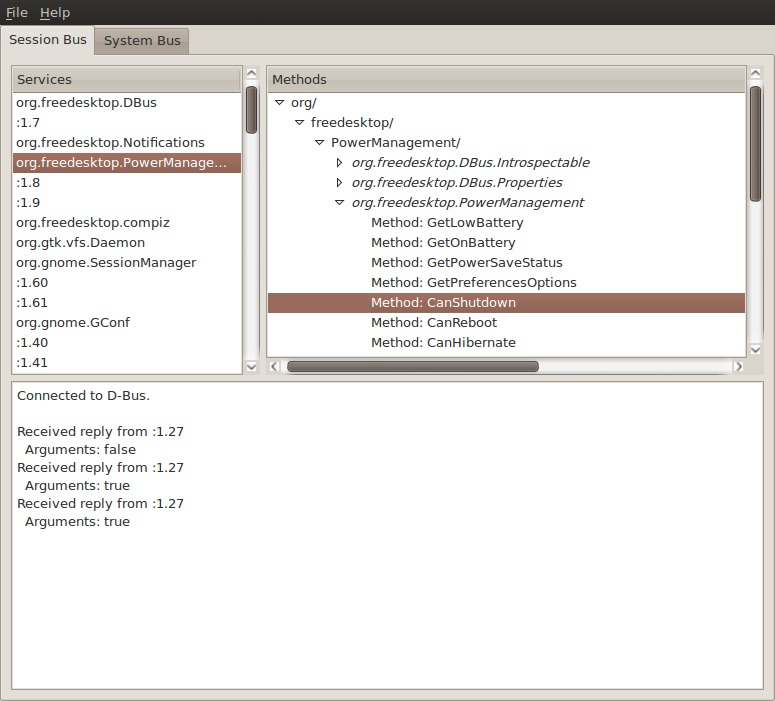
Figure 1. QDBusViewer Running on GNOME
When you run qdbusviewer, it shows two tabs: Session Bus and System Bus. Within each tab, the left pane shows a list of service names. If you click on a service name, the right pane shows information about that service, such as the available methods and signals. For example, if you click on the service org.freedesktop.PowerManagement, and then click in the right pane through the hierarchy org/, freedesktop/ and PowerManagement/, you will have navigated two parts of the D-Bus path: org.freedesktop.PowerManagement in the left pane is the service name, and the org/freedesktop/PowerManagement in the right pane is the object path.
The object path has one final part in the right pane, three so-called interfaces, with a dot-separated name: org.freedesktop.DBus.Introspectable, org.freedesktop.DBus.Properties and org.freedesktop.PowerManagement. Each interface implements some methods and signals. These are the things you can interact with. Here, we're interested in the interface org.freedesktop.PowerManagement, as this one implements the concrete power management actions. When you click on it, you can see all implemented methods and signals in a list. If you click on the method Suspend, your computer suspends, and wakes up only when you press the power button.
Some methods, such as Shutdown, Reboot, Hibernate and Suspend implement actions, and other methods give you some information about the system. For example, the org.freedesktop.PowerManagement object implements some methods like GetLowBattery, GetOnBattery, CanShutdown and so on. If your system (laptop) is running on battery power but with enough battery time remaining, clicking on GetOnBattery gives a reply “Arguments: true” in the pane below, but if you click on GetLowBattery, it gives the reply “Arguments: false”.
It's worth pointing out that qdbusviewer can show only the service names that are registered at the moment. For example, if you haven't started Pidgin, the viewer won't list the Pidgin service. Take this into account when you are exploring the D-Bus services you can use on your system.
If you are more of a command-line person, you don't have to fire up qdbusviewer. The command-line application qdbus exposes the same information. If you run qdbus in a terminal, you get the list of service names available on the session bus. If you run it with the --system flag, the services known to the system bus are shown. If you want to know the different objects a service exposes, run, for example:
$ qdbus org.freedesktop.PowerManagement
/
/org
/org/freedesktop
/org/freedesktop/PowerManagement
/org/freedesktop/PowerManagement/Backlight
/org/freedesktop/PowerManagement/Inhibit
/org/freedesktop/PowerManagement/Statistics
Now, if you want to know which interfaces the /org/freedesktop/PowerManagement object implements, use:
$ qdbus org.freedesktop.PowerManagement \
            /org/freedesktop/PowerManagement
This will give the same list of methods and interfaces that you saw in qdbusviewer. For example, the line:
method bool org.freedesktop.PowerManagement.GetOnBattery()
The bool means this method returns a boolean value, which can be true or false. If the method doesn't return a value, for example, org.freedesktop.PowerManagement.Suspend(), the line lists void instead of bool.
qdbus also allows you to call these methods directly. For example, if you want to call the Suspend method, execute:
$ qdbus org.freedesktop.PowerManagement \
            /org/freedesktop/PowerManagement \
            org.freedesktop.PowerManagement.Suspend
In the rest of this article, I show some of the D-Bus functionality exposed by some popular applications and write some scripts to communicate with those applications and automate some tasks. Hopefully, this will give you some inspiration to communicate with your own favorite applications. I use different D-Bus tools and script languages to show the different ways you can use D-Bus.
I've already mentioned the first way to make use of D-Bus: by using the KDE programs qdbusviewer and qdbus. However, if you're not into KDE, you can use the command-line programs dbus-send and dbus-monitor to send and monitor D-Bus messages, respectively. For example, you can put the system into suspend mode with the following command:
$ dbus-send --dest=org.freedesktop.PowerManagement \
                /org/freedesktop/PowerManagement \
                org.freedesktop.PowerManagement.Suspend
As you can see, the dbus-send calls are almost identical to the ones with qdbus. The only difference is that you have to use the --dest parameter for the service name. But, let's look at something new. If you are watching a long YouTube video in your browser, the screensaver can kick in, because the Flash plugin doesn't communicate with the rest of your system. With D-Bus, you can stop this annoying behavior. The magic command is this:
$ dbus-send --print-reply \
            --dest=org.gnome.ScreenSaver / \
            org.gnome.ScreenSaver.Inhibit \
                string:"YouTube" \
                string:"Inhibit Screensaver"
With this command, you call the Inhibit method of the org.gnome.ScreenSaver interface with two arguments. The first one is the application's name. I use “YouTube” here, but it can be an arbitrary name. The second argument is the reason to inhibit the screensaver. dbus-send expects each argument to be preceded by its type, such as string, boolean, int16 and so on. The two arguments here are strings. I also use the argument --print-reply, because I need the reply of the command: the Inhibit method returns a uint32 number, which is a “cookie” identifying the inhibit request. If you want to uninhibit the screensaver, you have to send this cookie as the argument:
$ dbus-send --dest=org.gnome.ScreenSaver / \
            org.gnome.ScreenSaver.UnInhibit \
                uint32:1234567890
With these two commands, you can hack your own personal screensaver-inhibition shell script. Note: you need to save the cookie to a variable or a file when the first command runs and then substitute the actual cookie value in the command above.
If you are debugging D-Bus scripts or observing the methods and signals of other D-Bus applications, the command-line program dbus-monitor comes in very handy. Just fire it up in a terminal, and you will see all D-Bus activity scrolling by. dbus-monitor is useful for seeing all D-Bus activity in real time. So if something is happening on your system, for example, your network goes down, you can see in the output of dbus-monitor how this message is sent to the D-Bus bus. This way, you know which signals to listen for or which methods to call to tap in to the same events.
dbus-monitor also allows you to specify a set of expressions you want to watch—for example:
$ dbus-monitor --system "interface='org.freedesktop.NetworkManager'"
This will monitor all NetworkManager events. I use the --system argument because NetworkManager uses the system bus.
The Liferea feed reader has a small but interesting set of D-Bus methods. The most interesting method is Subscribe, which allows you to add a feed to Liferea from another application. One application that uses this is FeedBag, a Firefox extension that modifies the feed button in the browser's address bar: if you click on the button, it will add a subscription to Liferea instead of to the Live Bookmarks. Under the hood, this works because FeedBag calls the org.gnome.feed.Reader.Subscribe method. You can do the same from a terminal:
$ feed="http://feeds2.feedburner.com/linuxjournalcom?format=xml"
$ dbus-send --dest=org.gnome.feed.Reader \
            /org/gnome/feed/Reader \
            org.gnome.feed.Reader.Subscribe \
                string:"$feed"
Liferea provides a script, liferea-add-feed, which does exactly this, but with some added error handling.
Liferea also exposes some information via D-Bus, which is interesting if you have an alternative window manager that is not using Liferea's notification area. Then, you can brew your own notification system—just ask for the number of new and unread items in Liferea and show the output:
$ dbus-send --print-reply \
             --dest=org.gnome.feed.Reader \
             /org/gnome/feed/Reader \
             org.gnome.feed.Reader.GetNewItems

$ dbus-send --print-reply \
            --dest=org.gnome.feed.Reader \
            /org/gnome/feed/Reader \
            org.gnome.feed.Reader.GetUnreadItems
If you want to do more complex tasks than calling a single method, you can write a shell script with dbus-send commands or use a higher-level language to simplify the task. There are D-Bus bindings for languages such as Python, Ruby and Java.
In this next example, I implement a Python script that sets your status on Pidgin to “Away from keyboard” if your screensaver activates. This shows two aspects of D-Bus: the script waits for a signal from the screensaver, and then it calls a method in Pidgin. The script is shown in Listing 1.
Listing 1. pidgin_screensaver.py
#!/usr/bin/env python

def pidgin_status_func(state):
    obj = bus.get_object("im.pidgin.purple.PurpleService",
                         "/im/pidgin/purple/PurpleObject")
    pidgin = dbus.Interface(obj, "im.pidgin.purple.PurpleInterface")
    status = pidgin.PurpleSavedstatusFind("afk")
    if status == 0:
        status = pidgin.PurpleSavedstatusNew("afk", 5)
    if state:
        pidgin.PurpleSavedstatusSetMessage(status,
                                           "Away from keyboard")
        pidgin.PurpleSavedstatusActivate(status)

import dbus, gobject
from dbus.mainloop.glib import DBusGMainLoop

dbus.mainloop.glib.DBusGMainLoop(set_as_default=True)
bus = dbus.SessionBus()

bus.add_signal_receiver(pidgin_status_func,
                        dbus_interface="org.gnome.ScreenSaver",
                        signal_name="ActiveChanged")

loop = gobject.MainLoop()
loop.run()
Let's dissect this script. The function pidgin_status_func sets your status in Pidgin. It gets the im/pidgin/purple/PurpleObject object and then the im.pidgin.purple.PurpleInterface interface from the session bus. Then, it calls this interface's methods. It creates a new “saved status” type by first checking if the status type with name “afk” exists, and if not, it creates it (“afk” stands for “Away From Keyboard”, and 5 is the “away” status type).
Then, the function checks the state variable that is an argument to the pidgin_status_func function call (I explain what this argument means later). If the argument is true, it sets the status message of the new “afk” status to “Away from keyboard” and activates the new status. The effect is that Pidgin shows your status as “afk” with the status message “Away from keyboard”.
Now you need to call this function when the screensaver activates. Therefore, start the dbus main loop and connect to the session bus. Then, add a signal receiver that listens to the signal ActiveChanged from the org.gnome.ScreenSaver interface. If/when the signal fires, it calls out pidgin_status_func function. As the ActiveChanged signal has a boolean argument that signifies the current state of the screensaver (1 for active and 0 for non-active), you have defined one argument called state in the pidgin_status_func function. To keep listening, let the loop run indefinitely, as long as the script is running.
Pidgin has an extremely rich D-Bus interface; you can do almost anything with it. So let this example give you some inspiration to do some creative tasks in Pidgin!
Let's look at another example, this time in Ruby. We're going to create a script that shows the currently playing song in Rhythmbox as your status in Pidgin (Listing 2).
Listing 2. pidgin_rhythmbox.rb
#!/usr/bin/env ruby

require 'dbus'

bus = DBus::SessionBus.instance
rhythmbox = bus.service("org.gnome.Rhythmbox")
player = rhythmbox.object("/org/gnome/Rhythmbox/Player")
player.introspect
player.default_iface = "org.gnome.Rhythmbox.Player"

pidgin = bus.service("im.pidgin.purple.PurpleService")
purple = pidgin.object("/im/pidgin/purple/PurpleObject")
purple.introspect
purple.default_iface = "im.pidgin.purple.PurpleInterface"

player.on_signal("playingUriChanged") do |uri|
  status = purple.PurpleSavedstatusFind("rhythmbox").first
  if status == 0
    status = purple.PurpleSavedstatusNew("rhythmbox", 2).first
  end
  purple.PurpleSavedstatusSetMessage(status, uri.to_s)
  purple.PurpleSavedstatusActivate(status)
end
Here you see the same type of commands as I used in the Python script: open a D-Bus session, define D-Bus services, objects and interfaces, and I define a signal receiver. And, a loop runs indefinitely to keep listening to the D-Bus signals.
Of course, this could be tidied up a bit. For example, you now are showing only the file path of the song as the status message. I'll leave it to the reader to extract the relevant ID3 tags out of the file and show them instead of the file path.
Now that you know how to perform D-Bus calls and how to handle D-Bus signals, you can get started automating tasks on your desktop. If you are a Linux power user, D-Bus definitely should be in your vocabulary.
There is much more to D-Bus than I could show you in this article, but with qdbusviewer, qdbus, dbus-send and dbus-monitor, you can explore the possibilities yourself. If you want to create some more complex automation tasks with D-Bus, the Python and Ruby programming languages are a good fit. Consider the tutorials mentioned in the Resources, and then just let your imagination flow.
If you're a software developer, the part I didn't cover here is registering a service. This is the other side of the D-Bus story. If you register a service, you can provide objects to other applications via D-Bus.
Resources
D-Bus: www.freedesktop.org/wiki/Software/dbus
D-Bus Bindings: www.freedesktop.org/wiki/Software/DBusBindings
Python D-Bus Tutorial: dbus.freedesktop.org/doc/dbus-python/doc/tutorial.html
Ruby D-Bus Tutorial: trac.luon.net/data/ruby-dbus/tutorial/index.html
Koen Vervloesem has been a freelance journalist since 2000, writing mainly about free and open-source software. He has Master's degrees in computer science and philosophy and cannot decide which is the most interesting domain. In the meantime, he likes to think “I code, therefore I am.”

