
An Introduction to Hydrogen
I'm going to interrupt my regularly scheduled broadcast to bring you a special program. For those of you expecting Part 2 of my MIDI article, have no fear, I'll present it next month, so please read on.
Recently I've been having so much fun with a particular Linux audio application that I have to share it with readers. The application is called Hydrogen, and for those of you unfamiliar with it, Hydrogen is an advanced drum machine/rhythm programmer with a remarkable set of features. Here's what the features list on the Hydrogen Web site has to say about the program's capabilities:
Very user-friendly, modular, fast and intuitive graphical interface based on QT 3
Sample-based stereo audio engine, with import of sound samples in WAV, AU and AIFF formats
Support of samples in compressed FLAC file format
Pattern-based sequencer, with unlimited number of patterns and ability to chain patterns into a song
Up to 64 ticks per pattern with individual level per event and variable pattern length
32 instrument tracks with volume, mute, solo and pan capabilities
Multi-layer support for instruments (up to 16 samples for each instrument)
Ability to import/export song files
Unique human velocity, human time and swing functions
Multiple patterns playing at once
OSS and JACK audio drivers, with assignable JACK ports
ALSA MIDI input with assignable MIDI-in channel (1..16, all)
Import/export of drumkits
Export song to WAV file
Export song to MIDI file
Impressive, but does it really live up to all that? I'm pleased to tell you that Hydrogen indeed does offer all that and more. Hydrogen is one of the finest examples of advanced Linux audio software. Its progress has been made possible through a successful collective development process with input from an active community of interested users and developers. I've watched Hydrogen grow from a relatively simple rhythm programmer to become the virtual drum machine of choice for Linux musicians. Now, I'm going to take this opportunity to introduce you to the latest and greatest cutting-edge Hydrogen, hot from its CVS sources and filled with enough musical features to keep you busy for a long while.
The version of Hydrogen profiled here is version 0.9.1-cvs, built from the CVS source code made available on the Hydrogen SourceForge site on October 7. CVS (control versioning system) is a programmer's resource for managing developmental or experimental source code that may or may not resemble the code for the official stable release of a program. In practice, CVS sources often are a preview of features to come, but be advised that versions of a program built from CVS sources may not resemble the final release version.
Personally speaking, I like compiling programs from CVS sources. I enjoy working with and testing new features under development, although I must say there is the prospect of features not working, application segfaults and even complete system crashes. Although that rarely happens with Hydrogen, it still is a possibility. If stability is what you need, you should use the official release available from Hydrogen's home Web site.
Preset-only rhythm machines first appeared in 1959. Twenty years later the Roland Corporation produced their CR-78, the first programmable drum machine. By the end of the 1980s, the MIDI-capable hardware drum machine was a standard part of recording studios everywhere. By the end of the 90s, hardware drum machines were being replaced by software rhythm programmers that offered greater flexibility and possibilities for expansion in ways that could not be matched by their hardware ancestors.
Real or virtual, a typical drum machine's basic design divides the machine's primary functions into two aspects, pattern creation and the song sequence. Pattern creation is facilitated by setting the machine to loop-record. That is, you can build your pattern in real time either by clicking on grid points or by using a MIDI keyboard to enter beats into the editor as it loops. Patterns can be copied and edited to make variations on the source pattern. You then arrange the patterns sequentially in the song editor. Once your song form has been defined, you can save your work as a standard MIDI file for import into a MIDI sequencer. Alternatively, you can designate the drum machine to follow a master clock source and run it in synchronization with external programs. Synchronization with other hardware or software has been another basic design concern for drum machines, even for pre-MIDI machines.
Hydrogen is endowed with all the features and amenities expected in a hardware drum machine. Like its contemporary software counterparts, it's also blessed with the expanded capabilities of the virtual drum machine. Let's take a look at how Hydrogen is put together, and then we'll walk through a simple example of its typical use.
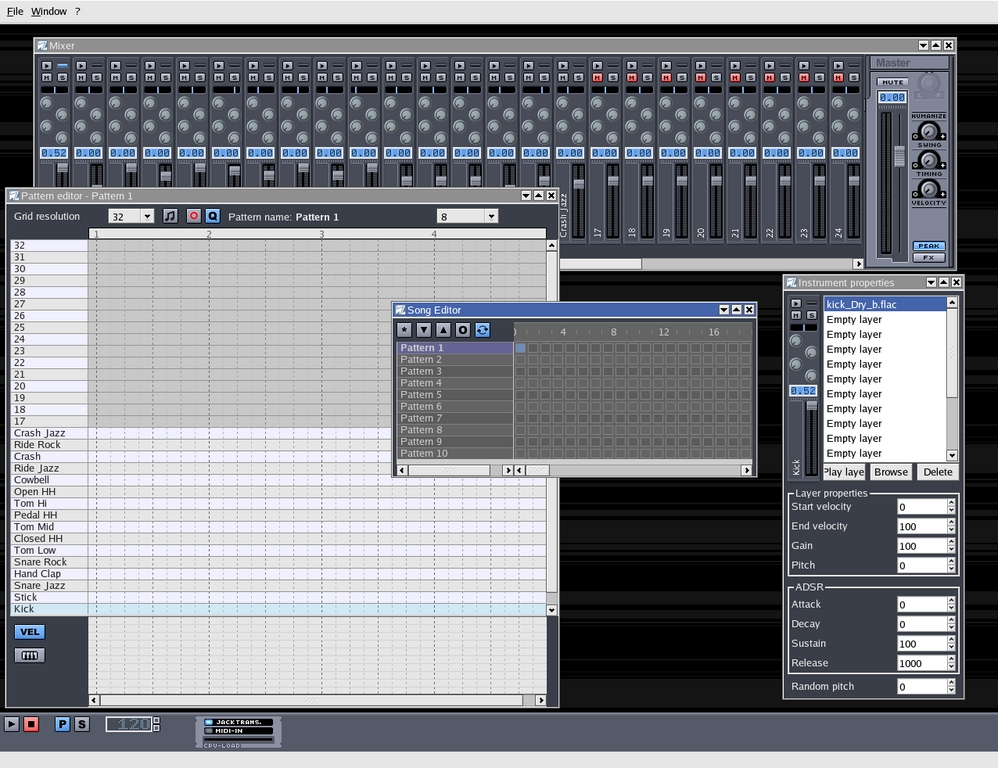
Figure 1. Hydrogen with Default New Song Settings
Hydrogen's user interface is made of a main parent window with a top-level menu bar and a set of play/record controls. This main window opens with its editor and mixer panels displayed. By default, Hydrogen displays the most recent work file upon opening, including any panels displayed when the file was last saved, but that action can be toggled from the File/Preferences dialog.
The main window's File menu supplies common operations such as new/open/save, export to MIDI and WAV and the program preferences settings. The Window menu is a list of show commands if you've hidden the song and instrument editors or the mixer. This menu also calls the drumkit manager and an audio engine status window, both hidden by default. The ? menu is Hydrogen's help menu for accessing the user manual and a tutorial.
The transport bar includes start/stop controls, pattern and song mode selectors, a tempo control scrollbox and status indicators for JACK, MIDI input and CPU load. That's all there is to describe for Hydrogen's main window functions, so now we move on to the various editor panels.
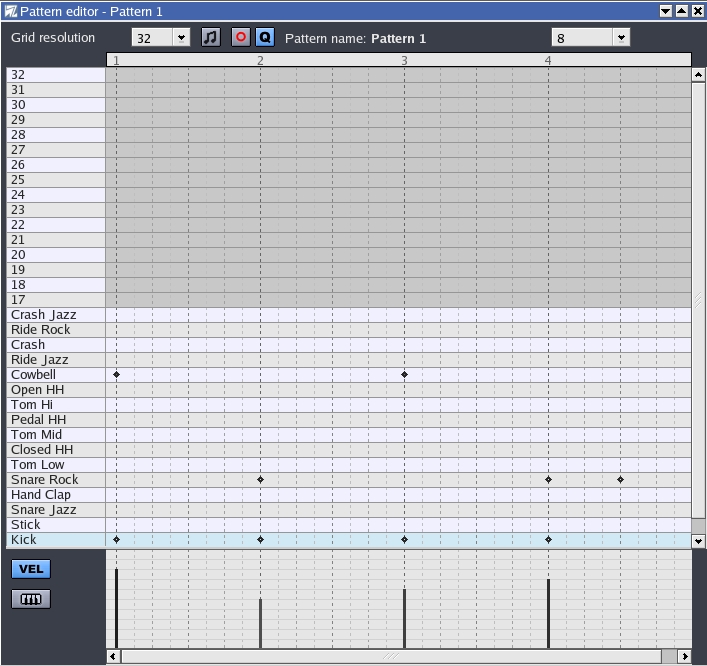
Figure 2. The Pattern Editor
Pattern and song are related closely in Hydrogen's interface. Patterns are selected, named, copied, added and deleted using the Song editor, and clicking on the pattern name in the song editor window immediately activates the pattern editor for the selected pattern. By default, the song editor provides ten blank patterns, but you can add as many as you need. Right-clicking on the pattern name pops up a menu for copying, deleting and naming the selected pattern.
The pattern editor panel presents a grid whose horizontal axis is the timeline along which you place beats and whose vertical axis represents the instruments played. Entering beats into a pattern is as simple as clicking on the desired coordinates point, resulting in a display similar to Figure 2. Each beat can have its own velocity and pitch setting, available in the lower panel of the pattern editor (the VEL and keyboard buttons). This panel can be toggled between velocity and pitch grids; Figure 2 shows the panel in velocity mode.
The left side of the pattern editor shows the names of the instruments assigned to their particular timelines. Left-clicking on the instrument name triggers its sound; right-clicking pops up a menu for mute/solo status and a clear/fill notes function. The fill function is useful especially if you like to shape your pattern by removing beats from a filled line. At this time, there is no undo/redo function for either pattern or song edits.
The pattern editor's controls are located at the top of the editor panel, as seen in Figure 2. These controls include a toggle for sounding the sample when a beat is entered into your pattern. There also are two controls for recording and quantizing beats entered from either the computer keyboard or a MIDI device such as a keyboard, guitar, wind controller or external sequencer.
The pattern editor control strip also includes the grid resolution and pattern length value selectors. The grid resolution can be set to a maximum of 64, with triplet resolutions up to the 32nd-note triplet. The pattern length determines the number of beats per measure, like the numerator in a conventional time signature, thus allowing odd bar lengths such as five or seven beats per measure.

Figure 3. The Song Editor
Hydrogen's song editor is its simplest panel. A song form is created by adding or deleting patterns in the linear track display; left-clicking on a box in a track enters or removes it from the form. Hydrogen allows the use of simultaneous patterns, a wonderful addition, especially for adding variations to an existing pattern. Of course, you can copy a pattern to an empty pattern slot and then edit it as you wish, but using a simultaneous pattern can be a more flexible approach to adding variations to an existing pattern.
The song editor's controls include buttons for adding a new pattern, shifting pattern positions, performing some song operations and toggling loop play on/off status. The song operations button calls a menu with an item for setting song properties (song name, composer's name and comments) and two controls for clearing a pattern sequence and deleting all patterns from the song form.
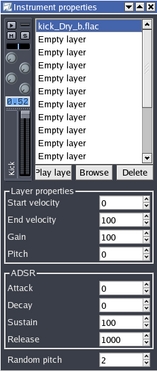
Figure 4. The Instrument Editor
Up to 32 instruments can be used within a pattern. Each instrument can be a single sampled sound, or it may consist of up to 16 samples layered together for more complex sounds. Of course, your selected sounds need not be restricted to drum and percussion samples; they can be any sounds you like. Remember, a drum machine is essentially an audio sequencer, and Hydrogen can play any sound you tell it to play.
Hydrogen's instrument editor provides some nice controls for shaping your sounds, with parameter settings for layer properties and an ADSR (attack/sustain/decay/release) envelope designer. The editor also includes a neat control for random pitch fluctuation when the instrument is played, thus creating more realistic sounds. Yes, even percussion sounds have a pitch element. By the way, in Figure 4 you can see the scrollbox controls for the envelope values, but plans have been made for adding a graphic envelope editor.
An instrument's corresponding mixer strip also is shown in the instrument editor, a nice convenience when designing your sounds. By default, Hydrogen mutes unused channels, so be sure to un-mute your new instrument channel.

Figure 5. Hydrogen's Drumkit Manager
You can save your instrument arrangement as a Hydrogen drumkit. The process is simple: after making your instrument choices, open the Window/Show Drumkit Manager dialog, click on the Save tab and do what must be done--name, comment, save.
If you'd like to share your drumkits with the world, use the Export tab to create a *.H2DRUMKIT file. Many kits already are available for import into Hydrogen, and more are welcome; see the Hydrogen Web site for details. Incidentally, you can load new drum kits or individual samples into Hydrogen in real time. Loading is smooth, with no delay or disturbance to the playback sound.
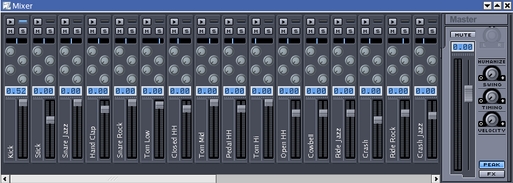
Figure 6. Hydrogen's Mixer
The mixer panel provides two functions in one panel. Its channels correspond to the instruments in your pattern, each channel strip providing a volume fader and level peak LED; four effects sends; controls for panning, mute and solo; and a sample trigger button. The master channel strip supplies a master volume control and three controls for humanizing swing, timing and velocities. These humanization controls add greater or lesser amounts of randomness to those factors and are effective at loosening up a too-rigid feel to your patterns.
The master channel also contains the FX toggle to summon the control strips for the four effects seen in each instrument channel. Double-click on the strip name (No plugin, by default) to call up the FX Properties dialog and then click on the Select FX button to see a list of the LADSPA plugins available on your system. If you've compiled Hydrogen with RDF (resource description framework) support, you should see the nicely organized display shown in Figure 7. Select a plugin, click on the OK button and the Properties dialog displays the parameter controls for the effect (Figure 8).
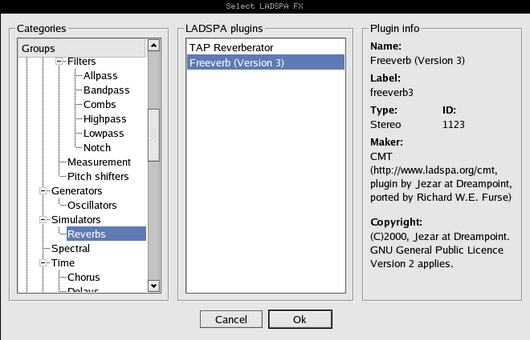
Figure 7. The LADSPA Plugins Selector
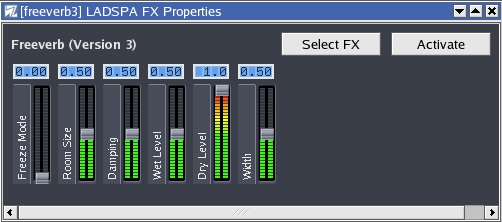
Figure 8. Freeverb3 in Hydrogen
Now you can apply the plugin effect to any instrument channel, in whatever amount you choose, and you can adjust the effect parameters in real time from the FX Properties dialog. And don't forget, you still have three more plugins to select and apply.
A complete installation of Hydrogen includes documentation in the form of a UNIX-style man page (man hydrogen); a tutorial in English and Italian; and a manual in English, French, German, Italian and Spanish. Further documentation and elucidation can be found on the Hydrogen mail-list (see Resources).
Hydrogen also comes with some instructive and musical demos from developers Emiliano Grilli and Artemiy Pavlov. These demos are excellent lessons themselves, and you can learn a lot about the program simply by studying them.
Now I am going to show you how to create some patterns and put them together into a simple song form. We select Hydrogen's default General MIDI drum kit for our sounds. Open the File/Preferences to select either the JACK or OSS/Free (or ALSA's OSS emulation) audio driver. I suggest using the JACK driver: Hydrogen development keeps in close step with JACK development, and its implementation of JACK usually is up to date. Thanks to JACK, Hydrogen can direct each instrument to a separate audio output, a valuable feature for recordists who like to dedicate a channel to each drum in a drum kit. Hydrogen also adheres to the JACK transport interface and is equally happy acting as the master timekeeper or as a synchronizer for another master.
Begin by selecting File/New to initialize the pattern and song settings. Leave the tempo and time signature settings at their default values, then activate Pattern 1 by clicking on its name in the song editor window. Because you want to work in the pattern editor, click on the P button in the main window controls to start pattern playback. For the kick drum, in the pattern editor click on each of the four numbered beat divisions, then add a snare drum on beats two and four and add other instruments as you wish. Figure 9 demonstrates one possible result with beats added for open and closed high-hat. Now add more instances of Pattern 1 to its track in the song editor to create an eight-bar chain.
Left-click on Pattern 2 in the song editor and add a crash cymbal on the first beat. Add the pattern to the first position in its track in the song editor. Repeat this process with Pattern 3, but add a tom-tom fill on the fourth beat. Add this pattern to the fourth position in its track in the song editor. The song form now should look like the screenshot in Figure 9. Figure 9 also demonstrates the use of a LADSPA plugin, the Freeverb reverberation effect, which has been adjusted for and applied to the high-hat sounds. Notice the positions of the FX send knobs in the high-hat mixer channels.
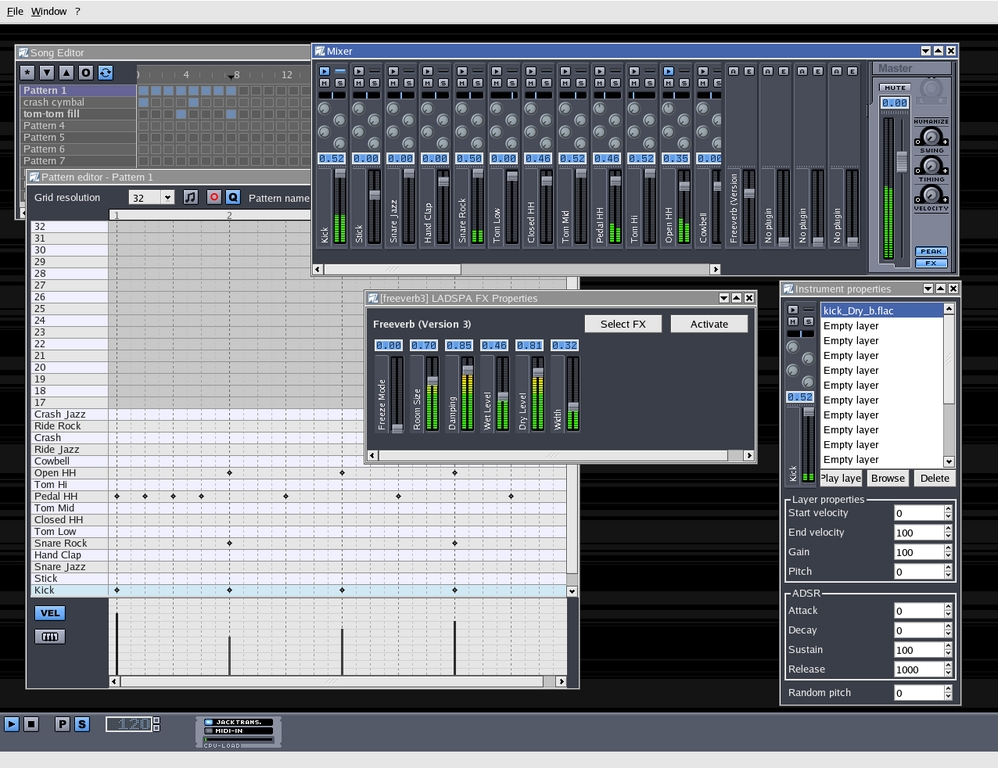
Figure 9. A Simple Pattern and Song Form
Repeat these procedures to create more patterns and the song form you desire. Remember, you can edit your song form in real time just as you can with the pattern editor. Play with the mixer balances, the FX sends, the instrument panning and the humanization controls. Try controlling Hydrogen's transport status from an external JACK-aware application, such as Ardour or Rui Nuno Capela's QJackCtl utility. If you're recording to Ardour or ecasound, set up Hydrogen to send each instrument out on its own channel--see the Audio System tab in the File/Preferences dialog--and route each channel to a separate track in the recording software.
Chemically or musically, Hydrogen is powerful stuff. In my opinion it currently is the most sophisticated software drum machine available for Linux, and its development team is driving quickly towards the program's 1.0 release. Hydrogen's main developer, Alex Cominu (aka Comix), is dedicated to improving Hydrogen's already formidable capabilities, and I've come to expect wonderful things from him and his crew. If you'd like to get involved with Hydrogen development or if you'd like to use Hydrogen for your own music-making projects, check out the program's Web site for details on downloading the package, directions for joining the mail-list or catching up on the latest news about Hydrogen's development plans. Projected improvements include a more usable pitch editor grid, a graphic envelope editor for Hydrogen instruments, a copy & paste pattern function, various MIDI enhancements and various GUI improvements. Obviously I'm enthused about Hydrogen: it's already one of the best examples of distributed development, and I find it fascinating to watch as the best just gets better.
Next month: Back to MIDI, with Part 2 of last month's article. See you then!
Dave Phillips (dlphilp@bright.net) is a musician, teacher and writer living in Findlay, Ohio. He has been an active member of the Linux audio community since his first contact with Linux in 1995. He is the author of The Book of Linux Music & Sound, as well as numerous articles in Linux Journal.
