
Work the Shell - Exploring Lat/Lon with Shell Scripts
With the rise of geolocation systems on mobile devices (think “around me” on the Apple iPhone), a consistent method of measuring points on Earth has become quite important. The standard that's used is latitude and longitude, which measure the distance north or south of the equator and the distance east or west of the prime meridian (which goes through Greenwich, England). Your GPS devices all understand this notation, as does Google Maps, Yahoo Maps, MapQuest and so on.
From a shell scripting perspective, we're interested in both being able to identify lat/lon for a point on the Earth and then, armed with that information, to see if we can calculate the distance between two points on the planet.
The first seems almost insurmountably hard until you learn that Yahoo Maps has a very simple API that lets you specify a URL that includes a street address and returns an XML object that includes its lat/lon values.
For example, you might be familiar with 1600 Pennsylvania Avenue, Washington, DC. I know you've seen pictures of the place. What's its lat/lon?
$ u='http://api.maps.yahoo.com/ajax/geocode'
$ a='?appid=onestep&qt=1&id=m&qs=1600+pennsylvania+ave+washington+dc'
$ curl "$u$a"
YGeoCode.getMap({"GeoID"      : "m",
                 "GeoAddress" : "1600 pennsylvania ave washington dc",
                 "GeoPoint"   : {"Lat" : 38.89859,
                                 "Lon" : -77.035971},
                 "GeoMID"     : false,
                 "success"    : 1} ,1);
<!-- xm6.maps.re3.yahoo.com uncompressed/chunked
     Tue Aug  4 12:16:51 PDT 2009 -->
Note that the output actually comes back as two lines; the the data above, and in the other examples, has been reformatted to make it more readable.
Skim that return object, and you'll see Latitude = 38.89859 and Longitude = -77.035971. Feed those two into Google Maps as “38.89859,-77.035971” as a check, and you'll find the image shown in Figure 1.
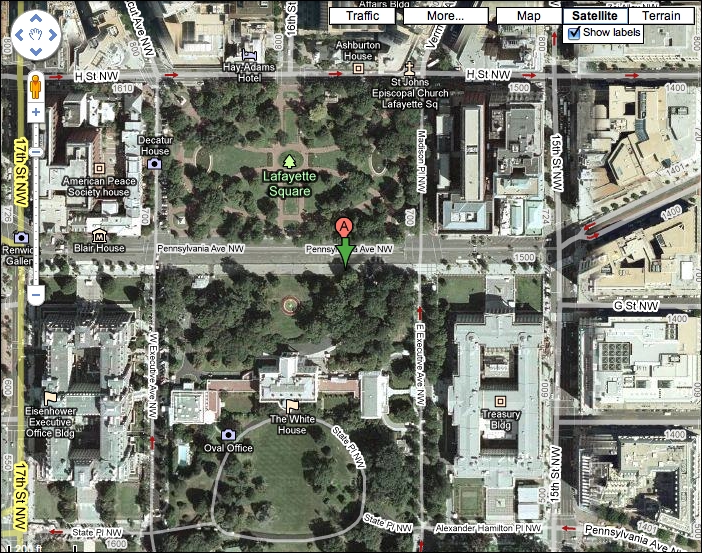
Figure 1. The White House
You guessed it, it's the street address of the White House.
Let's start by creating a simple script where you can specify a street address and it will output lat/lon values.
The first part is easy: take whatever was specified on the command line, and “recode” it to be URL-friendly. Then, append that to the Yahoo API URL, and output the results of a curl call:
#!/bin/sh

url='http://api.maps.yahoo.com/ajax/geocode'
args='?appid=onestep&qt=1&id=m&qs='
converter="$url$args"

addr="$(echo $* | sed 's/ /+/g')"
curl -s "$converter$addr"
exit 0
Let's test it with a different address this time:
$ sh whereis.sh 2001 Blake Street, Denver, CO
YGeoCode.getMap({"GeoID"      : "m",
                 "GeoAddress" : "2001 Blake Street, Denver, CO",
                 "GeoPoint"   : {"Lat" : 39.754386,
                                 "Lon" : -104.994261},
                 "GeoMID"     : false,
                 "success"    : 1}, 1);
<!-- x1.maps.sp1.yahoo.com uncompressed/chunked
     Tue Aug  4 12:37:44 PDT 2009 -->
You can figure out what's at this address if you like. More important, you can see that this simple four-line script does the job—sort of.
What we really want, however, is to extract just the lat and lon values and toss everything else out. This can be done with a bunch of different tools, of course, including Perl and awk, but I'm a rebel, so I use cut instead.
To do this, we need to count the double quotes (") in the output block. The 12th double quote is immediately before the latitude value, and the 15th is immediately after the longitude value. If we just worked with that, we would get:
$ sh whereis.sh 2001 Blake Street, Denver, CO | cut -d\" -f13-15
:39.754386,"Lon":-104.994261},
Okay, so that's most of the work. Better, though, is to specify two different specific fields (13,15 rather than 13-15):
$ sh whereis.sh 2001 Blake Street, Denver, CO | cut -d\" -f13,15
:39.754386,":-104.994261},
That's 99% of what we want. Now we just need to clean up the noise. To do that, I'll jump back into the script itself, rather than experimenting on the command line:
curl -s "$converter$addr" | \
    cut -d\" -f13,15 | \
    sed 's/[^0-9\.\,\-]//g'
And testing:
$ sh whereis.sh 2001 Blake Street, Denver, CO
39.754386,104.994261,
Almost. Really, really close. But, that last comma is not wanted. Hmmm....
Okay! To delete the last comma, we simply need to add a second substitution to the sed statement, so that the full sed expression is now:
sed 's/[^0-9\.\,\-]//g;s/,$//'
(The invocation is substitute/old-pattern/new-pattern/.)
Now we've got what we set out to create initially. Let's try it with yet another address:
$ sh whereis.sh 1313 S. Disneyland Drive, Anaheim CA
33.814413,-117.924424
Yep, that's the parking structure for Disneyland in California.
Now comes the hard part of this, actually. We can get the lat/lon of any address we desire, but calculating the distance between two points is a bit more tricky, as the mathematics involved is rather hairy, because what we're basically going to do is measure relative to the circumference of Earth.
I found a formula in JavaScript on-line as a starting point:
var R    = 6371;        // kilometers
var dLat = (lat2-lat1);
var dLon = (lon2-lon1);
var a    = Math.sin(dLat/2) * Math.sin(dLat/2) +
           Math.cos(lat1.toRad()) * Math.cos(lat2.toRad()) *
           Math.sin(dLon/2) * Math.sin(dLon/2);
var c    = 2 * Math.atan2(Math.sqrt(a), Math.sqrt(1-a));
var d    = R * c;
In this case, the circumference is R, and it's 6,371km. Because Earth is an oblate spheroid, not a perfect sphere, I expect this will have some small level of error, but let's proceed and see where we get.
To accomplish any sophisticated mathematics in a Linux shell, we're pretty much stuck with bc, but it's plenty powerful enough for this task, even if it's a bit clunky.
As an example, here's how you'd set the value of pi within a bc script:
pi=$(echo "scale=10; 4*a(1)" | bc -l)
The first stumble we have is that bc wants to work with radians, not degrees, but the lat/lon values we're getting are in degrees, so we need to convert them.
But before we do that, here's the intermediate output we seek, as we now need to work with two addresses, not just one:
$ sh farapart.sh \
  "1600 pennsylvania ave, washington dc" \
  "1313 s. disneyland drive, anaheim, ca"

Lat/long for 1600 pennsylvania ave, washington dc

= 38.89859, -77.035971

Lat/long for 1313 s. disneyland drive, anaheim, ca

= 33.814413, -117.924424
Next month, we'll crack open the script to see how I am working with two addresses at the same time and splitting it into the four variables we'll later need. Then, we'll look at how to use bc to do the math.
Dave Taylor has been involved with UNIX since he first logged in to the on-line network in 1980. That means that, yes, he's coming up to the 30-year mark now. You can find him just about everywhere on-line, but start here: www.DaveTaylorOnline.com. In addition to all his other projects, Dave is now a film critic. You can read his reviews at www.DaveOnFilm.com.
