
The Well-Tempered PHP Developer
Almost 300 years ago, in 1722, Johann Sebastian Bach wrote a book (actually, two volumes) of preludes and fugues in all major and minor keys, “for the profit and use of musical youth desirous of learning, and especially for the pastime of those already skilled in this study”. This work, The Well-Tempered Clavier, was intended to demonstrate the ability of a single instrument to play in all keys. In the same vein, in this article, we explore a set of tools, widely available on Linux systems, for a well-rounded PHP developer.
Since its inception in 1995, PHP has grown a lot. The current stable version (as of May 2008) is 5.2.6, and version 6 is in the works. You confidently can say that PHP is currently used for millions of Web sites, on millions of servers, and it's probably the most popular Apache module, outdistancing all other Web scripting languages. Apart from being used to generate dynamic Web pages, it also can be used for command-line work (I have used PHP for text file processing, in order to upload data to a database) or for server-side scripting, providing Web services and other functions. So, it's a safe bet that you can use PHP for practically anything you might need.
However, most PHP developers use only a few tools for development. In true code-hacking style, they employ a text editor, usually vi or emacs, and the barest programming and debugging aids. It should be no surprise that there are several (plenty) available tools that can help produce better tested and debugged code, whether you're working on your own or as a part of a team. In this article, we examine such a setup, based on Eclipse and several interesting plugins. Of course, this shouldn't be taken as the only way of doing things, and if you look around, you'll easily find other IDEs (Integrated Development Environments) and tools. This article is intended to be a nudge in one direction, rather than a mandated road to follow.
Eclipse is an integrated, extensible, development platform or environment. Originally, it was called VisualAge and was created for Java development (mostly written in Java itself), but it was renamed and then extended with additional plugins, so it can be used with many more programming languages and development tools—UML diagram creation and DB management are just two examples.
Although originally an IBM project, since 2003, Eclipse has been governed by the Eclipse Foundation, which adds several well-known technology companies as strategic members. The future of Eclipse doesn't depend on a single company. Eclipse is available under an open-source software license (not the GPL, but similar), and it eventually might use GPL version 3. The current version of Eclipse (3.4, also known as Ganymede) reportedly includes more than 18 million lines of code.
Thanks to its Java origins, Eclipse runs not only on Linux, but also on other operating systems, which is good for developers who target more than a single machine. Internationalization aspects are taken care of, and there are translations for several languages. Finally, the integration aspect of Eclipse is very important. You can do all your development (including not only code writing, but also testing, debugging, documentation writing, version control management and more) from within a single program, with a common interface and style.
Starting in 2006, there has been a Simultaneous Release each year, covering not only the base Eclipse package, but also many other Eclipse-related projects. This is provided as a convenience, and it certainly helps avoid compatibility problems. The packages are named after the moons of Jupiter. In 2006, it was called Callisto. The 2007 version was Europa. And, in June 2008, as I'm writing this article, Ganymede has just been released. In this article, we use both Europa (Figure 1) and Ganymede (Figure 2) with an emphasis on the former.
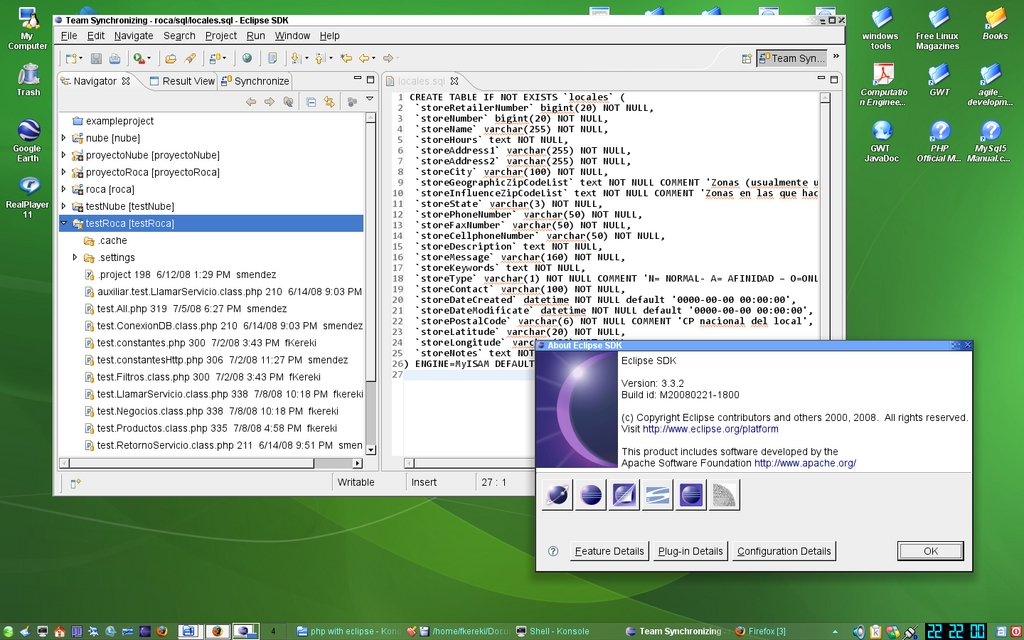
Figure 1. Eclipse Europa on OpenSUSE 10.3—all the plugins mentioned in this article were tested in this environment.
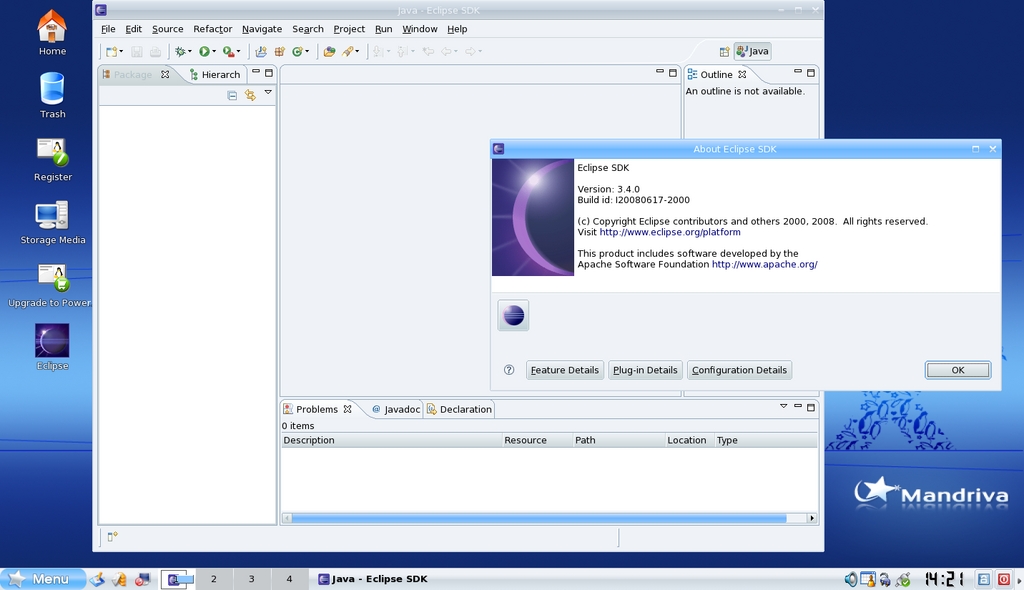
Figure 2. The just-released Ganymede on Mandriva 2008—be sure to do some tests before switching over to it.
I won't cover how to install PHP, Apache or related tools, but I do cover how to install Eclipse. Because of Eclipse's Java origins, first you need to get the Java Runtime Environment (JRE), although it's quite likely you already have it. I used the Sun 1.6.0 version, which already was installed. You could try using the IcedTea 1.7.0 version, but I cannot attest to its Eclipse (or other plugins) suitability. According to the Eclipse documentation, Java 1.5 should be good enough.
Getting Eclipse isn't difficult. Most distributions already include it, and you don't even need to visit the Eclipse Web site to download it, but it's likely you won't have the latest release. Go the Eclipse download site, choose the Eclipse Classic Project (version 3.4), and because the whole package weighs in at more than 150MB, select a close mirror. After the process is done, go to the directory where you downloaded the file, and do a tar zxf eclipse-SDK-3.4-linux-gtk.tar.gz. An eclipse directory will be created, and if you move to it and type ./eclipse, Eclipse will be up and running.
The first plugin you will need for serious PHP work is named, appropriately enough, PHPEclipse. PHPEclipse has been around since 2002, and although the current stable version (1.1.8) is from 2006, there is work currently on version 1.2, and there has been a steady flow of updates, so the project still is quite alive. Getting PHPEclipse is easy; simply use the Eclipse update method, and add a new remote site (see Resources).
PHPEclipse provides not only basic editing facilities, but it also adds syntax coloring and bracket matching for easier reading; code folding, so you can hide a block or function; parameter hints and tooltips—for example, if you don't remember the parameters for the stristr() function, a little pop-up will remind you; and syntax checks (if you make a syntax error, you will get a wavy red underline at the place of the error and pop-up help, Figure 3). PHPEclipse also offers debugging (with either XDebug or DBG) and version control (CSV or SVN)—more on this below.
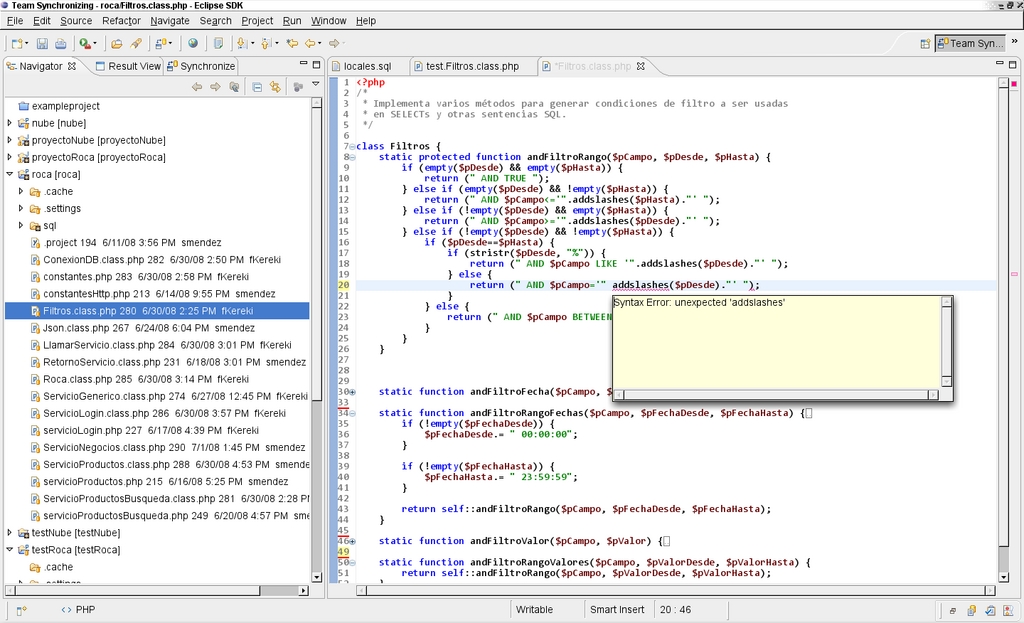
Figure 3. Errors are highlighted immediately. Folding routines can help you see only the relevant code on-screen and hide the rest.
When you edit a PHP source file, several shortcuts and functions can speed you along. Need to find the declaration for a certain function or variable? Right-click on any reference to it (or press F3), and you will be taken there. If you are unsure about a certain PHP function, pressing Shift-F2 produces a manual—although you usually can get by with hovering the mouse over the function name.
For more prolix coding, there are several formatting functions. You can re-indent any portion of code simply by selecting it, then right-clicking and choosing Format, or by pressing Ctrl-Shift-F. You can turn lines into comments (and vice versa) by right-clicking and choosing Source→Toggle Comment, and all selected lines will get // added in front. (From now on, I skip the shortcuts; unless you are a die-hard Ctrl and Shift fanatic, you probably will use the mouse menus all the time.) Adding or removing larger comments (for example, ones like /* ... */) also is simple with a right-click, then selecting Source→Add Block Comment or Remove Block Comment. A Refactor function can help you change a variable or function name globally; there's no excuse for shoddy names anymore.
PHPEclipse is fully configurable. On the main menu, go to Window→Preferences, and select PHP. You can set your own specific preferences for most of the features I've covered (and even more that I didn't touch on here), so you can set up project standards. If more people are working on the project though, make sure everybody uses the same set of parameters. It's no fun having to reformat other people's code just because of a tabbing configuration difference. Collaboration and version control plugins are discussed below.
When your code is ready, you get Run As..., Debug As... and Profile As... commands. You can create profiles (including runtime parameters, environment variables, directories and more) and use them later with a single click. The results of the run will appear on a console, integrated within Eclipse.
When do you test your code? After everything is done? How quaint and old fashioned! Modern development methodologies suggest an iterative way of working, which combine developing automated test cases even before the actual programming is done. Having the tests available before actual development starts ensures quick feedback after any change, and it also provides design-level documentation, for each test serves as an example of what the code should do. Even more important, putting all the tests together in a test suite provides for regression testing—before any new code is committed, all pre-existing tests should pass. If a programmer makes any mistakes, changing the way a function should have worked, a well-designed test will catch the problem and alert you.
This way of programming has been named test-driven development (TDD) and is a part of many modern agile development techniques. The basic idea is simply preparing an automated test (automated means it can be run on its own, without users having to do anything, which implies that running the same tests several times a day is no chore) that exercises your code and tests the results it produces by checking assertions that are either true or false. If any assertion fails, some piece of code isn't doing its expected thing. Writing (or at least planning) the tests before writing code, makes the developer pay attention to code requirements and modularity—two important quality factors.
There are several tools for testing, generically named xUnit—for example, JUnit is used for Java development, cppunit for C++, PHPUnit for PHP and so on. Although the specific details logically differ between tools, they actually are quite similar. For our purposes, we work with SimpleTest, which is a plugin that provides PHPUnit tests within Eclipse.
SimpleTest is available as open-source code, and its latest version is 1.0.1 (from April 2008). You can download it from SourceForge (see Resources) and install it with Eclipse. After you install and configure it, a new option will be added to the Run As... menu, allowing you to execute PHP unit tests. You can run tests on their own, so you can test only a single routine, or you can build more complex test suites, so you can run lots of tests at the same time. You probably will use individual tests while coding and suite tests before uploading any code.
When testing, a simple console with a colored bar will show up. Red means some test failed (your code doesn't do what was expected), and green means your code passed all tests (Figure 4). If you get a red bar, you can click on the offending test name, and you will be taken directly to the problematic test code (Figure 5).
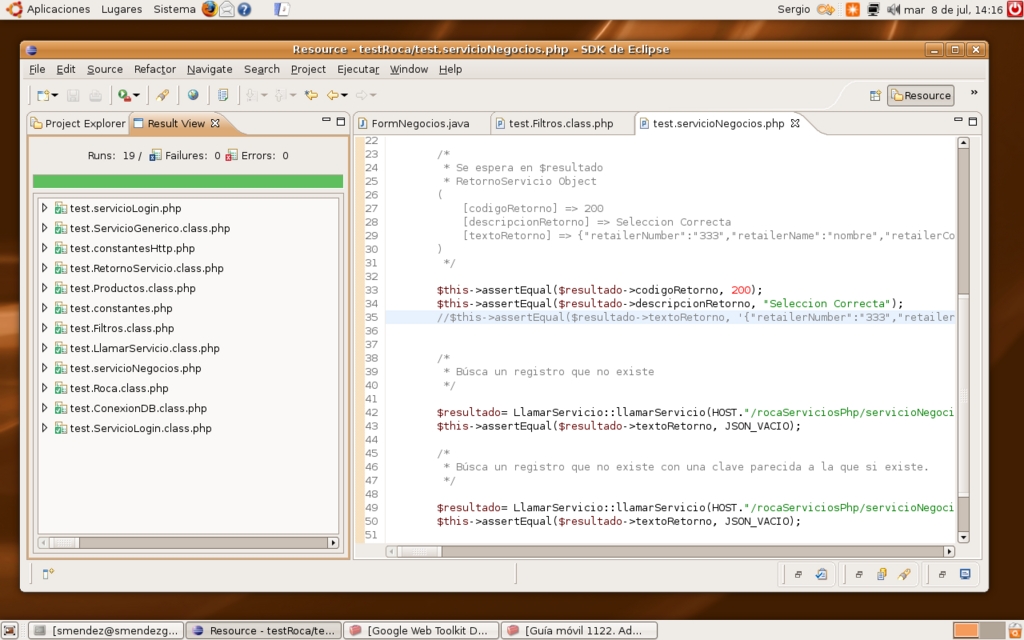
Figure 4. A green bar shows all tests ran as expected.
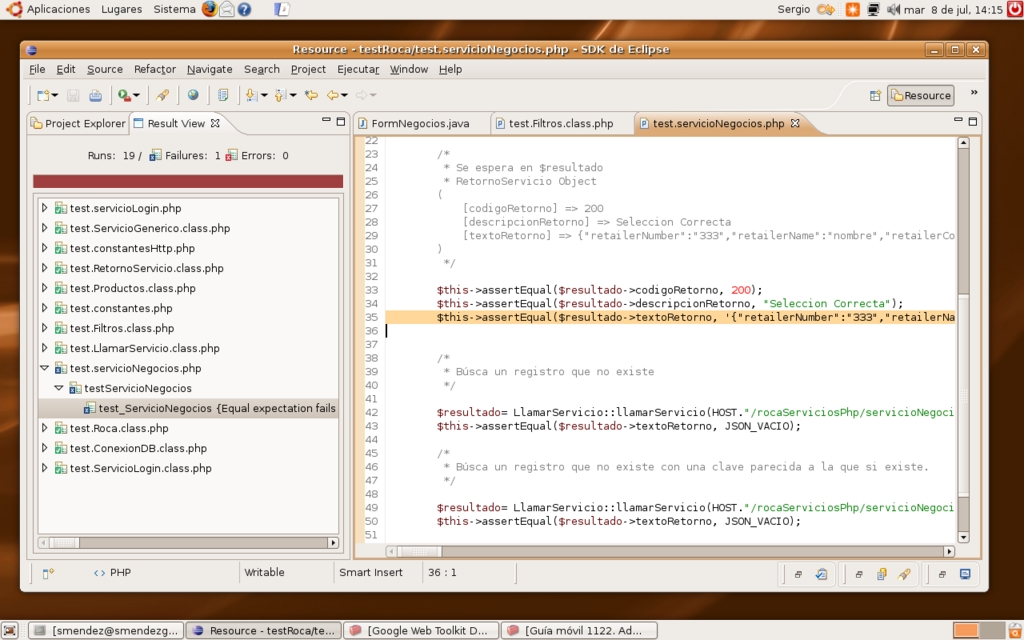
Figure 5. A red bar means something's wrong; clicking on the problematic test takes you to the offending code.
Due to space constraints, I won't go into how to write tests or use mock objects; check the documentation for more information. In any case, for each project you work on, you should create a second, parallel, test project. (Of course, use version control for it, as well.) Getting used to automated testing takes some time, but the rewards are high, and you may even become, as it has been said, “test-addicted”.
Can there be any errors if the testing techniques mentioned above are applied? Unfortunately, there are well-known theorems showing that no amount of testing can ensure program correctness, so now and then, you still will find yourself trying to figure out what went wrong. Classically, PHP programmers use print statements—usually, a die(...) instruction—but that's a cumbersome way of doing it. Furthermore, changing a program in order to see what happens (even if the change is an innocuous printing command) is not a good idea; you can make things even worse accidentally.
Although some languages (notably Java and Smalltalk) always have had quite good debugging environments, allowing you even to trace the code on a sentence-by-sentence basis, setting breakpoints, examining variables and so on, PHP programmers too often have found themselves with the short end of the stick.
There are basically two options: XDebug and DBG. XDebug is up to version 2.0.3 (from April 2008), and it's fully open source. On the other hand, DBG has two versions: a free one (at version 2.15.5) and a commercial one (at version 3.1.11). XDebug supports PHP 5.3, and DBG works only up to 5.2. For both programs though, the main sticking point is configuration, which is far too long to include here (see Resources). After you get the debugger to run, you will be able to debug your code easily; it's a pity that the installation procedure is such a chore.
Version control (also known as revision control or source code control) is a must for large-scale, multi-developer projects, but it also offers significant advantages even for standalone work. The first time you thrash your code and manage to restore it or find what you changed thanks to your VC system, you will fully appreciate version control.
Basically, all VC systems allow you to store documents and record the changes made to them. VC systems allow you to inspect not only the latest version of any document, but also to go back to previous ones and work out the differences between any two versions. Explaining version control in all its details is beyond the scope of this article.
Many different version control programs are available: BitKeeper, Git, Mercurial, CVS and SVN, but not all of them have Eclipse plugins. At the very least, both CVS and SVN can be used with PHPEclipse, but I prefer the latter, because it allows for moving files; CVS doesn't.
PHPEclipse can connect to SVN repositories by using either Subversive or Subclipse. Note that at the time of this writing, both plugins are assured to work only with Eclipse 3.3 (Europa) and not with 3.4 (Ganymede). After installing one of those plugins, you will be able to download a working copy or synchronize your work with the repository, simply by right-clicking on the project and selecting the Team option. The results of a synchronization operation will show in a separate console and usually will consist of files that you should download (others have modified them and you are not up to date), files you should upload (only you have modified them) and conflict files. Clicking on a conflicting file will bring up a file comparison window (Figure 6), highlighting the differences between your code and the already uploaded code. How to merge that code is up to you.
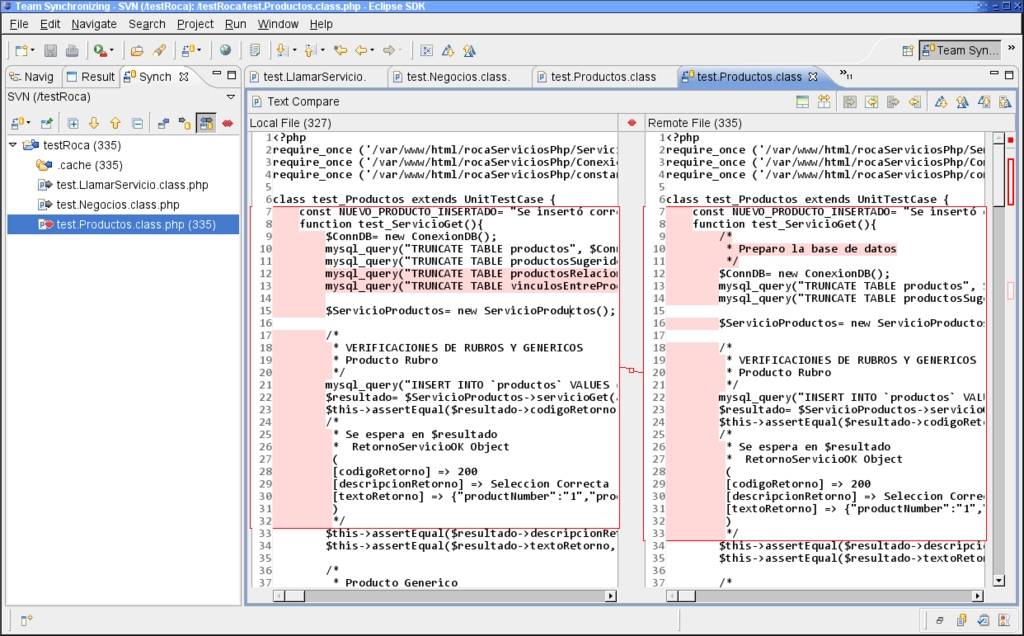
Figure 6. With a synchronization conflict, you need to analyze the differences between versions and decide what to do.
Eclipse can provide a great environment for PHP development, with all the necessary tools for modern, agile development. Take the time to learn all the existing functions, and you will find yourself creating good quality code in a faster, surer and easier way.
Resources
PHP Home Page: www.php.net
Eclipse Home Page: www.eclipse.org
Eclipse Download Page: www.eclipse.org/downloads
IBM's Description of Ganymede's New Features: www-128.ibm.com/developerworks/library/os-eclipse-ganymede
The IcedTea Project—a Free Implementation of Java: icedtea.classpath.org
Sun Developer Network Page: java.sun.com
PHPEclipse: www.phpeclipse.de
PHPEclipse Latest Version Update: update.phpeclipse.net/update/nightly
PHPEclipse Full Documentation: docs.schuetzengau-freising.de/modules/xdocman/index.php?doc=xo-002
The Last Craft (PHP Testing): www.lastcraft.com
SimpleTest: simpletest.sourceforge.net
SimpleTest for the Eclipse Update: simpletest.org/eclipse
PHP Debugging: www.ibm.com/developerworks/library/os-debug
XDebug: xdebug.org
Configuring XDebug for PHPEclipse: dev.phpeclipse.com/wiki/XDebug_and_PHPEclipse
DBG: dd.cron.ru/dbg
DBG Installation Guide: dd.cron.ru/dbg/installation.php
PHPEclipse DGB Configuration: docs.schuetzengau-freising.de/modules/xdocman/manual.php?doc=xo-002&id=sec.install_dbg&file=ch01s05.html
The Subversive Plugin for Using Subversion: www.eclipse.org/subversive
Subclipse, an Alternative for Accessing SVN Repositories: subclipse.tigris.org
Federico Kereki is an Uruguayan Systems Engineer, with more than 20 years' experience teaching at universities, doing development and consulting work, and writing articles and course material. He has been using Linux for many years now, having installed it at several different companies. He is particularly interested in the better security and performance of Linux boxes.
