
Using WebKit in Your Desktop Application
Qt always has included the ability to render basic HTML and download files with HTTP. With the release of version 4.4.0, this has been taken to a whole new level with the inclusion of WebKit. Developers who use Qt now can utilize WebKit for everything—from simple HTML document viewers to full-blown Web browsers. Trolltech always has been known for creating high-quality APIs that are easy and intuitive to use, and this is just as true with QtWebKit, the integration of WebKit with Qt.
The WebKit rendering engine is used by Safari and has its roots in the KDE Project's KHTML engine, which drives the Konqueror Web browser. Licensed under the LGPL, this open-source engine has been praised for its performance and low memory usage. It was the ideal choice for small devices, such as the Nokia S60 and the iPhone. Beyond Web browsers, WebKit is used by many applications, including Adium, Colloquy, MSN Messenger and Mac OS X's Dashboard. With the addition of the Qt port to WebKit, there no doubt will be many more cross-platform applications in the near future that take advantage of this engine.
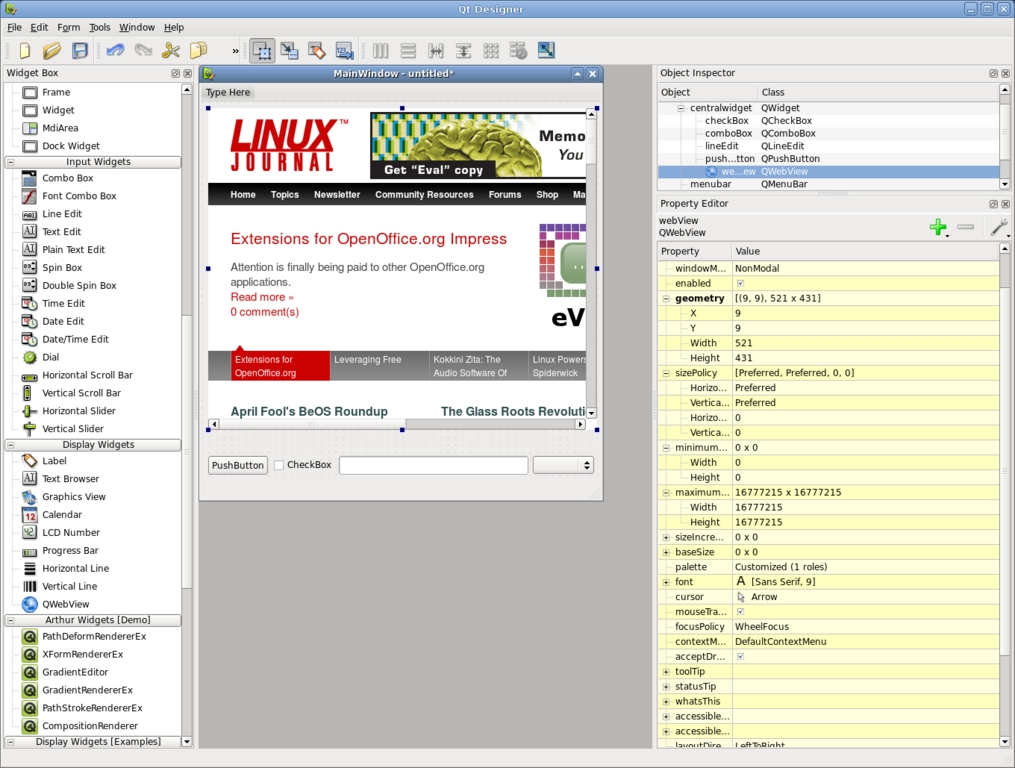
Figure 1. Designer lets you easily create forms with widgets, including WebKit.
QtWebKit provides developers with a handful of useful classes. At the very top level, there is QWebView, which is a QWidget with a number of convenience functions, such as setUrl(), loadProgress() and reload(). Inside Qt Designer, the GUI builder for Qt applications, you even can drag a QWebView into a form and set the URL. QWebView is built on top of QWebPage, which contains the Web content, history and settings. QWebPage is not a widget, but was built to be used on many surfaces, including QGraphicsView, Qt's canvas widget. Supporting QWebView and QWebPage are classes that let you build plugins, access the page history and walk the frames.
A lot of the fun of having WebKit in your application is having it pull content from the Internet. Qt 4.4.0 introduces new networking classes, including an all new HTTP implementation. QNetworkAccessManager handles all network requests and replies with support for HTTP 1.0, 1.1 and SSL. A custom cookie jar and proxy configuration also can be set. Qt's source code includes a demo browser and example applications that show off how to use many of the features of these classes.
Qt always has provided fantastic cross-platform support with integration into the desktop. With the introduction of QtWebKit, developers now can make a cross-platform desktop application for a Web site. Linux Journal provides a digital subscription that lets you download older issues. The Web site is very simple and a perfect candidate for building a small application around. Although the Web site does have the table of contents, it does not provide a way to search all the available issues for articles. So the application I am going to make provides an easy way to search through the issues and let you download them.
The GUI for the application was made with Qt Designer and has a matching main window class that contains the functionality. To compile the project, Qt includes a cross-platform build tool called qmake. Beyond the normal qmake template when using QtWebKit, the Qt variable also needs WebKit to be specified for the library to be linked in. Our application's project file (lj.pro) consists of the following:
TEMPLATE = app
QT += WebKit
FORMS += lj.ui
SOURCES += main.cpp mainwindow.cpp
HEADERS += mainwindow.h
Like most Qt applications, main.cpp contains only a small amount of code. It constructs a QApplication and the main window, and then starts the event loop. By setting the application name, we tell QtWebKit to include it in the user agent string automatically. That way, if Qt's networking in your application starts behaving badly, Web site developers know whom to contact. The user agent string is, of course, fully customizable by subclassing QWebPage if you need to. Here's the main.cpp file:
#include <qapplication.h>
#include "mainwindow.h"

int main(int argc, char **argv)
{
    QApplication app(argc, argv);
    app.setApplicationName("LinuxJournalDigital");
    MainWindow mainwindow;
    mainwindow.show();
    return app.exec();
}
The interface was built in just a few minutes using Qt Designer. On the left-hand side are two QListViews. The one on the top will contain the list of available issues, and the bottom one will contain the table of contents of the currently selected issue. On the right-hand side is a QWebView.
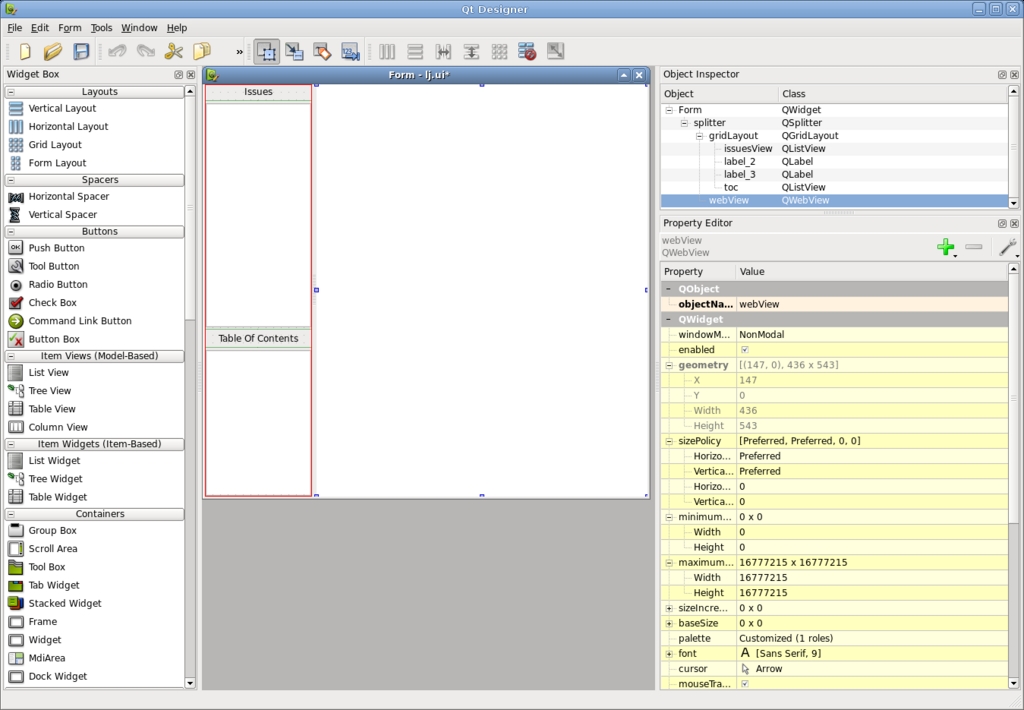
Figure 2. Designer shows off the form for our application.
The interface file is turned into a header file (ui_lj.h) by uic during the compilation process. ui_lj.h contains the generated Ui_Form class along with all the objects in the interface. The main window class definition is a subclass of QMainWindow and Ui_Form. The only new objects in the MainWindow classes are the models that are used to contain the list of issues and the proxy, which is used for searching. The mainwindow.h file is as follows:
#include <QtGui/QtGui>
#include <QtWebKit/QtWebKit>
#include "ui_lj.h"

class MainWindow :
   public QMainWindow, public Ui_Form
{
    Q_OBJECT
public:
    MainWindow();

private slots:
    void downloadFinished();
    void clicked(const QModelIndex &);
    void activated(const QModelIndex &);
    void downloadRequested(const QNetworkRequest &);
    void downloadingIssueFinished();
    void downloadProgress(qint64, qint64);

private:
    QStandardItemModel *issues;
    QSortFilterProxyModel *proxy;
    QStringListModel *tocModel;
};
mainwindow.cpp contains all the application's plumbing. The MainWindow constructor sets up the interface, creates the toolbar and begins to fetch the available issues. setupUi() is declared in the generated interface header and populates the central widget with the widgets that were specified in the interface file. The toolbar is populated with actions for the Web page and a line edit for searching. Rather than create and set up each QAction manually, QWebPage has built-in actions that can be used. Here's mainwindow.cpp:
#include "mainwindow.h"

#define SERVER "https://secure.linuxjournal.com/" \
               "allsubs/"

MainWindow::MainWindow() : QMainWindow()
{
  QWidget *w = new QWidget;
  setCentralWidget(w);
  setupUi(centralWidget());

  connect(issuesView, SIGNAL(activated(QModelIndex))
         ,this, SLOT(activated(QModelIndex)));
  connect(issuesView, SIGNAL(clicked(QModelIndex)),
          this, SLOT(clicked(QModelIndex)));
  issues = new QStandardItemModel(issuesView);
  proxy = new QSortFilterProxyModel(issues);
  proxy->setSourceModel(issues);
  proxy->setFilterCaseSensitivity(Qt::CaseInsensitive);
  proxy->setFilterRole(Qt::UserRole + 1);
  issuesView->setModel(proxy);
  connect(
    webView, SIGNAL(statusBarMessage(QString)),
    statusBar(), SLOT(showMessage(QString)));
  connect(webView->page(),
    SIGNAL(downloadRequested(QNetworkRequest)),
    this, SLOT(downloadRequested(QNetworkRequest)));
  tocModel = new QStringListModel(this);
  toc->setModel(tocModel);

  QToolBar *bar = addToolBar(tr("Navigation"));
  bar->addAction(
    webView->pageAction(QWebPage::Back));
  bar->addAction(
    webView->pageAction(QWebPage::Forward));
  bar->addAction(
    webView->pageAction(QWebPage::Stop));
  bar->addAction(
    webView->pageAction(QWebPage::Reload));
  bar->addSeparator();

  QLabel *label = new QLabel("Search:", bar);
  bar->addWidget(label);
  QLineEdit *search = new QLineEdit(bar);
  QSizePolicy policy = search->sizePolicy();
  search->setSizePolicy(QSizePolicy::Preferred,
                        policy.verticalPolicy());
  bar->addWidget(search);
  connect(search, SIGNAL(textChanged(QString)),
    proxy, SLOT(setFilterFixedString(QString)));
  QUrl home(SERVER "dlj.php?action=show-account");
  webView->load(home);

  setWindowTitle("Linux Journal Digital Archive");

  QNetworkAccessManager *networkManager =
    webView->page()->networkAccessManager();

  QUrl url(SERVER "dlj.php?action=show-downloads");
  QNetworkRequest request(url);
  QNetworkReply *r = networkManager->get(request);
  connect(r, SIGNAL(finished()),
          this, SLOT(downloadFinished()));
}
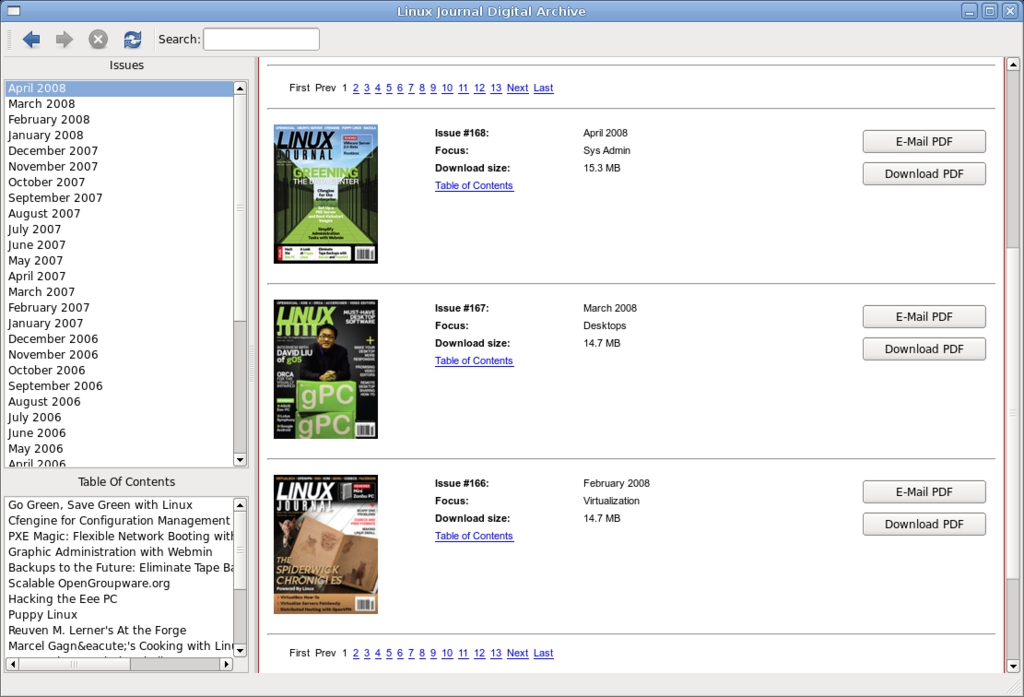
Figure 3. The application with all the found issues and the table of contents of the currently selected issue.
When the application launches, the user will see the main login page, and in the background, the “show-downloads” page is downloaded from Linux Journal. In an ideal world, Linux Journal would provide a simple XML file with all the available issues, table of contents and download location, but because this is just a demo, this information is acquired the hard way. It does this by using a regular expression to find any available issues, which is listed at the top of every Web page:
void MainWindow::downloadFinished()
{
  QNetworkReply *reply =
      ((QNetworkReply *)sender());
  QByteArray data = reply->readAll();
  QTextStream out(&data);
  QString file = out.readAll();

  // The first page, find all of the pages that
  // we can download issues from and fetch them.
  if (issues->rowCount() == 0) {
    QRegExp rx("show-downloads&row_offset=[0-9]*");
    QStringList pages;
    int pos = 0;
    while (pos != -1) {
      pos = rx.indexIn(file, pos + 1);
      QString page = rx.capturedTexts().first();
      if (!page.isEmpty() && !pages.contains(page))
        pages.append(page);
    }
    QNetworkAccessManager *networkManager =
      webView->page()->networkAccessManager();
    foreach (QString page, pages) {
      QUrl url(SERVER "dlj.php?action=" + page);
      QNetworkReply *reply =
          networkManager->get(QNetworkRequest(url));
      connect(reply, SIGNAL(finished()),
              this, SLOT(downloadFinished()));
    }
  }
Each Web page also contains several issues, usually three. Another regular expression is used to find each issue and the table of contents for that issue. After they are extracted, the data is put into the model where it is displayed:
  QRegExp issue("class=\"data-data\">([a-zA-Z]* " \
                "20[0-9][0-9])</td>");
  int pos = 0;
  while (pos != -1) {
    pos = issue.indexIn(file, pos + 1);
    QString page = issue.capturedTexts().value(1);
    QStandardItem *item = new QStandardItem(page);
    if (!page.isEmpty()) {
      item->setData(reply->url(), Qt::UserRole);
      item->setFlags(Qt::ItemIsSelectable
                     | Qt::ItemIsEnabled);
      issues->insertRow(issues->rowCount(), item);
    }

    // Now that we have an issue, find the
    // table of contents
    QRegExp toc("<div id=\"toc-div-[0-9]{1,4}\".*" \
                "</div>");
    toc.setMinimal(true);
    toc.indexIn(file, pos);
    QStringList list =
       toc.capturedTexts().first().split("<li>");
    for (int j = list.count() - 1; j >= 0; --j) {
      QString s = list[j].simplified();
      if (!s.endsWith("</li>"))
        list.removeAt(j);
      else {
         s = s.mid(0, s.length() - 5);
         list[j] = s;
      }
    }

    // The table of contents is joined
    // together in one string and is used
    // by the proxy for searching
    item->setData(list.join(" "),
                  Qt::UserRole + 1);

    // Save TOC which will be used to populate the
    // TOC list view if this issue is clicked on
    item->setData(list, Qt::UserRole + 2);
  }
}
The proxy is set to filter on Qt::UserRole + 1, which contains the full table of contents for each issue. When you type in the search box, any issue that doesn't contain the string will be filtered out.

Figure 4. On-the-fly searching filters the issues only to those that contain the search string.
When an issue is clicked, the table of contents is fetched out of the issuesView model and inserted into the tocModel where it is displayed in the lower list view:
void MainWindow::clicked(const QModelIndex &index)
{
  QVariant v = index.data(Qt::UserRole + 2);
  tocModel->setStringList(v.toStringList());
}
When an issue is activated (depending on the platform, this could be a double-click or single-click), the URL is fetched out of the issue model and set on the QWebView:
void MainWindow::activated(const QModelIndex &index)
{
  webView->load(index.data(Qt::UserRole).toUrl());
}
Once the user clicks on the download issue button, the Web site confirms authentication and then forwards to a Web page to download the actual file. Once there, downloadRequested() is called. From here on out, the example deals mostly with the new networking code. QWebPage has a built-in QNetworkAccessManager that is used to fetch the PDF:
void MainWindow::downloadRequested(
        const QNetworkRequest &request)
{
  // First prompted with a file dialog to make sure
  // they want the file and to select a download
  // location and name.
  QString defaultFileName =
    QFileInfo(request.url().toString()).fileName();
  QString fileName =
    QFileDialog::getSaveFileName(this,
                                 tr("Save File"),
                                 defaultFileName);
  if (fileName.isEmpty())
    return;

  // Construct a new request that stores the
  // file name that should be used when the
  // download is complete
  QNetworkRequest newRequest = request;
  newRequest.setAttribute(QNetworkRequest::User,
                          fileName);

  // Ask the network manager to download
  // the file and connect to the progress
  // and finished signals.
  QNetworkAccessManager *networkManager =
    webView->page()->networkAccessManager();
  QNetworkReply *reply =
    networkManager->get(newRequest);
  connect(
    reply, SIGNAL(downloadProgress(qint64, qint64)),
    this, SLOT(downloadProgress(qint64, qint64)));
  connect(reply, SIGNAL(finished()),
          this, SLOT(downloadIssueFinished()));
}
Because Linux Journal PDFs are large files, it is important to give notification on the download progress. The simplest method is to update the status bar with the progress:
void MainWindow::downloadProgress(qint64
           bytesReceived, qint64 bytesTotal)
{
  statusBar()->showMessage(QString("%1/%2")
          .arg(bytesReceived)
          .arg(bytesTotal), 1000);
}
When the PDF has finished downloading successfully, the filename and location that were chosen by the user before are retrieved, and the full file is saved to disk:
void MainWindow::downloadingIssueFinished()
{
  QNetworkReply *reply = ((QNetworkReply*)sender());
  QNetworkRequest request = reply->request();
  QVariant v =
    request.attribute(QNetworkRequest::User);
  QString fileName = v.toString();
  QFile file(fileName);
  if (file.open(QFile::ReadWrite))
    file.write(reply->readAll());
}
The inclusion of WebKit into Qt provides the opportunity for a number of very interesting applications to be developed. It will no doubt be utilized in many different types of applications, from desktop Web applications to applications that use it to display and manipulate HTML. QtWebKit has come a long way since the port was initially started two years ago. It will be exciting to see how QtWebKit improves and what people create with it.
Benjamin Meyer is a happily married hacker. He has been developing with Qt for 11 years, and he has worked on many tools and applications, such as KDE's audiocd ioslave, System Settings, KAutoConfig, KAudiocreator, QAutotestGenerator, Valgrind Tools, NetflixRecommenderFramework, Zaurus applications and much more. He collects Transformers and runs the site toybin.org.
